Good day@ CroqueMr, any reason when i use a laptop with your build i cant get hdmi to display on the tv just on the laptop screen only audio will work. I have tested hades build where this not a issue. Any thoughts thanks

[x86-64][LibreELEC x CB1 Builds] Dolby Vision FEL, HDR10+ and Full 3D
-
ht2tweak -
March 14, 2026 at 2:33 PM -
Thread is Resolved
-
-
I tried HLG -> DV, but unfortunately the GPU hits 100% usage and it stutters.
Tried HLG-->DV on my NUC 11 i3 and it works fine. GPU at about 70%, no dropped frames.
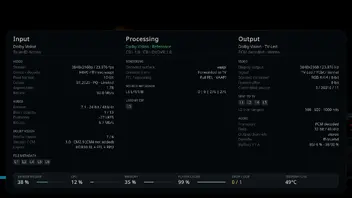
I think it would be nice if the upscaler in use was displayed somewhere in the O player info window.
And I still believe there should be rules based selection of scalers. But I'll work on something and we'll see. Maybe I'll convince you, CroqueMr
-
I have Firebat F1, and same issue.
The hdmi sometimes reset itself to 0 however the tv switched on, long time before the pc started. I made getedit, and all good now. For me it's a perfect solution.
Same here w/my F1, but also seeing this w/5800H, especially after shutdown/power back or reboots. What's the getedit fix? Can you elaborate how to do this? Thanks.
-
I tried HLG -> DV, but unfortunately the GPU hits 100% usage and it stutters.
I think my 7430U is too weak for that.
try creating a log and asking dev to look at it in github issues. thx
-
Yes if you have any issue please open an issue on github with the debug log, it will be easier for me to push a fix if needed and answer you.
All the procedure to have a debug log is in the github.

-

From my investigations in the past couple of weeks I don't think you got that right, as I've only read about CEC on/off functionality. If you have sources stating the opposite, I'd be happy to have them (not ironical, please post them
).Not much more than what I already responded to you with on the kodi forum https://forum.kodi.tv/showthread.php…5910#pid3315910.
Since then, I did throw an AI to go through the file bios using Reverse Engineer Anything. Don't know how much to trust it, but it did seem to find the cec interface from that pdf, but no extra functionality. -

4096 is really important for you? I think it is like to the bitrate. If 3840x2160 work it is an important issue IMO, but I will check the drivers on my side.
@CroqueMr It’s completely unimportant; I just happened to notice this. The UI resolution is currently 1920*1080.
-
Actually think leaving the UI rez at 1920 x 1080 is a good choice to even slightly lessen the load to render UI in 4K. (Or, maybe it doesn't matter, don't know, but that's what I do.) Actual video playback in 4K is more important.
-
Sorry for It
Does anyone that own a recent (like x2800) Denon or Marantz (i know same brand) have the black screen bug on refresh rate Change or start & stop
I had It several.years ago and wasn't solvable cause the problem was in denon clock generator
In other libreelec thread i read another user with the same problem with recent LE build
Just to be sure before buy a new mini pc 😅
-
Same here w/my F1, but also seeing this w/5800H, especially after shutdown/power back or reboots. What's the getedit fix? Can you elaborate how to do this? Thanks.
Connect in ssh to your minibat (use putty or winscp, run as root), bash
Then reboot the box, set your sound device, and passtrough device, reboot again. Now the box will be use the created edid , even when you power on without hdmi live connection.
The created edid will be found: in /storage/.config/firmware/edid/edid.bin
When you want use the minipc with another display, just run : getedid delete
then reboot.
-

Does anyone that own a recent (like x2800) Denon or Marantz (i know same brand) have the black screen bug on refresh rate Change or start & stop
No issue here with my Denon X2800H. Everything plays fine with this build and also with the build of hadesdevls.
-
R1.0.1 RC1 Is up with some improvement and fixes.
If you still encounter an issue, open an issue on github or share a new log if you already have an open issueRelease R1.0.1 RC1 · CroqueMr/libreelec-CB1Changes since R1.0.0 Expanded LLDV HDMI format support across AMD, Intel and NVIDIA. Improved format selection and recovery when a transport is refused.…github.comThere will be plenty of RC updates, I need to work through a number of open issues. It remains in a pre-release state, I recommand you to only check it out if you run into a problem. A new build with new feature will come later.
Please do not share the issue here, open an issue on github, the procedure is here GitHub - CroqueMr/libreelec-CB1: LibreELEC with High Quality Dolby Vision & HDR10+ support for Intel, AMD, Nvidia, and more I will investigate and propose a fix asap. -
Sorry for It
Does anyone that own a recent (like x2800) Denon or Marantz (i know same brand) have the black screen bug on refresh rate Change or start & stop
I had It several.years ago and wasn't solvable cause the problem was in denon clock generator
In other libreelec thread i read another user with the same problem with recent LE build
Just to be sure before buy a new mini pc 😅
my setup:
asrock deskmini with 3400g cpu >>> denon x4800h >>> philips oled808 65".
all connections are with high quality 48gbps hdmi cable.
my movie files are stored on windows 10, available to LE via SMB share on a 1gbit network/connections.
if you mean black screen when you start playing a movie file and then stop the playing...then yes, i also have black screens. both times (starting and stopping movie play) takes about 3-4 seconds before black screen vanishes.
i didn't try direct connection of ssd to usb port on my computer. maybe it is my network the reason for black screen? i dont know.
and i didn't try settings in denon on specific hdmi port. in denon you can try to set hdmi port. you have 3 options per hdmi port. try all 3 options
i also have minix u22 with CoreElec. i will try tonight (i am in EU) to see if minix also has black screen
-
R1.0.1 RC1 Is up with some improvement and fixes.
If you still encounter an issue, open an issue on github or share a new log if you already have an open issuehttps://github.com/CroqueMr/libre…/tag/R1.0.1-RC1
Please do not share the issue here, open an issue on github, the procedure is here GitHub - CroqueMr/libreelec-CB1: LibreELEC with High Quality Dolby Vision & HDR10+ support for Intel, AMD, Nvidia, and more I will investigate and propose a fix asap.Great work on R1.0.1 RC1! Thank you for your time, dedication, and continuous improvements. It's really appreciated, especially the Dolby Vision and Blu-ray fixes. Keep up the excellent work! 👏
-
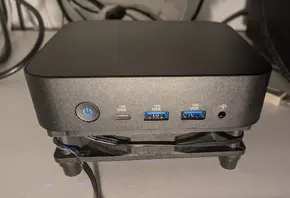
Reverted my earlier ssd switch, the N100 now runs Win 11 Pro and Win 10 IoT LTSC on separat disks and the N150 with 8GB RAM is back on LE13 DV-R1.0.1-RC1, removed the bottom cover and put a 120mm Cooler Master fan under it, works fine and its quiet.
Edit; If i press Pause and then Stop, i get No signal.
-
for anyone interested, this person use a fan with a controller and set it at low speed, you can't even hear
https://www.reddit.com/r/MiniPCs/comment..._mini_pcs/QuoteQuote:Just sharing something I came across.
The Fan controller is "DC12V PWM Speed Controller 4-Pin Fan Speed Controller Type-C USB Power Supply DIY Water-cooling Cooling Pulse Width Modulation" on Aliexpress
For best value 120mm fans, I've heard the Arctic P12 are the best.crazy cheap for the controller (was like $5 before)
https://www.aliexpress.us/item/325680746...4itemAdapt
you need a pwm fan, he suggest some in his thread, these fans are very cheap
the K12 has this kind of built in the bios, once you add the adapter to connect the fan but for other boxes you could use this
MatteN you could get the usb pwm controller and set lowest fan level -
No need, its not running att max speed, its on 9V i use a cheap wall adapter where i can set 3, 4,5, 6, 7,5, 9, and 12V.
-
CroqueMr, can you explain what you mean by "compatible setups" with this SDR BT2020 statement? Do you mean if the display supports it?
QuoteCalibrated SDR conversion and HLG to Dolby Vision - Convert Dolby Vision, HDR10, HDR10+, or HLG to SDR with Reference, Bright room, or Custom / Projector targets. SDR defaults to BT.709, with BT.2020 available on compatible setups. HLG gains a Dolby Vision rendering option alongside native playback.
I pre-ordered a Luma video processor, and wondering if I would really benefit from it with my projector.
-