[x86-64] Dolby Vision Development for PC (Intel & AMD)

  • N100/12gb DDR5 RAM Lady with Camera works great along with full Fel 7 rips. No huge issues I've seen so far.


    AMD Ryzen 7 3750H/Radeon Vega Mobile Gfx/16gb DDR4 RAM Lady with Camera outputs as HDR rather than Dolby Vision Fel 7. No further tests thus far.

  • Release R1.0.0-Beta3 · CroqueMr/libreelec-x86-DV
    DV-R1.0.0-Beta3 - Major stability and performance improvements, plus AMD Blu-ray 3D support Smooth Dolby Vision playback on N100, from demanding 4K 60 FPS…
    github.com


    DV-R1.0.0-Beta3 - Major stability and performance improvements, plus AMD Blu-ray 3D support

    Milestone : Smooth Dolby Vision playback on N100, from demanding 4K 60 FPS remuxes to 4K FEL remuxes.

    Changes since Beta2.

    Rendering and performance

    • Added optional Dolby Vision fast rendering, disabled by default. Significantly reduces rendering load with fine colour-detail differences expected to be almost imperceptible during playback. Disabling it restores the reference chroma filter.
    • Optimized Dolby Vision HDMI packing, avoiding redundant colour-conversion and PQ processing.
    • Reused the active HDMI mode during playback instead of requesting a modeset for every frame.
    • Optimized menu and subtitle composition, overlay caching and transparent-colour blending.
    • Reduced repeated metadata reshaping calculations by merging identical MMR intervals without changing their coefficients.
    • Added automatic VAAPI FEL upscaling where supported, with shader fallback. Applies to Dolby Vision Native, Enhanced and HDR10 conversion.
    • Isolated CB1 rendering from Kodi picture adjustments. Native playback and fallback retain Kodi's settings.

    Dolby Vision transport and GUI optimizations incorporate work from dangerouslaser, adapted to the shared CB1 rendering pipeline.

    Dolby Vision detection and output

    • Fixed rendering modes incorrectly marked unavailable when the Kodi interface runs at 1080p. #20
    • Fixed redundant Dolby Vision HDMI handshakes at playback startup. #21
    • Fixed output-surface cleanup when switching to native HDR10, HLG or SDR, including crashes during subsequent interface-resolution changes.
    • Improved startup-frame cancellation and GPU-resource cleanup when stopping playback or recreating the renderer.
    • Improved audio-engine acknowledgement during HDMI display changes when the audio sink is not yet configured.
    • Retained previous Profile 5, 1080p playback, Enhanced stability and Blu-ray ISO Dolby Vision detection fixes.

    HDR10-to-Dolby-Vision AI

    • Major performance improvements through optimized image analysis, asynchronous scheduling and combined rendering/HDMI packing.
    • Fixed startup sequencing that could block the first video output.
    • Improved prediction-worker scheduling and queue hand-off.
    • Reduced image-analysis overhead using source-plane sampling and deferred statistics/readback.
    • Moved future-frame analysis outside the current-frame presentation lock.
    • Combined rendering and HDMI packing for compatible Standard-AI output.
    • Fixed reuse of failed output preparations after geometry changes.
    • The LightGBM model and fallback deadlines remain unchanged.

    Controls and diagnostics

    • Fixed live presentation counters incorrectly reporting zero. #22
    • Added bounded AI fallback diagnostics covering processing stage, status, queue coverage and preparation counters.

    Blu-ray 3D playback on AMD

    • Added software H.264 MVC decoding and Kodi Blu-ray 3D playback.
    • Added paired-eye presentation, eye swapping, mono fallback and native stereo-output selection.
    • Preserved authored subtitle-depth information where available.
    • Added AMD HDMI 3D signalling for display-advertised modes.
    • Kept 3D sources outside CB1, including mono playback: no Dolby Vision conversion, AI processing or FEL upscaling.
    • Added malformed-MVC parser checks and recovery from rejected stereo-output transitions.

    3D support incorporates work from CinemaOne and popcornmix.

    Known issues

    • Lower-powered GPUs such as N100/N150 can stutter when displaying the GUI over Dolby Vision playback.
    • HDR10-to-Dolby-Vision AI conversion may fall back to native HDR10 when processing cannot keep up.
    • Enhanced presets need further tuning for a more noticeable effect.
    • AMD HDMI 3D output and retail MVC disc navigation require hardware testing.

    Next focuses

    • Improve the efficiency of HDR-to-Dolby-Vision and Dolby-Vision-to-HDR conversion pipelines.
    • Make the Enhanced rendering modes fully functional.
    • Integrate compatibility fixes and address newly reported support issues.

    Edited once, last by CroqueMr (October 11, 2026 at 9:20 PM).

  • What's the chance some of this work begins to get merged to master ? Could any of it in it's current state be merged upstream?

    I'll let Chewitt comment, but in my opinion I think this would be extremely difficult, if not impossible in the short term

    We've modified too many core components, including LibreELEC, Kodi, FFmpeg, and libplacebo. LibreELEC isn't really designed to maintain such extensive changes to its upstream dependencies. We need to push modifications not to LibreELEC itself, but to its upstream dependencies, this is a crucial task that requires great caution especially when you touch FFmpeg and libplacebo

    Much of this complexity comes from the optimizations DangerousLaser and I made to get Dolby Vision running smoothly on low-end CPUs. To achieve that, we had to go well beyond the boundaries of Kodi and LibreELEC.

    I'm trying to keep everything as clean as possible, but the build has become too heavily customized, this is no longer a build with a few patches, as it was in the beginning.

    Edited 3 times, last by CroqueMr (October 11, 2026 at 10:11 PM).

  • Thanks for the improvements in Beta3! I've tested the same Profile 7 FEL content with fast rendering disabled and enabled.

    There does seem to be a noticeable improvement with fast rendering enabled:

    • Fast rendering OFF: 119 skipped frames over approximately 60 seconds.
    • Fast rendering ON: 67 skipped frames over approximately 130 seconds.
    • Both sessions reported 0 dropped frames and 0 presentation failures.

    The tests weren't identical in duration or playback position, but with fast rendering enabled, the skipped-frame counter increased much more slowly after the initial playback period, with several intervals showing almost no additional skips.

    I'm still seeing repeated OutputPicture - timeout waiting for buffer messages in both sessions.

    I also noticed the following message:

    CB1 FEL upscaling: VAAPI unavailable, using full shader FEL reconstruction

    It looks like the Vega 8 isn't benefiting from the new VA-API FEL upscaling optimization.

  • I'm trying to keep everything as clean as possible, but the build has become too heavily customized, this is no longer a build with a few patches, as it was in the beginning.

    So you see this as being forever a custom build or you're simply cautious about the time it will need to be fully included in LE "proper"?

  • DV-R1.0.0-Beta3 - Major stability and performance improvements, plus AMD Blu-ray 3D support

    Thanks for integrating the 3D work! As a small thank-you, I tested Beta3 on my NUC (Radeon RX 7600, HDMI straight to a JVC NZ9), with our round 38 build on the same box for comparison:

    • Blu-ray 3D ISO (MVC) with authored subtitle depth: works like on our build. 1080p24 frame packing (the JVC reports 1080p 3D, 1920x2205, 12-bit RGB), correct eye order, subtitles at their dynamic authored depth, no kernel errors.
    • Half-SBS 4K30 MP4: Beta3 switches the stereo mode to monoscopic and plays it in 2D at 8K30. Our build sends it as 1080p60 side-by-side 3D (the JVC confirms, and it is real 3D through the glasses). The difference is popcornmix's "Resolution: select a native 3D display mode for stereo" patch (pm3d-0014 in our tree): it matches modes against one eye and lets the sink's 3D variant run at twice the content rate. It seems to be missing from Beta3.
    • Minor: Beta3's log shows "CDropControl: lost diff" about 250 times in 90 s of MVC playback; our build shows none for the same disc. Playback looked the same to us.

    Retail disc menus not tested.

  • So you see this as being forever a custom build or you're simply cautious about the time it will need to be fully included in LE "proper"?

    I think that if Dolby Vision ever makes it into LibreELEC officially, it will probably be through an approach closer to my initial implementation, before R1.0.0 Beta1, with minimal changes to FFmpeg and other upstream dependencies. I believe such an implementation is possible, but it will take time. It might also be useful to maintain a much simpler build with just the bare minimum needed for DV support. Performance won't be as good, but it will help with the implementation.

    Thanks for integrating the 3D work! As a small thank-you, I tested Beta3 on my NUC (Radeon RX 7600, HDMI straight to a JVC NZ9), with our round 38 build on the same box for comparison:

    • Blu-ray 3D ISO (MVC) with authored subtitle depth: works like on our build. 1080p24 frame packing (the JVC reports 1080p 3D, 1920x2205, 12-bit RGB), correct eye order, subtitles at their dynamic authored depth, no kernel errors.
    • Half-SBS 4K30 MP4: Beta3 switches the stereo mode to monoscopic and plays it in 2D at 8K30. Our build sends it as 1080p60 side-by-side 3D (the JVC confirms, and it is real 3D through the glasses). The difference is popcornmix's "Resolution: select a native 3D display mode for stereo" patch (pm3d-0014 in our tree): it matches modes against one eye and lets the sink's 3D variant run at twice the content rate. It seems to be missing from Beta3.
    • Minor: Beta3's log shows "CDropControl: lost diff" about 250 times in 90 s of MVC playback; our build shows none for the same disc. Playback looked the same to us.

    Retail disc menus not tested.

    Thanks I will try to fix that for beta4, can you send me your log file please?

    Edited once, last by CroqueMr (October 11, 2026 at 10:46 PM).

  • Thanks I will try to fix that for beta4, can you send me your log file please?

    The Kodi log from the Beta3 test is attached, cut to startup plus the two playbacks (debug logging on; ffmpeg debug lines and my test-automation lines removed).

    At the end, the half-SBS file: "stereo mode setting changed to monoscopic", then the whitelist matches 7680x4320 @ 30 Hz. On our build the same file logs "Stereoscopic source, matching modes against one eye: 3840x2160" and "Matched a native 3D mode 1920x1080 @ 60.000000 Hz 3D sbs (56) at double the content refresh rate".

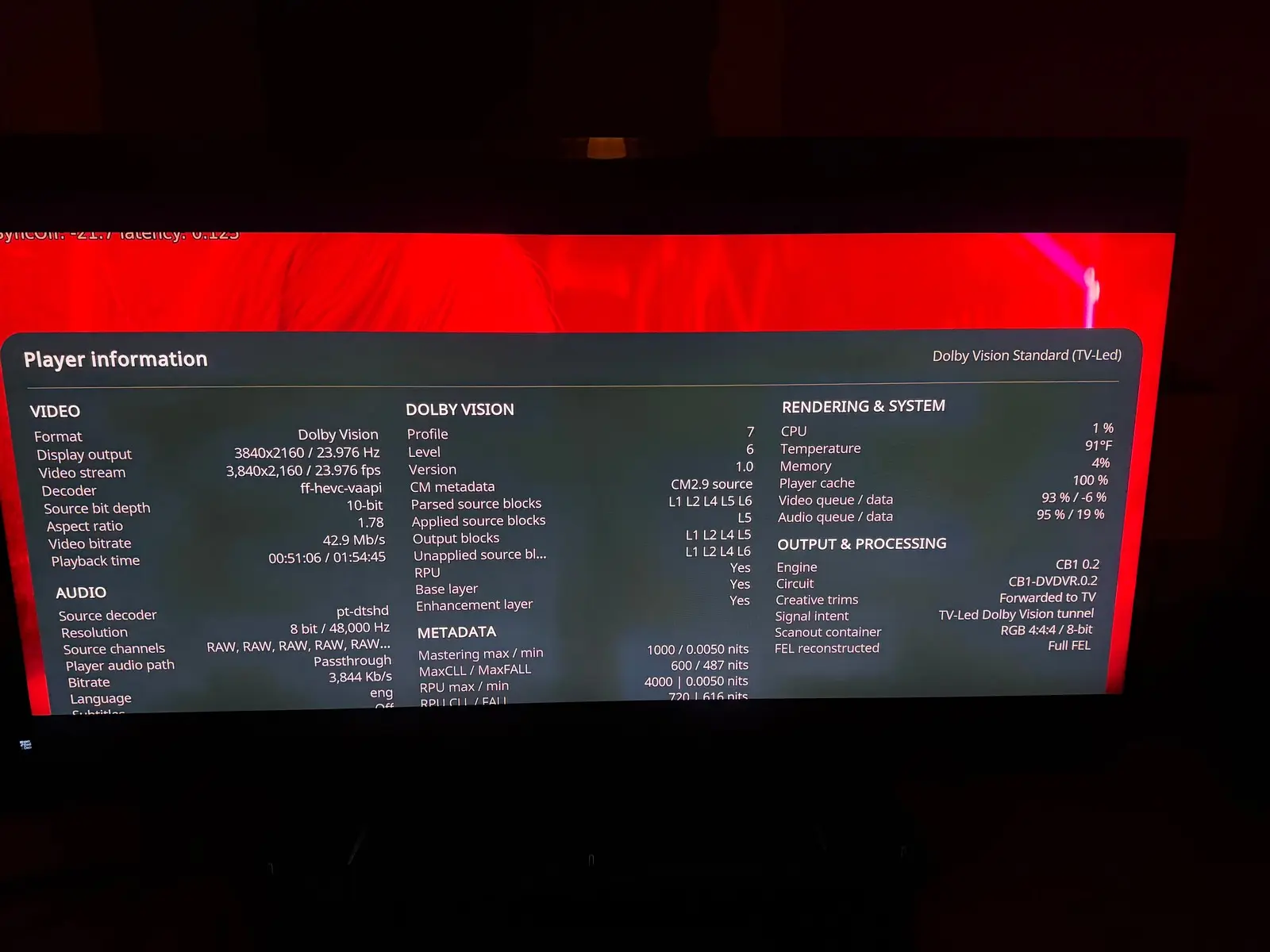
  • CroqueMr , I have better information about my no gui in DV bug. It seems the GUI does not display in the top and bottom black bars only. I attach a screenshot to show you, you can even see part of the last line of the player debug info on the top of the movie image and the player info is cutted on the bottom in the black bars too.

    It does the same thing on an FEL and NO FEL movie.

    I tried Gemini man with 1.85 very minor black bars and another full screen 1.78 DV file and I can see all the GUI correctly when playing back these videos.

    My minipc specs again:

    Beelink SER8 AMD Ryzen 7 8845HS with AMD Radeon 780M 12-Core 2700 MHz.

    Edited 4 times, last by Creator44 (October 12, 2026 at 12:58 AM).

  • CroqueMr , I have better information about my no gui in DV bug. It seems the GUI does not display in the top and bottom black bars only. I attach a screenshot to show you, you can even see part of the last line of the player debug info on the top of the movie image and the player info is cutted on the bottom in the black bars too.

    It does the same thing on an FEL and NO FEL movie.

    I tried Gemini man with 1.85 very minor black bars and another full screen 1.78 DV file and I can see all the GUI correctly when playing back these videos.

    Its an L5 bug.

    CroqueMr I have a fix for it my fork, just search commits for L5. This is a required fix for coreelec builds too.

  • CroqueMr and cinemaONE, can't thank you guys enough. Having full DV and full 3D working well on my AMD 5800H is amazing. Just tested a bunch of test clips and movies for both. Thanks to dangerouslaser as well. This is getting there in beating the best Amlogic solutions to date in terms of speed, power, and fluidity.

    I second that! Being able to use my powerful mini pc and decode absolutely everything with one box is awesome and it's thanks to you guys!