Posts by dangerouslaser

    That's normal, as the GUI puts a heavy load on the GPU. We worked with Dangerouslaser to include dedicated optimizations for this in beta 3.

    Beta 4 won't include additional changes for this. However, I plan to investigate AMD specific optimizations next week. Intel is currently performing slightly better with FEL, whereas AMD has a limitation I'm trying to fix.


    It is in my backlog but this will be adressed after the release of R1.0.0 Stable.


    I would particularly like to render Dolby Vision in HDR10+ for Samsung TVs (algo are different, picture will not be the same but we can try something), Since I don't own a HDR10+ TV, I won't be working on that.

    There are more optimizations possible for the OSD - but it is becoming overly complicated. Visual artifacting and general instability from trying to cache static OSD textures / portions of the frame are just and endless rabbit hole.

    The builds in my repo will play a remux of gemini man at 60fps with the OSD open, but it still drops a few frames when the OSD is first opened up or you are navigating around playback controls. It also only works with Intel GPUs.

    This also is heavily skin dependent. I think taking a version of esturary and stripping all gradient overlays from it could help.

    At the end of the day there are like 2 films in 60fps UHD that I know of (gemini man and billy lynns long halftime walk) - certainly neither of which people are queuing up to watch every weekend.

    This thread is to discuss testing and development of my personal builds as to keep the main DV thread less busy.


    All of the work on these builds specifically targets intel-based systems and LG OLED TVs (CX or later). AMD systems will not benefit from much of the changes. 3D isn't supported currently.

    Much of the optimizations will be or have already been pulled into CroqueMR's wider-support builds.

    Expect bugs and please stay on CroqueMR's builds if you are looking for a more stable experience.


    GitHub - dangerouslaser/libreelec-yblod: Unofficial LibreELEC build with native Dolby Vision for Intel HDMI systems (yblod)
    Unofficial LibreELEC build with native Dolby Vision for Intel HDMI systems (yblod) - dangerouslaser/libreelec-yblod
    github.com

    I think that if Dolby Vision ever makes it into LibreELEC officially, it will probably be through an approach closer to my initial implementation, before R1.0.0 Beta1, with minimal changes to FFmpeg and other upstream dependencies. I believe such an implementation is possible, but it will take time. It might also be useful to maintain a much simpler build with just the bare minimum needed for DV support. Performance won't be as good, but it will help with the implementation.

    We could definitely work on a branch for this. It would not work on an N100 (at least not FEL or 4k60), but it would be more maintainable and higher probability of being accepted upstream.

    CroqueMr , I have better information about my no gui in DV bug. It seems the GUI does not display in the top and bottom black bars only. I attach a screenshot to show you, you can even see part of the last line of the player debug info on the top of the movie image and the player info is cutted on the bottom in the black bars too.

    It does the same thing on an FEL and NO FEL movie.

    I tried Gemini man with 1.85 very minor black bars and another full screen 1.78 DV file and I can see all the GUI correctly when playing back these videos.

    Its an L5 bug.

    CroqueMr I have a fix for it my fork, just search commits for L5. This is a required fix for coreelec builds too.

    Thanks a lot :) I am finalizing to integrate the last improvement lever from tour last build, and I convert your optimization for AMD also. I will check the new oprimisation gain.

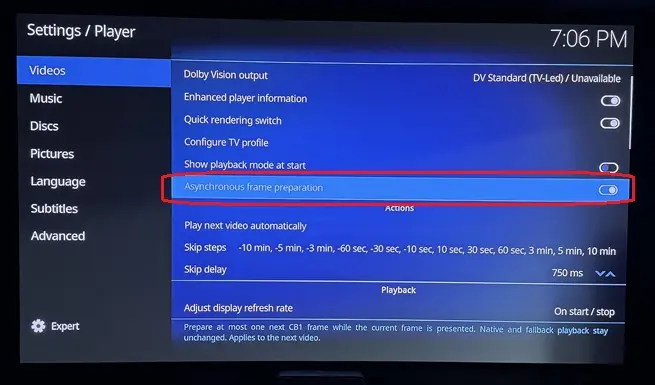
    Edit : Last improvement integrated, it's your chroma filter, this will be optional because it's reduce a little bit the fidelity (around 0,9%) of chrominance. Looking extremely closely at a shot where the discrepancy is at its greatest, you can perceive a tiny difference in the outline of the light halos. It's almost imperceptible and, above all, only visible in very few shots, but since it still has a tiny visible impact, it will be an optional optimization.

    Thank you!

    The chroma filter was just set to use guassian instead of lanczos (the libplacebo default) - so there actually isn't a performance gain there, I just did frame comparisons from a movie being played directly on my LG G5 on a thumb stick vs Kodi and guassian was "closer" to the output of the LG's native DV player. I am going to add the option to toggle between the filters in settings.

    Have a few more things I am working on to try and squeeze out a bit more performance and get 4k60 playing perfectly with the GUI up - without dropping frames. 4k24fps playback is now perfect with a lot of overhead so never dropping frames. Some things I have tried have been more complicated then their gains were worth so I have tabled them for now.

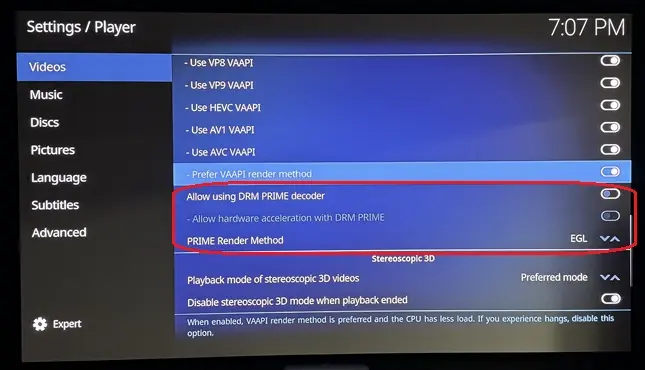
    DRM prime will bypass my DV pipeline, I would assume the same on CroqueMR's

    that said, my engine's path (and likely MrCroque's) already shares GPU buffers so the performance enhancement it offers is already being taken advantage of.

    dangerouslaser I tried 0.2-pre2 on an ASUS NUC 12 (Intel UHD 770 plus a Radeon RX 7600) with a Panasonic TV, TV-led DV.

    Intel UHD 770:

    • P5 4K59.94: smooth, 0 drops, also with the OSD open
    • P7 FEL (two files), P8.1, P10: DV on, 0 drops, pause and seek fine
    • P8.4 HLG 4K59.94 (iPhone clip): GPU saturated (render ~95%), 86 drops in 20 s
    • "FEL TEST ST DL P7 CMV4.0 4000nits V4" (mkv and mp4): DV badge but black picture. The startup commit times out after 10 s (result=3), then the renderer fails and kodi.bin sits at 100% CPU. Reproducible.
    • On the FEL test the letterbox bars stay black. Is that intended?

    RX 7600: no DV and no HDR10 conversion (native_eligible=false, dv=0), as expected without an AMD OpenCL driver and with the DV signalling patches being i915 only. P5 then plays as SDR with a purple/green tint.

    Logs are available if they help.

    Prepared with Claude Code (Anthropic)

    try FEL TEST ST DL P7 CMV4.0 4000nits V4 on this build - it should be fixed.

    The letterbox bars should be black at the end of the test - that is intended.

    Release YBLOD 0.2-pre4 · dangerouslaser/libreelec-yblod
    YBLOD 0.2-pre4 — polynomial FEL playback fix Fixes the black screen with Dolby Vision Profile 7 FEL streams using polynomial chroma mapping, including the…
    github.com

    small bux fix for when using the kodi GUI in DV

    Release YBLOD 0.2-pre3 — fix distorted menus after playback · dangerouslaser/libreelec-yblod
    YBLOD 0.2-pre3 — fix distorted menus after playback Fixes the reproduced return-to-menu corruption on the Intel VM: stopping 1917 with Dolby Vision menus…
    github.com


    Need N100 testers and AMD testers

    these optimizations are for for TV-Led DV only - they will also apply to HDR but not for DV->HDR or player led DV

    experimental build with a native C/OpenCL playback engine

    Testing on an N150 the only time I get any frame drops is Gemini Man with the OSD open.

    Need N100 testers and AMD testers to provide feedback before any of this gets refactored and PR'ed to CroqueMr's repo.

    Release YBLOD 0.2-pre2 — native Dolby Vision engine · dangerouslaser/libreelec-yblod
    YBLOD 0.2-pre2 — native Dolby Vision engine Experimental Generic x86-64 release with the standalone native C/OpenCL playback engine on YBLOD's resynced…
    github.com


    edit: this is for TV-Led DV only

    Yes AMD card support VAAPI, DV playing works great on my 7430U (just a small issue on Profile 5 but it is easy to fix), this is why I prefer to not use a 2nd path for Intel, and try to capitalize on optimization that benefit both Intel and AMD.

    I have some free time, so I’d like to integrate your changes as soon as possible while waiting for the fixes coming via the issues. If that works for you, I’ll go ahead and integrate your two major enhancements; it shouldn't take long, as I can see how to do it cleanly.


    The issue on the frame dropping is almost fixed, the next release will address it.

    Could you send me the kodi.log file? I ramped up the fallback mechanisms so that even devices without DV support could use the build and play DV content via HDR10, I might have been a bit too aggressive with that.

    Yes - you can integrate my changes!

    edit:

    One thing I have been trying to figure out is how we can scale the FEL layer with nearest neighbor. Based on my reading, that seems to be how the mediatek chipsets in the high-end UHD players scale the layer. Unfortunately neither vaapi or qsv has an out of the box nearest neighbor scaling option. It is possible to do it with the CPU - but then we lose the performance gains from offloading this upscale to the GPU.

    I am not entirely sure how much of a difference it actual makes but some people have complained about chroma and tearing issues when upscaling with bilinear etc.

    yes - I was testing VA-API vs QSV for decoding - and while I was getting minor performance improvements with QSV vs VA-API the biggest improvements were from planar output and switching decoding and FEL upscaling to VA-API.

    If playback is smooth with just VA-API upscaling on an n100 then no need for QSV - was just trying to eek out every last bit I could!

    There is a branch with this in my repo - but essentially I got the best performance from:

    Movie + Dolby instructions
    │
    FFmpeg / QSV decodes both layers
    │
    Intel media engine scales the enhancement layer
    │
    Reconstruction engine combines the layers using Dolby instructions
    │
    Colour conversion + DV packing
    │
    HDMI -> TV performs final brightness/color mapping

    To reduce reliance on libplacebo, specialized reconstruction code:

    • Interprets the Dolby reconstruction instructions.
    • Reshapes the base-layer picture.
    • Turns enhancement-layer values into corrections and combining them with the base layer.
    • Handles color-sample positioning and filtering.
    • Passes GPU-held frames through reconstruction efficiently, including planar output that avoids unnecessary copying and repacking.

    The engine is written in C, with GPU shaders doing the pixel work.

    Congrats

    I am working on some improvements for intel hardware - specifically for playing high bitrate L7. I have made a lot of progress - I will take a look at your code and see if a PR is possible against your updated codebase without requiring too many changes!


    If folks with n100/n150's can test P7/FEL playback of high-bitrate files (1917 seems to be one that gives some people trouble) with this and report their findings it would be much appreciated. You can just drop the .tar in /storage/.update/ and roll back to CroqueMr's build when you are done.

    This build uses Intel QSV to decode both layers and upscale the EL. It is far more efficient on my testing machine - but I am still waiting for the ali express guy to drop off the n150 box I ordered.

    If it is working as it should, I will start to shape a PR into CroqueMr's repo. It will take a bit of time though I will need to refactor to match his updated playback pipeline(s).

    Release yblod 0.2-pre1 — experimental dual-QSV P7 playback · dangerouslaser/libreelec-yblod
    yblod 0.2-pre1 — experimental Profile 7 dual-QSV playback Unofficial LibreELEC 13 Generic x86_64 testing build. This is a prerelease, not a stable upgrade or…
    github.com

    More than willing to work with you directly on this. We can probably make some changes to both of our workflows so that collaboration is easier.

    I typically use branches for features which are PR'ed to main after testing - and have master set to track upstream so that keeping main up to date is easier without having to rebase. If the goal is to target LE 13, I would set master to track the LE 13 branch once it is published.

    CI can be setup for PRs to main so that broken features aren't merged - and if you need to offload builds for quicker testing I have a server with an i9-14900k that can build kodi from source in minutes.