

 Display More
Are these options best for a AMD 5800H and/or N150? Asked Chat, but want to check with you guys. You can tell I've spent too many years in Amlogic land, and don't know what these actually do
...
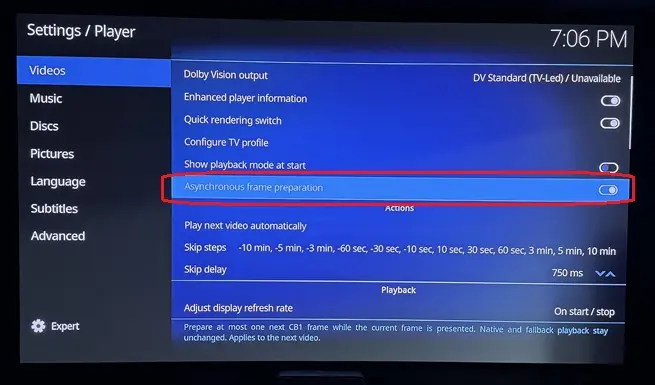
Asynchronous frame preparation: Chat says to leave 'on' unless it causes playback/sync issues? Chat says it's meant to reduce CPU bottlenecks and help smooth playback on lower-powered hardware. Correct, leave 'on'?
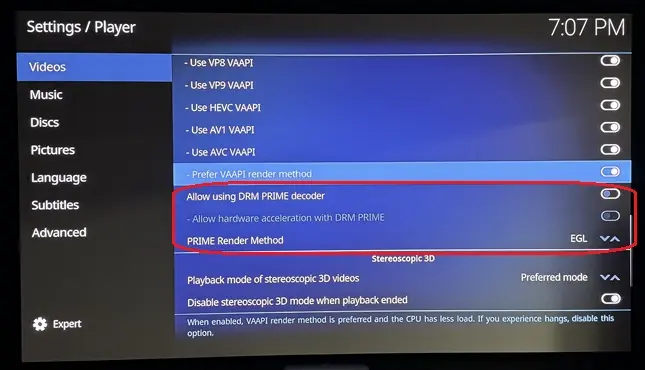
Allow using DRM PRIME decoder: Chat says this wses the Linux DRM PRIME hardware-decoding path. DRM PRIME is a Linux mechanism for passing decoded video frames between the hardware decoder and GPU efficiently, often with little or no copying through system RAM. This is particularly relevant on LibreELEC and Linux GBM systems. So, should this be enabled?
Allow hardware acceleration with DRM PRIME: Chat says this permits Kodi to use hardware acceleration through that DRM PRIME path. With it enabled, supported H.264/HEVC/VP9/etc. streams can be decoded by the GPU/VPU rather than the CPU. In most LibreELEC setups you want this 'on'. Correct?
PRIME Render Method: EGL: Chat says this determines how those DRM PRIME decoded frames are presented to the screen. EGL imports the hardware-decoded frame into the GPU's EGL/OpenGL rendering pipeline. This is generally an efficient, low-copy rendering method and is normally the preferred/default choice when it works properly. Kodi has long supported EGL interoperability with hardware video decoding on Linux. So, EGL is the option to choose?
Asynchronous Frame Preparation starts rendering the next frame as soon as the previous one is sent over HDMI, parallelizing part of the pipeline.
This puts more load on the rendering engine but extends the effective rendering window to roughly 1/20s instead of 1/24s for 24fps content, reducing frame drops.
I recommend keeping it On. On the N100, it prevents frame drops with Profile 7 FEL. Beta 3 will include dangerouslaser's optimizations, so frame drops should be eliminated even without it. I kept it configurable because, theoretically, some GPUs might struggle with two frames in flight and perform better sequentially. I haven't encountered this use case.
Regarding DRM PRIME, I haven't yet investigated how these settings interact with the DV pipeline. My assumption is that they only affect Kodi's native playback and have no impact on the dedicated DV pipeline.
The DV pipelines relie on VAAPI but operates independently from Kodi native pipeline, so I don't expect these settings to make a difference.
For the stable release, I'll verify these interactions and ensure this kind of settings don't interfere with DV playback but only with native kodi behavior.





