[x86-64] Dolby Vision Development for PC (Intel & AMD)

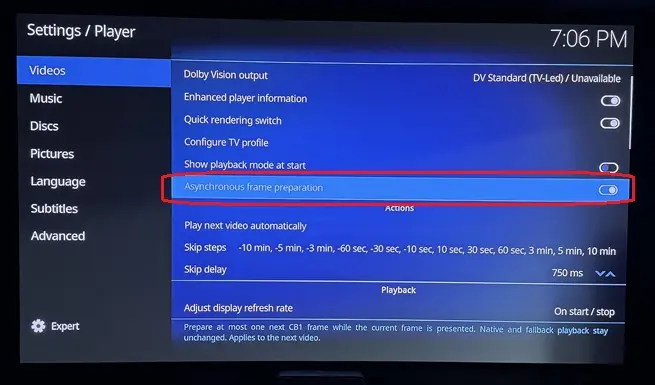
  • Asynchronous Frame Preparation starts rendering the next frame as soon as the previous one is sent over HDMI, parallelizing part of the pipeline.

    This puts more load on the rendering engine but extends the effective rendering window to roughly 1/20s instead of 1/24s for 24fps content, reducing frame drops.

    I recommend keeping it On. On the N100, it prevents frame drops with Profile 7 FEL. Beta 3 will include dangerouslaser's optimizations, so frame drops should be eliminated even without it. I kept it configurable because, theoretically, some GPUs might struggle with two frames in flight and perform better sequentially. I haven't encountered this use case.


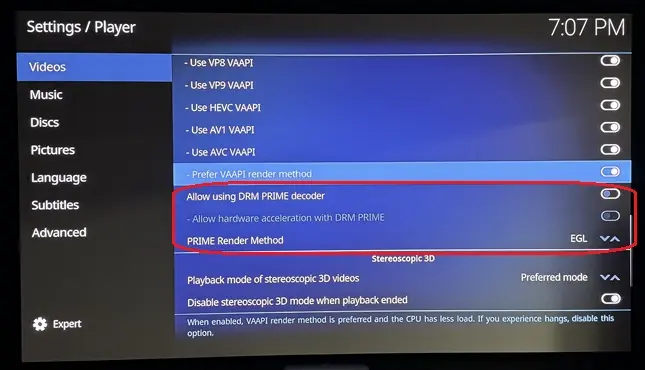
    Regarding DRM PRIME, I haven't yet investigated how these settings interact with the DV pipeline. My assumption is that they only affect Kodi's native playback and have no impact on the dedicated DV pipeline.

    The DV pipelines relie on VAAPI but operates independently from Kodi native pipeline, so I don't expect these settings to make a difference.

    For the stable release, I'll verify these interactions and ensure this kind of settings don't interfere with DV playback but only with native kodi behavior.

  • CroqueMr Kodi support for DRMPRIME is designed for ARM SoC hardware using direct-2-plane rendering. Although the GUI will allow it to be enabled with VAAPI decoding too, there a bunch of unresolved issues. If you have Intel/AMD hardware you need to be using EGL/VAAPI only.

  • Hello

    i like to help to test the DV integration. I have a Mini PC with AMD Ryzen 5 7640HS and AMD Radeon 760M (RDNA3).

    I have installed the Beta 2 and connected to my TCL 98Q8C 98" QD-Mini LED TV, 4K HDR Premium 5000.

    All menus shows DV not supported. Should it work with this AGPU or does this AGPU doesn't support DV?

    Thank you for yor help.


  • Really looking forward to Beta3, especially the improvements to GUI stuttering and DV rendering. I'll be happy to test it and share my feedback when it's released.

    Keep up the great work.

  • Hello

    i like to help to test the DV integration. I have a Mini PC with AMD Ryzen 5 7640HS and AMD Radeon 760M (RDNA3).

    I have installed the Beta 2 and connected to my TCL 98Q8C 98" QD-Mini LED TV, 4K HDR Premium 5000.

    All menus shows DV not supported. Should it work with this AGPU or does this AGPU doesn't support DV?

    Thank you for yor help.

    Hello it's a known issue it will be fixed in the next release. If everything is ok beta3 will be pushed tomorrow.


    CroqueMr Kodi support for DRMPRIME is designed for ARM SoC hardware using direct-2-plane rendering. Although the GUI will allow it to be enabled with VAAPI decoding too, there a bunch of unresolved issues. If you have Intel/AMD hardware you need to be using EGL/VAAPI only.

    Thank you for the info, I’ll make sure the rendering pipelines I’ve implemented don’t rely on and are unaffected by these settings. I’ll let those settings apply to Kodi & LE native circuit when DV is disabled.

  • Ryzen gpu support coming in Linux 7.3 and 7.4 adds HDMI 2.1 FRL (kernel high frame rate 144Hz etc) - without any flags. Its built in.

    7.3 in late October and 7.4 in late Dec/Early Jan.

    7.3 adds new Intl gpus and 7.4 gets HDMI 2.1 FRL too! About time!

  • Ryzen gpu support coming in Linux 7.3 and 7.4 adds HDMI 2.1 FRL (kernel high frame rate 144Hz etc) - without any flags. Its built in.

    7.3 in late October and 7.4 in late Dec/Early Jan.

    7.3 adds new Intl gpus and 7.4 gets HDMI 2.1 FRL too! About time!

    Yeah I saw that, I will not work to add VRR QMS on AMD, I will just add the last driver and merge it with the DV signaling

  • Is it normal that I don't see the GUI at all in DV mode in Beta2? I only tested one DV FEL movie so far and I had to guess where I was in the GUI because I don't see it but the GUI does work in the background. In HDR the GUI is fine.

  • Ryzen 5 3500U / Vega 8 – Dolby Vision FEL frame skipping on R1.0.0 Beta2

    I'm testing R1.0.0 Beta2 on a Ryzen 5 3500U with Radeon Vega 8 graphics, connected via HDMI through a Denon AVR.

    Dolby Vision Profile 7 FEL playback works, including enhancement-layer processing, but I'm seeing skipped frames accumulate during playback.

    System:

    • CPU: AMD Ryzen 5 3500U
    • GPU: Radeon Vega 8 (amdgpu)
    • Build: R1.0.0 Beta2
    • Kodi: 22.0 RC1
    • Kernel: 7.2.6
    • Mesa: 26.2.3
    • Playback: 4K HEVC Dolby Vision Profile 7 FEL, 23.976 fps
    • Output mode: DV Standard (TV-led)

    What I'm observing:

    • The skipped-frame counter increases during playback, sometimes quite rapidly.
    • The skipped frames don't appear to correlate with scene complexity or visible stuttering.
    • The dropped-frame counter remains at zero.
    • The video queue is generally around 97–100% full.
    • The log repeatedly reports:
      • OutputPicture - timeout waiting for buffer
      • CRenderManager::AddVideoPicture - timeout waiting for render
    • The display correctly switches to approximately 23.976 Hz.

    The logs suggest that frames are being delayed somewhere in the decoding/rendering/presentation pipeline, although I'm not sure whether this is a GPU performance limitation or an AMD driver synchronization issue.

  • Is it normal that I don't see the GUI at all in DV mode in Beta2? I only tested one DV FEL movie so far and I had to guess where I was in the GUI because I don't see it but the GUI does work in the background. In HDR the GUI is fine.

    Not normal and never saw this issue, what CPU do you have?

    more optimizations and improvements in this test build, primarily for intel devices.

    https://github.com/dangerouslaser…tag/yblod-0.2.1

    read the full 0.2 changes before installing

    Thanks a lot :) I am finalizing to integrate the last improvement lever from tour last build, and I convert your optimization for AMD also. I will check the new oprimisation gain.

    Edit : Last improvement integrated, it's your chroma filter, this will be optional because it's reduce a little bit the fidelity (around 0,9%) of chrominance. Looking extremely closely at a shot where the discrepancy is at its greatest, you can perceive a tiny difference in the outline of the light halos. It's almost imperceptible and, above all, only visible in very few shots, but since it still has a tiny visible impact, it will be an optional optimization.


    Now I work to implement Onecinema's build and I will push the beta3


    Thank you for the feedback, beta3 will have some new performance gain. It will help your CPU handle FEL.

    Opening ny GUI will increase framedrop. If you do not open anything and leave the film in full screen do you have frame drop?

    I know Kodi only tracks one type of frame drop, so the counter isn’t perfect. But I don’t think expanding it to count every dropped frame would be particularly useful, it would also include drops caused by the GUI, which don’t occur during fullscreen playback with the interface hidden.

    Edited 2 times, last by CroqueMr (October 11, 2026 at 10:14 AM).

  • Thanks a lot :) I am finalizing to integrate the last improvement lever from tour last build, and I convert your optimization for AMD also. I will check the new oprimisation gain.

    Edit : Last improvement integrated, it's your chroma filter, this will be optional because it's reduce a little bit the fidelity (around 0,9%) of chrominance. Looking extremely closely at a shot where the discrepancy is at its greatest, you can perceive a tiny difference in the outline of the light halos. It's almost imperceptible and, above all, only visible in very few shots, but since it still has a tiny visible impact, it will be an optional optimization.

    Thank you!

    The chroma filter was just set to use guassian instead of lanczos (the libplacebo default) - so there actually isn't a performance gain there, I just did frame comparisons from a movie being played directly on my LG G5 on a thumb stick vs Kodi and guassian was "closer" to the output of the LG's native DV player. I am going to add the option to toggle between the filters in settings.

    Have a few more things I am working on to try and squeeze out a bit more performance and get 4k60 playing perfectly with the GUI up - without dropping frames. 4k24fps playback is now perfect with a lot of overhead so never dropping frames. Some things I have tried have been more complicated then their gains were worth so I have tabled them for now.

  • Thanks for the response! Looking forward to trying Beta3.

    Yes, the skipped-frame counter continues to increase even during uninterrupted fullscreen playback with the GUI hidden. However, the counter doesn't seem to correlate with any noticeable stuttering on screen, so I'm not sure how accurately it reflects actual playback performance.

    Do you think the buffer timeouts could be related to the FEL processing overhead, or potentially an AMD-specific frame presentation issue?

    I'll report back once I've had a chance to test Beta3.

  • A general question on performance. I see you're more or less taking the N100 as least powerful specs to have working correctly. As such, can I be hopeful of my i3-1115G4 NUC being enough for HDR10/HDR10+ ----> DV conversions?

  • A general question on performance. I see you're more or less taking the N100 as least powerful specs to have working correctly. As such, can I be hopeful of my i3-1115G4 NUC being enough for HDR10/HDR10+ ----> DV conversions?

    I think yes, I optimized a lot this pipeline for beta3, a N100 is still not strong enough to handle the conversion, maybe a 1115G4 will handle the workload. I will push a new version in few hours you can give a try.

    For beta4 I will focus especially on conversions pipelines.