Dolby Vision w/FEL + 3D for PC (AMD/Intel/nVidia)

  • Greetings, everyone. Could someone share a working setup for running Windows 11 in a virtual machine—one that allows for full project functionality while enabling the use of the AMD 9950’s integrated graphics core, even when the system is running on a discrete graphics card? I would be very grateful. I’m sure this topic is of interest to many others here on the forum. And a huge thank you to the developer for all their hard work!!!

    I was looking into this, but AFAIK it's not possible under Windows 11. You need a hypervisor that can do Direct Device Assignment (DDA), but the Windows 11 version of Hyper-V does not support that. You would need to run Windows Server Datacenter Edition for that. Maybe there is anther hypervisor that can do this under Windows 11, but I haven't found it yet.

    More info here: https://www.nakivo.com/blog/hyper-v-gpu-passthrough/

  • I found this fork last Sunday and tried RC3 on an i3-14100 iGPU (2x4 GB DDR4-2133) + LG G4 and it works fantastic. I only have a handful of Dolby Vision rips (no FEL) but they all play with very little render utilization using Auto scaling (~25% shown on info OSD with DV Reference at 23.976 Hz). I never hoped to have DV from a PC, but here we are. :)

    Also tried DV to HDR10 which is also excellent. I could not really spot much difference with the naked eye compared to native DV and the image was miles better than the overblown contrast and colors of Kodi HDR10 fallback.

    Thank you CroqueMr for this insane work.

  • I wanted to watch "Saving Private Ryan", but it won't play. It’s stuck on a single static frame.

    Could it be an issue with the Ryzen 5 7430U? Tested on CroqueMr R1.0.0-RC3. Perhaps you could try it on an Intel-based system?

    Sample mkv FEL

    Password: libreelec

  • External Content youtu.be
    Content embedded from external sources will not be displayed without your consent.
    Through the activation of external content, you agree that personal data may be transferred to third party platforms. We have provided more information on this in our privacy policy.

  • External Content youtu.be
    Content embedded from external sources will not be displayed without your consent.
    Through the activation of external content, you agree that personal data may be transferred to third party platforms. We have provided more information on this in our privacy policy.

    amazing video. loved the intro, well done and well done to everyone involved , especially CroqueMr, it basically played everything you threw at it

  • sat4all Thanks for the logs with the PC straight to the TV. They show the same thing as through the Denon: at 3840x2160 23.976 Hz the driver wants its own HDMI vendor InfoFrame for the mode and turns down the Dolby Vision frames (275 times there), so the receiver is not the cause. I said before that the EDID of the Denon was why the driver picked the HDMI VIC; with the TV directly it picks it too, so that part was wrong. The fix stays the same: the mode goes in the AVI InfoFrame instead, which leaves the vendor InfoFrame free for Dolby Vision. It is in the next version.

    Awesome, Thanks for tracking that down so quickly! Glad to hear the fix is already coming in the next version.

  • External Content youtu.be
    Content embedded from external sources will not be displayed without your consent.
    Through the activation of external content, you agree that personal data may be transferred to third party platforms. We have provided more information on this in our privacy policy.

    Very usefull great video :)

  • Hi CroqueMr

    I've been testing YouTube 4K60 HDR on RC3 with my Intel Core Ultra 7 255H.

    AV1 hardware decoding works, and my LG TV switches to HDR mode, but Kodi reports an empty VideoPlayer.HdrType, so in Kodi's PPI show SDR.

    I compared it with a regular HEVC HDR10 movie, which works perfectly and correctly reports hdr10.

    I also noticed that VP9 HDR gives me a black screen with VAAPI enabled. Disabling VP9 VAAPI fixes the picture, but I'd prefer to keep hardware decoding enabled.

    Could you look into the AV1 HDR metadata reporting and VP9 VAAPI playback on Intel?

    I have logs and screenshots if needed. Thanks.

  • Release R1.0.0 RC3 · CroqueMr/libreelec-x86-DV


    R1.0.0 RC3 - Stability, hardware support improvement, GUI workload reduction

    Changes since R1.0.0 RC2. CB1 0.5.

    Dolby Vision

    • Improved scaled Master Reference rendering by removing a redundant full-resolution intermediate pass, without changing movie pixels, metadata or Kodi scaling filters.
    • Added software-decoded 10-bit AV1 Dolby Vision input using Kodi's existing uploaded textures. #85
    • Added an explicit active-area override for already-cropped files retaining incorrect L5 margins. Authored margins remain the default. #84
    • Added GPU bilinear FEL upscaling alongside Reference GPU. Master Reference retains its reference reconstruction filters.
    • Fixed playback freezing on the reported Saving Private Ryan FEL sample. The enhancement decoder now recovers forward after damaged data, preserves already decoded exact pairs and resumes at a verified random-access picture instead of waiting indefinitely.
    • Improved BL/EL pairing after Blu-ray seeks when both tracks contain unmatched preroll. Missing or ambiguous enhancement pictures are never replaced with neighbouring frames.
    • Aligned HDR10-to-Dolby Vision Adaptive processing with the DV-source Adaptive logic while retaining its AI-derived source statistics.
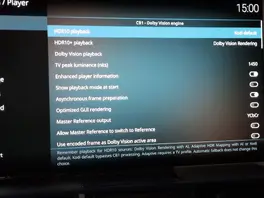
    • Kept independent playback preferences for Dolby Vision, HDR10 and HDR10+ sources. Automatic fallback no longer replaces the user's saved choice for the next file.
    • Added Kodi default consistently to the three playback selectors, leaving normal playback to Kodi without CB1 image processing.

    HDR10 rendering

    • Reworked HDR10 Expert renamed to HDR10 Rendering Reference around explicit display mapping: manually entered peak brightness, OLED/LCD/projector black presets or a custom black level, and output gamut selection.
    • Corrected near-black handling and creative-trim application to preserve shadow steps rather than applying a linear RGB offset that can crush them.
    • Added bounded highlight/gamut handling and coherent output metadata, including targets above the source mastering peak.
    • Improved HDR10 Rendering startup, resource ownership and transitions back from Dolby Vision; corrected the contrast-state issue reported during live switching.

    HDR10+

    • Improved HDR10+ to Dolby Vision Rendering metadata mapping with weighted source-distribution estimates, bounded handling of incomplete statistics and continuous scene/seek state. Source video pixels remain unchanged by this metadata conversion. Weighted-percentile estimation adapted from AVDVPlus HistogramPlus.
    • Improved conversion startup and playback/seek recovery, with source metadata kept separate from estimated values.
    • Retained native HDR10+ playback through Kodi default, without activating the conversion pipeline.

    Blu-ray and BD-J menus

    • Bundled the Java runtime and the BD-J JAR pair matching the native libbluray 1.5.0, avoiding the mismatch with older add-on JARs.
    • Fixed UHD menu video dimensions, missing/unknown video-size handling, audio/subtitle language selection and component inventories. Shared Java control fixes adapted from SamuriHL's CoreELEC work.
    • Improved direct-title stream inventory and BL/EL resynchronization without disc-name-specific workarounds.

    Playback, HDMI and hardware

    • Intel HDMI now identifies the source as a media player rather than a PC, avoiding LG automatic PC-mode and triggering Low Latency mode (#86). A driver override retains PC identification if required. Based on big-fella, via dangerouslaser.
    • Fixed an HDR10-to-Dolby Vision AI startup wait after fallback/re-entry by correcting the existing preparation order.
    • Fixed Intel HDMI link recovery with active HDR10+ metadata, retaining normal output validation. Contributed by lessbones in #83.
    • Improved return to SDR, live connector-state checks and output recovery after failed playback or mode changes.
    • Retained pending HDMI modesets until the requested timing is actually committed, including when Kodi temporarily reuses its last working configuration.
    • Improved AI frame/pool retirement, re-entry and paused-output resizing, without changing native Kodi scaling filters.
    • Added earlier NVIDIA driver-selection and boot diagnostics to distinguish driver initialization, connector selection and damaged boot media.
    • Corrected audio channel-map handling and retry state without adding artificial audio/video offsets.

    Interface and Player information

    • Added optional optimized GUI compositing for compatible Dolby Vision output paths; movie pixels and metadata are unchanged. reducing GPU workload by 30% to render GUI on certain circuit
    • Clarified file metadata, metadata used by CB1 and metadata sent to the TV. Forwarded metadata is no longer misleadingly described as unused merely because CB1 does not apply it locally.
    • Clarified CM2.9/CM4 processing status, including live Auto/Auto 2 decisions.

    Known issues

    • Disc-specific Java applications and repeated-disc memory behaviour are not universally qualified.
    • Some GTX 10-series , Intel Arc and NVIDIA RTX 50-series compatibility reports.
    • DV to HDR10+ need to be refined

    Next focuses

    • Bug fixing following new issues.
    • Continue HDR10/HDR10+ and affected-GPU compatibility qualification.
    • Extend Blu-ray menu coverage with further authored discs and logs.
    • Player Information UI rebuild
  • Yes please open an issue and share the log.

  • Thanks for all the fixes in RC3.

    Super minor thing, the currently selected "Dolby Vision playback" option in the settings is always displayed as blank even though the option is actually selected and working.