

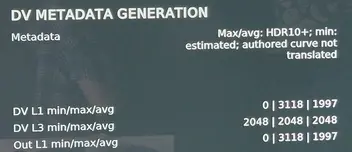
S24 HDR10+ "authored curve not translated" - whatever it means
S24 HDR10+ "authored curve not translated" - whatever it means

can you send me the log
for both the HDR10+ message and the fel that is not working when you move in your film
RC4 Preview is up with certain fixes
wow, S24 HDR10+ works now  it tell´ s something about missing curve, but I works and shows DV, no freeze/crash.
jumping in chapters (Ryan FEL mkv) works great and fast.
another mkv FEL (Nürnberg) is playing, but if I jump to the next chapter playback ends with an error, but no crash maybe a bad rip, in Hades build I can jump... I´ ll try more movies.
I think CroqueMr and Hades should sit down together for a few days 
 making a ultimate version
I can answere myself thanks to claude AI
create .nfo for example:
<?xml version="1.0" encoding="UTF-8" standalone="yes"?> <movie> <title>Der Soldat James Ryan</title> <originaltitle>Saving Private Ryan</originaltitle> <year>1998</year> </movie>
put this into the mkv:
| Datei | Name | MIME-Typ |
|---|---|---|
| NFO | kodi-metadata | text/plain |
| Cover | cover.jpg | image/jpeg |
| Background (optional) | fanart.jpg | " |
I’m still working on the MP4 container part.

If possible, please include a short original S24 clip that reproduces it, without re-encoding.
thats easier for me, here a sample: Link
hadesdevls I’ve noticed one little bug: when I play a video from my S24 (HDR10+)—processed as Dolby Vision—and then stop the clip, the screen remains black. The PC hasn’t crashed, though; I can tell because I can hear the audio feedback as I navigate through the menu.
Is this a known issue, or should I provide a log? There are no such problems when playing in HDR.
Another thing I noticed in terms of comparison: with CroqueMr, skipping between chapters doesn't really work, the image usually just stays frozen when using mkv DV FEL whereas with Hades, you can jump through the chapters without any issues.
Hi, i am searching if it is possible to have the embedded `cover.jpg in` MP4 and MKV containers displayed as thumbnails?
Currently, I only see random scenes from the video used as thumbnails.
Or the "full" preview/artwork retrieved from an online database, complete with all the trimmings.
I’m asking because several AI models claim it is possible.
According to the wiki, this only works if you have separate `.jpg` files named the same as the movie—but that’s not what I’m asking for!
I assumed that since Windows handles this natively (for MP4 files), Kodi would do the same by default. 
I tried both builds on the same machine (Geekom A5 Pro Ryzen 5 7430U)
Hades: playback stutters while the media info overlay (O key) is open. Without the overlay, playback is smooth.
CroqueMr: The overlay/info panel causes no stutter here. However, playing a video recorded on my Samsung Galaxy S24 (HDR10+) causes an immediate, complete crash of Kodi (need hard reset). The same file plays without any problem on Hades with DV.
Another point that interests me and I’m unable to judge is whether CB1, with its "Dolby Vision Master Reference" option (offering state-of-the-art Dolby Vision output with uncompromised precision), is technically superior to the Hades `dvbridge` module (which uses FFmpeg and `libplacebo`).
Thanks for your work on both projects!
The issue come from your file, the FEL layer is broken, but I’m still going to incorporate more robust reading methods for imperfect files
I´`´ m sorry for the false alarm. 
I ripped it again with makemkv -> no problems.
and I paid for the ape 
I used the R1.0.0-RC3 Preview since 2 days, just now you released
CroqueMr tagged this 5 hours ago
is this another version as my 2 days old preview
you don´ t want to test Privat Ryan 
I wanted to watch "Saving Private Ryan", but it won't play. It’s stuck on a single static frame.
Could it be an issue with the Ryzen 5 7430U? Tested on CroqueMr R1.0.0-RC3. Perhaps you could try it on an Intel-based system?
Sample mkv FEL
Password: libreelec
Yesterday I was able to try out CroqueMr work:
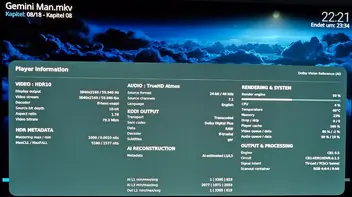
DV 60fps, ~50% GPU load.
I was just wondering: in Win11, the A5 Pro draws 3.9W, whereas in Kodi—even when not playing anything—it draws 12W. Are there no power-saving options enabled in Libreelec-Linux ?
I have a question regarding audio output:
My LG TV only supports (E)AC3  - my Logitech Z906 supports AC3 & DTS, no HD/lossless audio !
Options:
a) Geekom A5 Pro –> HDMI 1 – LG TV – S/PDIF – Logitech Z906. Disadvantage: no DTS (1.5 Mbit/s), only AC3 (640 kbit/s). I think Kodi can convert DTS-HD Master or Dolby TrueHD to AC3 5.1 640k ?
b) Geekom -> HDMI 2 -> HDMI adapter to S/PDIF –> Z906; DTS/AC3 support. is this possible? HDMI1 -> Video with DV; HDMI2 -> Sound?
c) USB soundcard with 6-channel analog –> Z906 (analog connection). Advantage: lossless PCM 6-channel output for TrueHD / DTS-HD. Potential drawback: interference/noise due to the analog cable.
edit
d) USB S/PDIF adapter like this - but supports linux/Kodi it?
any ideas?
I’ve now bought the GEEKOM A5 Pro / AMD Ryzen 5 7430U / 16 GB DDR4 RAM and am really looking forward to trying it out with CroqueMr´ libreelec-x86-DV.
Is there a DV FEL sample with 60fps available anywhere?
I found a new one:
GEEKOM A5 Pro
• AMD Ryzen 5 7430U Prozessor
• 16 GB DDR4 RAM
same price like the Core Ultra 5 125H. (seller has stopped responding me)
How should the suitability or graphics performance be evaluated?
Do CroqueMr and LibreELEC-Hades have the same hardware requirements?
I don’t even know which version I should choose.
if I can use Win11 in parallel
I´ ve got no answere yet, so I ask again
350€ but not new.
N100 ~250-270€, not new.

Hi everyone, first post!
Anyone is using a dual boot solution? ...
exactly my question 
I would like to buy: ASUS Mini PC NUC14RVH| 'NUC14 Pro'|Core Ultra 5 125H | RAM: 16GB | SSD: 512GB| Windows 11 Pro
and I don´´t know if the hardware is perfect for DV FEL 24-60fps and if I can use Win11 in parallel