


Player cache being full is a good thing, you don't have to change anything.
You can also change it in the GUI, Settings / Services / Caching but don't bother.
Player cache being full is a good thing, you don't have to change anything.
You can also change it in the GUI, Settings / Services / Caching but don't bother.

I haven't, no. If somebody wants to check, I'll be happy to note results and see if I can do something about it
Doesn't work on a mainline build, the same libXrender.so.1 missing error. You should be able to build Hyprland without any xorg deps.
I think Gemini is partially right, but looking at all the build config it looks like only generic-legacy builds include DISPLAYSERVER="x11" which CB1 is not. Generic builds set DISPLAYSERVER="no".
So it's not quite a clean cut as it says but clearly YBLOD is missing the lib for some reason.
Have you tried a mainline LE nightly?
fyi this addon doesn't work on the YBLOD builds with the following error:
Nov 19 19:37:04 LibreELEC kodi-run-external[22933]: /storage/.kodi/addons/tools.hyprland/bin/Hyprland: error while loading shared libraries: libXrender.so.1: cannot open shared object file: No such file or directoryNot sure why that library is needed as you are building Hyprland with NO_XWAYAND already.
I don't know if recent vanilla LE builds are also missing libXrender.
Also the Hyprland add-on isn't visible in my installed add-ons list even though it's installed, so there is no way to remove it or check it's version etc.
Worked that bit out the addon.xml needs a script defined, even if its just a stub:
and a very simple default.py like:
This is fantastic, i never imagined getting Linux 7.4 so quickly. 4k120 10bit VRR HDR in moonlight is here 
I have a couple of bits of feedback if you're open to them:
Thanks

Hi Nissel,
The NUC have two HDMI out. Where i can setup LibreElec to split the signal?
One HDMI to the TV and the other HDMI to the AVR INThanks
Just make sure your TV is on the primary HDMI and AVR on the secondary, and change the Audio devices (both normal and passthrough) in the System / Audio settings to be the secondary HDMI.
This is why I'll never forgive LG for not enabling DTS passthrough for E-ARC.
If you have 2 hdmi outs you can use one for video directly to the TV and the other to the AVR for audio. But it is a bit of a faff as it requires switching inputs on your AVR and TV separately.
I'm using the Audio Profiles add-on to only switch to the secondary audio HDMI when the codec is DTS.
One new problem I've just discovered with the GMKTec K12 is if you do turn off HDMI CEC in the bios it seems to cause other devices on your HDMI chain to also not be able to use CEC.
I've enabled it again in the BIOS and everything else is working again, I'll just have to put up with it turning off my AVR on shutdown.
Sure. But this does not have much to do with isolating AC3/E-AC3 compatibility from HDR switching functionality. Or am I missing something? I absolutely do not want to ignore you, I hope I haven't given you that impression.
It wouldn't change functionality at all, I'm just suggesting something that would make your code simper and more inline with how Flatpaks are designed to function. Their whole point is to bundle applications and dependencies together isolated from the rest of the system, exactly what you are doing, and be portable and installable on a wide range of systems.
But it's fine, I understand this is more of a proof of concept and you just want something working, rather than doing it right.
Edit:
It's very easy to build a Flatpak with a custom electron build just use a command such as:
Display MoreConsidering that Hyprland usage is limited to the specific vacuumetubemod addon, I don't see much to gain. If somebody does not want to install the modded version (which anyway can coexist with the official release), I made available the patches and binaries to do so.
Re-reading what you just wrote, I am unsure whether you checked the new page I posted. The new page provides instructions to install two addons (read the instructions for the order of installation) that lead to the vacuumtubemod to be installed on LE. It can coexist with the regular vacuumtube flatpak (although, at least currently, I don't see the advantage in keeping both).
Having a version of the addon with just EAC3 is not something I'm particulary interested in doing. As mentioned above, patches are available in a separate repository if somebody wants to do that (but why, considering that hyprland is totally inactive until vacuumtubemod is launched?).
Also, and most importantly, if the official devs want to lift everything and bring it to the official addon, I'd be simply honored. I have no ambition here, I'm just doing something I wanted to use myself, even just for testing the limits of what I could achieve through Gemini in non-agentic mode.
I hope my answer is clear but in case it isn't, absolutely feel free to ask further questions.I would really appreciate if somebody using regular builds (not CroqueMR's) could test this.
I've read your page and reviewed your code, I'm simply offering a cleaner way for you to achieve the same thing you already have.
Currently your Flatpak.vacuumtubemod has lots of custom code to download and patch the normal VacuumTube flatpak. You can just build a Flatpak file with your patches, host that on your GitHub and get your add-on to fetch and install that as a normal Flatpak, no vacuumtuberuntime-x86_64.tar.gz needed.
Your free to ignore me obviously, just trying to offer some advice.
Here it is: https://github.com/atrugiel69/vacuumtubemod
It was built against CroqueMR DV-R1.0.0-RC4-Preview-Update3. I hope it works with the current release.
There are clear (I hope) instructions for installation on GitHub.HiassofT maybe this latest development could be of interest to you. Not necessarily to bring everything over to the official release but, I don't know, as inspiration. I obviously couldn't have done anything without your development. I'm just a user with too much time and Gemini (not even an agentic AI, you can imagine the copy and paste involved in doing this), absolutely NOT a coder.
One suggestion would be to build your VacuumTube fork (with your electron and ffmpeg patches) as a Flatpak which you can just install normally, rather than having some patching process the modifies the already installed version.
That way someone could use your Flatpak on Linux or in LibreElec without the Hyprland session if they don't want HDR but do want to try EAC3.

VRR isn't necessary to fix the Flatpak issue, it's a workaround.
VRR can work very well on some PCs but be a nightmare on others, often causing Kodi to panic and fall back to the UI resolution. Implementing it properly is far more complex than adding a simple toggle. You need to handle several aspects of Kodi and the video pipeline carefully to achieve reliable behavior.
If VRR eliminated the black screens when switching between HDR, SDR, and Dolby Vision, I'd see a stronger reason to implement it. But as it stands, I don't see much benefit, you do not need VRR to switch from a 60fps GUI to a 23,976fps movies
What DangerousLaser did with QMS-VRR is interesting and for me is the only worth use case. I've experimented with the same approach in an internal build: keeping everything in Dolby Vision to eliminate black screens entirely. However, IMO, the stability issues across different hardware outweigh the relatively small benefits.
I might eventually introduce something similar, but only for a limited set of validated hardware, or provide no support for this feature
I have no interest in using VRR for Kodi media playback at all, the current status quo with your build is fine. Even QMS is a bit janky and not really worth it, I'm fine with that 1 sec hdmi resync on mode changes.
Using it in some Flatpaks such as Moonlight is totally separate and valid for the gaming scenario where frame rate actually varies with gameplay and VRR is a much smoother experience. That also works already in your build and others. I'm not asking for any changes, quite the opposite, I'm sharing my delight in everything working great 👍
That might well be but I hope something can be done to have VRR on only for flatpak. For video playback purposes I don't want VRR active, as I agree with CroqueMr: it can lead to unintended consequences for frame timing, etc.
madshi always advised to keep VRR off when using madVR, for instance.
That's solved now too, see RE: [x86-64] After Flatpak add-on execution Kodi no longer outputs 10 bit when required this will clear the left over 8bit max and freesync activation from the Flatpak run, if you have enabled vrr in your kanshi display configuration.
Freesync will still say enabled at 60hz on the Kodi GUI but doesn't activate so stays at 60hz. Once you play a video under 30fps and switch to a suitable refresh rate it disables entirely, this is good enough for me personally.

good thermal paste will also work
I repasted with some MX-4 that I already had, it's not the best stuff in the world but has always been good enough.
Did a thermal stress test before with balanced mode (55w) all default settings boost on, SMT on. Fixed the CPU fan at 50% speed, which is noisy but makes for a fairer test.
Before: 10 mins all core load in OCCT reached 76c and had stopped increasing, still pulling 55w and all cores clocks at 3.6Ghz
After: Same test, 75c same power and clocks. So not any difference.
So in my testing the stock paste is OK, maybe they are using better compound now or mine was just new and not dried up yet. And/or a basic paste like MX-4 isn't any better than what they use, PTM pads should be better but I'm not getting one to test.
At least I didn't make it worse, and it's still very quiet in LibreElec anyway 

Q1 Did you have the old bios then update it as I herd the older bios had a better control of the fans ? How did you stop the fan from starting and stopping for the cpu ? Set it to 35% does that keep the fan running all the time at a slow 1000rpm.
It had the latest BIOS already installed, so i can't comment or provide it to you. But the new one is fine once you set some manual settings. These are the settings i'm using, the CPU fan is stopped when you first boot until it hits 45c (start temp) then it runs at 25% PWM, if it ever got back down to 10c (it won't) it would stop again. During LibreElec usage it basically stays in this 10c to 45c range and stays at 25% PWM. If I run a benchmark in Windows or Linux and the temps go above 45c and the fan slowly ramps up (PWM slope). The system fan just stays at 40% PWM with these settings.
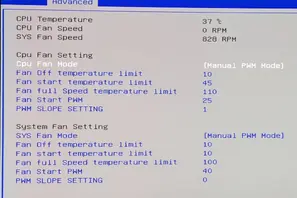
Q2 Is the case fan blowing air into the case or pulling ? I was looking around and you can find a case fan that’s 5v at 92mm but I think it’s 25mm deep not sure how deep the fan is inside the case that comes out the unit as if it s the same that’s a straight swap fan right there.
It's blowing and yes it's 92mm x 25mm 5v with a non standard connector, i won't be changing it, its OK at 40% fixed speed.
Q3 so is this a true HDMI 2.1 FRL or TMDS because they don’t state the spec on there site like others do
The hardware is HDMI 2.1 and it's capable of full 48Gbit FRL and VRR, confirmed in a Windows install. But this is not fully available in Linux yet. Kernel 7.2+ can do FRL with a kernel parameter and is considered experimental, Kernel 7.4 should have FRL and VRR enabled by default.
Q4 can you disable the fan in the unit if it’s just running video from Kodi or do you think the cpu would get to hot
As shown in Q1 you can set the fan stop to something higher than 10c, 35c for example would work, so the fan comes on at 45c cools to 35c then turns off.
I won't do this as the fan makes a little 'chirp' sound when going from stopped to spinning, that i find more annoying than it staying slow the whole time. if i could avoid the initial fan stop until the first rise to 45c i would but that does not seem possible with the limited settings.
I'll be interested in your results once you added ptm7950, and where did you get it from?
Good call, i did order it from Amazon but it's probably fake so I've cancelled the order. I'll just use some decent thermal paste, that i already have plenty of.
As for VRR, I have internal builds that include it and I managed to enable VRR on non compatible device even on a HDMI 1.4 output, but honestly, it’s almost useless in Kodi, and, more importantly, it’s an overly complex mess that creates all sorts of support issues. That’s why I’ve never released it
VRR / Freesync isn't useful for video playback, but with something like Moonlight via the flatpak its very useful, I'm using Freesync to good affect for that in your build already

Quick heads up: updated externalhelper and flatpak addons are now in the repo.
externalhelper now uses the labwc compositor instead of cage, you can enable screen blanking in the externalhelper addon settings and volume control with multimedia keys should work, too (no visual feedback though).
so long,
Hias
This is great, everything is working here: pointer restraints, screen saver/blanking, custom resolutions including VRR, multi channel audio.
The price is fine, could have signed up for PayPal credit and other cashback stuff but didn't care to.
The top fan is quiet enough for me when running at a low fixed speed as i explained. I do have some ptm7950 on order though.
Part of my LibreElec for everything plan is to not have my LG connected to the internet or network at all anymore, but i have tried that youtube app in the past and it's not as slick as VacuumTube.
Thank you, i was trying to find a way of resetting max bpc via the command line and your suggestion works.
I managed to do a similar trick with modetest, so I don't get the test image flashing up, also disabled VRR (which I enabled for Moonlight) with a similar trick. Thanks again.
If anyone else wants my script it's:
#!/bin/sh
for c in $(modetest -M amdgpu -p | awk '/^CRTCs:/{f=1;next} /^Planes:/{f=0} f&&/^[0-9]+[ \t]/{print $1}'); do
    modetest -M amdgpu -a -w $c:VRR_ENABLED:0
done

# "max bpc" is a connector property (listed by modetest -c)
for c in $(modetest -M amdgpu -c | awk '/^Connectors:/{f=1;next} f&&/^[0-9]+[ \t]/&&$3=="connected"{print $1}'); do
    modetest -M amdgpu -a -w "$c:max bpc:12"
done
This is for AMD, but you can probably adjust it for intel / Nvidia if needed.
Please ping us when it's been accepted in upstream wlroots, then we can look at including a backport patch.
so long,
Hiass
it's not my patch, and i sadly think its unlikely to be included upstream. Another solution to my issue would be welcome.
