Dolby Vision Hardware

  • So what your saying is these devices are HDMI 2.1 FRL it’s just there locked out even AMD ? As all advertise as 18gb ports on there sites apart form some other Chinese manufacturers

    Quoting from my understanding of FOSSlinux, yes AMD GPU needs Linux Kernel v7.2 + amdgpu.dc_feature_mask=0x400 boot kernel parameter. Linux v7.3 will have native FRL & VRR support for AMD. Physically it has no issue to run using FRL, kernel support is the limitation.

    LE Croque & Hades are v7.2.6 & v7.3 respectively

  • It's been some years since I've bough thermal paste. Are these PTM7950 pads supposed to be the best choice now?

    from what I'm seeing in the community yeah, as long as you get genuine stuff, the manufacturer only send big roles to companies. in USA their are a few stores like LTT that sell it among others. but if you check igorslanm the thermal grizzly TG Phase Sheet PTM is basically the same performance for cheaper, which has less chance of being fake. also I'm not an expert or a user, I just research and almost everyone is using PTM7950 with amazing results

  • We do not use standard linux kernel.

    As for VRR, I have internal builds that include it and I managed to enable VRR on non compatible device even on a HDMI 1.4 output, but honestly, it’s almost useless in Kodi, and, more importantly, it’s an overly complex mess that creates all sorts of support issues. That’s why I’ve never released it


    Regarding HDMI 2.1 bandwidth, I don’t really see an issue there for Kodi either, you almost never need 48 Gbps for Kodi. I could easily enable it, but I don’t see any use case for it.

  • Regarding HDMI 2.1 bandwidth, I don’t really see an issue there for Kodi either, you almost never need 48 Gbps for Kodi. I could easily enable it, but I don’t see any use case for it.

    4K interface at 120Hz would be nice. I use 120Hz in 1080p and the smoothness of animations is perceptible, compared to 60Hz

  • It's been some years since I've bough thermal paste. Are these PTM7950 pads supposed to be the best choice now?

    It's better since it won't dry out - apply once and forget. Thermal paste will harden and get pumped out, probably 1-3 years depending on usage. Leaving almost none to little thermal interface material after a long period of thermal cycling.

    The challenge is applying ptm7950 since it's one whole piece like a thermal pad, except it's way thinner and sticky when it's handled at room temperature. Removing the first protective layer is easy. After applying on the CPU die/IHS, removing the second protective layer without the ptm7950 sticking to it is the challenge.

    Freezing it is one trick. Applying a scotch tape to the second protective layer and quickly lifting it in one pull is another.

    Good thing is the ptm7950 sheet comes as a large piece, so you'll get there after 2-3 tries.

    By the way, it needs manual precision cutting with sharp knife or scissors to match the CPU die/IHS size.

    Either LTT's ptm7950 or Thermal Grizzly Phase Sheet PTM works, whichever is available and more cost effective for you. Or digilently change thermal paste before it causes damage.

    Especially if you have a projector, I believe most of them uses thermal paste. Mine dried out and luckily the firmware has good thermal safety measures. Laser dimmed and video playback stops. The symptom was like a stuck DMD mirror but clearly it wasn't.

    Going back to HDMI@120Hz support, on hardware perspective if cost is not much of an issue and the goal is for long term usage, then it's a better buy.

    Else HDMI@60Hz is the safe upper limit for a media box.

  • not heard anyone talking about mx6 but have seen expert audit of thermal grizzly compared to it

    https://www.igorslab.de/en/thermal-gri…lly-in-reality/

    it's slightly cheaper on amazon but if you can trust the UK place for ptm7950 it's barely that much extra
    (posted above for the shop)

    here is a couple of videos if anyone is interested in the thermal paste tests with the PTM7950, watch the first then the new paste in the 2nd video

    Don't Buy PTM7958? Phase Change vs. Traditional Paste on Mini PC - YouTube

    i thought it was the MX6 its not its the MX7

    Arctic Just Changed the Game... Again. [Arctic MX-7 Review]

  • here is a couple of videos if anyone is interested in the thermal paste tests with the PTM7950, watch the first then the new paste in the 2nd video

    Don't Buy PTM7958? Phase Change vs. Traditional Paste on Mini PC - YouTube

    i thought it was the MX6 its not its the MX7

    Arctic Just Changed the Game... Again. [Arctic MX-7 Review]

    this is a great video but surprised he didn't do a few cycles on ptm7950, everyone knows that, it's not going to be the best on first run. he needs to blast out one run then, try it, otherwise it's not a fair test, also ptm7950, you don't need to replace as often as thermal paste. ptm7950 is the best then that thermal grizzly sheet

  • this is a great video but surprised he didn't do a few cycles on ptm7950, everyone knows that, it's not going to be the best on first run. he needs to blast out one run then, try it, otherwise it's not a fair test, also ptm7950, you don't need to replace as often as thermal paste. ptm7950 is the best then that thermal grizzly sheet

    video review of the K12 with the same bloke with the paste reviews, shows you the temp difference with the paste changed at 16:28

    Better Ports, Great Mini PC. This is the New 780M Leader [GMKtec K12 Review]

  • Q1 Did you have the old bios then update it as I herd the older bios had a better control of the fans ? How did you stop the fan from starting and stopping for the cpu ? Set it to 35% does that keep the fan running all the time at a slow 1000rpm.

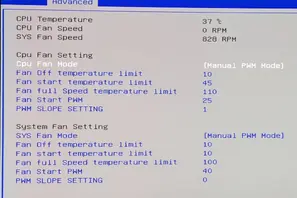
    It had the latest BIOS already installed, so i can't comment or provide it to you. But the new one is fine once you set some manual settings. These are the settings i'm using, the CPU fan is stopped when you first boot until it hits 45c (start temp) then it runs at 25% PWM, if it ever got back down to 10c (it won't) it would stop again. During LibreElec usage it basically stays in this 10c to 45c range and stays at 25% PWM. If I run a benchmark in Windows or Linux and the temps go above 45c and the fan slowly ramps up (PWM slope). The system fan just stays at 40% PWM with these settings.

    Q2 Is the case fan blowing air into the case or pulling ? I was looking around and you can find a case fan that’s 5v at 92mm but I think it’s 25mm deep not sure how deep the fan is inside the case that comes out the unit as if it s the same that’s a straight swap fan right there.

    It's blowing and yes it's 92mm x 25mm 5v with a non standard connector, i won't be changing it, its OK at 40% fixed speed.

    Q3 so is this a true HDMI 2.1 FRL or TMDS because they don’t state the spec on there site like others do

    The hardware is HDMI 2.1 and it's capable of full 48Gbit FRL and VRR, confirmed in a Windows install. But this is not fully available in Linux yet. Kernel 7.2+ can do FRL with a kernel parameter and is considered experimental, Kernel 7.4 should have FRL and VRR enabled by default.

    Q4 can you disable the fan in the unit if it’s just running video from Kodi or do you think the cpu would get to hot

    As shown in Q1 you can set the fan stop to something higher than 10c, 35c for example would work, so the fan comes on at 45c cools to 35c then turns off.

    I won't do this as the fan makes a little 'chirp' sound when going from stopped to spinning, that i find more annoying than it staying slow the whole time. if i could avoid the initial fan stop until the first rise to 45c i would but that does not seem possible with the limited settings.

    I'll be interested in your results once you added ptm7950, and where did you get it from?

    Good call, i did order it from Amazon but it's probably fake so I've cancelled the order. I'll just use some decent thermal paste, that i already have plenty of.

    As for VRR, I have internal builds that include it and I managed to enable VRR on non compatible device even on a HDMI 1.4 output, but honestly, it’s almost useless in Kodi, and, more importantly, it’s an overly complex mess that creates all sorts of support issues. That’s why I’ve never released it

    VRR / Freesync isn't useful for video playback, but with something like Moonlight via the flatpak its very useful, I'm using Freesync to good affect for that in your build already :thumbup:

    Edited once, last by nissel (November 14, 2026 at 12:19 PM).

  • Good call, i did order it from Amazon but it's probably fake so I've cancelled the order. I'll just use some decent thermal paste, that i already have plenty of.

    Quote

    in UK I've seen this
    https://www.trmfy.co.uk/genuine-honeywell-ptm7950-85wmk

    Why Buy From Us?

    • Genuine Honeywell material, cut from full 160 × 400mm sheets - batch label photographed on request.
    • Superior Performance - 8.5 W/mK thermal conductivity, phase change at ~45°C
    • Trusted by Manufacturers - the same material used in Dell, HP and Lenovo systems


    This item isn't sold in retail packaging because it's only available from the supplier in large raw sheets (160mm × 400mm). We carefully cut it to size in-house and pack it in labelled bags for you.

    this expert analysis says Thermal Grizzly PhaseSheet PTM is just as good

    Thermal Grizzly Phase Sheet PTM Review
    I'm deliberately starting this test at the beginning, because the question of the actual origin and quality of such phase change pads often determines the…
    www.igorslab.de


    https://www.amazon.co.uk/Thermal-Grizzly-PhaseSheet-Performance-Non-Conductive/dp/B0DB84CQW6/ref=sr_1_1?crid=2C62C1SV5XNNE&dib=eyJ2IjoiMSJ9.3rYV7O0sRl1Mzpt9oYhMY-8jHv4IWPiS9GxveIkkimq7z6oyfZTZsAk0NZl60CiZ6_EI9KUdMees8wJB_mwQ7eH1kBmwEUTl9LmvyRM3fgB1QaHAinM-rLvcN08DvNS0d3b-yAwNQiYiVJQbsr5Rpiri0a7WG9uGSApSIXcvjfqJ-1WT8dP7xC0rqOzB7pYIfKFFxSDZsVctTgtK30LbNe2SKTsCyN38ExhYoKfK1Kw.Ddwx0pYB4k2PSj3vw51YXHWpWPrzFzBdiUEvTOx6Gsk&dib_tag=se&keywords=thermal+grizzly+phasesheet+ptm&qid=1794659458&sprefix=thermal+grizz%2Caps%2C115&sr=8-1

    a good thermal paste will also work, on black Friday with deals, it could come with good discount to tempt you. the product should be fine for multiple installations. either way, it'll be interesting to know with your chosen thermal paste what temps you get. thx

  • VRR / Freesync isn't useful for video playback, but with something like Moonlight via the flatpak its very useful, I'm using Freesync to good affect for that in your build already

    That might well be but I hope something can be done to have VRR on only for flatpak. For video playback purposes I don't want VRR active, as I agree with CroqueMr: it can lead to unintended consequences for frame timing, etc.
    madshi always advised to keep VRR off when using madVR, for instance.

  • That might well be but I hope something can be done to have VRR on only for flatpak. For video playback purposes I don't want VRR active, as I agree with CroqueMr: it can lead to unintended consequences for frame timing, etc.
    madshi always advised to keep VRR off when using madVR, for instance.

    That's solved now too, see RE: [x86-64] After Flatpak add-on execution Kodi no longer outputs 10 bit when required this will clear the left over 8bit max and freesync activation from the Flatpak run, if you have enabled vrr in your kanshi display configuration.

    Freesync will still say enabled at 60hz on the Kodi GUI but doesn't activate so stays at 60hz. Once you play a video under 30fps and switch to a suitable refresh rate it disables entirely, this is good enough for me personally.

    good thermal paste will also work

    I repasted with some MX-4 that I already had, it's not the best stuff in the world but has always been good enough.

    Did a thermal stress test before with balanced mode (55w) all default settings boost on, SMT on. Fixed the CPU fan at 50% speed, which is noisy but makes for a fairer test.

    Before: 10 mins all core load in OCCT reached 76c and had stopped increasing, still pulling 55w and all cores clocks at 3.6Ghz

    After: Same test, 75c :D same power and clocks. So not any difference.

    So in my testing the stock paste is OK, maybe they are using better compound now or mine was just new and not dried up yet. And/or a basic paste like MX-4 isn't any better than what they use, PTM pads should be better but I'm not getting one to test.

    At least I didn't make it worse, and it's still very quiet in LibreElec anyway :thumbup:

  • VRR isn't necessary to fix the Flatpak issue, it's a workaround.

    VRR can work very well on some PCs but be a nightmare on others, often causing Kodi to panic and fall back to the UI resolution. Implementing it properly is far more complex than adding a simple toggle. You need to handle several aspects of Kodi and the video pipeline carefully to achieve reliable behavior.

    If VRR eliminated the black screens when switching between HDR, SDR, and Dolby Vision, I'd see a stronger reason to implement it. But as it stands, I don't see much benefit, you do not need VRR to switch from a 60fps GUI to a 23,976fps movies

    What DangerousLaser did with QMS-VRR is interesting and for me is the only worth use case. I've experimented with the same approach in an internal build: keeping everything in Dolby Vision to eliminate black screens entirely. However, IMO, the stability issues across different hardware outweigh the relatively small benefits.

    I might eventually introduce something similar, but only for a limited set of validated hardware, or provide no support for this feature

    I have no interest in using VRR for Kodi media playback at all, the current status quo with your build is fine. Even QMS is a bit janky and not really worth it, I'm fine with that 1 sec hdmi resync on mode changes.

    Using it in some Flatpaks such as Moonlight is totally separate and valid for the gaming scenario where frame rate actually varies with gameplay and VRR is a much smoother experience. That also works already in your build and others. I'm not asking for any changes, quite the opposite, I'm sharing my delight in everything working great 👍

    Edited once, last by nissel (November 14, 2026 at 3:59 PM).

  • Thank you taking the time and for doing the re paste and reporting your findings, this is very useful to know GMKtec stock thermal paste is not hindering the chipset. the K12 is probably going to be the best hardware for this build. especially if RAM prices subside

  • Just a quick question. If you have a mixture of displays say 1080p TVs as well will this version of Kodi let you play 4K properly on a 1080p tv as when I have tried in the past they are way to dark and I am having to keep both versions of the movie in 1080p and 4K because of this. ?
    as of Kodi 21.2 you cannot.
    Thanks