

N100 playing The Three Musketeers - Part II: Milady 76GB with full FEL on my LG OLED.
Just checked, it draws less than 18W from the grid.

N100 playing The Three Musketeers - Part II: Milady 76GB with full FEL on my LG OLED.
Just checked, it draws less than 18W from the grid.
May get some flack for this, but ranking this as the best enthusiast Kodi solution now 😁.
CroqueMr, already donated to LE, but can we support you in any way? Those AI tokens you burned through, and all the hours invested in this? Will extend the same to cinemaONE, popcornmix, dangerouslaser and hadesdevls.
That’s really kind of you! But if you’d like to donate, please consider supporting LibreELEC or a cause you care about instead. I just do this as a hobby 
Right now ChatGPT is resetting tokens quite a lot, I can’t even reach half of my quota before it resets. And that’s with two other projects, too.

N100 playing The Three Musketeers - Part II: Milady 76GB with full FEL on my LG OLED.
nice choice 
CroqueMr I tested Beta4 on my NUC (Radeon RX 7600, a discrete RDNA3 card) with the JVC projector:
One leftover from Beta3: during the MVC ISO kodi.log still shows about 250 "CDropControl: lost diff" lines; my own build of the same 3D stack shows none on that disc.

CroqueMr I tested Beta4 on my NUC (Radeon RX 7600, a discrete RDNA3 card) with the JVC projector:
- 3D, checked with glasses: the MVC Blu-ray ISO plays frame-packed at 1080p24 with correct depth and subtitle depth, and the half-SBS clip that fell back to 2D in Beta3 now plays as 1080p60 side-by-side 3D. So AMD HDMI 3D works. Thanks for adding the half-SBS modes!
- Dolby Vision: although the notes list AMD DV for iGPUs only, it also works on the RX 7600. With a DV TV's EDID loaded (the projector itself has no DV), your engine chose Dolby Vision Standard, the kernel accepted it, and P7 FEL played at 240 frames per 10 s with no drops. Note that I didn't check this on a real Dolby Vision TV.
One leftover from Beta3: during the MVC ISO kodi.log still shows about 250 "CDropControl: lost diff" lines; my own build of the same 3D stack shows none on that disc.
Thank you for your quick feedback, could you please send me your log files to correct the small issue, apart from that, can you confirm that everything is correct regarding the implementation? I’m not very familiar with 3D.
As for the supported hardware and all the notes, the redame is not up to date, I'm currently updating it.
The log i got from Three Musketeers.
May get some flack for this, but ranking this as the best enthusiast Kodi solution now 😁.
CroqueMr, already donated to LE, but can we support you in any way? Those AI tokens you burned through, and all the hours invested in this? Will extend the same to cinemaONE, popcornmix, dangerouslaser and hadesdevls.
Thanks for this it should help bring people to the build, which will hopefully lead to more feedback.
What I’d really like is for some highly knowledgeable people to conduct a very detailed analysis of the DV Master output, there are likely a few small things that could use some tweaking.
The log i got from Three Musketeers.
Smooth and efficient (no framedrop / 22% of your rendering engine is used) no issue in the DV standard rendering, you can push the mastering reference rendering, your iGPU is clearly capable.
CroqueMr Here is the kodi.log of that test: Beta4 start, the MVC ISO, then the half-SBS clip. I removed the lines of my own add-ons and masked the LAN addresses. The "lost diff" lines appear during the MVC ISO.
On 3D, everything I can check from the output is right: the projector detects frame packing (1920x2205 at 23.976) and side-by-side (1080p60), and geometry, depth, eye order and the authored subtitle depth on the MVC disc are correct. I haven't looked at your code, so I can only speak for the result. Top-and-bottom I didn't test with Beta4.

Thanks for this
What I’d really like is for some highly knowledgeable people to conduct a very detailed analysis of the DV Master output, there are likely a few small things that could use some tweaking.
Smooth and efficient (no framedrop / 22% of your rendering engine is used)
This is what im running, https://www.asrock.com/mb/Intel/N100DC-ITX/#Overview with 16GB DDR4
Log from when running Mission Impossible; Dead Reckoning 68,5GB.
What I’d really like is for some highly knowledgeable people to conduct a very detailed analysis of the DV Master output, there are likely a few small things that could use some tweaking.
noggin are you around? .. that ^ sounds like something you'd be good for
thank you!
would this mini pc be a good choice:
GEEKOM Air12 Lite, Intel N100 4 Kerne, max. 3,4 GHz, 8 GB RAM, 256 GB SSD, HDMI + DP-Dual-Screen-Display
or would 4GB of RAM be enough? or maybe 16GB be better ?
CroqueMr Here is the kodi.log of that test: Beta4 start, the MVC ISO, then the half-SBS clip. I removed the lines of my own add-ons and masked the LAN addresses. The "lost diff" lines appear during the MVC ISO.
On 3D, everything I can check from the output is right: the projector detects frame packing (1920x2205 at 23.976) and side-by-side (1080p60), and geometry, depth, eye order and the authored subtitle depth on the MVC disc are correct. I haven't looked at your code, so I can only speak for the result. Top-and-bottom I didn't test with Beta4.
Thank you I fixed it, and recompiled the build into the Beta4 release, the image changed.
Log from when running Mission Impossible; Dead Reckoning 68,5GB.
Same as before, smooth, no framedrop, no issue, even with GUI
thank you!
would this mini pc be a good choice:
GEEKOM Air12 Lite, Intel N100 4 Kerne, max. 3,4 GHz, 8 GB RAM, 256 GB SSD, HDMI + DP-Dual-Screen-Display
or would 4GB of RAM be enough? or maybe 16GB be better ?
Yeah a N100 is perfect and works great, 4gb of RAM is enough.
CroqueMr Confirmed: with the rebuilt Beta4 the MVC ISO shows no "lost diff" lines any more (0 instead of about 250). Thanks for the quick fix!
CroqueMr , here's the new log for the DV Freeze.
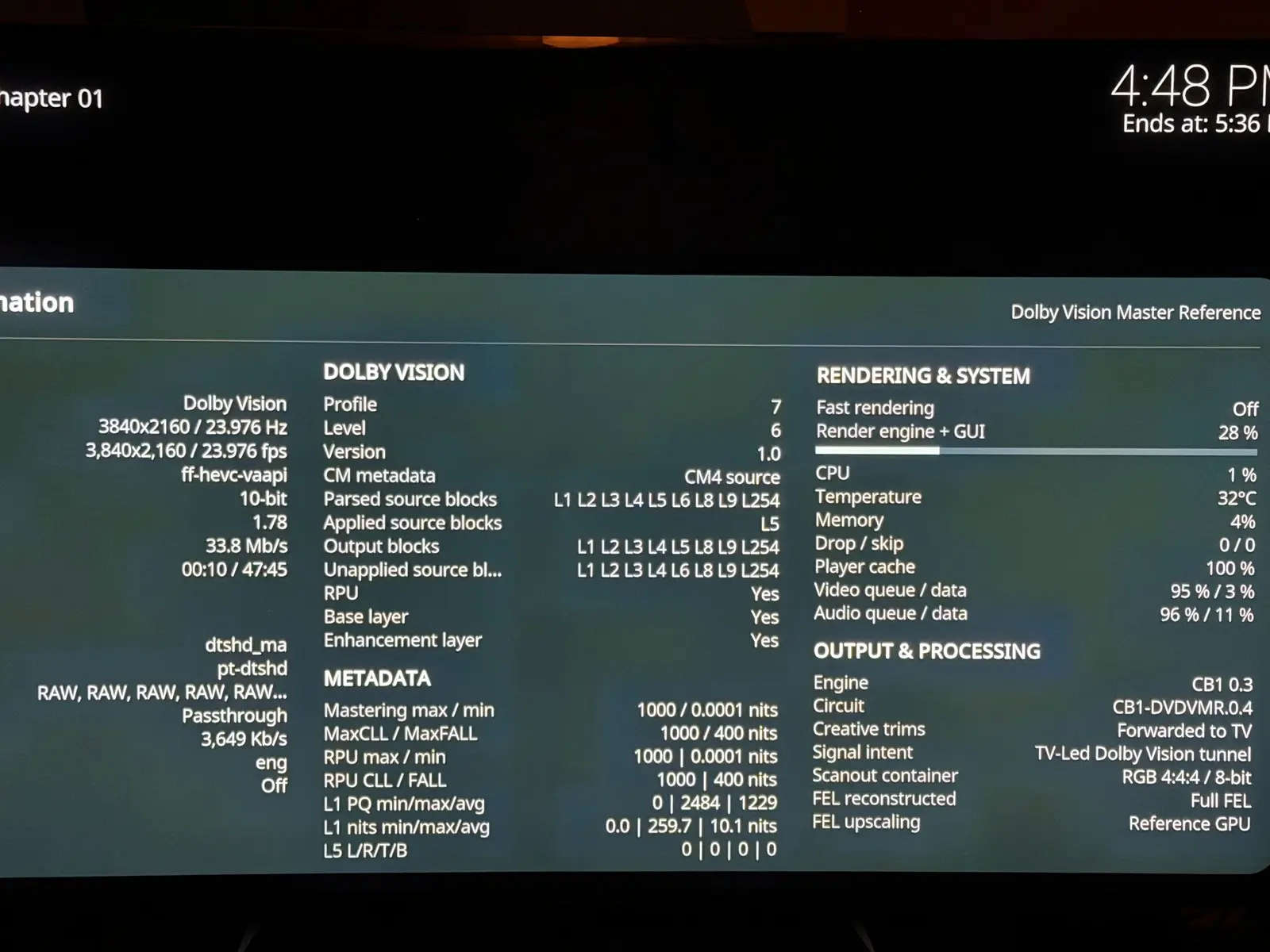
CroqueMr , here are the playback infos before and after the freeze and it's not really a freeze of the system because I can still popup the gui and choose the stop button. It's just doing "nothing" and a black screen forever.
It works fine on my AM6B+ in DV so I don't think it's my file that is corrupted.
BEFORE:
AFTER:
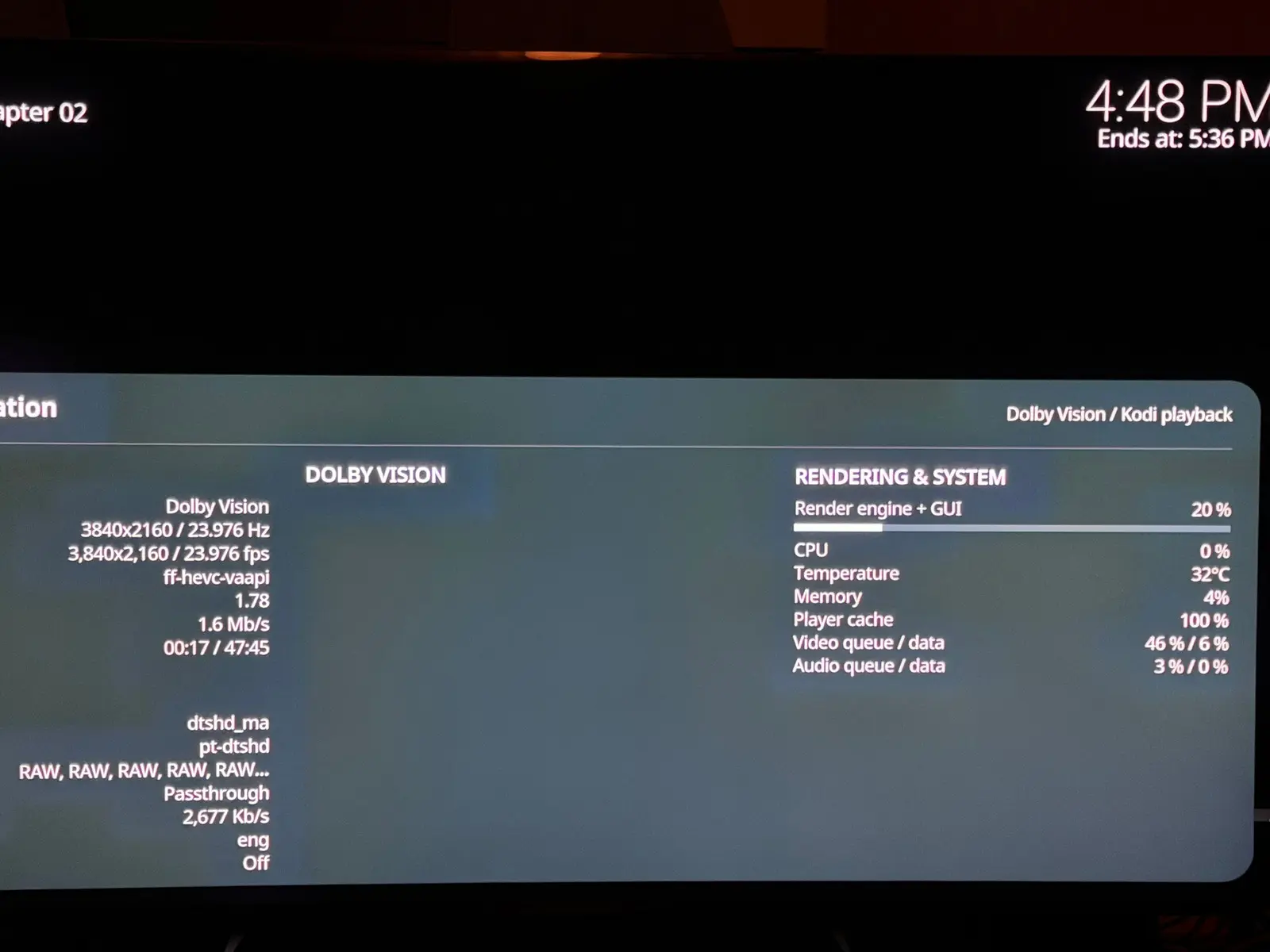
I tried the different DV modes, even DV to HDR10 (HDR10 conversion) and all the modes freeze. If I disable DV then it plays in HDR10 fine.
Also, happy to report that the GUI is now fine, it's not cutted in the black bars anymore thanks to the L5 fix! Thanks to you and dangerouslaser for this!

CroqueMr , here's the new log for the DV Freeze.
Thanks I will investigate on that, I think I’ll need to go through quite a few iterations with you. I’ll send you a pre-release build so you can test a few things. Now that the features are all laid out, I have time to take a detailed look at the support. There will be no more major releases, instead, there will be shorter iterations with minor fixes. I will push you a fix tentative tomorrow.
Possibly also DMDreview. PM'd him to check here.
I can not send PM in avsforum, but I sent him an email. I had already come across these videos before this project, he makes some really great stuff.
I did a clean install of Beta4 but there still seems to be some issues. When I play the three "test" files, they still all seem to have the wrong aspect ratio. I am assuming they are 16:9? The FEL Test is weird: when it starts, all i get is a black screen. However, if I activate the OSD, the picure appears (red screen). Turn off the OSD and it goes back to a blank screen. It does come on by itself about halfway through.
Also, I am using the Estuary Mod V2 skin and it blocks all access to the Enhanced player information. I just get the basic one. Thats probably a "me" problem!
This is my hardware...
LG C9 TV
Clean install, no add-ons or mods

