[x86-64][CroqueMr Builds] Dolby Vision w/FEL, HDR10+, and 3D

  • Thanks for doing the research! 👍

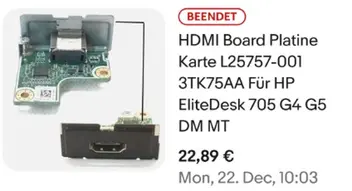
    Just to add some information: I bought my HP EliteDesk machines for less than €100 each, and I've found HDMI Flex IO modules on eBay for around €22.

    So these machines can be a very affordable option, especially if you already have one.

    I'll share the eBay links below. Of course, we still need to confirm which HDMI module version works with the 705 G4 SFF.


    https://ebay.io/m/RW64Ft

    https://ebay.io/m/B0gKEs

    Edited once, last by Samui67: Merged a post created by Samui67 into this post. (November 9, 2026 at 2:37 PM).

  • I tried this on the new RC4 and set the maximum bit depth to 8. That fixed the issue for 4k SDR and 4K HDR movies. But as expected all the 10 bit and now being downsampled to 8 bit. Also still have massive frame drops and stuttering when a movie is playing and you trigger the OSD using the O button on the keyboard.

    That's sort of strange... I don't have that. I will double check. As far as 8 bit / 10 bit, personally I'll convert all non-SDR content to Dolby Vision anyway. DV encapsulate its 12 bit content in a 8 bit stream, so no color information should be lost. For SDR 10 bit content (it's basically just anime scene encodes that use it, AFAIK), I'll use 8 bit dithering. I remember testing it with madVR, years ago, and results are basically indistinguishable from the source, to the naked eye.

  • I tried this on the new RC4 and set the maximum bit depth to 8. That fixed the issue for 4k SDR and 4K HDR movies. But as expected all the 10 bit and now being downsampled to 8 bit. Also still have massive frame drops and stuttering when a movie is playing and you trigger the OSD using the O button on the keyboard. Again this only happens with Tigger Lake. I ran another using vm on proxmox with AMD Ryzen 5 5600G and it had no such issues.

    Can you share the log please.

    Hi CroqueMr would you take a PR adding desktop OpenGL support, so Dolby Vision works on a GBM OpenGL build as well as GLES? I’d like to run my AMD box on the OpenGL build without losing DV.

    What I have in mind:

    • One code path rather than a GL copy. CB1’s GLSL ES 3.x shaders compile unchanged in a desktop GL context on Mesa (ARB_ES3_2_compatibility on radeonsi and iris), and the GL calls are the same apart from a few OES/EXT names.
    • Lift the GLES-only checks in CMake and package.mk, build DVBridgeGLES for both, and hook it into LinuxRendererGL, RendererVAAPIGL and WinSystemGbmGLContext the same way as their GLES versions, sharing the output code between the two GBM contexts.
    • Test on an AMD 780M across TV-Led, Master Reference, HDR10 conversion and FEL.

    Would you take that, and would you rather have it as one PR or split (build and shared code first, then the GL renderer and context)?

    Yeah of course feel free to submit PR :) but for this kind of evolution I will check after the stable release,

    - DV & HDR to SDR are already in the pipe.
    - SDR to HDR/DV : personally I don't like this kind of modification, If I add it it will be after the stable release. I need to check if this kind of dynamic range extention are very straight forward or complicated and need to involve iGPU optimization. If it needs a lot of time it will not be added.

    I’ve been around since the first days of CE having FEL support and I watched CPM get burnt out by incessant requests while the CE team got so fed up that they banned all discussion of forks. I don’t want to see this replicated here. The code is already an enormous amount of effort that has taken over CroqueMr life over the past month. I’ve seen them delay their work to fix this which is a danger sign. I also want perfect Dolby Vision, but not at the cost of somebodies mind, job or happiness.


    DP-to-HDMI conversion adds a whole new layer of complexity to code and support. Sure, it would be nice, but, frankly, not necessary. Let’s let the core work be finished and give all the devs a well-deserved break.

    Np on my side feel free to share your feature request but I prefere to receive everything in github in the issue tab and please don’t be disappointed if I say no, from time to time, I receive requests that are a bit off-topic or things that are very complicated to implement. But for DP -> HDMI the main reason is the support :

    - Sometime it's not possible at all to cover one kind of LSPCON
    - Sometime even if you bought the exact same DP -> HDMI converter the LSPCON inside will be different.
    - Sometime it's simple to enable DV for a LSPCON

    That’s why I say from the start: use a native HDMI port. It’s already very complicated to port the build across so many different iGPUs, adding adapters with the "lottery" involved with various LSPCON chip models, just isn’t feasible. If we find a simple way to support them, then sure, why not, but for now, that’s not the case.

    As I said, optional HDMI board are based on DP output converted to HDMI the major part of the time. Please de not consider this kind of solution.

    It is simple to check : HDMI module 3TK75AA -> picture of the board : https://www.ebay.co.uk/itm/115996621563 -> chip inside : PS175HDM = LSPCON : DP to HDMI converter https://www.paradetech.com/products/ps175/

  • Attaching the logs here.

    What happened in each test (the time is when the O dialog opened)

    FilmDialog openedWhat the log shows
    Bad Apples (SDR)14:07:47OutputPicture - timeout waiting for buffer at 14:07:48. No frame counters exist for this film.
    The Odyssey (HDR10)about 14:08:48The same buffer timeout. In that 10-second window, 1 frame dropped and 44 skipped.
    Mission Impossible (DV FEL)about 14:09:48The same buffer timeout. 21 frames dropped, 2 skipped.
    • Common pattern: every film shows the same buffer timeout at the moment the dialog opens, followed by a short burst of drops or skips. After that the log shows no more.
    • Bad Apples has no drop count: Kodi’s frame statistics only exist on the Dolby Vision path. For plain SDR playback, the buffer timeout is the only evidence, so tell the author that.
  • Hi All

    New here, i have an elitedesk 705 G5 DM (the very small form factor), has the ryzen 5 pro 3400g and I have dolby vision and 3d capable projector. The 705 does not have a hdmi but can order the 3TK74AA. Its just sitting there, would love to get a use for it, so if there is anything i can help with I am more than happy to do so.

  • Hi CroqueMr,

    Thanks for your explanation regarding the PS175HDM and the internal DisplayPort-to-HDMI conversion.

    However, I'd like to share one important finding from my own testing:

    The HDMI Flex IO module already working in my HP EliteDesk Mini is exactly the HP 3TK75AA / L25757-001 that you mentioned!

    Attached is a screenshot of my original eBay purchase:

    With the new LibreELEC 13 build, the system detects the output as HDMI-A-1, offers 1920×2205 3D frame-packing modes at 23.976 Hz, and my LG 3D plasma automatically switches into 3D mode during playback.

    So despite the internal DP-to-HDMI conversion, this particular module is already working in my Mini.

    Of course, I understand that this doesn't guarantee the same result on the 705 G4 SFF. I'll test that as soon as the additional module arrives.

    I just wanted to share this real-world result, as it might be useful for your development work.

    Thanks again for all your efforts!

  • It's a very good news if you managed to have a HDMI connection with this kind of board, but Even if it works for you, it is not garranted for other, as I said, we saw a lot of different LSPCON for the exact same reference of a board, the best advice I can share is to avoid this kind of solution.

  • all of people talking about hardware in this thread,...plz...stop talking about hardware....this software development thread. not hardware help or discussion topic....you are already way toooo long talking about hardware in software development thread.


    go here

    DolbyVisionFriend
    October 18, 2026 at 10:55 AM
  • Can you guys test this sample out? Getting lip synch issue w/N150 and 5800H, but perfect playback w/8745HS. Look at Freddy Mercury's lips in correlation to the audio.

    Couldn't resist Freddy's call. I don't have lip synch issues on my NUC 11 i3. I even tried seeking back and forth but it was always good.
    Fun fact: I had the VHS of this concert. Seeing it like this, today, is... jaw dropping.

  • LibreElec 1.0 RC8(22.0 RC1 Kodi)


    BD menus and returning back to Top Menu works on My Best Friends Girlfriend 2008 (2 cuts seamless branching). This doesnt work right on CE 22.0 RC1 samirhul experimental build 20007 on my Ugoos AM6B+.


    Seamless Branching works on Alien 1979 Anniv. UHD BD ISO.


    Avatar 2009 (non-remastered) 3D BD ISO: can get to 2D Menu. Plays in 2D like it should as I dont have 3D TV.

    FBI warning popups and 3 BD Menus too early as well. 3D Option comes up but it detects I dont have a 3D TV and player. So I can only play in 2D. That is normal


    CroqueMr LibreElec RC4 Preview (22.0 RC1 Kodi)

    Seamless Branching broken in Alien 1979 Anniv. UHD BD ISO.


    BD menu issues:

    Avatar 2009 CE UHD 3cuts, when return to Top Menu, all buttons are missing.

    Same issue on CE 22.0 RC1 samirhul experimental build 20007 build for my Ugoos.


    Avatar 2009 (non-remastered) 3D BD ISO: can get to 2D Menu. But I saw side by side view momentarily until movie started in 2D.


    So far, I like Hades build. I was able to figure out the Dolby Vision settings and got Avatar 2009 CE UHD BD ISO in Dolby Vision on my Sony Bravia AH8 TV. BD menus seem to work better.


    Dolby Vision worked on my two test UHD BD ISOs that I used makemkv 1.18.4 (MacOS) Profile 7 in an mkv work.


    Music & Lyrics 2007 VC-1 plays right with no judder.


    My PC Specs:

    Gigabyte AMD Radeon RX 6500 XT Eagle 4GBvram

    AMD Ryzen 5 5600-X 6cores

    2TB Nvme (Windows 10 Pro)


    Both LibreElec OSes was run from USB 3.0 128Gb flash drive on my PC.


    I have an Oppo-203 with the Free RU 65 JB firmware to play all my BD ISO and see how their menus are supposed to work.

  • CroqueMr  hadesdevls [Feature Request] Enable CONFIG_USB_VHCI_HCD kernel module for proxmox-bluetooth support
    Use case:
    I run this LibreELEC build inside a Proxmox VM with Intel iGPU passthrough for Dolby Vision output. The on-board Intel AX201 Bluetooth (CNVi) frequently throws `usb error -71` and becomes completely unresponsive after long uptime, which makes USB passthrough very unreliable.

    Proposed solution:
    The community standard workaround for this is `proxmox-bluetooth`, which shares the host Bluetooth controller to the VM over TCP. This eliminates all USB-level lockups, as the host BlueZ stack manages the hardware with full error recovery.

    Blocker:
    The current kernel build does not include the `vhci_hcd` module. Running `modprobe vhci_hcd` returns:
    `modprobe: FATAL: Module vhci_hcd not found in directory /lib/modules/7.2.6`

    Request:
    Please enable `CONFIG_USB_VHCI_HCD=m` in the kernel config so the virtual USB host controller module is available.

    This change adds only a small standard kernel module, is not loaded by default, and has zero impact on bare-metal users. It would greatly improve Bluetooth reliability for all users running this build in virtualized environments with Intel CNVi Bluetooth adapters.