[x86-64][LibreELEC x CB1 Builds] Dolby Vision FEL, HDR10+ and Full 3D

  • CroqueMr R1.1.1 RC1 on an RX 7600 with a JVC projector: DV, HDR10, HDR10+ and LLDV all fine, P5 at 2160p59.94 plays. Thanks!

    MV-HEVC 3D: a sample with WPP (DVprofile20.mp4) plays as frame packing 1080p24 without drops. A commercial 3D film (3840x2160 per eye, one slice per picture, no tiles or WPP) also switches to frame packing but drops about 7 frames a second. That is most likely FFmpeg's multilayer decoding with frame threads, which barely runs faster than one thread on such streams. I reported it with a patch against n9.0.2 (22 -> 90 view pairs/s on that film): https://code.ffmpeg.org/FFmpeg/FFmpeg/issues/26347

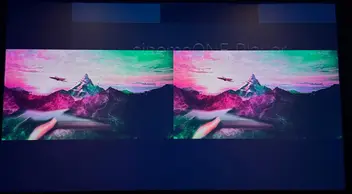
  • MV-HEVC 3D is playing in 3D, not 2D? And with correct colors?

    No, I have to correct my post: I had only read the log. Rechecked on the projector with a scanout capture: the output is signalled as 3D frame packing (1080p24), but the top eye carries both views side by side and the bottom eye only the GUI, so the picture is flat. Colours are wrong too (magenta/green): the P20 picture goes out without DV processing, as you suspected. A 2D DV file on the same build looks fine.

    CroqueMr not a complaint: you never said MV-HEVC/P20 3D works, and you wrote that profile 20 isn't your focus. Just for the record.

    Edit: Picture was upside down.

    Edited once, last by cinemaONE (November 25, 2026 at 4:04 PM).

  • Think NexiGo MKII supports HDR (maybe DV) 4K 3D, but most TVs/projectors won't. Converting to FSBS or MVC MKV is best for play-ability and compatibility. Using my app or another solution.

    It may be possible for CroqueMr or hadesdevls to on-the-fly convert MV-HEVC to FSBS SDR. No idea how taxing that would be to the CPU and/or iGPU in the mini PC's we're using. With my app, I'm also recommending choosing option to add 75 nits to brightness so SDR looks right.

  • Hi CroqueMr,

    Thanks for all your work on CB1—Dolby Vision (`Master Reference`) and `HDR10DVML1.0` are working great on my setup.

    ### Issue Summary
    When playing **HLG** videos, playback starts and runs smoothly (outputting in 8-bit), **but as soon as I stop the video**, my TV loses HDMI sync and goes completely blank/black instead of returning to the Kodi GUI. Restarting Kodi via SSH (`systemctl restart kodi`) immediately restores the picture.

    ### Hardware & Signal Chain
    * **HTPC GPU:** Intel Arc B570 (`xe` DRM driver)
    * **AVR:** Denon AVR-X2800H
    * **TV:** Sony A80K OLED
    * **Kodi Setting:** Adjust display refresh rate set to `On start / stop`

    ### Debug Log
    * **LibreELEC Log:** https://paste.libreelec.tv/chondritic-elden.log

    Please let me know if you need a `dmesg` or `drm.debug` capture around the `OnPlayBackStopped` event on the Arc B570.

  • CroqueMr I tried the Release 1.0.1 RC3 on a RTX2080ti/5800X3D pc yesterday, Dolby Vision looks stunning on Master Reference and seemed to work flawlessly. Did not notice any hiccups or errors in the short timeframe i tested, maybe i get to lend it some more and do further testing. Very good job sir!

  • Hi CroqueMr,

    Thanks for all your work on CB1—Dolby Vision (`Master Reference`) and `HDR10DVML1.0` are working great on my setup.

    ### Issue Summary
    When playing **HLG** videos, playback starts and runs smoothly (outputting in 8-bit), **but as soon as I stop the video**,

    Never ending story i had this problem in the past with a denon x1000 and libreelec 9 , so frustated that i create a shortcut on my remote to restart kodi ....(that was a bug well know of denon reclocking issue)

    I have also a denon x2800 and this problem still occurr ? argh

    Somewhere i see a user that created a script to to get around this problem—though it’s not a bug fix, just a workaround

    Please give me some hope that this is a bug specific to this release only Please give me some hope that this is a bug specific to this release only. :D

  • Never ending story i had this problem in the past with a denon x1000 and libreelec 9 , so frustated that i create a shortcut on my remote to restart kodi ....(that was a bug well know of denon reclocking issue)

    I have also a denon x2800 and this problem still occurr ? argh

    Somewhere i see a user that created a script to to get around this problem—though it’s not a bug fix, just a workaround

    Please give me some hope that this is a bug specific to this release only Please give me some hope that this is a bug specific to this release only. :D


    I can add a feature to reboot your HDMI connexion after a playback or after pressing a defined shortcut if you want, when I see the log I do not see any thing wrong, I will see in google if someone find a player side fix


    After playing an episode with profil 8.1 on Reference the signal disappeared when the episode ended, had to reboot via ssh.


    https://paste.libreelec.tv/arcform-leda.log

    Unfortunatly the log capture the reboot and did not catch the issue. If you re-encounter it and want to submit a new log you can collect the log in SSH with "pastkodi" command. I will investigate on my side, but I did not see anything wrong at this stage

  • I can add a feature to reboot your HDMI connexion after a playback or after pressing a defined shortcut if you want, when I see the log I do not see any thing wrong, I will see in google if someone find a player side fix


    Unfortunatly the log capture the reboot and did not catch the issue. If you re-encounter it and want to submit a new log you can collect the log in SSH with "pastkodi" command. I will investigate on my side, but I did not see anything wrong at this stage

    I can't do any test now because my player is still travelling from HK but:

    As old boy what i can say that i know this bug since i do beta testing libreelec for egl/vaapi mod many many years ago

    My setup was different : Denon x1000, Intel Braswell box, Panasonic VT 60 but as i read now the problem seems to be the same

    There was two bugs: 1)handshake bug fixed by forcing edid and 2nd bug: refresh rate stop bug fixed 8/10 using 1080p 30 or 1080p 24, tried also using dr hdmi but no luck (some one say that was a bug in denon cpu)

    Many years ago there wasn't ai so i found as only solution to restart kodi via remote keyshortcut

    For what i remember in the logs all was normal (i posted several logs to poor Fernetmenta and fritsch )

    Many years after i found this Ivasan post and some days ago this post RE: [x86-64] Best LE 13 Nightly for Intel N150 (Alder Lake-N) that create a script to workaround it

    And by fate the user is the same that years ago have the same problem with Onkyo and we posted in the same post for the same bug

    The post before of that is also me of 8 years younger with the same problem :D

    Btw after this long post:

    If you google on ai "Denon libreelec bug on refresh rate stop" is well famous unlucky

    I don't know if i will encounter this bug wih my denon x2800 and new tv, but if you can find a trick to fix it will be very appreciate

    If you can't i hope to fix via 1080p 30 fix or use a shortcut to restart kodi

    Thank you and sorry for my english ;)

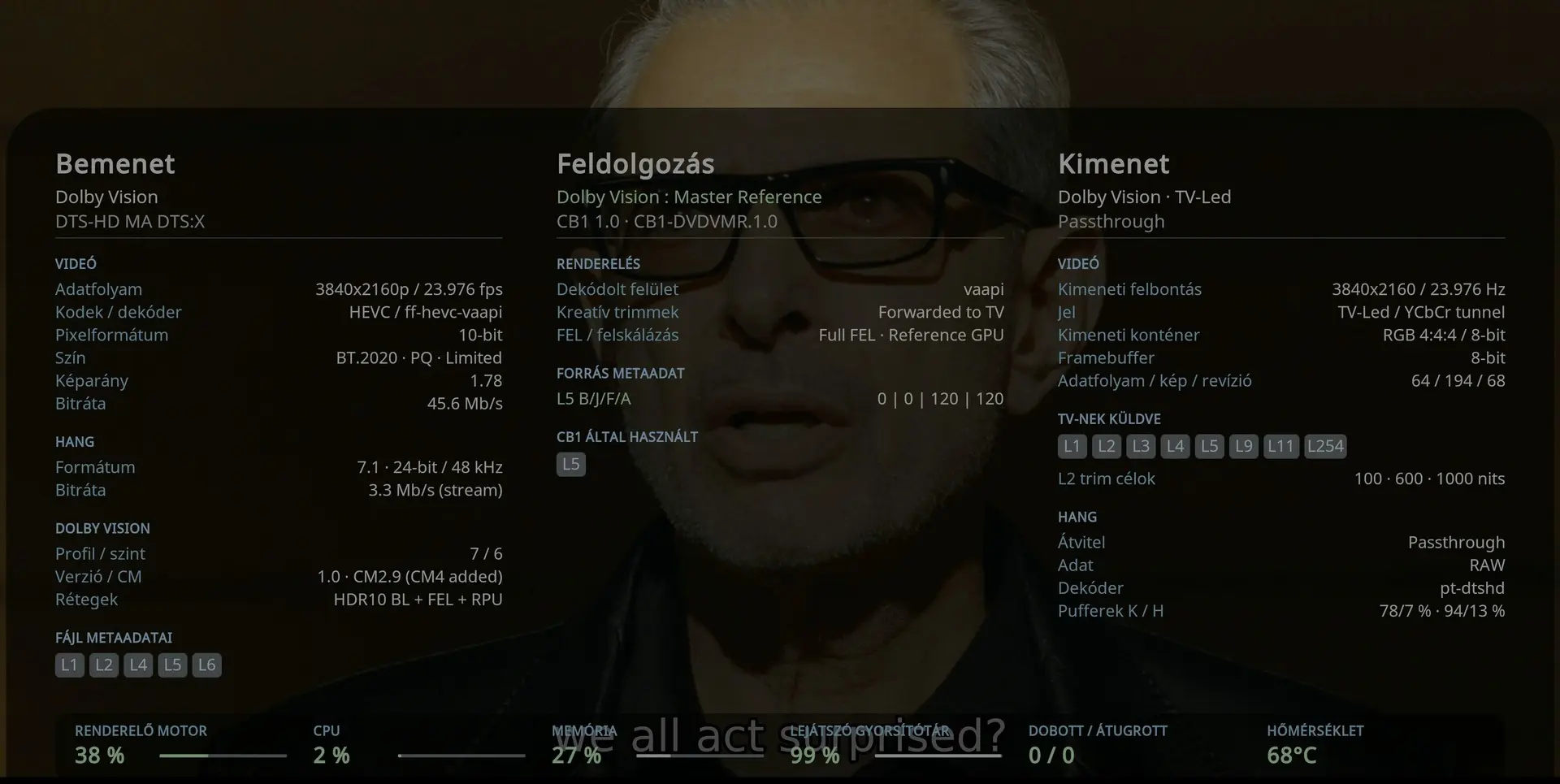
  • Here is one small ppi info service addon for CB1 build.

    The addon enable the user configurable playerinfo transparency, text colors, and more, it will looks same in all skin.

    • Backgrounds: main panel, bottom (meter) card, playback modes panel: colour + opacity; selected row colour.
    • Every colour list shows a dot in the option's own colour, so you can see the result before choosing.
    • Text colours: main, values, labels, accent (green), warning (yellow), plus separate colours for column titles, column headers, section titles and values

    The addon made copy of the cb1 PlayerProcessInfo panel, and run in same way.

    The values are same as the original ,builded .

    It's dont overwrite the original one.

    Also have optional webserver, to connect your android phone to see your library,

    start/stop the movie, browse, see the processinfos there etc, with app, called tiny mobile.

    (that linked in the github page)

    Download from the release page

    Thanks for CroqueMr for his awesome build.

    (the sample picture texts are in Hungarian, yours will be English)

  • Thanks I will add a link to your add on in the repo