R1.0.0 Stable - Reference-Grade Dolby Vision and LLDV now stable
R1.0.0 is the first stable release of LibreELEC × CB1. It delivers state-of-the-art Dolby Vision fidelity in both TV-led and player-led (LLDV) modes, alongside calibrated HDR and SDR rendering tailored to your display’s characteristics. It also improves Blu-ray menu playback, lets you switch rendering modes on the fly, and adds new upscaling options including FSR.
What's new since RC3
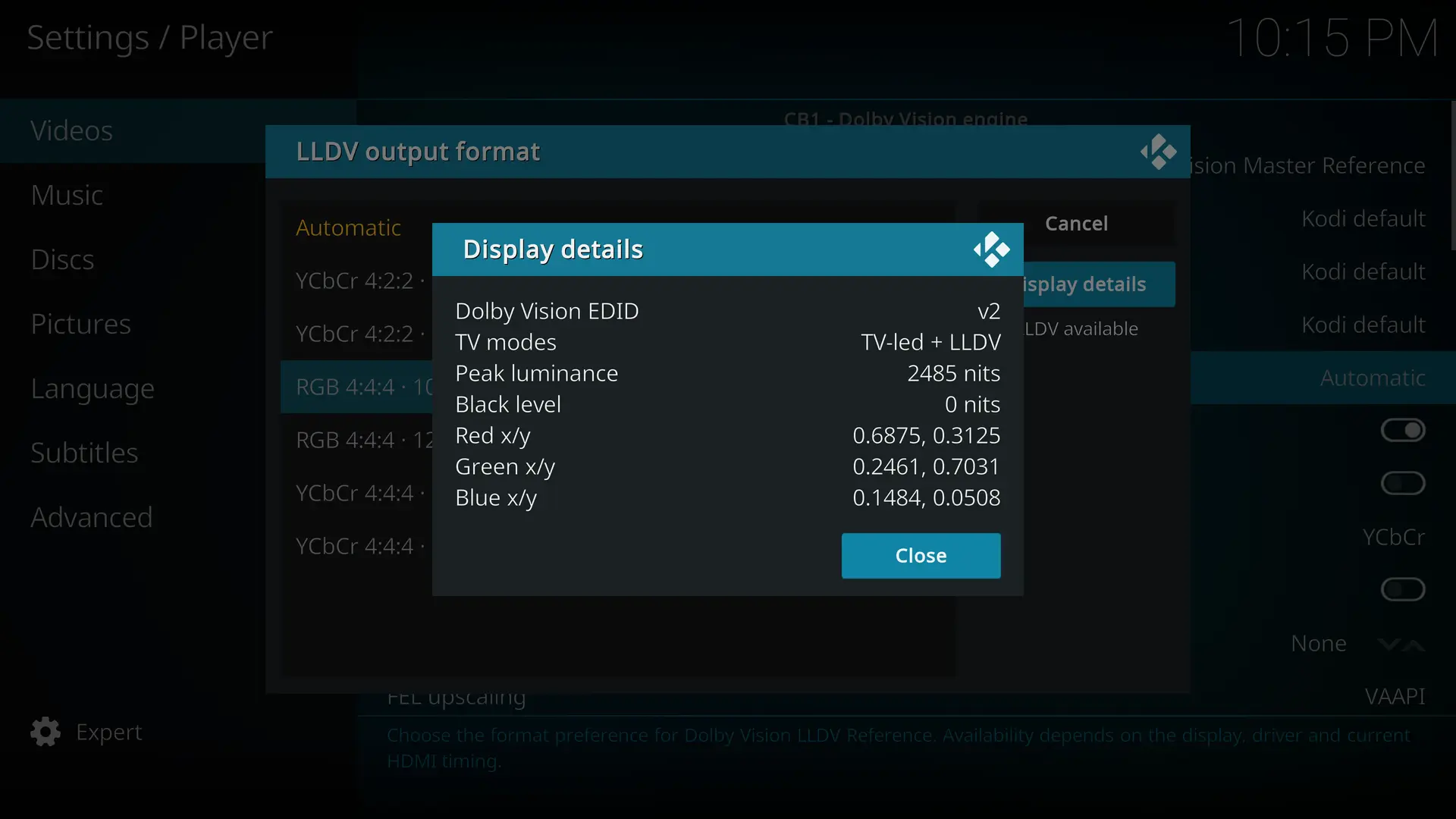
Native Dolby Vision LLDV Reference - CB1 reads the display's target brightness, black level, and color primaries from its EDID. The HDMI format selector shows which formats are available, explains why others are unavailable, and labels experimental modes. LLDV display targeting
Calibrated SDR conversion and HLG to Dolby Vision - Convert Dolby Vision, HDR10, HDR10+, or HLG to SDR with Reference, Bright room, or Custom / Projector targets. SDR defaults to BT.709, with BT.2020 available on compatible setups. HLG gains a Dolby Vision rendering option alongside native playback. HLG to SDR · BT.2020 SDR
Improved AV1 playback - Playback resumes more reliably after seeking, including with software decoding. Supported inputs also include 10-bit Dolby Vision in AV1. RC4 notes
New video upscalers including FSR - Choose separate filters for 1080p and above and below 1080p, based on the source resolution. Both menus default to Kodi Default and offer the same filters for SDR, HDR, and Dolby Vision, including FSR 1 with or without RCAS, FSRCNNX x2, and Anime4K Fast. Player Information shows the active filter when the picture is upscaled. Upscaler comparaison
Better Blu-ray and UHD Blu-ray ISO playback - More reliable HDMV and BD-J navigation, including animated menus, chapters, extras, and audio and subtitle selection. On supported transitions, the player maintains HDMI output and PCM audio to reduce interruptions. Blu-ray transitions
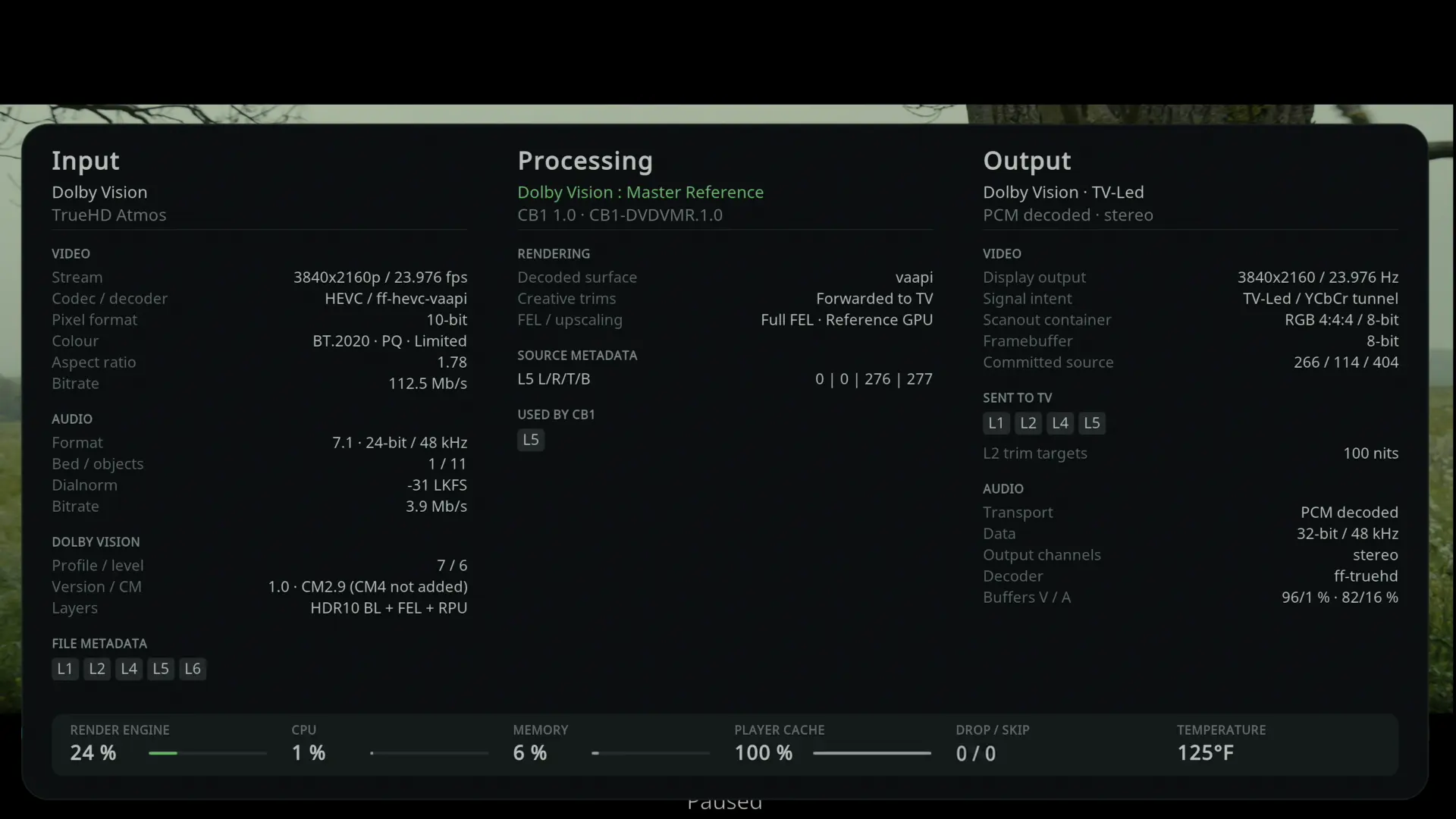
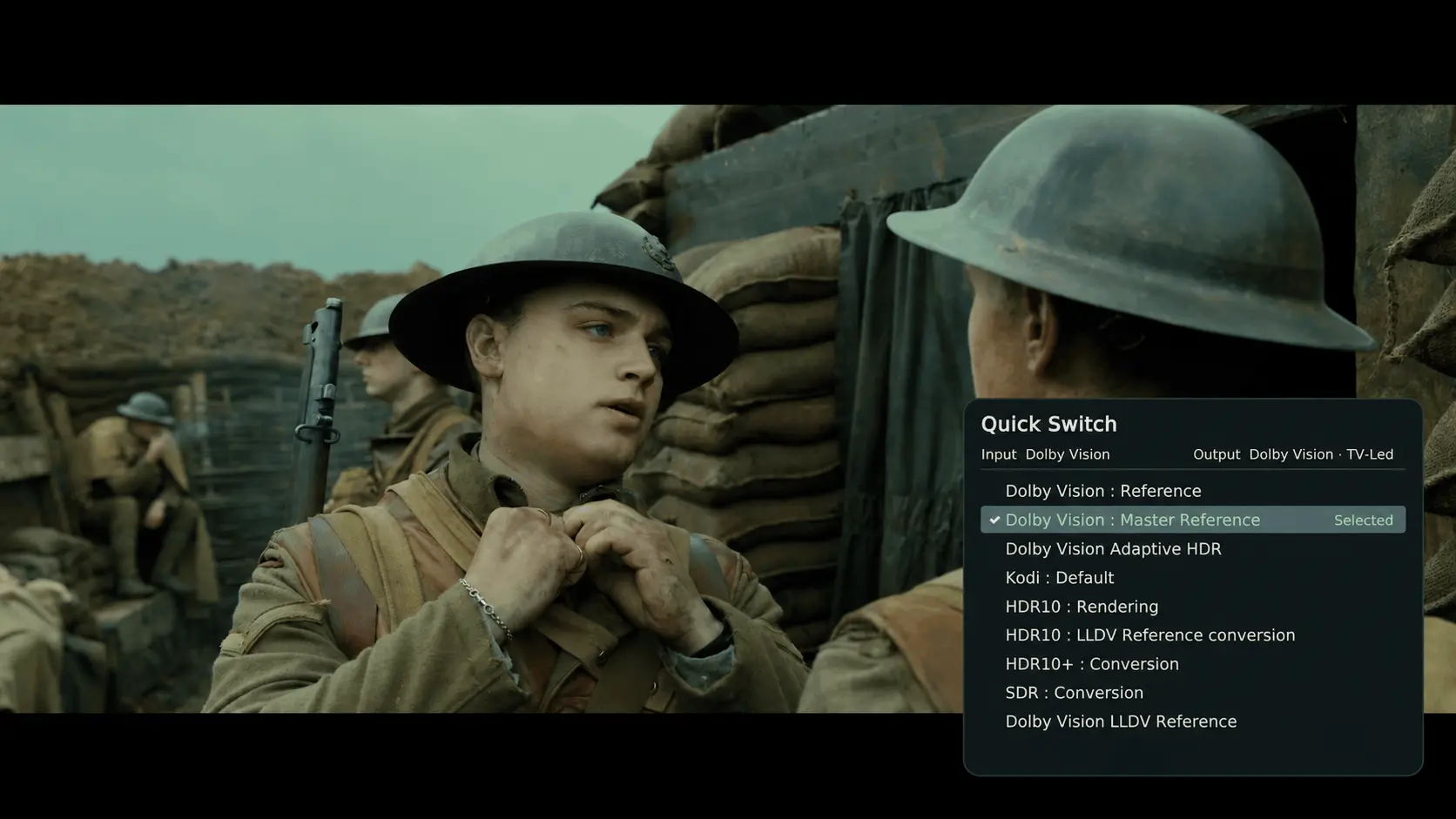
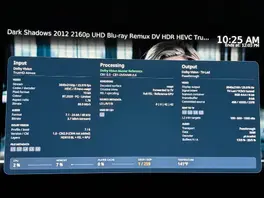
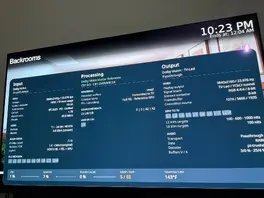
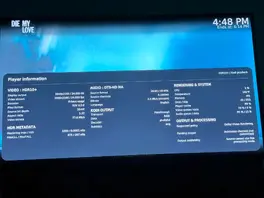
New Player Information panel and per-format defaults - Press O to see the source, the processing applied, and the HDMI output. Each file starts with the default circuit for its input format. Quick Switch lets you change circuits during playback and explains why an option is unavailable. Thanks to CorentinB for the three-column redesign. Player Information
More reliable HDR playback and HDMI switching - Faster signal recovery on Intel when switching from Dolby Vision to HDR10 or SDR, improved HDR10+ frame pacing, and a fix for the recurring stutter observed on the True Black sample. RC4 Preview Update 4
Broader hardware and audio compatibility - Improved boot and 10-bit HDR10 output on NVIDIA GTX 10-series cards, Intel Xe3 display fixes, CEC detection on compatible setups, HDMI range and bit-depth settings, and optional Dialnorm neutralization for audio passthrough, adapted from the CoreELEC p3i work by pannal. RC4 notes · Dialnorm
Clearer diagnostics - Kodi explains why a circuit cannot start and lets you adjust how much detail CB1 logs. The installer saves logs from the current and previous boot to the USB drive. Playback diagnostics · CB1 logging
What's next?
I'll focus on fixing bugs and reviewing feature requests for future updates.
Report a bug or performance problem
In Kodi, go to Settings → System → Logging and enable debug logging.
Reproduce the issue, then open Settings → LibreELEC → System → Submit Log. Choose Upload latest Kodi log and configs, and view the short URL. If Kodi crashed, upload the latest crash log from the same menu.
Paste the short log URL into your report. Include your build version, GPU, TV or projector, HDMI setup, source format, selected circuit, and steps to reproduce. Open a bug report
Turn off debug logging once you’ve shared the log.
Suggest a feature
Send your suggestion through the private form. Describe what you would like to do, what is missing today, and how the change would help. An email address is required so we can reply and keep you informed about your suggestion.
A huge thank you for checking in and for the incredible work on R1.0.0 Stable (CB1)!
On my setup (Intel Arc B570 → Denon AVR-X2800H → Sony A80K OLED), Dolby Vision Profile 7 FEL (Master Reference, TV-Led) works flawlessly—VAAPI hardware decoding is active with zero dropped frames.
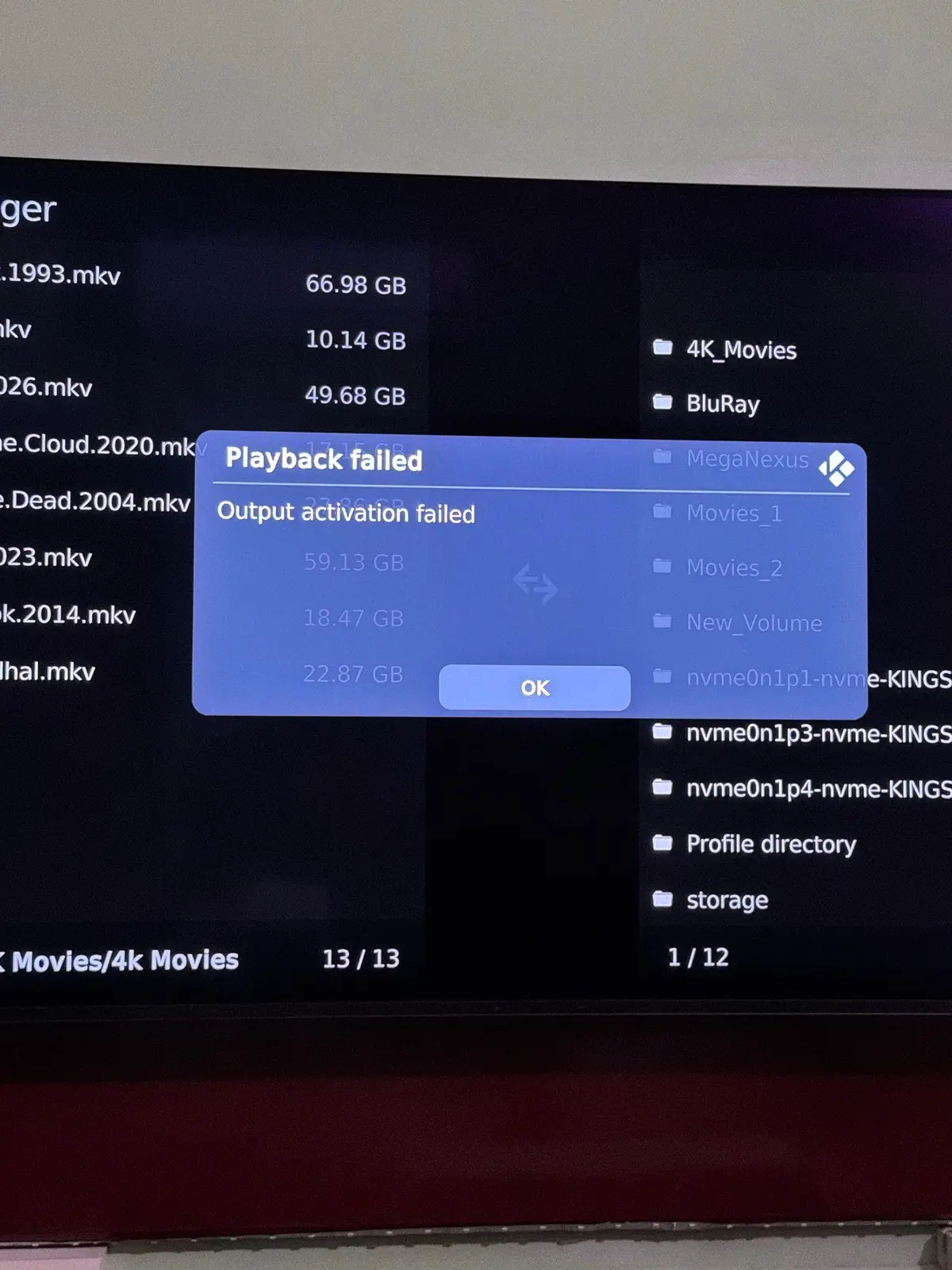
However, I ran into one issue when testing HLG playback with Dolby Vision : Rendering enabled: it fails with Playback failed — Output activation failed.
Switching HLG default playback back to Native works around it completely, while Profile 7 FEL DV remains rock-solid. Thanks again for all your support and for delivering such a great release!
I don’t think I’m causing any trouble for Dolby, it’s a niche need, and it actually adds value to their files and the TVs that can read DV. People will be even more inclined to seek out Dolby Vision capable TVs, and, films in Dolby Vision.
Absolutely bro having such detailed setup to use it in a way where the true innovation speaks in detail 🙏
Just to be clear, the public build has absolutely no remote access capabilities whatsoever. It's fully open source, and any AI can independently review the code and confirm that.
Remote access is inherently risky, which is why I use a completely separate build with multiple additional security layers.
This remote support build is hosted in a private GitHub repository and is entirely isolated from the public release.
My private support build connects exclusively to my personal Tailscale network. Even if the build were leaked, it would be useless without access to that network.
On top of that, remote access requires explicit user consent at multiple stages:
The user must manually enter a connection key in a custom add-on in LibreELEC.
They must accept several consent and security warnings before enabling remote access.
Each connection uses a unique, single-use key that is automatically invalidated after use.
Keys expire after 7 days, even if unused.
And also the code is open source. If you have access to my remote access build you can send the code to an IA to have a neutral opinion.
Regarding legal aspect and DV. I haven't used any proprietary Dolby code, reverse-engineered their software or its behavior, or knowingly infringed on any of their patents.
As far as I can tell, there's nothing illegal about what I'm doing, I'm not trying to hide, either. My real name is linked to my GitHub account, and anyone with basic OSINT skills could identify me from my username in just a few minutes. I have no reason to be anonymous because I genuinely believe I'm operating within the law.
If Dolby ever wants to contact me, they're more than welcome to. I'd be perfectly happy to have an open and constructive discussion with them.
Display More
Bro your genuineness speaks your work. Hats off to you, bro.
is it safe to log into someone else's computer, what are the chances they find out your IP, I don't think a few people in power (Dolby digitals) are enthusiastic a developer has made their Dolby digital license for premium arm based devices obsolete. stay safe CroqueMr
reminds me of the Linux hack with social engineering and peer pressure on a lone developer
Brother I am not a hacker I am just a 40yrs old Family Man nothing to worry, if someone needs to test a particular hardware they need to access even a developer can’t buy all the hardwares to test his build.
Sounds good, thank you for looking into it! If you aren't able to reproduce it on your setup, you are more than welcome to connect directly to my system over SSH (or whichever remote access method you prefer) to inspect and test it live on my Intel Arc B570 setup.
Just let me know whenever you are ready and I will send you the SSH details via private message.
Thanks again for all your work on libreelec-x86-DV. The Dolby Vision picture quality and punch on this build is much better than CoreELEC, so I really want to keep using it as my main setup.
However, even with 64 MB cache, Buffer all filesystems, Adaptive read factor, and 128 KB chunk size, Dark Shadows (2012) (88 Mb/s Profile 7 FEL) still drops to 0% PLAYER CACHE and hits 1 / 152 skipped frames in under two minutes while CPU is at 2%. Profile 7 MEL plays at 99% cache with 0 / 0 drops/skips.
Since this happens across WebDAV and local playback whenever Full FEL - Reference GPU is active, it looks like a CFileCache / dual-layer read conflict in the build. Could you please take a look when you get a chance? Happy to test any build or fix right away.
Confirmed one critical detail: **any HTTP range request (both `Resume` and seeking forward during playback)** causes `CFileCache` to collapse from `45%` straight to `0%` (`Buffers V/A` dropping to `54/-6 % : 72/14 %` and `DROP / SKIP` climbing again).
- **Local disk (`Videos -> Files`):** Both seeking and Kodi `Resume` keep `0 / 0` drops/skips. - **Debrid HTTPS stream (MegaNexus):** Starting at `0:00` fills `PLAYER CACHE` to `45%` with `0 / 0` drops/skips, **until** you seek forward or use `Resume`—at which point the HTTP range re-entry drops `PLAYER CACHE` permanently to `0%`.
So the bug is specifically how Kodi's `CFileCache` / Curl handles HTTP `Range` requests on re-entry/seek in this build.
One more confirmation: I just tested a **Dolby Vision Profile 7 MEL** stream (`HDR10 BL + MEL + RPU`, `35.4 Mb/s` + `3.2 Mb/s` TrueHD Atmos, `FEL / upscaling: No FEL`) over the exact same Real-Debrid HTTPS connection:
So the `0%` `CFileCache` collapse on HTTP range requests (`Seek` / `Resume`) happens **exclusively when the dual-layer `Full FEL - Reference GPU` (`vaapi`) pipeline is active** (simultaneous BL + EL reads over HTTPS/WebDAV), whereas single-layer MEL over HTTPS and dual-layer FEL from local disk both run at `0 / 0` drops/skips.
I tested the new release on my **Intel Arc B570** setup (connected via Denon AVR-X2800H to Sony A80K OLED):
1. **Profile 7 FEL Mid-Stream Resume Causing Continuous Frame Skips:** - Starting a Profile 7 FEL movie from `00:00:00` plays smoothly with `0` dropped and `0` skipped frames. - However, selecting **Resume** mid-movie causes playback to stutter every alternate second, and the Player Info (`O`) overlay confirms it is rapidly accumulating **Skipped** frames (not Dropped frames), indicating an A/V clock / PTS desync between the dual-layer VAAPI decoders and the audio stream upon mid-file re-entry. - Confirmed this happens identically on both **local files** and network streams. - Debug log reproducing the local FEL resume frame-skipping:
First off, huge appreciation for the build and the R1.0.0-RC4 release! Testing on an Intel Arc GPU with LibreELEC x86 connected to a Denon AVR and Sony A80K OLED, the CB1-HDR10DVR circuit is performing exceptionally well—flawless TV-Led / YCbCr tunnel inside RGB 4:4:4 / 8-bit, solid TrueHD Atmos / DTS:X passthrough, and zero frame drops with real-time AI metadata generation (CB1-L1L3).
Feature Request: Could you consider adding an opt-in SDR -> Dolby Vision conversion circuit (e.g., CB1-SDRDVR / inverse tone-mapping) in a future update?
Currently, standard 8-bit BT.709 SDR streams rightly bypass processing and stay in "SDR / Kodi playback". Having a dedicated CB1 SDR mode that can map Rec.709 gamma into the Dolby Vision tunnel (expanding specular highlights while anchoring SDR 100-nit diffuse white to preserve tones and shadow detail) would be fantastic for SDR Blu-ray remuxes and regional web streams.
Would an inverse tone-mapping circuit like this fit into the roadmap alongside HDR10/HDR10+, or does the engine intentionally strictly restrict to HDR sources?
Comprehensive feedback on RC4 Preview running on Intel Arc:
1. What Works: - Native DV Profile 7 FEL / Profile 8.1 commits and plays bit-perfect under CB1-DVDVMR.0.6. - Dynamic HDR10+ to DV conversion commits cleanly under circuit CB1-HDR10PDVR.0.2 (verified on multiple titles including non-standard 2880x2160 aspect ratios). - Static HDR10 to DV commits when set to Master Reference / Reference (circuit CB1-HDR10DVR.0.13).
2. Major Issue — "Adaptive HDR Mapping (AI)" on Static HDR10: - When "Adaptive HDR Mapping (AI)" is selected for static HDR10 titles, the pipeline engages circuit CB1-HDR10DVA.0.8 with model CB1-L1L3 0.1. - Telemetry shows: "Pending output: Admission checked (not committed)".
3. Teardown / Black Screen Hang: - Whenever playback is stopped from an uncommitted AI session (or during conversion teardown), the display drops to a permanent black screen instead of unblanking back to the Kodi GUI. - Subsequent playback attempts immediately fail with "ERROR CONVERSION IS NOT POSSIBLE" until Kodi is restarted via SSH (`systemctl restart kodi`).
Switching from Adaptive AI to Master Reference (circuit CB1-HDR10DVR.0.13) resolves the admission hang and allows static HDR10 to commit properly.
I pulled up the current Player Information screen on my RC3 build during playback of an HDR10+ stream (screenshot attached), and it caught the exact admission failure:
Under OUTPUT & PROCESSING: - Requested policy: Dolby Vision Rendering - Pending output: Admission checked (not committed) - Output availability: Source cannot use this processing mode
Kodi requests Dolby Vision, but CB1 returns "Source cannot use this processing mode" and drops back to native HDR.
Is there any config toggle or parameter in RC3 to bypass this admission check, or is HDR-to-DV conversion admission for Intel Arc also being addressed in the upcoming support build?
And unfortunaty for skin I can not expose the information like amlogic and dolby, but I have a comprehensive player info pannel, and thanks to a great developper we will have a new play info soon
Separating it cleanly into Input -> Processing -> Output makes tracking the entire pipeline so much clearer—especially having the CB1 engine/DVDVMR circuit status, active RPU metadata blocks, and TV-Led tunnel precision right there in a native panel without having to rely on skin add-on scripts.
Following up on the log: I pulled up the native Player Information HUD during playback of an HDR10+ stream (screenshot attached), and it reveals the exact roadblock:
Under "OUTPUT & PROCESSING": - Requested policy: Dolby Vision Rendering - Pending output: Admission checked (not committed) - Output availability: Source cannot use this processing mode
The player is actively requesting Dolby Vision output, but the CB1 engine is reporting that the HDR10/HDR10+ source cannot use this processing mode, dropping the tunnel back to native HDR.
Let me know if this is a known limitation with the HDR10/HDR10+ admission logic in RC3 that will be resolved in your upcoming support build early next week. Thanks!
Whenever you get a moment to review the log, please let me know what you see regarding why HDR-to-DV conversion isn't engaging on my Intel Arc setup. Looking forward to the upcoming player info panel as well!
Posting a quick diagnostic summary from testing on my setup with the current build (`DV-R1.0.0-RC3 Generic.x86_64` on Intel Arc)
1. Native Profile 7 FEL is Fully Functional: - True 4K UHD Blu-ray Remux files (Profile 7 FEL with lossless TrueHD Atmos) trigger Dolby Vision correctly on my display and AVR. The enhancement layer reconstruction is decoding and playing smoothly.
2. HDR to DV Tone-Mapping Does Not Engage: - Standard HDR10 streams fall back to native HDR10 output. - The on-the-fly conversion/tunneling of standard HDR10 into Dolby Vision is not happening. Is there a specific configuration toggle, player setting, or kernel module flag required on Intel Arc to force HDR-to-DV tone-mapping?
3. Diagnostics Clarification (MegaNexus vs Native Kodi): - Native Kodi PlayerProcessInfo HUD (invoked via action `PlayerProcessInfo` / OSD control 70050) is 100% functional, confirming active hardware decoding (`ff-hevc-vaapi`) and solid cache/buffer performance. - The MegaNexus skin diagnostic card fails and displays "Source layer: Unknown / Base layer is shown" solely because its backend script (`dv_diagnostics.py`) hardcodes checks for Amlogic sysfs nodes (`/sys/class/amhdmitx/`, `amvdec`) which do not exist on x86 hardware.
Looking forward to testing the new support build next week whenever you get back to your desk. Thanks for the great work on this project!
Hi @CroqueMr, Feedback on RC3 with Intel Arc B570: 1. **OSD Scaling:** Fully resolved. The player info overlay scales properly without flickering or shrinking into the corner. 2. **HDR-to-DV Conversion:** Working as intended. (Needed to ensure the default rendering preference was saved globally across all HDR10 media). 3. **Playback Stop Hang:** Still deadlocking. Stopping playback on native HDR10 or HDR-to-DV causes Kodi to freeze on the final video frame instead of returning to the SDR GUI. The OS remains alive in the background (SSH works, and `systemctl restart kodi` unfreezes the GUI). Captured logs during the freeze:https://paste.libreelec.tv/retardative-mervin.log - **kodi log:** <KODI_PASTE_URL>https://paste.libreelec.tv/unretaliating-fausto.log
Following up on the initial log submission with detailed observations on the Intel Arc B570 (`xe` kernel driver) connected to a Sony OLED:
### 1. HDMI Modeset & Display Dropout Failures - **Refresh Rate Switching:** - With `Adjust display refresh rate` set to `On start / stop` or `Always`, starting 23.976p playback causes the HDMI carrier clock to fail handshake, resulting in a persistent blank/black screen. - **Teardown / Stop Hang (Even with Rate Switching OFF):** - Even when `Adjust display refresh rate` is locked to `Off` (desktop kept at 60Hz), pressing **Stop** on an HDR or DV stream causes the display to drop signal or freeze indefinitely on the last frame. - The atomic modeset deadlock appears triggered by the DRM pipeline transitioning color planes (10-bit HDR/DV colorspace back to 8-bit SDR GUI). - The OS and kernel remain fully responsive over SSH; running `systemctl restart kodi` immediately restores the SDR GUI without a system reboot.
### 2. HDR10-to-Dolby Vision Conversion Inconsistency - Only a small subset of HDR10 files trigger the CB1 HDR-to-DV conversion pipeline automatically; the majority fall back to standard native HDR10 passthrough. - It appears container flags or static metadata without dynamic metadata (unlike HDR10+) are being treated as pure passthrough rather than defaulting to the global Dolby Vision rendering target. - Setting "Dolby Vision" as default in the OSD video menu does not reliably persist across different source containers (mkv vs mp4 / different scrapers).
### 3. Motion Judder - Disabling refresh-rate switching avoids the startup blank-screen issue, but playing 23.976p content at 60Hz introduces noticeable 3:2 pulldown judder unless the entire desktop is permanently locked to 23.98Hz.
Ready to test the custom support build and authentication key whenever your agent/pipeline is ready.
FYI : From now on, I'll gradually add fixes and features to the next build. Once enough changes have accumulated, I'll clean up the code, optimize everything, and push a new release.
Feel free to check it out and let me know if it meets your expectations, especially the CM 2.9 to 4.0 information, HDR10+ settings, stability fixes, etc.
Changes since R1.0.0-RC2
Dolby Vision
Added GPU bilinear FEL upscaling, replacing the nearest-neighbor fallback when VAAPI scaling is unavailable.
Added the Reference GPU FEL filter as a selectable option for other conversion modes. Master Reference retains its reference filter.
Playback and stability
Fixed cases where stopping playback during a resolution change could leave HDR signaling active instead of returning to SDR.
Fixed stale HDR10 session reuse after a rejected output activation, ensuring subsequent playback prepares the required output surface.
Settings
Separate remembered rendering preferences for Dolby Vision, HDR10 and HDR10+ inputs.
Automatic fallback no longer replaces the preferred rendering mode.
Fixed rendering options incorrectly remaining unavailable after stopping a different source format.
HDR10+
Fixed source-specific preference selection during continued HDR10+ playback, preventing accidental use of the plain-HDR10 preference.
Player information
Corrected misleading "Unused blocks" reporting: metadata forwarded to the TV is no longer marked unused.
Displays whether CM2.9-to-CM4 conversion is actually active, including live updates for Auto and Auto 2.
Blu-ray menus
Updated BD-J Java add-on packaging with matching libbluray 1.5.0 support files.
Prevented stale or incomplete Java support files from being packaged. Requires the updated JRE add-on attached to this release.
Bro ABSOLUTELY WOW you are obsessed on building all the best ever features into this HATS OFF 🔥 as I said once I am back will test it on my PC & will confirm