is it safe to log into someone else's computer, what are the chances they find out your IP, I don't think a few people in power (Dolby digitals) are enthusiastic a developer has made their Dolby digital license for premium arm based devices obsolete. stay safe CroqueMr
reminds me of the Linux hack with social engineering and peer pressure on a lone developer

[x86-64][LibreELEC x CB1 Builds] Dolby Vision FEL, HDR10+ and Full 3D
-
ht2tweak -
March 14, 2026 at 2:33 PM -
Thread is Resolved
-
-

is it safe to log into someone else's computer, what are the chances they find out your IP, I don't think a few people in power (Dolby digitals) are enthusiastic a developer has made their Dolby digital license for premium arm based devices obsolete. stay safe CroqueMr
reminds me of the Linux hack with social engineering and peer pressure on a lone developerBrother I am not a hacker I am just a 40yrs old Family Man nothing to worry, if someone needs to test a particular hardware they need to access even a developer can’t buy all the hardwares to test his build.
-
is it safe to log into someone else's computer, what are the chances they find out your IP, I don't think a few people in power (Dolby digitals) are enthusiastic a developer has made their Dolby digital license for premium arm based devices obsolete. stay safe CroqueMr
reminds me of the Linux hack with social engineering and peer pressure on a lone developerJust to be clear, the public build has absolutely no remote access capabilities whatsoever. It's fully open source, and any AI can independently review the code and confirm that.
Remote access is inherently risky, which is why I use a completely separate build with multiple additional security layers.
This remote support build is hosted in a private GitHub repository and is entirely isolated from the public release.
My private support build connects exclusively to my personal Tailscale network. Even if the build were leaked, it would be useless without access to that network.
On top of that, remote access requires explicit user consent at multiple stages:
- The user must manually enter a connection key in a custom add-on in LibreELEC.
- They must accept several consent and security warnings before enabling remote access.
- Each connection uses a unique, single-use key that is automatically invalidated after use.
- Keys expire after 7 days, even if unused.
And also the code is open source. If you have access to my remote access build you can send the code to an IA to have a neutral opinion.
Regarding legal aspect and DV. I haven't used any proprietary Dolby code, reverse-engineered their software or its behavior, or knowingly infringed on any of their patents.
As far as I can tell, there's nothing illegal about what I'm doing, I'm not trying to hide, either. My real name is linked to my GitHub account, and anyone with basic OSINT skills could identify me from my username in just a few minutes. I have no reason to be anonymous because I genuinely believe I'm operating within the law.
If Dolby ever wants to contact me, they're more than welcome to. I'd be perfectly happy to have an open and constructive discussion with them.
-
 Display More
Just to be clear, the public build has absolutely no remote access capabilities whatsoever. It's fully open source, and any AI can independently review the code and confirm that.
Remote access is inherently risky, which is why I use a completely separate build with multiple additional security layers.
This remote support build is hosted in a private GitHub repository and is entirely isolated from the public release.
My private support build connects exclusively to my personal Tailscale network. Even if the build were leaked, it would be useless without access to that network.
On top of that, remote access requires explicit user consent at multiple stages:
- The user must manually enter a connection key in a custom add-on in LibreELEC.
- They must accept several consent and security warnings before enabling remote access.
- Each connection uses a unique, single-use key that is automatically invalidated after use.
- Keys expire after 7 days, even if unused.
And also the code is open source. If you have access to my remote access build you can send the code to an IA to have a neutral opinion.
Regarding legal aspect and DV. I haven't used any proprietary Dolby code, reverse-engineered their software or its behavior, or knowingly infringed on any of their patents.
As far as I can tell, there's nothing illegal about what I'm doing, I'm not trying to hide, either. My real name is linked to my GitHub account, and anyone with basic OSINT skills could identify me from my username in just a few minutes. I have no reason to be anonymous because I genuinely believe I'm operating within the law.
If Dolby ever wants to contact me, they're more than welcome to. I'd be perfectly happy to have an open and constructive discussion with them.
Bro your genuineness speaks your work. Hats off to you, bro.
-

Brother I am not a hacker I am just a 40yrs old Family Man nothing to worry, if someone needs to test a particular hardware they need to access even a developer can’t buy all the hardwares to test his build.
apologise if you felt It's aimed at you, it was a general remark and I'm not a developer so I don't understand how this works. I only wished to make sure dev is safe.
CroqueMr thanks for the detailed response, I've been following your work and understand your clean room methodology and how after viewing the binary code audit, your solution to get DV is nothing like Dolbys. just when companies get desperate... so wanted to just say something. -
I don’t think I’m causing any trouble for Dolby, it’s a LE & other DV boxes are a niche need, and it actually adds value to their files and the TVs that can read DV. People will be even more inclined to seek out Dolby Vision capable TVs, and, films in Dolby Vision.
-
I don’t think I’m causing any trouble for Dolby, it’s a niche need, and it actually adds value to their files and the TVs that can read DV. People will be even more inclined to seek out Dolby Vision capable TVs, and, films in Dolby Vision.
Absolutely bro having such detailed setup to use it in a way where the true innovation speaks in detail 🙏
-
Hi i tried Croquet build on my notebook (Just for curiosity) with GPU AMD Radeon 860 but say that dolby vision is not supported
Tried some movies with dolby Mel 7 and works in hdr 10 , i GOT Dolby vision standard only on 8 profile but file test dv fel all layer test rightly give black screen
Am i doing something wrong ?
Edit i wasn't connected to my TV but tried with notebook display (full HD)
-
Yes your laptop screen is not DV compatible. DV is only possible through a native HDMI connexion.
-
Yes your laptop screen is not DV compatible. DV is only possible through a native HDMI connexion.
Thx,
This is what happens when you get old.if i may another hint a user on another said the installation stalls due to an issue with the Bluetooth kernel module.
The hardware is: MediaTek Wi-Fi 7 MT7925
or should I report it in the general topic? thx sorry for the ot
Same user have another pc that give same errore but have as hardware
Qualcomm QCNCM865 or MediaTek MT7927) (these are the info on pc website)
-

or should I report it in the general topic? thx sorry for the ot
- for CroqueMr builds: use this thread
- for official LE releases: use a new thread at "General Support" sub-forum
- for LE nightly builds: use a new thread at "Development" sub-forum
-
No problem at all,don't apologize for anything
Yes, this thread is the right place to discuss issues, alternatively, there’s also the "Issues" tab on GitHub.
I’m aware that the MT7925 has plenty of issues with Linux and Windows, this isn't specific to LE or my build, but we can certainly take a look, please post the details here.
If the issue is linked to LE I will push the fix upstream and add it to my build, if it's linked only to my build I will keep the patch here
EDIT : To follow Da Flex post, if you are sure that the issue is not linked to my build but LE in general use the right thread. -

R1.0.0 Stable - Reference-Grade Dolby Vision and LLDV now stable
R1.0.0 is the first stable release of LibreELEC × CB1. It delivers state-of-the-art Dolby Vision fidelity in both TV-led and player-led (LLDV) modes, alongside calibrated HDR and SDR rendering tailored to your display’s characteristics. It also improves Blu-ray menu playback, lets you switch rendering modes on the fly, and adds new upscaling options including FSR.
What's new since RC3
- Native Dolby Vision LLDV Reference - CB1 reads the display's target brightness, black level, and color primaries from its EDID. The HDMI format selector shows which formats are available, explains why others are unavailable, and labels experimental modes. LLDV display targeting
- Calibrated SDR conversion and HLG to Dolby Vision - Convert Dolby Vision, HDR10, HDR10+, or HLG to SDR with Reference, Bright room, or Custom / Projector targets. SDR defaults to BT.709, with BT.2020 available on compatible setups. HLG gains a Dolby Vision rendering option alongside native playback. HLG to SDR · BT.2020 SDR
- Improved AV1 playback - Playback resumes more reliably after seeking, including with software decoding. Supported inputs also include 10-bit Dolby Vision in AV1. RC4 notes
- New video upscalers including FSR - Choose separate filters for 1080p and above and below 1080p, based on the source resolution. Both menus default to Kodi Default and offer the same filters for SDR, HDR, and Dolby Vision, including FSR 1 with or without RCAS, FSRCNNX x2, and Anime4K Fast. Player Information shows the active filter when the picture is upscaled. Upscaler comparaison
- Better Blu-ray and UHD Blu-ray ISO playback - More reliable HDMV and BD-J navigation, including animated menus, chapters, extras, and audio and subtitle selection. On supported transitions, the player maintains HDMI output and PCM audio to reduce interruptions. Blu-ray transitions
- New Player Information panel and per-format defaults - Press O to see the source, the processing applied, and the HDMI output. Each file starts with the default circuit for its input format. Quick Switch lets you change circuits during playback and explains why an option is unavailable. Thanks to CorentinB for the three-column redesign. Player Information
- More reliable HDR playback and HDMI switching - Faster signal recovery on Intel when switching from Dolby Vision to HDR10 or SDR, improved HDR10+ frame pacing, and a fix for the recurring stutter observed on the True Black sample. RC4 Preview Update 4
- Broader hardware and audio compatibility - Improved boot and 10-bit HDR10 output on NVIDIA GTX 10-series cards, Intel Xe3 display fixes, CEC detection on compatible setups, HDMI range and bit-depth settings, and optional Dialnorm neutralization for audio passthrough, adapted from the CoreELEC p3i work by pannal. RC4 notes · Dialnorm
- Clearer diagnostics - Kodi explains why a circuit cannot start and lets you adjust how much detail CB1 logs. The installer saves logs from the current and previous boot to the USB drive. Playback diagnostics · CB1 logging
What's next?
I'll focus on fixing bugs and reviewing feature requests for future updates.
Report a bug or performance problem
- In Kodi, go to Settings → System → Logging and enable debug logging.
- Reproduce the issue, then open Settings → LibreELEC → System → Submit Log. Choose Upload latest Kodi log and configs, and view the short URL. If Kodi crashed, upload the latest crash log from the same menu.
- Paste the short log URL into your report. Include your build version, GPU, TV or projector, HDMI setup, source format, selected circuit, and steps to reproduce. Open a bug report
- Turn off debug logging once you’ve shared the log.
Suggest a feature
Send your suggestion through the private form. Describe what you would like to do, what is missing today, and how the change would help. An email address is required so we can reply and keep you informed about your suggestion.
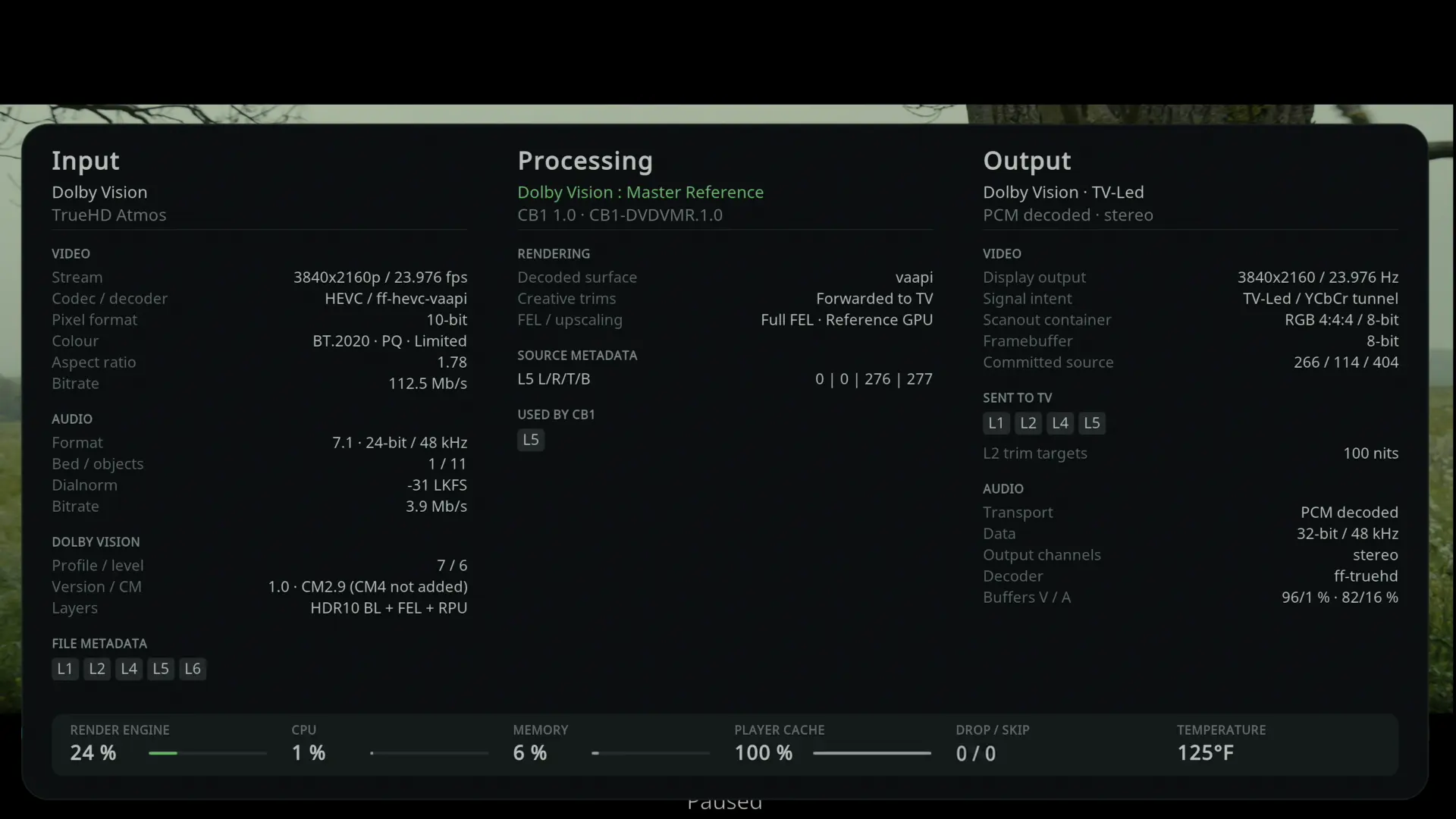
Player information
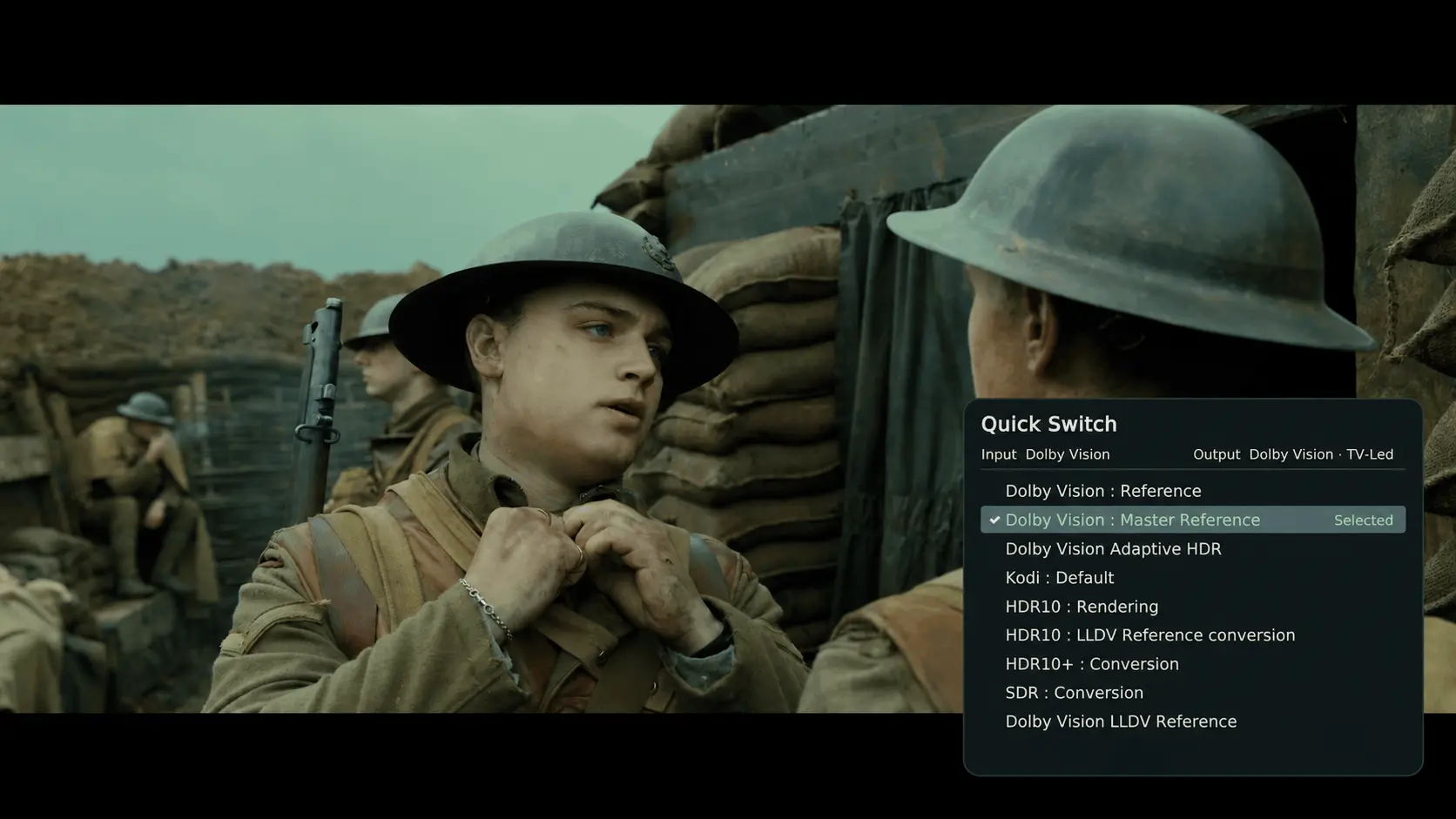
Quick switch rendering during playback
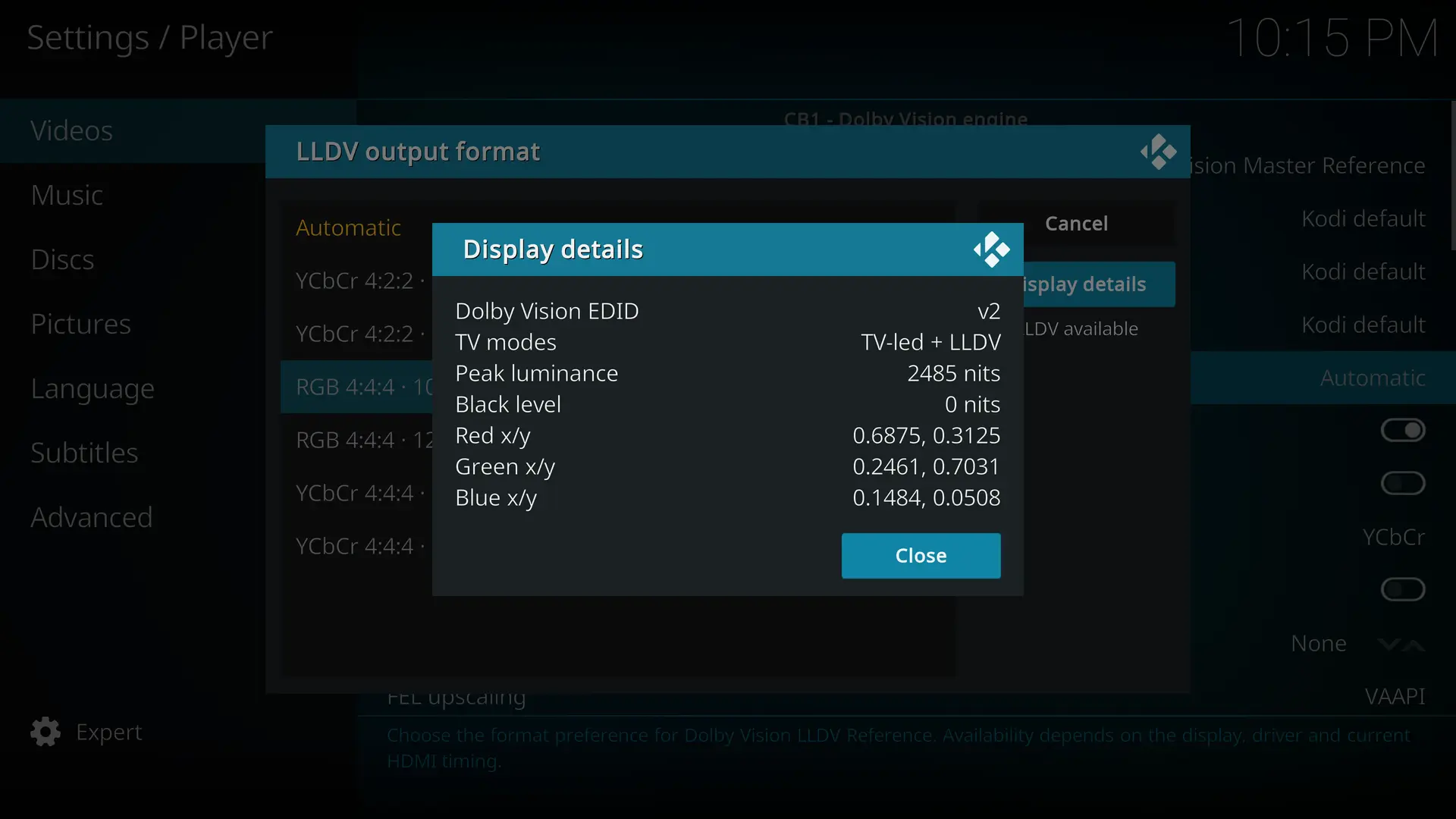
Read and display Dolby vision HDMI EDID
GitHub - CroqueMr/libreelec-x86-DV: LibreELEC with High Quality Dolby Vision and HDR10+ support for Intel, AMD, and Nvidia, and moreLibreELEC with High Quality Dolby Vision and HDR10+ support for Intel, AMD, and Nvidia, and more - CroqueMr/libreelec-x86-DVgithub.com -
Installed, will try during the day when im not busy.
Version info says your build is on RC1 (21.90.901) while LE nighties been on RC2 (21.90.902) a while now.
-
CroqueMr congratulations on your release, if I had reddit I'd post this everywhere lol. this should be on hacker news to.
-
R1.0.0 Stable - Reference-Grade Dolby Vision and LLDV now stable
Congratulations on the release of R1.0.0 Stable! 🎉
A huge thank you for your dedication, hard work, and continuous commitment to improving this project.
It’s impressive to see how far the project has come, especially the improvements to Dolby Vision, FEL playback, Blu-ray menus, HDMI switching, and the new LLDV Reference mode.
Your efforts and attention to detail make a real difference to the community, particularly for Intel users and Dolby Vision enthusiasts.
Thank you for sharing your work with us and for listening to user feedback throughout development. Wishing you continued success, and looking forward to seeing what comes next!
Congratulations once again, and keep up the fantastic work! 👏
-
CroqueMr thanks for the release, great work.

-

Installed, will try during the day when im not busy.
Version info says your build is on RC1 (21.90.901) while LE nighties been on RC2 (21.90.902) a while now.
This will be one of my next priorities, but updating Kodi is a pretty major undertaking. I'm considering skipping RC2 and waiting for the stable Kodi release before upgrading.
I'll take a look at what RC2 and last LE build brings before deciding
-