[x86-64][LibreELEC x CB1 Builds] Dolby Vision FEL, HDR10+ and Full 3D

  • Thanks CroqueMr for the release. It's fantastic.
    My setup is TV LG G6, Denon AVR, ASUS NUC Ultra 7 225H.
    I have one issue with the NUC connected trought the Denon HDMI. When i start the NUC, i see the BIOS screen and then the video output don't switch to the TV. I can't see the setup screen. I need to switch off and on several time the Denon to view the setup screen. The same with LiibreELEC installed on the system. I see the home screen only if I turn off and on the Denon many times.
    But, if i connect the NUC directly to the TV, it's all fine.
    My Denon is the avr 110 anniversary edition.

    I have try with a Windows 11 USB Stick, and works.
    It's a generic problem of LibreElec?

    Thanks

    try different setting for 4k/8k signal format in denon, you options STANDARD, ENHANCED, 8K ENHANCED. maybe this will help
  • Hi Nissel,

    The NUC have two HDMI out. Where i can setup LibreElec to split the signal?
    One HDMI to the TV and the other HDMI to the AVR IN

    Thanks

    Just make sure your TV is on the primary HDMI and AVR on the secondary, and change the Audio devices (both normal and passthrough) in the System / Audio settings to be the secondary HDMI.

  • Sorry for the offtopic but... have you checked with them about DTS? Because for audio they state, and I quote: "Audio passthrough — byte for byte: LPCM to 7.1, Dolby Digital, Dolby Digital Plus and TrueHD with Atmos. Lip sync adjustment."

    No mention at all of DTS formats. Considering how LG is handling stuff, I wouldn't give that for granted.

    FYI, the Luma website has been updated and it accepts ALL passthrough audio formats, including DTS-MA.

  • Please note a build 1.1.0 RC1 will come this WE.

    There won’t be any major functional changes, instead, it will be a repository overhaul, including versioning and support for HDMI 2.1.
    Some regressions are possible, but this is for the greater good of the project, the setup will be much cleaner and more closely aligned with the source repository. It will be far easier to report issues that aren't specific to my build and help other communities, and just as easy to receive fixes from the source repositories.

    Every reports that you will make will help all other communities, I will push the fixes upstream if necessary.

    Functional enhancements are planned, but they will arrive with the R2.0.0 release. Some significant developments are already underway I have some surprises ;)

  • I am working on a comprehensive benchmark for upscaler, I will push a PDF next week.

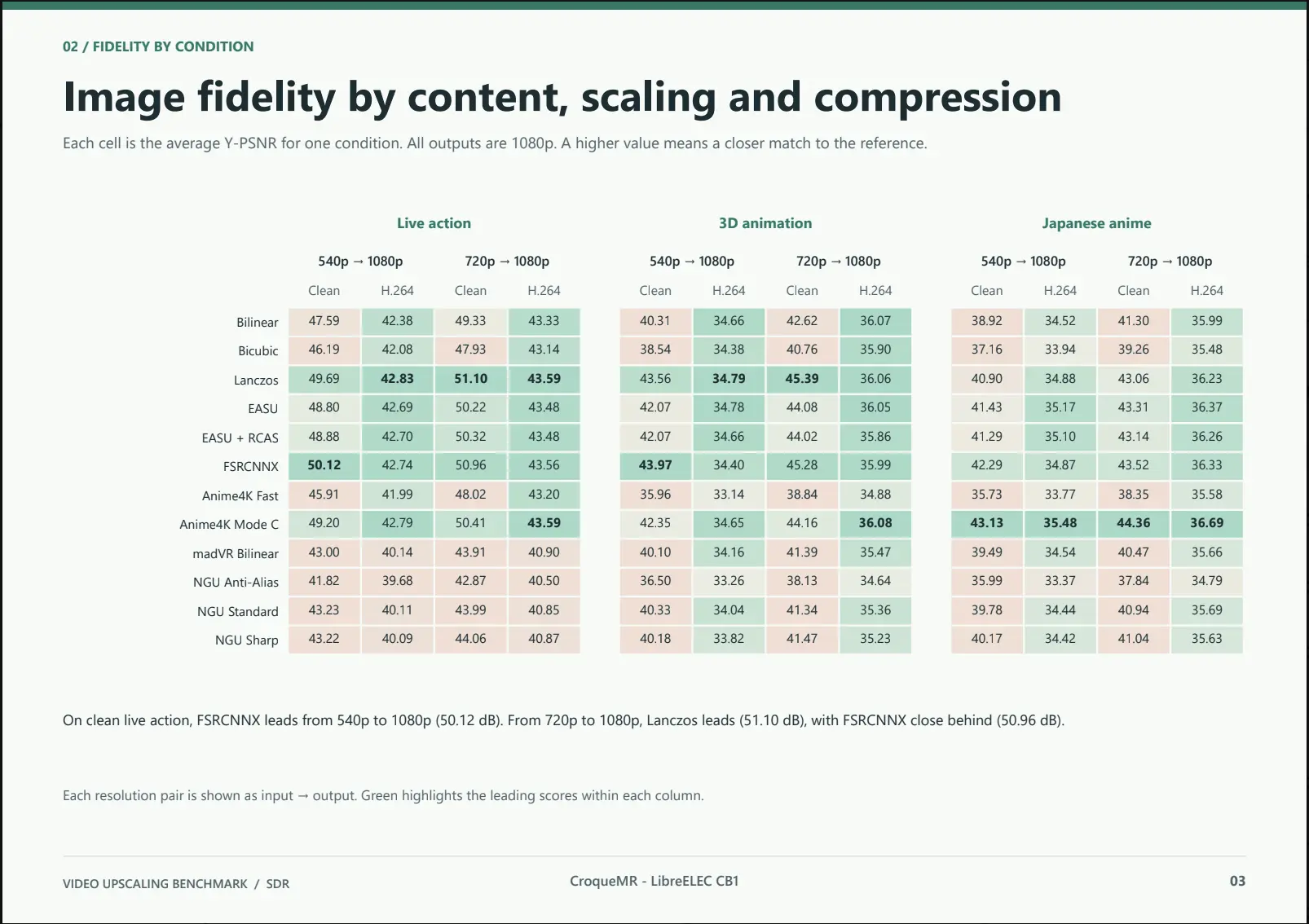
    First result :

    • Anime4K Mode C is very good for Anime (as expected)
    • NGU upscaler from madVR are not very convincing
    • FSRCNNX is the more versatile one

    EDIT : I have an issue with madVR measurement, results are false for madVR / NGU

  • CroqueMr google AI mode wrote this

    Important Context: Why NGU Scores Low Here

    While the author is reading the chart correctly, PSNR doesn't tell the whole story for perceptual quality:

    • Sharpening vs. Pixel Accuracy: Algorithms like NGU Sharp and NGU Standard intentionally add edge enhancement and reconstruct fine textures to make images look crisper to the human eye. Because PSNR strictly measures exact mathematical similarity to the original pixels, deliberate sharpening is penalized as "error" or "noise."
    • Blurring Scores Higher: Softer upscalers (like Bilinear or Lanczos) avoid creating artifacts or altered edges, which often rewards them with higher PSNR scores even if the image looks softer in motion.

    Love your work, impressed you did it in such a short time.

  • CroqueMr google AI mode wrote this

    Important Context: Why NGU Scores Low Here

    While the author is reading the chart correctly, PSNR doesn't tell the whole story for perceptual quality:

    • Sharpening vs. Pixel Accuracy: Algorithms like NGU Sharp and NGU Standard intentionally add edge enhancement and reconstruct fine textures to make images look crisper to the human eye. Because PSNR strictly measures exact mathematical similarity to the original pixels, deliberate sharpening is penalized as "error" or "noise."
    • Blurring Scores Higher: Softer upscalers (like Bilinear or Lanczos) avoid creating artifacts or altered edges, which often rewards them with higher PSNR scores even if the image looks softer in motion.

    Love your work, impressed you did it in such a short time.

    Yes it's a first result, I have a far more intense benchmark and measurement to come

  • Hello CroqueMr,

    First of all, thank you very much for your excellent work on CB1!

    I would like to report a reproducible issue with original commercial Blu-ray discs using BD-J menus.

    System configuration

    • LibreELEC 13.0 – DV-R1.0.1-RC3
    • Generic x86_64
    • AMD GPU
    • LG BU40N Blu-ray drive, connected via SATA
    • libbluray.so.4.0.0
    • libbluray-j2se-1.5.0.jar
    • libbluray-awt-j2se-1.5.0.jar
    • Zulu Java 8 (64-bit)

    Affected discs

    • The X-Files, Season 1, German retail Blu-ray edition
    • Disc 1 and Disc 2 exhibit exactly the same behaviour.
    • Other Blu-ray menus work correctly on the same system.

    Steps to reproduce

    1. Insert the original Blu-ray disc.
    2. Start playback with the original Blu-ray menu enabled.
    3. The 20th Century Fox intro starts playing correctly.
    4. Immediately afterwards, playback stops and Kodi returns to the GUI without displaying an error message.

    Updating to R1.0.1-RC3 did not resolve the issue.

    Debug log analysis

    The initial video playback works correctly. However, during the transition to the interactive menu, the following events occur:

    Code
    18:08:07.859 BD_EVENT_STILL_TIME 0
    18:08:07.859 BD_EVENT_STILL_TIME - waiting 0 msec, with delay of 0 msec
    18:08:07.877 PSR change: psr4 = 87
    18:08:07.959 BD_EVENT_TITLE 87
    18:08:07.962 Audio and video threads terminate
    18:08:07.963 Creating Demuxer
    18:08:07.963 Open - error probing input format
    18:08:07.963 BD_EVENT_STILL_TIME 0
    18:08:07.963 OpenDemuxStream - New stream available from input, retry open

    All subsequent demuxer retry attempts occur within the same millisecond and fail with:

    Code
    Open - error probing input format
    OpenDemuxStream - Error creating demuxer
    CVideoPlayer::OnExit()

    After playback has been aborted, several BD-J errors appear:

    Code
    ERROR: waitForShutdown timeout
    ERROR: sync(): not visible
    ERROR: start() failed: Title Context already destroyed
    ERROR: release(): STOP timeout, killing Xlet
    ERROR: ThreadGroup destroy failed:
    java.lang.IllegalThreadStateException

    The affected BD-J menu application is identified as:

    Code
    com.foxbd.dds.xfiles.s1.ww.StandardMenuXlet

    Possible cause

    It appears that Kodi attempts to recreate the demuxer immediately after the BD-J title transition while no usable video stream is available yet.

    What seems particularly suspicious is that all demuxer retry attempts are exhausted within the same millisecond.

    Could this be a timing issue involving the handling of BD_EVENT_STILL_TIME, BD_EVENT_TITLE and demuxer reinitialisation?

    The subsequent Java shutdown errors might be a consequence of the premature playback termination rather than the original cause.

    I cannot determine whether this is specific to CB1 or an upstream Kodi/libbluray issue.

    Would you please investigate this behaviour?

    I would be happy to provide additional debug logs and test a potential fix on my original Blu-ray discs.

    Thank you very much for your support and all your development work!

  • Thank you very much for your quick response! 🙂

    Unfortunately, I don't have a GitHub account.

    Would it be possible to attach my complete debug log here in the forum instead?

    I would also be very happy to test any future BD-J improvements with my original X-Files Blu-ray discs.

    Thank you again for your excellent work and support!

    Unfortunatly, it is too time consuming to me to effectively handle all the support requests on the LE forum + AVS + Kodi forum, while simultaneously working on my patches. My AI is directly linked to my github repo. That is why I ask people to make the effort to submit issues via GitHub, it makes the work and the tracking process much easier.

  • I completely understand your reasoning.

    As it turns out, I already had a GitHub account and had simply forgotten about it! 🙂

    I have now added my detailed report and the relevant debug log to your existing BD-J issue #26.

    Interestingly, I also used AI to analyse the debug logs, identify the exact point of failure and prepare the technical report.

    Perhaps our combined efforts, with the help of AI, can contribute to improving BD-J compatibility even further.

    I would be very happy to test any potential fixes with my original Blu-ray collection.

    Thank you again for your dedication, your valuable time and your excellent work!