[x86-64][CroqueMr Builds] Dolby Vision w/FEL, HDR10+, and 3D

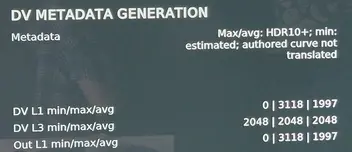
  • wow, S24 HDR10+ works now :thumbup: it tell´ s something about missing curve, but I works and shows DV, no freeze/crash.

    jumping in chapters (Ryan FEL mkv) works great and fast.

    another mkv FEL (Nürnberg) is playing, but if I jump to the next chapter playback ends with an error, but no crash :thumbup: maybe a bad rip, in Hades build I can jump... I´ ll try more movies.

    I think CroqueMr and Hades should sit down together for a few days ;):S making a ultimate version

    There is a loooot of bad rips out there.

    Today is quite easy with AI to create scripts to test any kind of RPU sync problems, the most common source of problems, using dovi_tool, ffmpeg and ffprobe, I always suggest to do that in case of suspicious artifacts, flashes, laggy frameskipping, etc.


  • There is a loooot of bad rips out there.

    Today is quite easy with AI to create scripts to test any kind of RPU sync problems, the most common source of problems, using dovi_tool, ffmpeg and ffprobe, I always suggest to do that in case of suspicious artifacts, flashes, laggy frameskipping, etc.

    I agree, the Ryan FEL shared previously is really bad, but It is useful to have this kind of file to try to create a more robust "bad rip proof" playing.

  • Damn you've got a Software Engineer at Mistral AI ($25B valuation) use and improve on your work, incredible stuff, the stuff Dev's can now do with the help of AI in terms of speed and breadth is like nothing we've ever seen. wonder which other experts will come and offer their expertise. nice work.

  • Damn you've got a Software Engineer at Mistral AI ($25B valuation) use and improve on your work, incredible stuff, the stuff Dev's can now do with the help of AI in terms of speed and breadth is like nothing we've ever seen. wonder which other experts will come and offer their expertise. nice work.

    Yeah, I know, we've talked on Twitter. ;) He's a really nice guy and genuinely wanted to contribute. I pointed him toward a few areas to investigate, but since he didn't have the hardware needed to unblock things (HDR10+ GTX 1000...), he decided to revisit the Player Info screen. He came up with better ideas than I did

  • Yeah, I know, we've talked on Twitter. ;) He's a really nice guy and genuinely wanted to contribute. I pointed him toward a few areas to investigate, but since he didn't have the hardware needed to unblock things (HDR10+ GTX 1000...), he decided to revisit the Player Info screen. He came up with better ideas than I did

    Damn so he just liked the work and wanted to help out and be part of your project, respect! this deserves a few thousand stars on GitHub, thought not long before that happens! I'm looking forward to where this project leads!

  • CroqueMr

    Comprehensive feedback on RC4 Preview running on Intel Arc:

    1. What Works:
    - Native DV Profile 7 FEL / Profile 8.1 commits and plays bit-perfect under CB1-DVDVMR.0.6.
    - Dynamic HDR10+ to DV conversion commits cleanly under circuit CB1-HDR10PDVR.0.2 (verified on multiple titles including non-standard 2880x2160 aspect ratios).
    - Static HDR10 to DV commits when set to Master Reference / Reference (circuit CB1-HDR10DVR.0.13).

    2. Major Issue — "Adaptive HDR Mapping (AI)" on Static HDR10:
    - When "Adaptive HDR Mapping (AI)" is selected for static HDR10 titles, the pipeline engages circuit CB1-HDR10DVA.0.8 with model CB1-L1L3 0.1.
    - Telemetry shows: "Pending output: Admission checked (not committed)".

    3. Teardown / Black Screen Hang:
    - Whenever playback is stopped from an uncommitted AI session (or during conversion teardown), the display drops to a permanent black screen instead of unblanking back to the Kodi GUI.
    - Subsequent playback attempts immediately fail with "ERROR CONVERSION IS NOT POSSIBLE" until Kodi is restarted via SSH (`systemctl restart kodi`).

    Switching from Adaptive AI to Master Reference (circuit CB1-HDR10DVR.0.13) resolves the admission hang and allows static HDR10 to commit properly.

  • Oh fantastic, setting the new "maximum bit depth controls" to 10 bit has fixed an issue I was having with Flatpak apps.

    Without that setting after running a Flatpak app and returning to Kodi it would be stuck to outputing at 8 bit even for HDR10 and 10 bit SDR videos.

  • Hi all

    First of all, huge thanks to CroqueMr for this project, it is highly appreciated.

    I am testing sins beta 3 and I am facing the same issue until the the actual build right now, so I thought it's time to write a comment.

    When I open a dolby vision profile 5 or 8 movie it works well for a few minutes and then out of nothing the render pipeline increases to 100% and the movie only stutters... It can be that it will recover a little but the playback never feels really smooth again. The only solution is to stop and restart the movie. Afterwards it works well again for a few minutes. The same file runs well with kodi native modeö The behavior also doesn't seem to appear with profile 7 movies. Is this a known behavior? Does a workaround exist?

    My player is based on a Intel U5 125u CPU, AVR is a Denon X1200 and the TV an LG OLED C7...

  • Hi, many thanks for this build. I am just new to this. It seems to be working, but my remuxes still play HDR, not DV. If I switch the setting play HDR in DV it works. Is that the right way?

  • Hi, many thanks for this build. I am just new to this. It seems to be working, but my remuxes still play HDR, not DV. If I switch the setting play HDR in DV it works. Is that the right way?

    Which build do you have installed? And what is your CPU?


    In the settings under CB1 - dolby vision engine, select the required playback for any input in DV/HDR10/HDR10+.

    You can switch on the fly during a playback with "O" press twice. And the last rendering circuit selected will be applied.

  • I've got the n150 miniPC and installed the RC3. If i press O I see that the source is HDR10. It plays well in Dolby Vision, but I expected natice Dolby Vision on profile 7.

    To get native Dolby Vision on profile 7, your source has to be native Dolby Vision profile 7. You say your source is HDR10 so I don't know how to interpret your question.

  • I've got the n150 miniPC and installed the RC3. If i press O I see that the source is HDR10. It plays well in Dolby Vision, but I expected natice Dolby Vision on profile 7.

    Just use Dolby vision master reference output to play perfectly your file. If your file is in HDR10 the issue is here.
    Share the log if you have any issue or if you want me to check