[x86-64][CroqueMr Builds] Dolby Vision w/FEL, HDR10+, and 3D

  • Hello,

    Is anyone having issues using HDR10 to Dolby Vision? I've tried 2 films and both closed after several minutes of playback, this is both with DVD Rendering and Adaptive HDR Mapping. After the movie closes automatically I see the console which I believe is restarting the video driver.

    The films I tried are Ghost In The Shell and The 365

    I'm not sure how to collect logs, but if anyone can point me to a tutorial I'll attach them.

    My PC is 9800x3d RTX 4090 64GB DDR5-6000 RAM. Libreelec is installed in a NVME connected via USB 10gbps. My movies are in sata HDD connected directly to the motherboard.

    Finally I cannot start how much I'm enjoying this release, DV looks amazing on my TV, way better than using MadVR in Windows 11 and HDR10.

    Thanks for any guidance to solve this issue.

  • CroqueMr

    Posting a quick diagnostic summary from testing on my setup with the current build (`DV-R1.0.0-RC3 Generic.x86_64` on Intel Arc)

    1. Native Profile 7 FEL is Fully Functional:
    - True 4K UHD Blu-ray Remux files (Profile 7 FEL with lossless TrueHD Atmos) trigger Dolby Vision correctly on my display and AVR. The enhancement layer reconstruction is decoding and playing smoothly.

    2. HDR to DV Tone-Mapping Does Not Engage:
    - Standard HDR10 streams fall back to native HDR10 output.
    - The on-the-fly conversion/tunneling of standard HDR10 into Dolby Vision is not happening. Is there a specific configuration toggle, player setting, or kernel module flag required on Intel Arc to force HDR-to-DV tone-mapping?

    3. Diagnostics Clarification (MegaNexus vs Native Kodi):
    - Native Kodi PlayerProcessInfo HUD (invoked via action `PlayerProcessInfo` / OSD control 70050) is 100% functional, confirming active hardware decoding (`ff-hevc-vaapi`) and solid cache/buffer performance.
    - The MegaNexus skin diagnostic card fails and displays "Source layer: Unknown / Base layer is shown" solely because its backend script (`dv_diagnostics.py`) hardcodes checks for Amlogic sysfs nodes (`/sys/class/amhdmitx/`, `amvdec`) which do not exist on x86 hardware.

    Looking forward to testing the new support build next week whenever you get back to your desk. Thanks for the great work on this project!

  • Could you please send me the log,

    And unfortunaty for skin I can not expose the information like amlogic and dolby, but I have a comprehensive player info pannel, and thanks to a great developper we will have a new play info soon :)

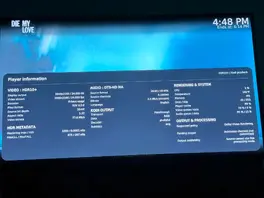
    Redesign Player information as Input, Processing and Output columns by CorentinB · Pull Request #92 · CroqueMr/libreelec-x86-DV
    Player information now reads in three columns: Input (what the file carries), Processing (what CB1 does with it) and Output (what leaves the box). Each column…
    github.com
    Dolby Vision source, Master Reference
  • Could you please send me the log,

    And unfortunaty for skin I can not expose the information like amlogic and dolby, but I have a comprehensive player info pannel, and thanks to a great developper we will have a new play info soon :)

    https://github.com/CroqueMr/libreelec-x86-DV/pull/92

    Dolby Vision source, Master Reference

    Thanks for the quick response!

    Here is the full debug log from my setup:
    https://paste.libreelec.tv/dyspneal-nicol.log

    That new Player Info HUD looks incredible!

    Separating it cleanly into Input -> Processing -> Output makes tracking the entire pipeline so much clearer—especially having the CB1 engine/DVDVMR circuit status, active RPU metadata blocks, and TV-Led tunnel precision right there in a native panel without having to rely on skin add-on scripts.

    Following up on the log: I pulled up the native Player Information HUD during playback of an HDR10+ stream (screenshot attached), and it reveals the exact roadblock:

    Under "OUTPUT & PROCESSING":
    - Requested policy: Dolby Vision Rendering
    - Pending output: Admission checked (not committed)
    - Output availability: Source cannot use this processing mode

    The player is actively requesting Dolby Vision output, but the CB1 engine is reporting that the HDR10/HDR10+ source cannot use this processing mode, dropping the tunnel back to native HDR.

    Let me know if this is a known limitation with the HDR10/HDR10+ admission logic in RC3 that will be resolved in your upcoming support build early next week. Thanks!


    Whenever you get a moment to review the log, please let me know what you see regarding why HDR-to-DV conversion isn't engaging on my Intel Arc setup. Looking forward to the upcoming player info panel as well!

  • RC4 Preview is up with certain fixes, much like with RC3, the preview will receive small, regular updates.

    Hardly any changes, no further updates expected over the weekend or early next week.There are things that are higher priority, Zelda Ocarina of time is available :sleepy:

    Releases · CroqueMr/libreelec-x86-DV
    LibreELEC x86_64 with Dolby Vision support for Intel, AMD, and Nvidia. I REBASE MY REPO UNTIL THE STABLE RELEASE - Releases · CroqueMr/libreelec-x86-DV
    github.com
  • CroqueMr

    I pulled up the current Player Information screen on my RC3 build during playback of an HDR10+ stream (screenshot attached), and it caught the exact admission failure:

    Under OUTPUT & PROCESSING:
    - Requested policy: Dolby Vision Rendering
    - Pending output: Admission checked (not committed)
    - Output availability: Source cannot use this processing mode

    Kodi requests Dolby Vision, but CB1 returns "Source cannot use this processing mode" and drops back to native HDR.

    Is there any config toggle or parameter in RC3 to bypass this admission check, or is HDR-to-DV conversion admission for Intel Arc also being addressed in the upcoming support build?

    Log: https://paste.libreelec.tv/dyspneal-nicol.log

  • I will optimise conversion start up on next release, ty for the log it's very useful

  • I tested RC3 on my Windows 10 Pro PC, 2TB nvme, Gigabyte Radeon RX 6500 XT Eagle 4GBVram GPU, but ran LibreElec from 128GB USB 3.0 Flash drive.


    compared to my:

    Ugoos AM6B+ 2021 device thats on avdvplus R10 and CE 22.0 RC1 samirhul experimental build 20007 And 2 Oppo-203 on the Free RU 65 JB firmware, you got alot of fixes needed:


    Alien 1979 UHD Anniv. ISO BD menu and Fox logo are fine, selected directors cut.
    Seamless branching isnt fixed!!

    My Best Friends Girl BD ISO:

    Blank White Screen! Hit enter and BD main menu showed up.

    Avatar 2009 non remastered 3D BD ISO, plays in 2D main menu like it should so I can choose 3D or 2D!

    Avatar 2009 CE UHD Disc 1 ISO, main menu options showed up, selected 3rd cut. It exited out to file browser.. tried a 2nd time, movie wont play.

  • check the RC4 preview, it has a lot of fix for BD Menu

  • Anyone testing these builds with a NUC 13?

    Just curious to see whether it shares the 10 bit shenanigans of my NUC 11 that CroqueMr is so immensely kind to be trying to solve.

  • Anyone testing these builds with a NUC 13?

    Just curious to see whether it shares the 10 bit shenanigans of my NUC 11 that CroqueMr is so immensely kind to be trying to solve.

    I'm on a NUC 13, everything seems fine.

    I assume your referring to your thread about HDMI drop outs. No such issues here, played multiple DV and HDR10 movies without any issues.

    Sounds like you have a faulty cable, connector or some other hardware to be honest. I know other uses on gen 11 hardware with no problems either.

    Edited once, last by nissel (November 7, 2026 at 3:05 PM).

  • I assume your referring to your thread about HDMI drop outs. No such issues here, played multiple DV and HDR10 movies without any issues.

    Sounds like you have a faulty cable, connector or some other hardware to be honest. I know other uses on gen 11 hardware with no problems either.

    It's not the cable. Tested it thouroughly. The problem arises when it outputs at 10 bit color depth. Do you have a way to check whether yours is outputting at 10 bit for HDR10 / HDR10+? DV outputs at 8 bit and works perfectly.

  • It's not the cable. Tested it thouroughly. The problem arises when it outputs at 10 bit color depth. Do you have a way to check whether yours is outputting at 10 bit for HDR10 / HDR10+? DV outputs at 8 bit and works perfectly.

    Just watched some 10 bit content both 1080p SDR and 4K HDR10, confirmed outputing at RGB 10 bit via LG green button info. No HDMI drop outs or playback issues here.

  • Just watched some 10 bit content both 1080p SDR and 4K HDR10, confirmed outputing at RGB 10 bit via LG green button info. No HDMI drop outs or playback issues here.

    Ok, thank you, really, for having checked for me (I'm on LG too, so that green button is perfectly in line with what I needed to know).

  • RC4 Preview is up with certain fixes

    wow, S24 HDR10+ works now :thumbup: it tell´ s something about missing curve, but I works and shows DV, no freeze/crash.

    jumping in chapters (Ryan FEL mkv) works great and fast.

    another mkv FEL (Nürnberg) is playing, but if I jump to the next chapter playback ends with an error, but no crash :thumbup: maybe a bad rip, in Hades build I can jump... I´ ll try more movies.

    I think CroqueMr and Hades should sit down together for a few days ;):S making a ultimate version