[x86-64][CroqueMr Builds] Dolby Vision w/FEL, HDR10+ and 3D

  • Hi ashlar,

    Thanks for your interest! 😃

    Unfortunately, my Optoma UHD50 projector does not support Dolby Vision, so I can't properly test Dolby Vision FEL.

    However, I can confirm that 4K UHD playback works beautifully on my HP EliteDesk 705 G4 SFF with the new LibreELEC 13 build.

    I tested King Kong in 4K yesterday, and the picture quality on my Optoma projector was absolutely stunning!

    The projector correctly recognizes the UHD resolution. Although it supports HDR10, I haven't verified whether HDR10 was actually active during playback.

    Hopefully, someone with a Dolby Vision-capable display can test FEL on the same hardware.

  • if your cpu is amd 2400g, then it has the same igpu what i have (cpu 3400g).

    it can play dv fel !!!

  • if your cpu is amd 2400g, then it has the same igpu what i have (cpu 3400g).

    it can play dv fel !!!

    It's not a question if the Chopset can play FEL, it's if the fact he's using a module for HDMI, which converts DP to HDMI, will it work over the module is what we'd like to know

  • Using projectors mainly... an XGIMI Titan Noir Max and an XGIMI Aura 3 Max. Settings for these builds mostly default, other than for 3D w/Preferred and Same as Movie, which I show in my YT videos.

  • CroqueMr Since you mentioned that you prefer your issues and logs over on github i created an issue over there with a log attached. Might not have seen your answer to my first message, so if my hardware is not of interest for you to consider supporting i sincerely apologise for the additional clutter.

  • Hi CroqueMr,

    I tested the new release on my **Intel Arc B570** setup (connected via Denon AVR-X2800H to Sony A80K OLED):

    1. **Profile 7 FEL Mid-Stream Resume Causing Continuous Frame Skips:**
    - Starting a Profile 7 FEL movie from `00:00:00` plays smoothly with `0` dropped and `0` skipped frames.
    - However, selecting **Resume** mid-movie causes playback to stutter every alternate second, and the Player Info (`O`) overlay confirms it is rapidly accumulating **Skipped** frames (not Dropped frames), indicating an A/V clock / PTS desync between the dual-layer VAAPI decoders and the audio stream upon mid-file re-entry.
    - Confirmed this happens identically on both **local files** and network streams.
    - Debug log reproducing the local FEL resume frame-skipping:

    https://paste.libreelec.tv/moralless-alycia.log


    2. **HDR10 & Video Stop:**
    - [Add note here: e.g., HDR10 playback and stopping video back to GUI no longer crash/hang]

  • CroqueMr Since you mentioned that you prefer your issues and logs over on github i created an issue over there with a log attached. Might not have seen your answer to my first message, so if my hardware is not of interest for you to consider supporting i sincerely apologise for the additional clutter.

    perfect thanks, do not apologise


    ty I will check that

  • Hi CroqueMr,

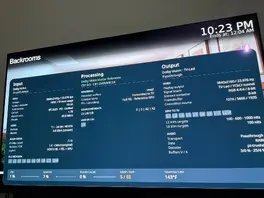
    Confirmed one critical detail: **any HTTP range request (both `Resume` and seeking forward during playback)** causes `CFileCache` to collapse from `45%` straight to `0%` (`Buffers V/A` dropping to `54/-6 % : 72/14 %` and `DROP / SKIP` climbing again).

    - **Local disk (`Videos -> Files`):** Both seeking and Kodi `Resume` keep `0 / 0` drops/skips.
    - **Debrid HTTPS stream (MegaNexus):** Starting at `0:00` fills `PLAYER CACHE` to `45%` with `0 / 0` drops/skips, **until** you seek forward or use `Resume`—at which point the HTTP range re-entry drops `PLAYER CACHE` permanently to `0%`.

    So the bug is specifically how Kodi's `CFileCache` / Curl handles HTTP `Range` requests on re-entry/seek in this build.


    One more confirmation: I just tested a **Dolby Vision Profile 7 MEL** stream (`HDR10 BL + MEL + RPU`, `35.4 Mb/s` + `3.2 Mb/s` TrueHD Atmos, `FEL / upscaling: No FEL`) over the exact same Real-Debrid HTTPS connection:

    - **`PLAYER CACHE`:** `99%`
    - **`DROP / SKIP`:** `0 / 0` (even after seeking/resuming)
    - **`Buffers V/A`:** `76/-7 % : 98/18 %`

    So the `0%` `CFileCache` collapse on HTTP range requests (`Seek` / `Resume`) happens **exclusively when the dual-layer `Full FEL - Reference GPU` (`vaapi`) pipeline is active** (simultaneous BL + EL reads over HTTPS/WebDAV), whereas single-layer MEL over HTTPS and dual-layer FEL from local disk both run at `0 / 0` drops/skips.

    https://paste.libreelec.tv/humeral-jefferey.log

    Edited once, last by lvasan: Merged a post created by lvasan into this post. (November 13, 2026 at 5:48 PM).

  • Im tested both RC3 and RC4 preview in as much time as i had for now with ASUS NUC 14 Pro s Core Ultra 5 125H with Intel Arc GPU. Transformers, Tron and other mentioned work fine with Full FEL7 decoding, no skipped frames, nothing, it just works great.

    What i did notice is that after the playback is stopped audio output device is lost and there is no more audio. For example i have audio output set to ALSA: HDA Intel PCH, GSM LG TV SSCR2 on HDMI #0.

    When i stop the playback i only have ALSA: HDA Intel PCH, HDMI #0.

    When i reboot i again have LG HDMI connection. I tried several combination, it doesn't mater which video or audio codec was used before stopping the playback.

    Also, after some 30 minutes to an hour GUI losses 60fps and goes sluggish, probably 30fps or even lower. After reboot its again 60fps. Its the same when GUI is set to 4K or 1080p.