Dolby Vision w/FEL + 3D for PC (AMD/Intel/nVidia)

  • Do any of these have the option to upgrade cmv2.9 to 4.0 as the custom coreelec builds? This is one of my favorite options as it fixes so many cmv2.9 issues, such as black crush. thank you

    I'm interested in knowing this too. It's a really nice feature of the custom CE builds.

  • Regarding cmv2.9 and cmv4.0 and black crush, I would like to know if this is also could be related with L2 trims.

    Disabling L2 trims fixes washed blacks in some movies on my Hisense PX1 Pro, but I always find It strange that some other movies with L2 trims enabled looks ok. Maybe we are looking to the wrong place.

    I'm curious about from where the option to disable L2 trims comes in first place to Hades build. I have an open request for that feature on OSMC, but previous to that, I didn't find anything about this problem, I find it out as a conclusion from Claude and then testing myself by doing MKV samples without L2 trims, and also removing 100, 600 and 1000 blocks separately. In my case 100 seems to be the problem, but only on some movies.

  • Regarding cmv2.9 and cmv4.0 and black crush, I would like to know if this is also could be related with L2 trims.

    Disabling L2 trims fixes washed blacks in some movies on my Hisense PX1 Pro, but I always find It strange that some other movies with L2 trims enabled looks ok. Maybe we are looking to the wrong place.

    I'm curious about from where the option to disable L2 trims comes in first place to Hades build. I have an open request for that feature on OSMC, but previous to that, I didn't find anything about this problem, I find it out as a conclusion from Claude and then testing myself by doing MKV samples without L2 trims, and also removing 100, 600 and 1000 blocks separately. In my case 100 seems to be the problem, but only on some movies.


    I think L2 trim deactivavation is already in place in the rc1.1 debug pre release in github

    All features related to CM2.9 to CM4.0 conversion are in place in my internal build and will be release tomorrow.

  • Greetings to the group

    Mr. developer (CroqueMR) thank you for this wonderful gift for our community. I'm new to the

    pc with Fel group and not to familiar with the terms. Can you or someone in the group give settings for:

    dervice = intel NUCi7 10th gen, 32GB ram

    AVS = Marantz SR7011

    TV = LG C2

    everthing installed correctly, but when I play DV FEL Power Rangers Credits Test, I just get the HDR badge, but no video of the credits. Samething happens when I play FEL TEST ST DL P7 CMV4.0 4000nits V4.

    these files play perfectly on my AM9 Pro, AM6B+, Fire Cube 3gen rooted.

    Thanks in advance for some guidence

  • Their box simply cannot output the video signal properly because of how 10th Gen Intel chips handle video connections.

    Here is exactly what is happening to that user, broken down:

    1. The 10th Gen Intel Display Limitation (Intel Display 9)

    As noted right in the developer's documentation under known limitations, Intel 10th Gen (Comet Lake) uses an older display architecture (Display 9) that cannot natively pass native HDMI HDR10, HLG, or HDR10+ signals through this Linux display driver stack.

    When the user attempts to play a Dolby Vision Profile 7 FEL file, the custom CB1 engine tries to process the base video layer and the enhancement layer. However, because the Intel NUC’s HDMI port cannot handle the required signaling handshake with their LG C2 TV under this build, the video engine crashes or fails to render entirely. The TV triggers its default "HDR" badge because it detects an HDR metadata packet, but it gets zero video frames from the NUC.

    2. The Marantz Receiver Complexities

    Intel NUCs of this generation are notorious for display handshaking issues when routed through an Audio/Video Receiver (AVR) like their Marantz SR7011.

    • Dolby Vision on PCs requires incredibly precise "tunneling" metadata packets.
    • Passing this uncertified, custom Linux Dolby Vision signal through an older HDMI 2.0 AVR (the Marantz SR7011) to a modern HDMI 2.1 TV (the LG C2) frequently breaks the video chain completely on Intel hardware.

    ___________________________________
    You'll need a new box. Unless you have a different one. N100 was optimised and will handle everything except some converstions, but if all you want to do is play DV using DV source, it will play it. Ryzen 3500U is like the base to handle everything and recommended. if you looking to get a new box. Aliexpress has a sale on right not for UK and in about 7 hours for USA. check this thread

    DolbyVisionFriend
    October 18, 2026 at 10:55 AM


    Check for used 3500U or R2544 in ebay, but I don't think you'll get as cheap as what aliexpress are selling new. happy to help out on hardware thread if I can. Dev got R2544 for 90 euros, this will be faster than any box you currently have to. also welcome.

  • thank you for the reply and info, dang, I thoight I had a use for this box. Thanks again

  • thank you for the reply and info, dang, I thoight I had a use for this box. Thanks again

    Sorry but I should have said I'm not Dev and don't know what I'm saying, I got the information from AI. I know i5 11th gen laptop works, I've not seen a 10th gen intel CPU work, Dev might tell me I'm wrong. so I think I'll let him explain.

  • Regarding cmv2.9 and cmv4.0 and black crush, I would like to know if this is also could be related with L2 trims.

    Disabling L2 trims fixes washed blacks in some movies on my Hisense PX1 Pro, but I always find It strange that some other movies with L2 trims enabled looks ok. Maybe we are looking to the wrong place.

    I'm curious about from where the option to disable L2 trims comes in first place to Hades build. I have an open request for that feature on OSMC, but previous to that, I didn't find anything about this problem, I find it out as a conclusion from Claude and then testing myself by doing MKV samples without L2 trims, and also removing 100, 600 and 1000 blocks separately. In my case 100 seems to be the problem, but only on some movies.


    No, the L2 trims(the generated portion from a cmv4.0 workflow) actually help improve black crush when the RPU MDL is 4000 (or 10,000 nits).

    What you're referring to (washed-out blacks) is probably related to the positive lift metadata (offset), which is the trim control that can raise the black floor (and the letterbox bars when L5 is incorrect or ignored).

    This positive lift metadata is also somehow ignored by Blu-ray players in TV-LED mode, but strangely enough, not in LLDV. Also, with LG TVs' internal player, if L5 is missing (as is the case with Apple TV content), the positive lift is ignored.

  • everthing installed correctly, but when I play DV FEL Power Rangers Credits Test, I just get the HDR badge, but no video of the credits. Samething happens when I play FEL TEST ST DL P7 CMV4.0 4000nits V4.

    If something doesn't run, provide a log. Don't buy new hardware now, because optimizations are possible.

  • Completed full suite of test files I have on both CroqueMr's and hadesdevls builds. Both are very good, with just a few things to address from what I see...

    CroqueMr's RC1.1: Debug and crash logs here

    • HDR10+ doesn't work, or only occasionally or w/certain clips/movies. HDR10+ works well with hadesdevls' 1.0 RC5
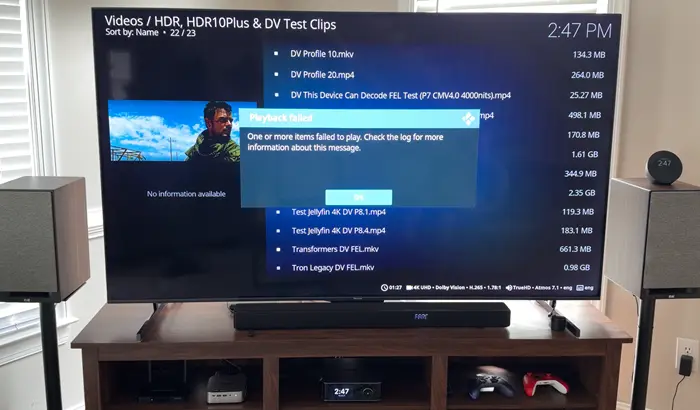
    • As I reported, this 'Transformers' clip either plays (5800H) or shows cannot play error (N150 and H255/8745HS). When it does play, as reported earlier, OSD overlay won't show, including being able to bring up player controls to stop playback. Creator44 reported the first 5 'Transformers' UHD rips don't play for him
      • The clip plays well on hadesdevls' 1.0 RC5, and I'm able to bring up the player process info and OSD w/o issue
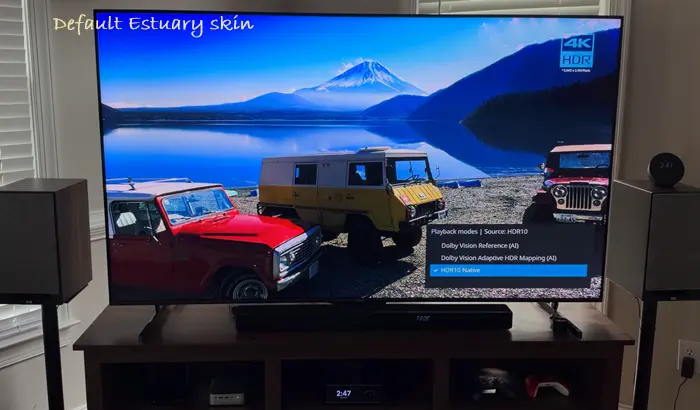
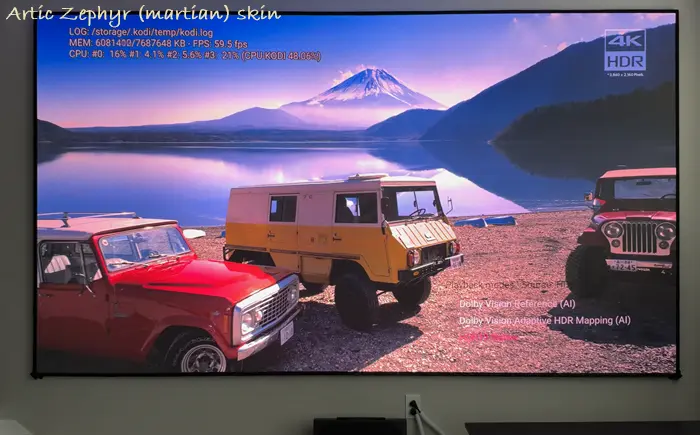
    • The HDR formats overlay (pressing 'O' twice) is hard to see and navigate and tell which is highlighted to choose with Artic Zephyr skin (martian version specifically); not a problem with default Estuary as you can see
    • There is instability with OSD on-the-fly switching from DV to HDR, etc. It works sometimes, more so on 5800H and 8745HS, while struggles, is unresponsive on N150

    hadesdevls' 1.0 RC5:

    • No on-the-fly switching between HDR formats via OSD, so couldn't test. Unless it's there and I missed how to initiate. If not, hadesdevls, are you planning to add? Hope so as I love it on CroqueMr's build... times it works reliably, it's great for conveniently switching from HDR to DV or vice versa
    • Struggled with a few anime clips, namely pausing/freezing at start of playback. But, after that, no issues. So, minor thing. Sorry, don't have log, but here's a sample clip. Did fine with HEVC Main10 1080p, including ones w/heavy subtitles

    Both builds play all 3D formats well. Tested a few random actual FEL movies ('Alien Romulus', 'Mission Impossible: Dead Reckoning - Part 1', and 'Saving Private Ryan'), and both did well, including bringing up OSD and player process info. HDR10 was also fine on both. AV1 24p HDR and 60p HDR also; no issues. Even an 8K AV1 24p HDR sample played surprisingly okay-ish most times, with a few dropped frames. No dice on OSD working, but surprised this clip played at all.

    Edited once, last by ht2tweak (October 31, 2026 at 7:59 PM).