Dolby Vision w/FEL + 3D for PC (AMD/Intel/nVidia)

  • MKVs yes, I saw a lot of issues with VAAPI and FEL thanks to this issue report : https://github.com/CroqueMr/libreelec-x86-DV/issues/29 , I think I already fixed it in my internal build, I need to clean my code before pushing an update of the debug version.

    The issue is wider than MKV, it impacts also MP4, M2TS, everything has been fixed.

    According to the issue report, the person cannot playback DT DV. I have the DT test file of "This Device Can Play DV" but for the DT test file specifically, it only displays black screen on my AM6B+ on CoreElec NG AND on your builds same thing. I thought this was normal and unsupported by ffmpeg or something. If you fixed that too that's pretty neat.

  • A laptop powered by intel i7-1260p works fine with SONY TV X90L and beta4, FEL and all RPU response no issues.

    However, the laptop defaults to the internal display. You need to modify the cfg file to output signal correctly to the TV and activate Sony's Dolby mode.
    It is recommended to add a script to switch between the laptop's internal display and external display.


  • Disaster averted! I unplugged the Kodi box and powered it on again. Booted and was able to select DV again. Phew. Still hopefully it's useful feedback.

    Edited 2 times, last by Glennza: Merged a post created by Glennza into this post. (October 20, 2026 at 1:57 AM).

  • I also disabled DV once and then all the DV modes became unavailable until I rebooted. I did the same later and I did not have that problem.

    I'm guessing it's because I am using a centralised MariaDB database. Maybe it killed the network connection. Dunno. Just glad I didnt have to reinstall from scratch

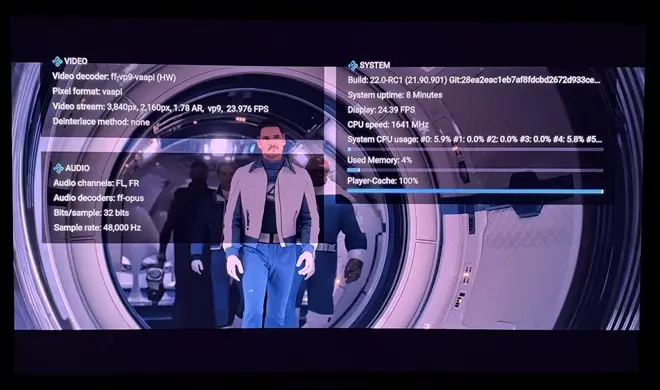
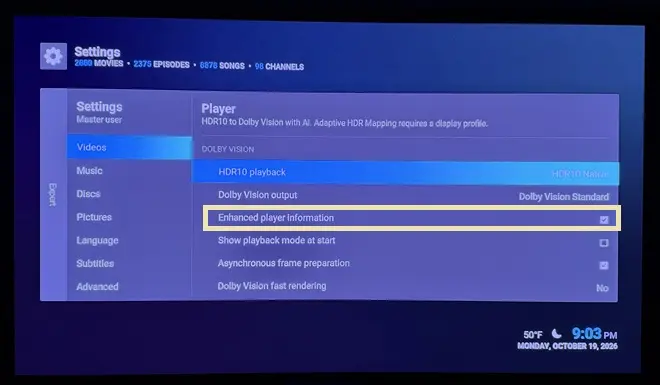
  • CroqueMr, looks like we've lost the enhanced player info w/beta4:


    Also, re-tested DV FEL playback of actual UHD rips on both AMD 5800H and Intel N150, and playback is excellent on both. Dramatic improvements in latter.

    Edited once, last by ht2tweak: Merged a post created by ht2tweak into this post. (October 20, 2026 at 2:33 AM).

  • Small update (smaller than other beta release but still important) https://github.com/CroqueMr/libre…ag/R1.0.0-Beta5

    R1.0.0 Beta5 - Playback stability and wider format support

    Compared with Beta4

    Playback

    • Improved scaling and placement for non-4K video across the shared rendering pipelines.
    • Improved Master Reference presentation with GUI
    • Added shared BL/EL assembly for declared dual-track MKV/MP4 and dual-PID TS/M2TS sources.
    • Fixed stale enhancement-layer data after seeking and preserved original packet framing during seek-point detection.
    • Improved FEL decoder-surface allocation and VAAPI context reuse.
    • Improved audio recovery after temporary output loss.
    • Corrected HDR state handling after a rejected metadata request.
    • Improved extended EDID handling and recovery of available Dolby Vision modes.
    • Prefer 3840x2160 over 4096x2160 when selecting a Dolby Vision output mode.
    • Added stream-selection diagnostics for ISO/STRM playback without forcing Dolby Vision on unverified streams.

    Player information and settings

    • Player information now uses shared Kodi resources and native fonts.
    • Disabling enhanced information restores the active skin's native panel.
    • Quick rendering selection uses the active skin's native selector layout.
    • Corrected the consistency of generated L3 metadata and HDR10-to-Dolby Vision AI information.

    Known limitations

    • HDR10 on some older Intel HDMI configurations remains under investigation.
    • Heavy conversions and visible menus can exceed low-power GPU capacity.
    • Adaptive HDR Mapping remains subject to visual refinement.
    • Dedicated NVIDIA GPU support remains experimental.

    CroqueMr, looks like we've lost the enhanced player info w/beta4:


    Also, re-tested DV FEL playback of actual UHD rips on both AMD 5800H and Intel N150, and playback is excellent on both. Dramatic improvements in latter.

    Thank you for the feedback, I think it's fixed in beta5

    I also disabled DV once and then all the DV modes became unavailable until I rebooted. I did the same later and I did not have that problem.


    I improved the HDR10/DV detection in beta5 if you have still this issue please report it :)

    A laptop powered by intel i7-1260p works fine with SONY TV X90L and beta4, FEL and all RPU response no issues.

    However, the laptop defaults to the internal display. You need to modify the cfg file to output signal correctly to the TV and activate Sony's Dolby mode.
    It is recommended to add a script to switch between the laptop's internal display and external display.

    Thank you for your feedback, I did not test the build on a laptop. I will try to fix that this WE.

    According to the issue report, the person cannot playback DT DV. I have the DT test file of "This Device Can Play DV" but for the DT test file specifically, it only displays black screen on my AM6B+ on CoreElec NG AND on your builds same thing. I thought this was normal and unsupported by ffmpeg or something. If you fixed that too that's pretty neat.


    Beta5 is out and try to fix that, if you can send me your feedback it would be great.

    Hey CroqueMr I have an rtx 4080 gaming laptop. I flashed the latest beta 4 on my usb and connected to tv via hdmi. I am not getting output to tv. Only the initial one line libreelec r1.0.0 beta 4 shows up on both tv and laptop, but after that everything is on laptop screen. I have tried libreelec hades build before and I was able to get output to my tv , I tested fel files and everything worked properly on that build. Any idea what's going on?

    I will have a laptop with a 5080 this WE I will try to fix that. Complicated to fix it blindely.

    Thanks for the explanation, I understand the limitations of Master Reference mode, and I'd definitely prefer to keep the picture quality intact. I'll test Debug2 when it's available and let you know if the frame drops improve. Really appreciate your work.

    Beta5 increase the GUI performance in master reference mode, thanks for your test feedback.

    Edited once, last by CroqueMr: Merged a post created by CroqueMr into this post. (October 20, 2026 at 7:49 PM).

  • CroqueMr you do mention K17 mini pc with 226V chip. Will your builds work alright on it or does it need some modified drivers to run?

    Might get one of those as I'm running couple docker images already so a bit more power horse would be great 😉

  • CroqueMr you do mention K17 mini pc with 226V chip. Will your builds work alright on it or does it need some modified drivers to run?

    Might get one of those as I'm running couple docker images already so a bit more power horse would be great 😉

    I never installed LE on my 226V, I am running Kubuntu with a lot of container for my intensive NAS/media server setup. And I installed my custom DV engine with modified drivers to play Dolby Vision through Jellyfin using the HDMI output.

    All modified drivers (Intel, Xe, AMD, Nvidia...) are included inside the build

  • This question may have been answered, but should DV Master Reference be expected to work fine on lower end h/w like MatteN shared logs for? Haven't looked at the logs; not that I could figure out what's what anyway.

  • This question may have been answered, but should DV Master Reference be expected to work fine on lower end h/w like MatteN shared logs for? Haven't looked at the logs; not that I could figure out what's what anyway.

    I do not know I need to check with this precious log. A N100 is ok for the master reference mode but the headroom is small.

    To be honest, this mode is pretty overkill, but I guess purists/geek might appreciate it. There are no compromises here, just full-precision calculations throughout. I'm not even sure certified Dolby Vision devices go this far, I am pretty sure these devices make some compromise.

    And I challenge anyone to spot the difference compared to Standard mode. You can pause on any frame and switch between modes in real time with "O". Even on frames where I know there's a measurable difference is at its maximum (still less than 0.8% in chrominance), I honestly can't see anything different

    The only obvious difference is that one uses twice as much processing power :S Don’t be frustrated if your device doesn’t support this mode, you aren’t missing out on much. The standard mode was designed with very minor, imperceptible compromises to ensure it runs smoothly on less powerful hardware.


    Works fine, no dropped frames.

    Really that's very nice :huh: I do not think your CPU will handle a 60fps DV file in this mode, but at least if it can handle a Remux/Iso with FEL it's amazing.


    Edited 2 times, last by CroqueMr: Merged a post created by CroqueMr into this post. (October 20, 2026 at 9:46 PM).

  • Yes, to ensure 100% accuracy in the analysis, I need all players to use the same color space. Otherwise, I’d have to convert ITP to YUV or vice versa, and that isn’t a lossless process—I need a lossless process without any color conversions.
    I’m testing on an Intel i3-12100 (UHD730)—it seems to be sufficient for 30 fps tests.

    Hello DMD :)
    I released a debug version with a "Dolby vision Master Reference IPT" pipeline, It’s the same as the Master reference (Non IPT) in the non-beta version, though in a different format to help you to compare this output with other player. If you need any modification nor format is not what you excpected please let me know.

    I’d be interested in your feedback on this circuit, it will be rolled out more broadly in the next release. It isn’t fully optimized yet, an N100 processor can just manage 30 fps with FEL enabledwith 2,8ms headroom, but it can’t sustain 60 fps. I made sure that not a single bit changes between each modification. As I mentioned, it’s a very "overkill" circuit, featuring full-resolution calculations and the cleanest possible filters, the changes vs standard dolby vision output in the build are almost invisible, the implementation is similar the difference are in the rounding and precision.

    Releases · CroqueMr/libreelec-x86-DV
    LibreELEC x86_64 with Dolby Vision support for Intel, AMD, and Nvidia - CroqueMr/libreelec-x86-DV
    github.com
  • Lucky I didn't waste money on that extra ram, you were right! Thank you again.

    Is there any chance of being able to use vertical shift in 3d playback? Currently changing the values doesn't do anything.

  • Lucky I didn't waste money on that extra ram, you were right! Thank you again.

    Is there any chance of being able to use vertical shift in 3d playback? Currently changing the values doesn't do anything.

    Yeah I think I can give it a try, alors I think you was interested in DV to HDR10 expert conversion I saw some issue, black are crushed I will investigate to see the cause behind.

  • CroqueMr a pointer for elstr's vertical shift question, in case it saves you time: in Kodi a vertical shift between -1 and 1 only moves the picture inside the black bars Kodi itself adds (see the comment in CBaseRenderer::CalcDestRect). Each eye of a 3D Blu-ray is a full 1920x1080 frame with the letterbox inside the picture, so there are no Kodi bars and that range does nothing. Values beyond ±1 should still move the whole picture towards the screen edge. Upstream Kodi behaves the same, and so does a 2D file with baked-in bars. If values beyond ±1 do nothing in 3D either, that part would be a real 3D issue.