Nightly Builds

  • edit says #2:

    Good morning
    (LibreELEC-RPi5.aarch64-13.0-nightly-20260715-314b0bf)
    I think/suspect I’ve found the culprit
    LibreELEC --> Settings --> System --> Input --> Peripherals --> CEC Adapter (7.1.1 old adapter)
    (this is a workaround for me)
    ...
    On start-up ... (ms) 0
    Repeat ... (ms) 0
    ...
    ...
    ...
    ...
    ...
    Repeat delay ... (ms) 50 / (can’t go any lower)
    Saved
    (made a backup just in case)
    Updated to
    LibreELEC-RPi5.aarch64-13.0-nightly-20260716-05f71dc
    Done
    Seems to be working for now (in my humble opinion)
    Funnily enough, there are now
    >> 2x (two) <<
    LibreELEC --> Settings --> System --> Input --> Peripherals --> CEC Adapter --> 8.0.0 - firmware v0
    are present
    I’ve no idea what’s going on
    I can’t get it to work any other way
    this is a workaround for >>me<<
    Best regards, jd
    If anyone spots any errors, please correct them
    Translated with DeepL

  • Yes, use your previous settings. Double-check them and/or reset to default and set them as desired - the two cec adapters might have caused some mess to kodi's cec settings file.

    so long,

    Hias

  • Hello Kodi Team,

    I’m experiencing the same issue as in #162 & #163 in the version

    LibreELEC-RPi5.aarch64-13.0-nightly-20260730-cad29d6

    again. 2x 8.1.1 firmware v0 (HDMI 1 & HDMI 2)

    Kind regards, jd

    Translated with DeepL

  • johnny depp the two CEC adapters are expected and kodi now supports separate configuration of both.

    If you have CEC issues make sure you start with clean settings, whatever you changed before in CEC settings may now interfere.

    Stop kodi, remove the old CEC settings and reboot:

    Code
    systemctl stop kodi
    rm /storage/.kodi/userdata/peripheral_data/cec*
    reboot

    If you get "double button presses" from CEC then try increasing the Remote button double press timeout setting, eg to 30 or 50ms - that can be needed on some buggy TVs.

    so long,

    Hias

  • If you get "double button presses" from CEC then try increasing the Remote button double press timeout setting, eg to 30 or 50ms - that can be needed on some buggy TVs.

    Checking through the libcec issues I noticed you might need to set that to even higher values like 200 or 250ms - just check what works best for you.

    so long,

    Hias

  • Oops

    That was quick as a flash ("ruck-zuck" in German)

    CEC reset (renamed)

    LibreELEC-RPi5.aarch64-13.0-nightly-20260730-cad29d6 in .update

    Restart

    And it’s working!

    Thanks jd

    Translated with DeepL

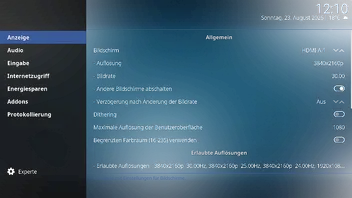
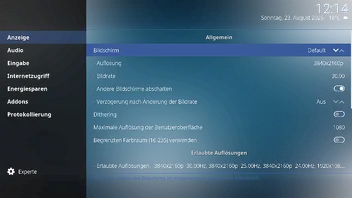
  • Hi there, I’ve got a question about the new option:

    (LibreELEC-RPi5.aarch64-13.0-nightly-20260823)

    Screen See images (2)

    What should I set here?

    HDMI-A-1

    or Default

    ... or... or... or

    A brief explanation would be helpful

    Kind regards, jd

    (translated with DeepL)

  • I wasn't aware that change was merged. We probably need to patch it out of the GUI to avoid people saying the monitor selector doesn't work; because Kodi GBM does not currently support dynamic change of the DRM connector used for output.

  • I noticed in the nightly builds that output for AMD radeon has shifted from YUV to RGB. Are we able to change that back? or at least offer a setting to switch?

    AMD/Intel/nVidia cards *should* output in their native RGB format, and this is not a problem as long as the correct conversions are used; which are all broadcast standards. The change is that Kodi now implements and handles colour things correctly instead of not-handling them at all resulting in wrong output.

  • AMD/Intel/nVidia cards *should* output in their native RGB format, and this is not a problem as long as the correct conversions are used; which are all broadcast standards. The change is that Kodi now implements and handles colour things correctly instead of not-handling them at all resulting in wrong output.

    That's fine, i noticed that previous build outputted properly in YUV but was not correct in RGB. However looking at it today it seems fine in RGB which is good to see.