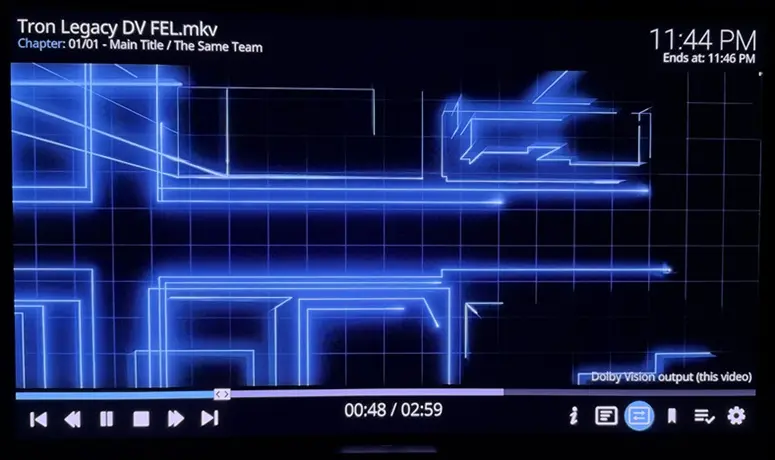
[x86-64][hadesdevls Builds] LibreELEC Hades - native Dolby Vision, HDR10+ and 3D

  • lfemperor Thanks for testing RC7 so thoroughly, and good to hear the FEL test plays in all four formats, seeking included. Transformers 2 dropping to HDR10 is a fault in Hades. ht2tweak saw the same with the Transformers and Tron samples on an N150, so both reports are on Intel graphics. I'll reproduce it with those samples and fix it for the next version.

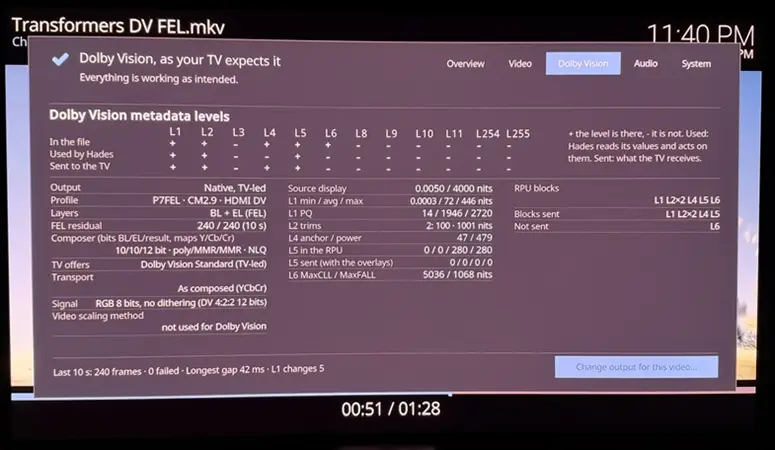
    Yes please, the kodi.log of a playback that drops would help, ideally with the diagnostic on (rename DIAG-OFF.TXT to DIAG-ON.TXT on the boot partition, play the film until it drops, then zip the hades-diag folder from that partition). When Hades leaves native Dolby Vision, it writes the reason in kodi.log and on the Dolby Vision page of the player information. I'll start with the samples from ht2tweak and ask for a clip only if they don't show it. Thanks also for pointing to RC2 of CroqueMr.

    Hi hadesdevls,

    That makes sense, if ht2tweak is also experiencing this on an N150, it's definitely an Intel i915 pipeline issue.

    I have already enabled the diagnostic mode by renaming DIAG-ON.TXT, played Transformers 2 until it dropped to HDR10, and zipped the hades-diag folder. Please find the attached diagnostic log.

    I also noticed the reason is written in the Player Information Dolby Vision page, which is a great debugging feature! Hopefully, this log helps you nail down the issue quickly. Since you have samples from ht2tweak, I'll hold off on sending the clip for now. Let me know if you still need it!

    Thanks!

  • Quote from Samui67

    Could you please clarify whether the AMD 3D implementation supports Vega 11, and whether a native HDMI output is required?


    Samui67 Sorry for the slow reply. cinemaONE got there first, and he's right. Hades uses his amdgpu 3D patch, so the same rule applies: the frame-packing modes are only offered on a connector the driver sees as HDMI. Vega 11 isn't the issue. Your Mini shows it well: with the HDMI module it comes up as HDMI-A-1 and gets the 1920x2205 modes, while the SFF on the DP cable is DP-3 and gets none. Only your test will show whether the SFF sees the module as HDMI-A too. One thing to know for Hades: frame packing for a 24p film also needs "Adjust display refresh rate" turned on.

    Quote from ht2tweak

    External Content youtu.be
    Content embedded from external sources will not be displayed without your consent.
    Through the activation of external content, you agree that personal data may be transferred to third party platforms. We have provided more information on this in our privacy policy.


    ht2tweak Thanks for the video, and for showing what failed as well as what worked. Transformers and Tron dropping to HDR10 are bugs I have to fix. Your 5800H result also proves me wrong: I said this was an Intel problem, and it isn't.

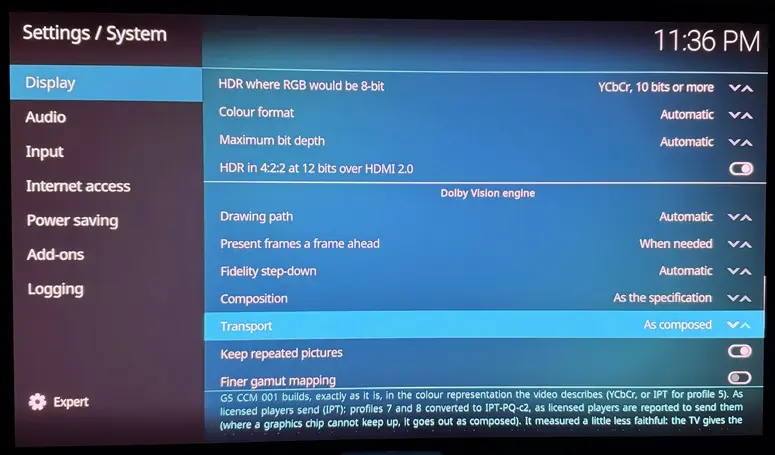
    On the transport setting: "As composed" sends the picture as the composer builds it, without the conversion to IPT that the default "As licensed players send (IPT)" does for profiles 7 and 8. Switching between them should never turn a sample that plays into one that breaks, so that's a second bug. If you kept diagnostics from either machine, please attach them and say which sample and which setting each one is.

    Fair points on updating. A .tar update shouldn't bring a setup wizard back. Which one came back, the LibreELEC first-run wizard or the installer? Samba is off by default. Once you turn it on, the user is "libreelec" and the password is generated and shown right there in LibreELEC Settings > Services > Samba. SSH is separate: while root still has the default password it only accepts keys, so set a password first if you want to log in with one. The update instructions should say all of that, and I'll add it. I've also noted what you said about the number of options, and the overlay cost is already on my list.

    Quote from lfemperor

    I have already enabled the diagnostic mode by renaming DIAG-ON.TXT , played Transformers 2 until it dropped to HDR10, and zipped the hades-diag folder.


    lfemperor Got it, thanks. Dolby Vision started fine with FEL. About two seconds in, a frame was rejected at the metadata and reconstruction check, no Dolby Vision frame could be shown for the next two seconds, and Hades fell back to HDR10. As I wrote above, it isn't an Intel i915 problem after all. The same error also shows up in an NVIDIA report on GitHub (issue #1). The log names the check but not exactly what failed, so that's mine to dig out. Keep your clip for now.

    Unrelated to the drop: your display reports no 4K mode at 24 Hz (it lists 4K only at 50 and 60), so the film went out at 59.94 Hz. If anything sits between the PC and the display, check whether it's hiding the 24 Hz modes.

    Quote from DolbyVisionFriend

    Gemini Man 60fps HDR->DV + subtitles a) Hades -> stutters with subtitles or video info open


    DolbyVisionFriend That's a good test case. It's the same problem as the overlay stutter you reported on the Geekom: anything drawn over a Dolby Vision picture still costs Hades too much GPU time, and at 60 fps there's even less to spare. I'm working on it for the next version, and Gemini Man with subtitles goes on my test list. A diagnostic of that playback would help, if you have a minute.

    I also have your S24 sample: 4K HEVC at 60 fps, with HDR10+ that carries its own tone curve. Hades doesn't use that curve when it makes Dolby Vision. It uses the scene statistics and lets the TV build its own curve. I haven't reproduced the black screen after stopping yet. The diagnostic I asked for before (stop the clip and leave the black screen for 30 seconds) is still what I need for that.

  • ht2tweak  hadesdevls i can confirm that transformers 2007 movie in mkv and in bdmv format doesn't play in DV. tried with Hades rc6 and rc8 builds. no DV.


    hadesdevls may i request one small feature?

    on kodi SHUTDOWN menu, i would like also to see option RESTART KODI, without restarting whole computer.


    and reporting some kind of bug.

    after playing transformers 2007 (in mkv and bdmv) and stopping it (pressing X) on keyboard.... under SETTING >>> SYSTEM INFORMATION >>> VIDEO i don't see DV anymore as supported display (i see hdr10, hlg and hdr10+). probably caused by transformers 2007 movie...


    my hardware: amd cpu 3400g (radeon vega 11) with philips OLED808 (similar to LG C2 or C3)

  • CroqueMr  hadesdevls [Feature Request] Enable CONFIG_USB_VHCI_HCD kernel module for proxmox-bluetooth support
    Use case:
    I run this LibreELEC build inside a Proxmox VM with Intel iGPU passthrough for Dolby Vision output. The on-board Intel AX201 Bluetooth (CNVi) frequently throws `usb error -71` and becomes completely unresponsive after long uptime, which makes USB passthrough very unreliable.

    Proposed solution:
    The community standard workaround for this is `proxmox-bluetooth`, which shares the host Bluetooth controller to the VM over TCP. This eliminates all USB-level lockups, as the host BlueZ stack manages the hardware with full error recovery.

    Blocker:
    The current kernel build does not include the `vhci_hcd` module. Running `modprobe vhci_hcd` returns:
    `modprobe: FATAL: Module vhci_hcd not found in directory /lib/modules/7.2.6`

    Request:
    Please enable `CONFIG_USB_VHCI_HCD=m` in the kernel config so the virtual USB host controller module is available.

    This change adds only a small standard kernel module, is not loaded by default, and has zero impact on bare-metal users. It would greatly improve Bluetooth reliability for all users running this build in virtualized environments with Intel CNVi Bluetooth adapters.

  • hadesdevls I was testing RC8 and noticed a strange issue when playing my ISO rip of Avatar 2: As soon as a PGS subtitle is displayed on screen, the video starts to judder heavily. Is this a known issue? I tried another disc with PGS subs (Fantastic Beasts: The Secrets of Dumbledore) and with that one, it didn't happen.

  • LibreELEC Hades 1.0 is out

    The first version that is not a release candidate.

    For anyone new here: LibreELEC Hades is an unofficial build of LibreELEC for 64-bit PCs. It sends Dolby Vision from the PC to the TV over HDMI the way Dolby Vision players do, including profile 7 with its full enhancement layer, with HDR10+ and with Dolby Atmos and the other HD sound formats passed through. Everything else LibreELEC does is kept.

    New in 1.0

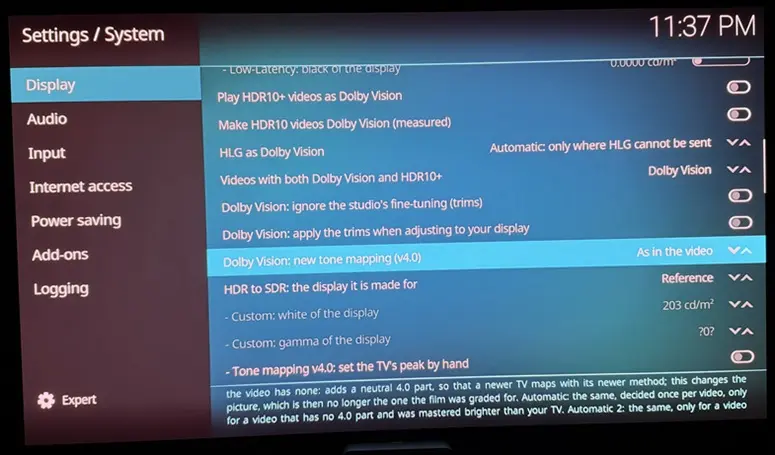
    • Check this setup (Settings > LibreELEC > System): short test pictures (SDR, HDR10, HLG, Dolby Vision 8.1 and 5) and sounds (each speaker, Dolby Digital, Dolby Digital Plus, TrueHD) say in plain words what reached the TV, and only the sound formats you heard are switched on.
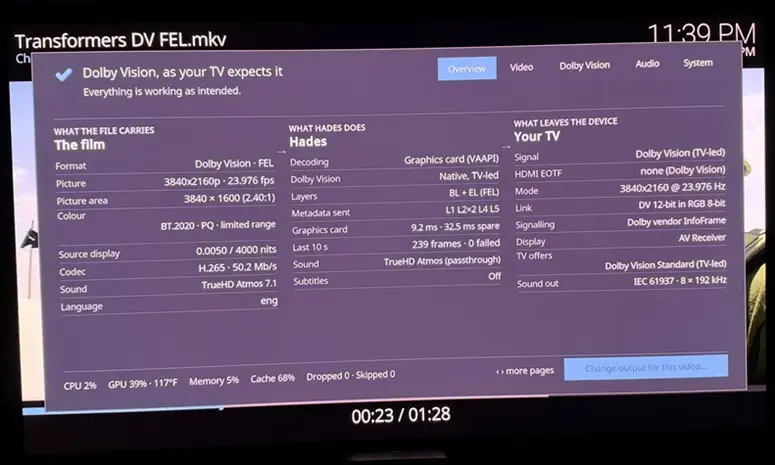
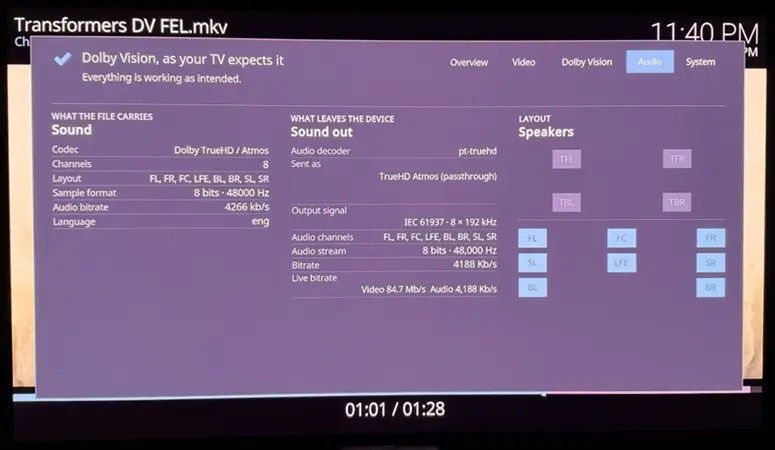
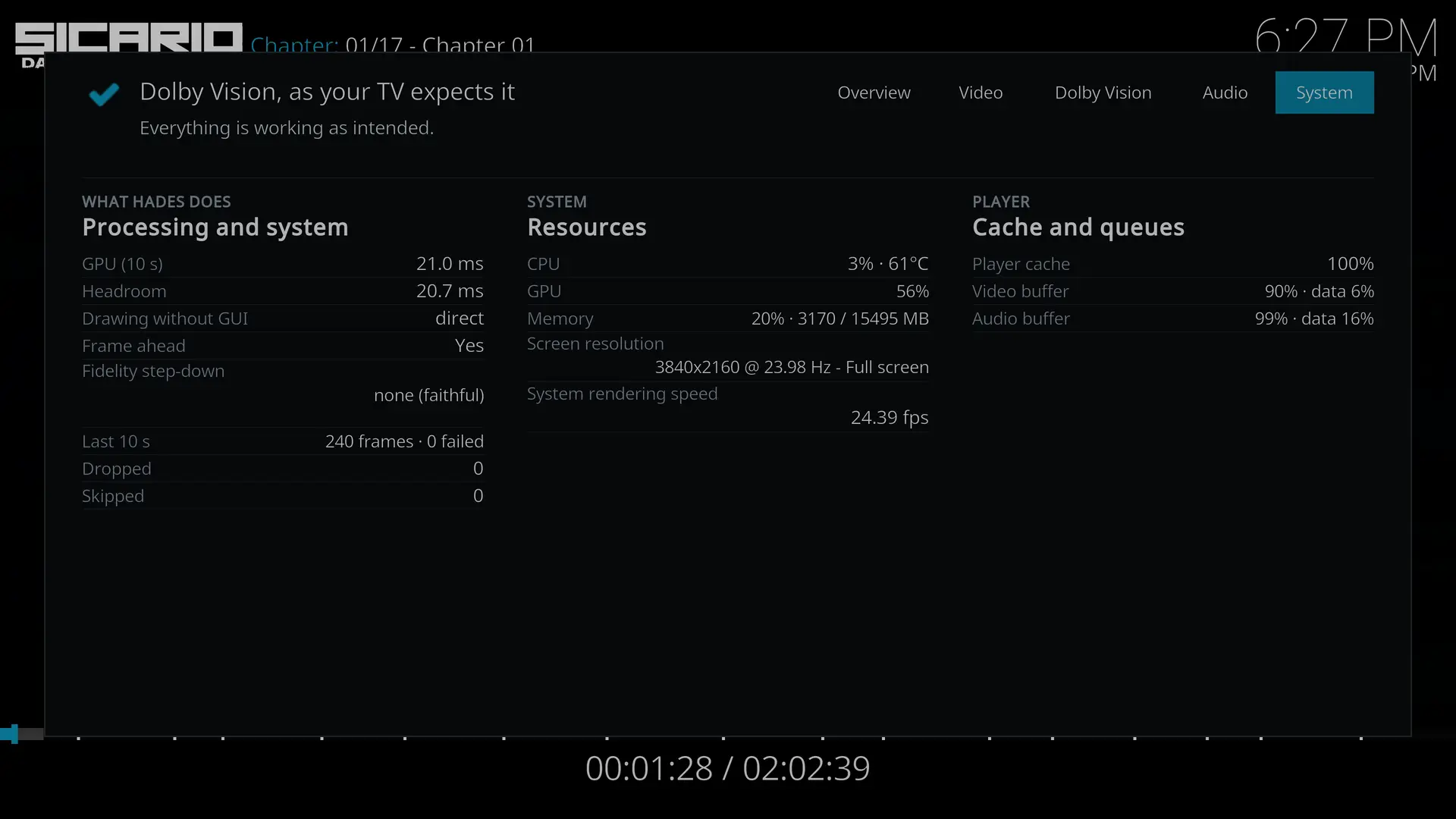
    • A player information page that a person can read: press O, or the red key of a CEC remote. The first page says in one sentence whether the video plays as intended and, if not, what to do; the details are behind it.
    • A diagnostic report in one file, made with one button, filtered, and copied to a USB drive if you want.
    • Dolby Vision profiles 7 and 8 sent as composed by default, the picture of the composer in the YCbCr of the video, bit for bit. Sending IPT-PQ-c2 stays as an expert choice.
    • HDR mapped more faithfully: the BT.2390 curve with the knee of the ITU-R report (the previous one stays as a choice), HDR10+ adapted by its own metadata, HDR videos played as SDR by choice, and the trims of the colourist off by default for Dolby Vision mapped by Hades itself (native Dolby Vision output is unchanged).
    • HDR above 8 bits where the link would carry RGB at 8: YCbCr 4:2:2 at 12 bits on NVIDIA (on by default) and over HDMI 2.0 on Intel and AMD.
    • DVD films play as films: films in interlaced video are rebuilt and played at 23.976, 25 or 29.97 Hz, and soft telecine at 23.976 Hz.
    • Displays: a display connected while Hades runs is taken without a restart (same graphics card), and only the display in use is lit, with the sound going to it. An expert setting keeps a separate output on for sound, for an AV receiver on its own HDMI output.
    • Dolby Vision on more hardware: the newest Ryzen processors (DCN 4.2 and 4.2B, with a check of the display pipe each time Dolby Vision starts), and passive DP++ adaptors (Dolby Vision, HDR10 and HDMI 3D).
    • Safer by default: Run and Live start with DMA translation, so a device can only reach the memory the kernel gives it, where the computer has an IOMMU.
    • Boot menu at 5 seconds, and the remote control decoders built from source.

    Fixed

    • Films that repeat a pivot in their Dolby Vision metadata stay in Dolby Vision, as the specification allows: the Transformers films used to drop to HDR10 because of it.
    • Picture in step with its sound: on every driver the picture left one refresh before its sound (42 ms at 24 Hz); Hades now measures when each frame reaches the screen.
    • A network drop no longer ends a stream: playback waits, says the connection is interrupted, reconnects and plays on from where it stopped (up to 5 minutes). Stopping a stream whose server does not answer no longer freezes the interface for a minute, and a second video no longer waits for the first or gets lost when the first one fails.
    • Passthrough: a pause keeps TrueHD, DD+, DD and DTS sound, with nothing lost or repeated at the resume; five faults of DTS-HD and TrueHD passthrough are fixed, two of them with fixes by tanio99 (for OSMC) and heit88.
    • Blu-ray: a disc image over the network (HTTP, .strm) opens with its menu, a VC-1 video in a .m2ts opens at its own rate (not twice it), a second seek pressed quickly is no longer lost, and picture subtitles keep their colours.
    • Displays and EDID: the sound no longer jumps to another display when several are connected to an NVIDIA card, and EDID blocks that a display counts are kept when one of them is not valid (Linux and NVIDIA).
    • AMD: HDR10 through a passive DP++ adaptor reached the display as no HDR at all; it now arrives as HDR10.
    • And more: seven fixes of libCEC, JSON-RPC per connection with five fixes of its server, USB disks stopped cleanly at power off, drive labels shared safely by Samba.

    Faster

    • Dolby Vision made from HDR10, HDR10+ and profile 8.1 takes about a third less GPU time per frame: the picture of the decoder goes straight into the transport, the same bytes.
    • Dolby Vision packing costs less while menus or the player information are on screen, with the same bytes, after ideas from the build of CroqueMr.
    • On graphics that cannot keep up, frames with menus over a single-layer Dolby Vision picture are sent converted only where it was measured to help; frames without menus are unchanged.
    • TrueHD comes back sooner after a start or a seek (about 320 ms instead of 680).
    • A Blu-ray image over the network opens faster: half the requests and half the time at 100 ms of latency.

    Up to date
    Linux 7.3.4, LibreELEC master, Kodi 22.0rc2 (Piers branch), NVIDIA 620.70.06 and 580.196.07, Intel microcode 20261110, OpenSSL 4.1 and 3.5. Everything else is in the release notes.

    Tested on hardware
    I tried the final build of 1.0 on my PC: a GeForce RTX 4080 SUPER connected by HDMI to an LG C5 TV, with a TCL Q85H Pro sound bar on the eARC of the TV, and a Samsung Odyssey OLED G6 monitor with HDR10+. These work:

    • Native Dolby Vision of profile 7 with its full enhancement layer (the Transformers films and several others, with Dolby TrueHD and Atmos passed through), profile 5 and profile 8.1, and HDR10 sent as Dolby Vision.
    • The three Tron films, which had dropped out of Dolby Vision before, play in Dolby Vision.
    • An HDR10 film with DTS-HD Master Audio sound.
    • The new player information page.
    • Moving from the LG C5 to the Odyssey monitor and back from the settings, with the display that is not in use turned off.
    • On the Odyssey, which takes HDR10+ and not Dolby Vision: Dolby Vision videos that carry their own HDR10+ go out as HDR10+, and HDR10+ videos go out as HDR10+.


    Not tried on hardware yet, so your results are very welcome: Check this setup, streaming through a network drop, DP++ adaptors, the newest Ryzen processors, 1.0 on AMD and Intel graphics (so far only on NVIDIA), HDR at 12 bits on GeForce GTX 16, RTX 20 and newer, the sound that follows the display in use, and DVD and the Blu-ray changes.

    Download
    LibreELEC Hades 1.0 on GitHub: the image, the update file, the Windows installer and the sources.

    How to update
    Settings, add-ons and diagnostics are kept. With the Windows installer, choose the drive that has Hades and "Update". Or copy the .tar to the Update folder of the drive and restart (over the network: turn Samba on in Settings > LibreELEC > Services, and use the address and password that it shows).
    Before you update:

    • If you had set Audio offset to make up for the picture coming early, set it back to 0.
    • The boot menu now waits 5 seconds (Settings > LibreELEC > System > Boot menu).
    • On Radeon RX 400, RX 500 and Vega cards, Dolby Vision plays as HDR10 unless you turn on System > Display > Dolby Vision on this Radeon (experimental).
    • With several displays on one graphics card, only the one that shows the picture stays on, and the sound goes to it.

    Reporting problems
    Please use the GitHub issues, not LibreELEC or Kodi, and attach a diagnostic report: Settings > LibreELEC > System > Submit Log > Create a diagnostic report makes one file and can copy it to a USB drive. It is filtered, but look through it first.

    Thanks
    This work began in the Dolby Vision fork of LibreELEC by CroqueMr and its contributors, from which the Dolby Vision output of Hades grew. Several features of 1.0 follow ideas from the build of CroqueMr, YBLOD, CorentinB, cinemaONE, SamuriHL, pannal, avdvplus, matthane, malard, damnms and Pro-me3us, written again here. Thanks also to Dom Cobley (popcornmix), cinemaONE, quietvoid, CoreELEC, big-fella and harment, credited one by one in the README, to the LibreELEC and Kodi teams, and to everyone here, on the Kodi forum and on GitHub who reported, asked and tested.

  • hadesdevls since I didn't see it in the change logs, any chance we can get the quick change menu for the DV conversions?

    I think in Croqs build it is available with a double O tap.

    And a big thank you for the 1.0 release, I will try it out tomorrow.

  • Hi hadesdevls I see you copied my DVD-related PR in your build, I don’t care that you use the code or the idea obviously it’s what open source is for but my PR was still WIP, untested. I do think most if not all of it is fine but maybe wait a bit before porting stuff to your build, no need to rush!

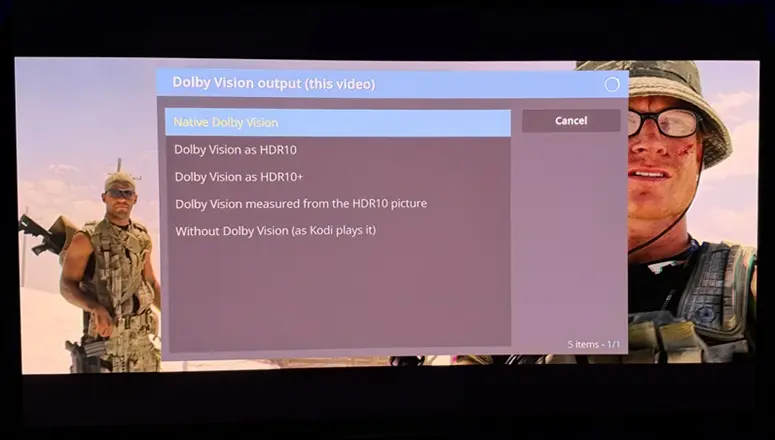
  • hadesdevls since I didn't see it in the change logs, any chance we can get the quick change menu for the DV conversions?

    I think in Croqs build it is available with a double O tap.

    There is a "Change output for this video" button in the player process window (O key), but I can't seem to activate it using the keyboard or the Yatse app. I can only seem to reach it using a mouse.

    But there is also a change video output button in the default Estuary skin that is delivered with this build which does work.

    hadesdevls Happy to report that the video stuttering I experienced with the Avatar 2 ISO is no longer present in 1.0.

  • hadesdevls since I didn't see it in the change logs, any chance we can get the quick change menu for the DV conversions?

    I think in Croqs build it is available with a double O tap.

    And a big thank you for the 1.0 release, I will try it out tomorrow.

    There is a "Change output for this video" button in the player process window (O key), but I can't seem to activate it using the keyboard or the Yatse app. I can only seem to reach it using a mouse.

    But there is also a change video output button in the default Estuary skin that is delivered with this build which does work.

    hadesdevls Happy to report that the video stuttering I experienced with the Avatar 2 ISO is no longer present in 1.0.

    Khazar  MrMagic Thanks both. The player information page (O) has "Change output for this video" for that, but MrMagic is right that it can only be reached with a mouse: with a keyboard, a remote or Yatse the focus never gets to it. That is a fault in Hades and I will fix it in the next version, and look at a quicker way to switch the Dolby Vision conversion while a video plays at the same time. Until then, the change of video output in the player controls of Estuary works, as MrMagic found.

    MrMagic Great to hear the stutter with the Avatar 2 ISO is gone, thanks for telling me.

    Looks like a very solid release, congrats! Will do a fresh install and try out.

    ht2tweak Thanks! A fresh install is a good way to see the new defaults; if anything looks off, the diagnostic report (Settings > LibreELEC > System > Submit Log) makes it easy to see why.

    Hi hadesdevls I see you copied my DVD-related PR in your build, I don’t care that you use the code or the idea obviously it’s what open source is for but my PR was still WIP, untested. I do think most if not all of it is fine but maybe wait a bit before porting stuff to your build, no need to rush!

    CorentinB Hi, thanks for reaching out about it, and for the work you shared. The film detection for DVDs in Hades builds on your pull request 101 to the build of CroqueMr: the idea and the approach with fieldmatch and decimate come from there, and I adapted them to how Hades decodes and presents video, with its own checks and tests. You are credited for it in the README and the changelog, as you should be. The measured display latency in 1.0 also grew from something you pointed out in another pull request; that credit is only in the commit for now, and I will add it to the README and the changelog as well.

    And fair point about it still being in progress, I appreciate the heads-up. In Hades it is marked as not tried on hardware yet, and I will gladly follow your pull requests and bring in your improvements as they come. It is great to see more people working on DVD and timing on PC, so thanks again, and if you would like the credit worded any differently, just let me know.

  • Sorry, adding this post for you to mishmash away as well 😜.

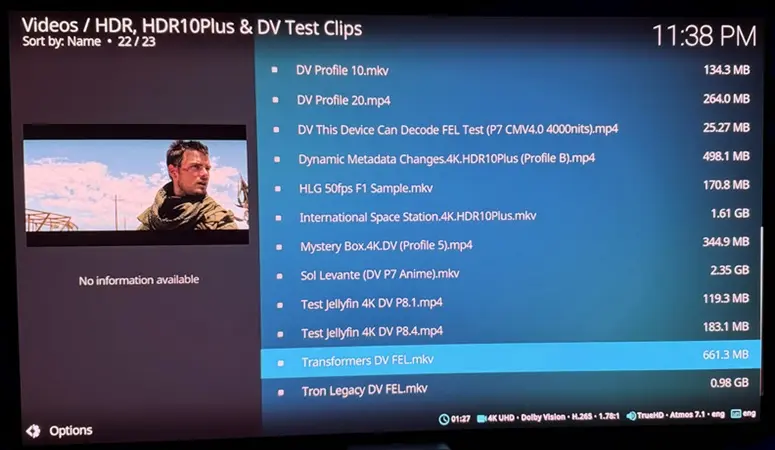
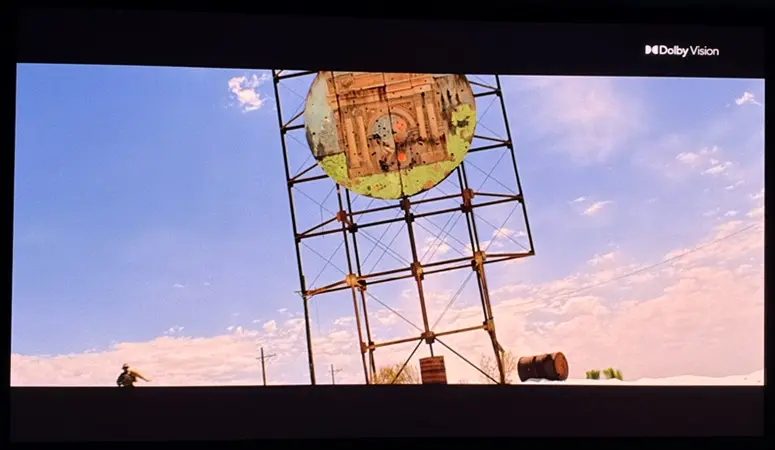
    hadesdevls, I'm very impressed with 1.0! Tested using AMD 5800H. The 'Transformers' & 'Tron Legacy' samples play with ease, bringing up the excellent new multi-tabbed playerprocessinfo overlay, and toggling from DV to HDR, HDR10+, etc. (which I tried):

    Also quickly re-tested a few minutes of actual DV FEL movies, and no issues. Also a MVC MKV and FSBS.

    You've also improved the settings options, and thumbs up for the defaults:

    The only issue I've found so far is inability to navigate to 'Change output for this video' from playerprocessinfo. As soon as I arrow down to try to get there, the overlay goes away:

    (The above details are beautiful)

    I can only toggle HDR/SDR formats on the fly from by bringing up the player OSD and:

  • LibreELEC Hades

    LibreELEC Hades is an unofficial build of LibreELEC for 64-bit PCs. It sends native Dolby Vision from the PC to the TV over HDMI the way Dolby Vision players do, including profile 7 with its full enhancement layer (FEL), and adds HDR10+, 3D Blu-ray and HD sound passed through. Everything LibreELEC does is kept, with safer defaults.

    This thread was split off the Dolby Vision on PC thread, as ht2tweak and ashlar suggested, so that each build can be followed on its own. Questions and results are welcome here; faults are best reported on GitHub (see below).

    What it does

    • Dolby Vision: profiles 5, 7 (with FEL or MEL) and 8.1 sent as native Dolby Vision, seen working on NVIDIA, AMD and Intel graphics. As options, off by default: Low-Latency Dolby Vision for a TV input that offers only that, and HDR10 or HDR10+ sent as Dolby Vision. On a display without Dolby Vision, the video plays as HDR10 or HDR10+.
    • HDR10+: with the dynamic metadata of each frame, where the graphics driver can send it.
    • HDR on any display: HDR10, HDR10+ and HLG go to the display as they are; for a display that cannot show them, Hades maps the picture itself with the BT.2390 curve, keeping the middle tones as mastered.
    • Blu-ray: Blu-ray Java (BD-J) menus with nothing to install, and 3D Blu-ray (H.264 MVC) with both views decoded and a 3D display switched to 3D over HDMI.
    • Sound: Dolby TrueHD with Atmos, Dolby Digital Plus with Atmos and DTS-HD passed through to the TV, sound bar or receiver.
    • The right refresh rate: each film plays at its own rate (23.976, 24 or 25 Hz, for example), and Dolby Vision never changes it.
    • Easy to check: the player information page (press O) says in one sentence whether the video plays as intended and, if not, what to do. Settings > LibreELEC > System > Check this setup plays test pictures and sounds to show what your TV and sound system take.
    • Safe by default: started from USB, the internal disks of the PC stay hidden; file sharing (Samba) is off until you turn it on, and then has a password that Hades generates; no third-party add-ons are included.

    What you need

    • A 64-bit PC with an HDMI output and supported graphics: NVIDIA GeForce GTX 16, RTX 20 or newer, and with NVIDIA driver 580 the GeForce GTX 900 and GTX 10 cards and the TITAN V; AMD Radeon graphics with display hardware DCN 1.0 or newer (from Raven, Picasso and Navi 1x to the RX 9000 series), integrated ones included; or Intel graphics.
    • A TV with Dolby Vision for native Dolby Vision, one with HDR10+ for HDR10+, and any HDR display for HDR10.
    • A USB drive of 8 GB or more (a USB SSD runs much more smoothly than a stick), or a disk of its own. Windows stays as it is: Hades starts from its own drive.


    Which graphics have been tried with which TV is listed in the README.

    Getting started
    Download the latest version from GitHub and run the Windows installer. It writes Hades to the USB drive or disk you choose, and later updates it keeping your settings. Then start the PC from that drive. The README explains each step, the settings and how it works.

    Version 1.0, the first stable release

    • Dolby Vision profiles 7 and 8 sent as composed, bit for bit, and films that repeat a pivot in their metadata (the Transformers films) kept in Dolby Vision.
    • Picture in step with its sound, measured at the screen.
    • A network drop no longer ends a stream: it waits and plays on from where it stopped.
    • DVD films played as films, HDR at 12 bits where the link would carry 8, and Dolby Vision on the newest Ryzen processors and through passive DP++ adaptors.
    • Dolby Vision takes less GPU time, with the same output.


    Work goes on: the next versions are already being prepared, and your reports shape what comes first. Everything in 1.0 is in the release notes.

    I tried 1.0 on my PC: a GeForce RTX 4080 SUPER with an LG C5 TV, a TCL Q85H Pro sound bar on its eARC and a Samsung Odyssey OLED G6 monitor. Native Dolby Vision of profiles 5, 7 with FEL and 8.1, HDR10 as Dolby Vision, TrueHD Atmos and DTS-HD MA, HDR10+ on the monitor and switching between them all work. My TV has no 3D, but users with 3D displays have seen 3D working. Results on other hardware, AMD and Intel above all, are very welcome.

    Reporting problems
    Please use the GitHub issues, not LibreELEC or Kodi, and attach a diagnostic report: Settings > LibreELEC > System > Submit Log > Create a diagnostic report makes one file and can copy it to a USB drive. It is filtered, but look through it first.

    Thanks
    This work began in the Dolby Vision fork of LibreELEC by CroqueMr and its contributors, from which the Dolby Vision output of Hades grew. Several features follow ideas from the build of CroqueMr, YBLOD, CorentinB, cinemaONE, SamuriHL, pannal, avdvplus, matthane, malard, damnms and Pro-me3us, written again here, and others are credited one by one in the README. Thanks to the LibreELEC and Kodi teams, to Da Flex for giving the builds their own threads, to ht2tweak and ashlar for suggesting it, and to everyone who reported, asked and tested.

  • Quote from ht2tweak

    I'm very impressed with 1.0! Tested using AMD 5800H. The 'Transformers' & 'Tron Legacy' samples play with ease… The only issue I've found so far is inability to navigate to 'Change output for this video' from playerprocessinfo. As soon as I arrow down to try to get there, the overlay goes away.


    ht2tweak Thank you for testing 1.0 so thoroughly and for the detailed feedback. It's good to hear that Transformers and Tron Legacy play well on the 5800H, along with the MVC and FSBS files. The overlay closing when you arrow down to "Change output for this video" is a fault in Hades, and I will fix it in the next version. Until then, you can change the output from the player controls in Estuary.

    ashlar  ht2tweak Thanks for suggesting a separate thread. Hades now has its own here: [x86-64] LibreELEC Hades - native Dolby Vision, HDR10+ and 3D for PCs (NVIDIA, AMD and Intel)

  • I tried it on my 5600u with excellent results. It seems to have eliminated the occasional flickering I had in CroqueMR build. The temperature runs lower and DVDs play at more reasonable frame rates.

  • Hardware
    Beelink EQ12 Pro (Intel Core i3-N305, 16GB DDR5 RAM, Alder Lake iGPU 32EU 1.25GHz, 2.5GbE Network)
    Hisense L9H 4K Projector
    Samsung HW-Q990C Soundbar
    Jellyfin Server on TrueNAS CE also on 2.5GbE Network

    Hades v1.0 on SATA SSD-USB3 adapter
    Jellyfin Kodi Client Add-on.
    Default settings from fresh install.
    No bugs so far.
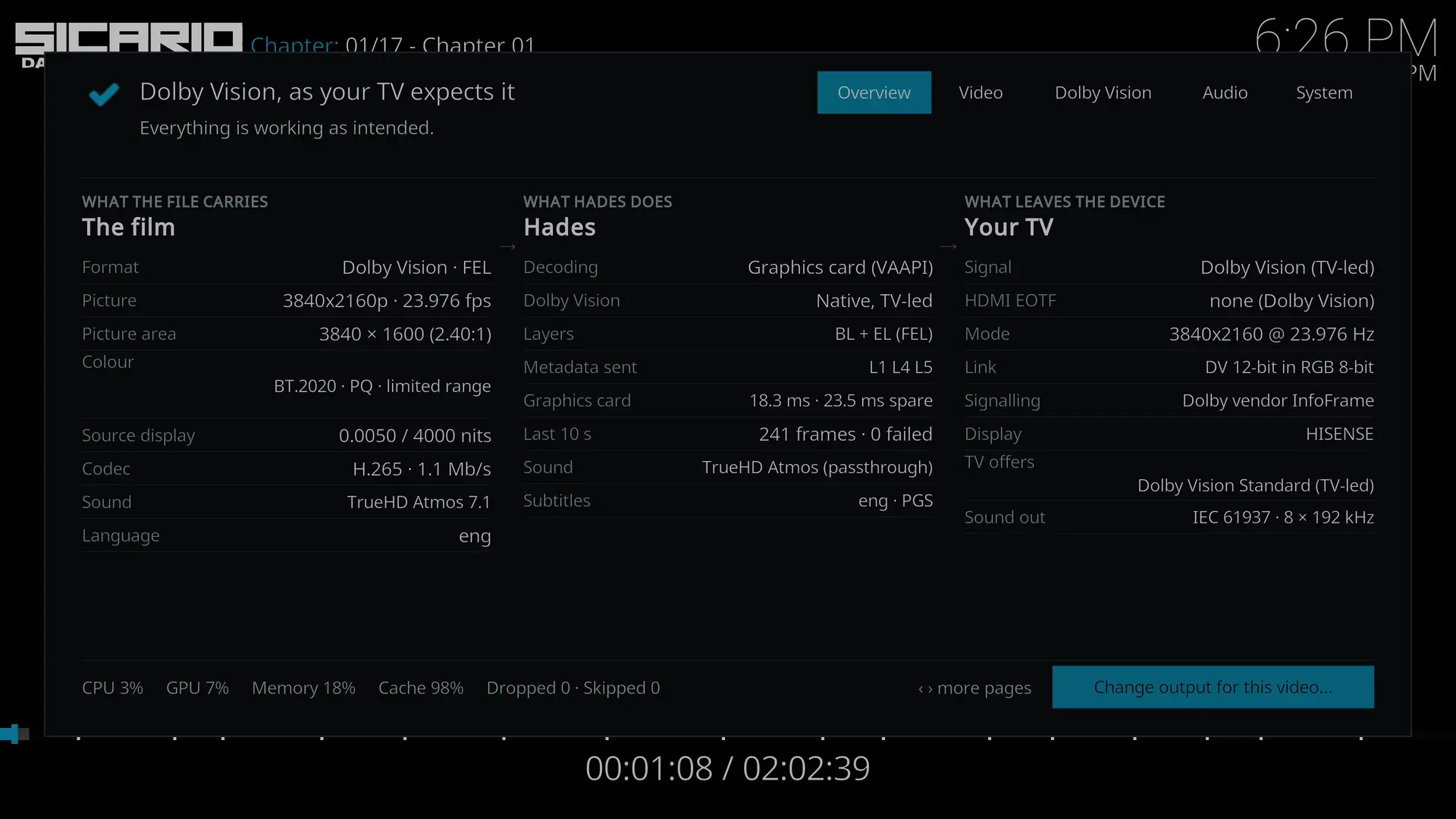
    Previously on Hades RC8, Sicario2 will jump back to Main Menu just after the end of the opening credits (Lionsgate & Black Label Media). On v1.0 Sicario2 plays fine.

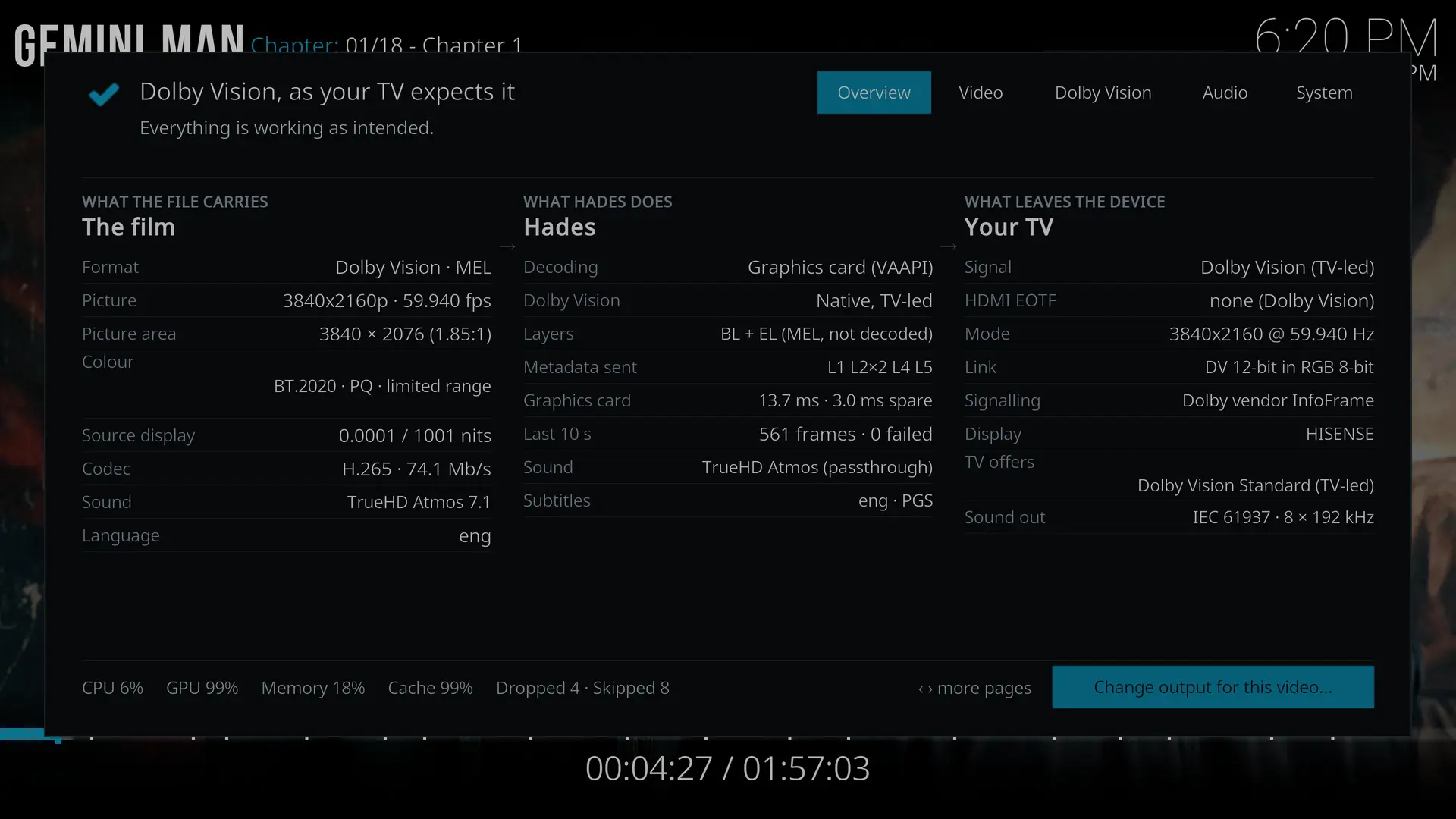
    Gemini Man plays fine even with near GPU ceiling limit.
    Dropped & skipped frames kept increasing only with OSD turned on.

    Typical DoVi 4K @ 24Hz playback, GPU is around 50-60%.