[x86-64][dangerouslaser Builds] Dolby Vision w/Vulkan Engine Builds

  • I think that AMD cards can support vaapi via mesa - but I don't have an AMD card to test / confirm on. If we can confirm that works then we should be able to use one path for both playback paths.

    Yes AMD card support VAAPI, DV playing works great on my 7430U (just a small issue on Profile 5 but it is easy to fix), this is why I prefer to not use a 2nd path for Intel, and try to capitalize on optimization that benefit both Intel and AMD.

    I have some free time, so I’d like to integrate your changes as soon as possible while waiting for the fixes coming via the issues. If that works for you, I’ll go ahead and integrate your two major enhancements; it shouldn't take long, as I can see how to do it cleanly.


    Tried it but curiously all DV and HDR related stuff appeared as "/unavailable" on my N100... on the same hardware that had everything working in release R0.3.0. So I can't even play test it.

    As a side note. I tried both dangerouslaser and R0.3.0 CroqueMr build on "Tron Ares" (a DV P7 highbitrate REMUX) and on both I get the same 1 frame drop per second. So it seems that lightweight file test or gigantic movie file size really don't matter.

    The issue on the frame dropping is almost fixed, the next release will address it.

    Could you send me the kodi.log file? I ramped up the fallback mechanisms so that even devices without DV support could use the build and play DV content via HDR10, I might have been a bit too aggressive with that.

  • experimental build with a native C/OpenCL playback engine

    Testing on an N150 the only time I get any frame drops is Gemini Man with the OSD open.

    Need N100 testers and AMD testers to provide feedback before any of this gets refactored and PR'ed to CroqueMr's repo.

    Release YBLOD 0.2-pre2 — native Dolby Vision engine · dangerouslaser/libreelec-yblod
    YBLOD 0.2-pre2 — native Dolby Vision engine Experimental Generic x86-64 release with the standalone native C/OpenCL playback engine on YBLOD's resynced…
    github.com


    edit: this is for TV-Led DV only

  • small bux fix for when using the kodi GUI in DV

    Release YBLOD 0.2-pre3 — fix distorted menus after playback · dangerouslaser/libreelec-yblod
    YBLOD 0.2-pre3 — fix distorted menus after playback Fixes the reproduced return-to-menu corruption on the Intel VM: stopping 1917 with Dolby Vision menus…
    github.com


    Need N100 testers and AMD testers

    these optimizations are for for TV-Led DV only - they will also apply to HDR but not for DV->HDR or player led DV

  • Need N100 testers and AMD testers to provide feedback before any of this gets refactored and PR'ed to CroqueMr's repo.

    dangerouslaser I tried 0.2-pre2 on an ASUS NUC 12 (Intel UHD 770 plus a Radeon RX 7600) with a Panasonic TV, TV-led DV.

    Intel UHD 770:

    • P5 4K59.94: smooth, 0 drops, also with the OSD open
    • P7 FEL (two files), P8.1, P10: DV on, 0 drops, pause and seek fine
    • P8.4 HLG 4K59.94 (iPhone clip): GPU saturated (render ~95%), 86 drops in 20 s
    • "FEL TEST ST DL P7 CMV4.0 4000nits V4" (mkv and mp4): DV badge but black picture. The startup commit times out after 10 s (result=3), then the renderer fails and kodi.bin sits at 100% CPU. Reproducible.
    • On the FEL test the letterbox bars stay black. Is that intended?

    RX 7600: no DV and no HDR10 conversion (native_eligible=false, dv=0), as expected without an AMD OpenCL driver and with the DV signalling patches being i915 only. P5 then plays as SDR with a purple/green tint.

    Logs are available if they help.

    Prepared with Claude Code (Anthropic)

  • Hi,

    Just wondering, do you have any plans to add HDR10 or HDR10+ to Dolby Vision conversion in future releases? I think it would be a great feature for those who want to watch their HDR movies in Dolby Vision.

    Thanks for your great work.

  • Hi,

    Just wondering, do you have any plans to add HDR10 or HDR10+ to Dolby Vision conversion in future releases? I think it would be a great feature for those who want to watch their HDR movies in Dolby Vision.

    Thanks for your great work.

    These are just test builds. I am working w/CroqueMr to get them into his builds where possible. His builds currently handle DV -> HDR conversion.

  • dangerouslaser I tried 0.2-pre2 on an ASUS NUC 12 (Intel UHD 770 plus a Radeon RX 7600) with a Panasonic TV, TV-led DV.

    Intel UHD 770:

    • P5 4K59.94: smooth, 0 drops, also with the OSD open
    • P7 FEL (two files), P8.1, P10: DV on, 0 drops, pause and seek fine
    • P8.4 HLG 4K59.94 (iPhone clip): GPU saturated (render ~95%), 86 drops in 20 s
    • "FEL TEST ST DL P7 CMV4.0 4000nits V4" (mkv and mp4): DV badge but black picture. The startup commit times out after 10 s (result=3), then the renderer fails and kodi.bin sits at 100% CPU. Reproducible.
    • On the FEL test the letterbox bars stay black. Is that intended?

    RX 7600: no DV and no HDR10 conversion (native_eligible=false, dv=0), as expected without an AMD OpenCL driver and with the DV signalling patches being i915 only. P5 then plays as SDR with a purple/green tint.

    Logs are available if they help.

    Prepared with Claude Code (Anthropic)

    try FEL TEST ST DL P7 CMV4.0 4000nits V4 on this build - it should be fixed.

    The letterbox bars should be black at the end of the test - that is intended.

    Release YBLOD 0.2-pre4 · dangerouslaser/libreelec-yblod
    YBLOD 0.2-pre4 — polynomial FEL playback fix Fixes the black screen with Dolby Vision Profile 7 FEL streams using polynomial chroma mapping, including the…
    github.com
  • try FEL TEST ST DL P7 CMV4.0 4000nits V4 on this build - it should be fixed.

    dangerouslaser confirmed: on pre4 that test plays on the UHD 770 with picture, DV badge and the FEL content visible. The startup commit went through after 1.9 s (first playback after boot), then 0 drops and no renderer rejections, render ~28%. Thanks for the quick fix, and for clarifying the letterbox bars.

    Prepared with Claude Code (Anthropic)


    Are these options best for a AMD 5800H and/or N150?

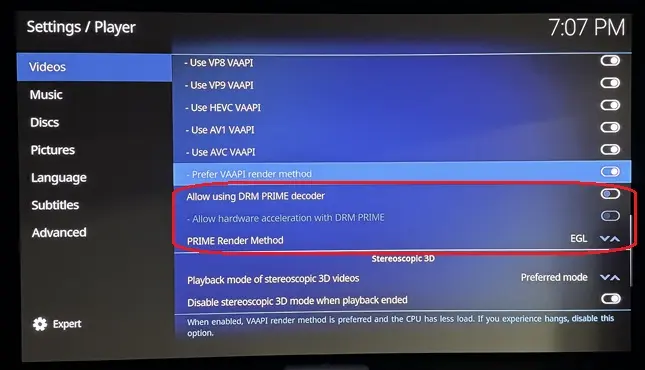
    ht2tweak for the three DRM PRIME options, on both the 5800H and the N150: leave "Allow using DRM PRIME decoder" off (the default). On x86, FFmpeg has no DRM PRIME hardware decoder, so with it on, Kodi decodes in software on the CPU. Hardware decoding on AMD and Intel goes through VAAPI ("Allow hardware acceleration - VAAPI", on). The other two DRM PRIME options only apply when that decoder is on, so they don't matter here.

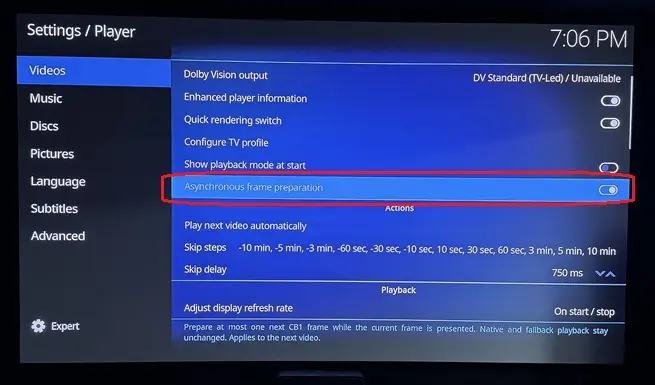
    "Asynchronous frame preparation" isn't a standard Kodi setting. It comes with this build, so CroqueMr or dangerouslaser know best.

    Prepared with Claude Code (Anthropic)

    Edited once, last by cinemaONE: Merged a post created by cinemaONE into this post. (October 10, 2026 at 3:59 PM).

  • DRM prime will bypass my DV pipeline, I would assume the same on CroqueMR's

    that said, my engine's path (and likely MrCroque's) already shares GPU buffers so the performance enhancement it offers is already being taken advantage of.

  • Thanks a lot :) I am finalizing to integrate the last improvement lever from tour last build, and I convert your optimization for AMD also. I will check the new oprimisation gain.

    Edit : Last improvement integrated, it's your chroma filter, this will be optional because it's reduce a little bit the fidelity (around 0,9%) of chrominance. Looking extremely closely at a shot where the discrepancy is at its greatest, you can perceive a tiny difference in the outline of the light halos. It's almost imperceptible and, above all, only visible in very few shots, but since it still has a tiny visible impact, it will be an optional optimization.

    Thank you!

    The chroma filter was just set to use guassian instead of lanczos (the libplacebo default) - so there actually isn't a performance gain there, I just did frame comparisons from a movie being played directly on my LG G5 on a thumb stick vs Kodi and guassian was "closer" to the output of the LG's native DV player. I am going to add the option to toggle between the filters in settings.

    Have a few more things I am working on to try and squeeze out a bit more performance and get 4k60 playing perfectly with the GUI up - without dropping frames. 4k24fps playback is now perfect with a lot of overhead so never dropping frames. Some things I have tried have been more complicated then their gains were worth so I have tabled them for now.

  • This thread is to discuss testing and development of my personal builds as to keep the main DV thread less busy.


    All of the work on these builds specifically targets intel-based systems and LG OLED TVs (CX or later). AMD systems will not benefit from much of the changes. 3D isn't supported currently.

    EDIT: AMD now supported w/vulkan

    Much of the optimizations will be or have already been pulled into CroqueMR's wider-support builds.

    Expect bugs and please stay on CroqueMR's builds if you are looking for a more stable experience.


    GitHub - dangerouslaser/libreelec-yblod: Unofficial LibreELEC build with native Dolby Vision for Intel HDMI systems (yblod)
    Unofficial LibreELEC build with native Dolby Vision for Intel HDMI systems (yblod) - dangerouslaser/libreelec-yblod
    github.com

    Edited 2 times, last by dangerouslaser: Merged a post created by dangerouslaser into this post. (October 12, 2026 at 5:44 PM).

  • Release R1.0.0 RC1.1 YBLOD1 - YBLOD engines for Master Reference · dangerouslaser/intel-dv-libreelec
    R1.0.0 RC1.1 YBLOD1 - YBLOD's engines for Master Reference CroqueMr's R1.0.0 RC1.1 Debug with YBLOD's Dolby Vision engines added as alternative Master…
    github.com


    Build with Vulkan and OpenCL rendering engines - TV-Led / master reference mode only.

    AMD users should see performance improvements with this build using vulkan.

    The first time you play a video with vulkan the shaders need to compile.

    This is for testing only.

  • If you have an LG (webos) TV there are some extra goodies in there. Can control picture mode directly in Kodi. Set picture mode and options based on content playing. Better integration with the magic remote if your TV is rooted (cursor / scroll wheel / button mapping / more responsive than CEC).