Possible fix here: RPi5
You're incredible: Both issues gone 
 Thanks a lot
Possible fix here: RPi5
You're incredible: Both issues gone Thanks a lot
popcornmix Do you have any information on where to make a donation? You could include this in your first post, provided it is allowed according to the forum rules.
Good idea vobs ... done :)!
How much RAM should the Pi 5 have for smooth 3D playback? Is the 2 GB version sufficient?
Was told 2GB or 4GB... I went for 4GB to be safe, have enough headroom for heavier skins, larger movie/TV libraries.

I went for 4GB to be safe, have enough headroom for heavier skins, larger movie/TV libraries.
Heavier skins tax the CPU, GPU, and I/O performance, not RAM. Libraries do impact on RAM.
An NVME HAT with a small M2 drive is a nice upgrade.
Thanks, ht2tweak. You had actually asked yourself whether 4 or 8 GB would be the better choice.
It would have been nice if someone with a Pi 5 2 GB could have confirmed that it handles smooth playback without any issues.
The boards are currently sold out here, and for twice the price, I’d rather invest in an NVMe HAT, as chewitt already mentioned. The Pi 5 will only be used to play 3D movies, since it lacks Dolby Vision support.
For around $100 including the board, case, etc., it would already be a reasonably priced alternative — especially if it delivers better picture quality than the Zidoo.
Hi popcornmix, thanks for the 3D work.
I'm building your fix-stereoscopic-3d-gbm-upstream branch myself on Raspberry Pi OS Lite (Debian 13 trixie, Pi 5, kernel 6.18.50+rpt-rpi-2712) instead of using the LibreELEC image, to package it for apt.
Build: Kodi tree at 9ce78f1 ("[VideoPlayer] Start an open GOP's plane offsets at its first shown frame"), gbm/gles, internal FFmpeg. FFMPEG-VERSION says 9.0.1, but tools/depends/target/ffmpeg/0001-rpi-Add-hevc-acceleration.patch doesn't apply to it (configure, v4l2_buffers.c and more reject). I switched to FFmpeg 8.1.2 (as in rpios_master) and fixed one context line in 001-ffmpeg-all-libpostproc-plugin.patch. The build completes. 4K HEVC plays fine with hardware decoding (ff-hevc-drm_prime, about 6% CPU).
Problem: my 3D files are MakeMKV Blu-ray rips with MVC (MediaInfo: Format profile Stereo [email protected] / [email protected], Count of views 2, MultiView_Layout both eyes laced, 1920x1080, 23.976 fps). They play in 2D only. Kodi asks how to play the 3D video, I choose "same as movie", it switches to the stereoscopic mode, but only one eye is shown. Decoder: ff-h264-drm_prime (software H.264; h264_v4l2m2m and vaapi fail as expected on the Pi 5), CPU load is high. Settings as you recommend: adjust refresh rate on start/stop, playback mode "ask me", stereoscopic 3D mode/current disabled, empty whitelist.
My guess is that the stock FFmpeg drops the dependent view, and that your MVC-capable FFmpeg is what's missing in my build. Where do I find that FFmpeg source or patch set (repo/branch or patch files) that goes with the Kodi tree, so I can use it in tools/depends/target/ffmpeg instead of the stock tarball?
Happy to post kmsprint -m, edid-decode and a debug log if that helps. Thanks!

My guess is that the stock FFmpeg drops the dependent view, and that your MVC-capable FFmpeg is what's missing in my build. Where do I find that FFmpeg source or patch set (repo/branch or patch files) that goes with the Kodi tree, so I can use it in tools/depends/target/ffmpeg instead of the stock tarball?
Hi RalMun, I build popcornmix's branch for my x86 LibreELEC images, so here is what I know.
Your guess is right: stock FFmpeg decodes only the base view, so an MVC title plays as 2D. popcornmix's H.264 MVC decoder is in his own FFmpeg fork, https://github.com/popcornmix/FFmpeg, on two branches:
I applied the MVC commits from dev/mvc/h264_mvc_1 to FFmpeg 9.0 without conflicts. With them, Kodi pairs both views and MVC remuxes play in 3D.
Prepared with Claude Code (Anthropic)

It would have been nice if someone with a Pi 5 2 GB could have confirmed that it handles smooth playback without any issues.
2GB should be fine for LibreELEC.
popcornmix, guessing this 3D MVC s/w decode dev work on S928X is another beneficiary of your work.
2GB should be fine for LibreELEC.
Thank you for your great work and for the clarification! I’ll go ahead and order a Raspberry Pi 5 with 2GB of RAM and will post my feedback once I’ve had a chance to try it.
It would have been nice if someone with a Pi 5 2 GB could have confirmed that it handles smooth playback without any issues.
Even though people already have answered that the RAM has no impact on the performance of the 3D playback. Here is the usage of my RPi5 playing Avatar: Fire and Ash, with subtitles enabled.
RAM usage is constant around the 500-600MB mark when playing 3D Blu-ray ISOs. So if you are buying an RPi5 for this fork go with the 2GB version, even the 1GB version should work if you can find it.
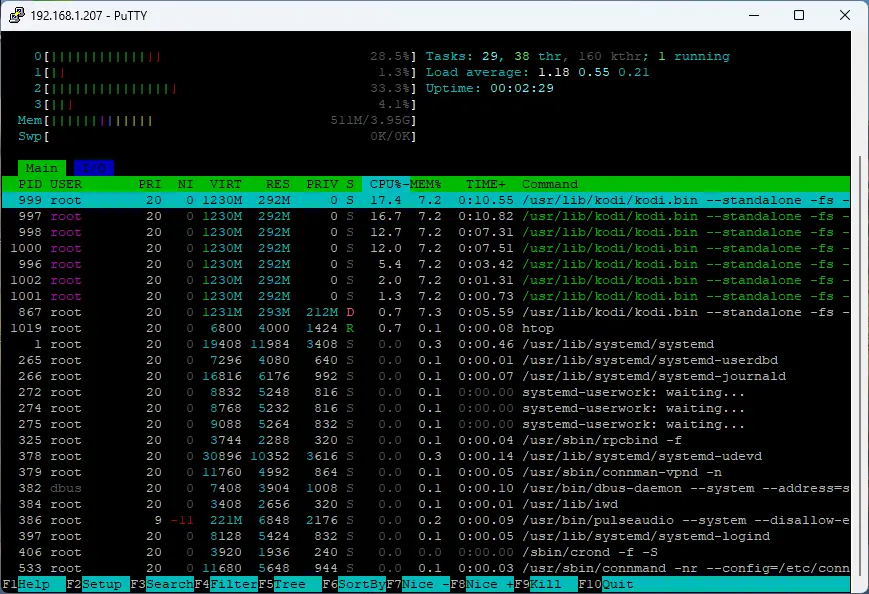

So if you are buying an RPi5 for this fork go with the 2GB version, even the 1GB version should work if you can find it.
The RPi5 1GB model will not handle 4K media properly due to the RAM size so unless it's a dedicated 1080p/3D device, the 2GB model is our minimum recommendation.