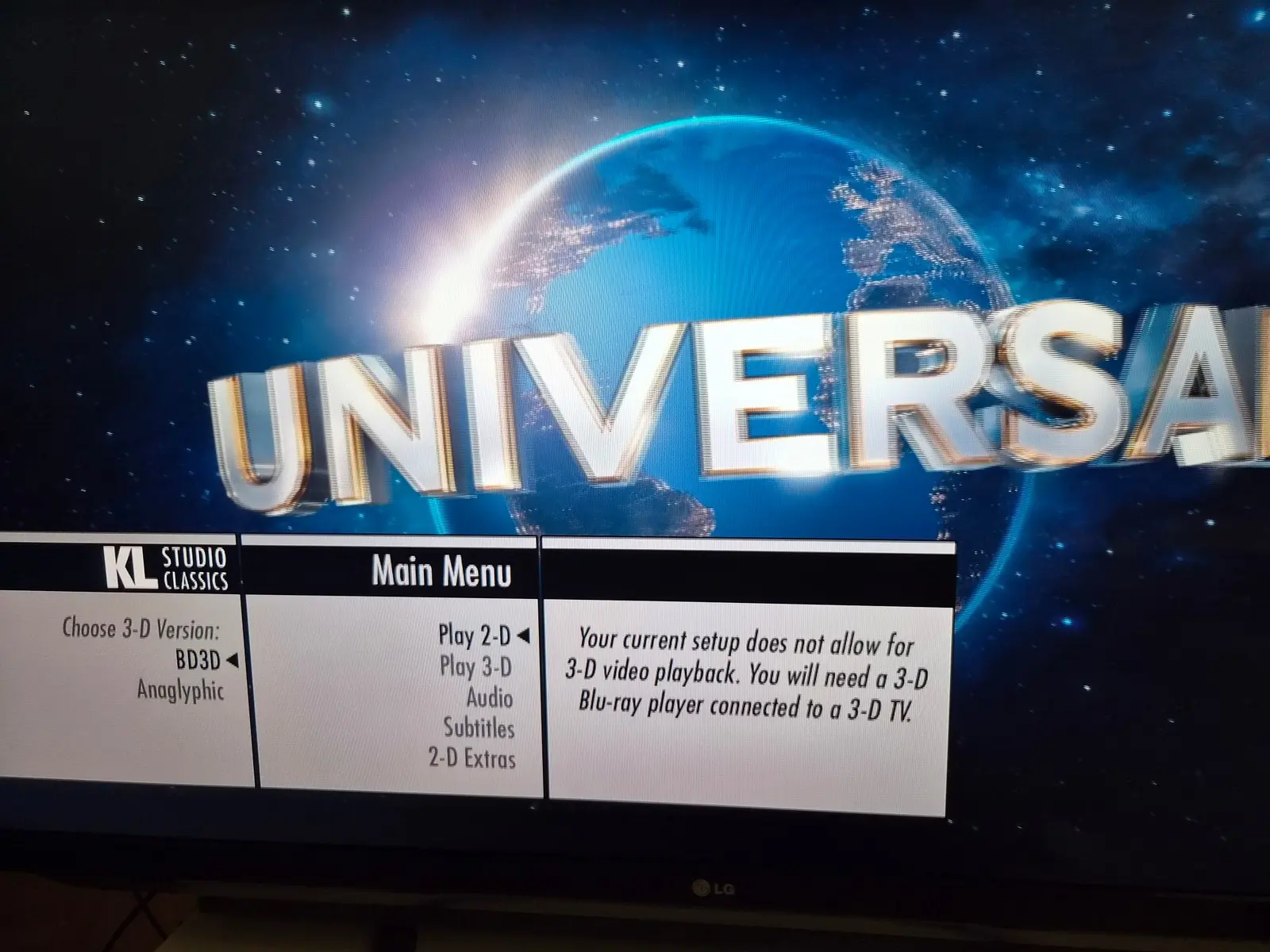
Sorry for slow feedback but I have now tried this on the AVR setup. I have the RPI5 there right now. I first checked that I still could trigger the kernel panic and yeah no problem causing it. Short skips seems to be the problem, single press skips a few times and crash.
After updating I can still trigger it, I see the buffering circle but now it's handled. It's buffering circle, video starts playing with no audio and 5-10 seconds later audio returns. So you loose audio for a bit but it do recover 
I have not taken the time of trying to trigger the 2D subtitles on the RPI4 on one of the titles you mentioned yet. But it is not forgotten and I will report back.
Posts by NTM-3D
-
-
I will try and see if I can trigger it on any of those movies. But I have a few observations so far. I tried the RPi5 on the AVR setup and when skipping around it also fails, but this one kernel paniced, see the photo. If I disable passthrough it seems to work, so something connected to passthrough that fails hard.
The subtitles do seem better on the RPi5 using the latest, atleast I have not seen any 2D yet. But still problems on the RPi4. It is not always the same subtitles texts that are 2D but there seems to be "hotspots" in the videos where they are more likely. That combined with the greater likelihood on the RPi4 may indicate where the issue is.
Will report back when I have been able to test more. -

Potential fixes for NTM-3D’s sub depth issue...
Just tried the new version but still get 2D subtitles from time to time and skipping still can freeze the RPi completely so I have to pull the powercable to recover. What do you want me to try and capture in logs?
-
popcornmix
Debug logs
I've been playing movies and have noticed that sometimes the subtitles loose their depth and go 2D.
Here is a log from my RPi, I start a Avatar - Fire and Ash. Skip forward a bit and around 14:10 the subtitles go 2D until the next scene and then 3D again.
Also sometimes when skipping the whole RPi freezes, it does the buffer animation and go up to 100 and then frozen. No SSH or nothing. Not sure if it got captured in the log of not, this is the kodi.old.log after pulling the power and starting again. -

....
What's the best way for me to confirm a 3d MKV or ISO video is playing at the optimal level for my hardware?
No worries
If your TV automatically goes into 3D when you start playing the video it is using the frame packing mode and you are getting the best quality you can get. -
21 [email protected] 74.250 1920/638/44/148/+ 1080/4/5/36/+ 24 (24.00) D 3dfp|16:9
...
25 [email protected] 74.176 1920/638/44/148/+ 1080/4/5/36/+ 24 (23.98) D 3dfp|16:9There are your 24/23.976 hz 1080p frame-packing modes.
-

Your optimism is noted, but to be crystal clear: If anyone shows up in this forum with a 1GB board and 4K playback issues we're going to auto-respond by pointing fingers at RAM size and investigate no further.
Yes this is 100% true!
Just saying that if you want to build a dedicated 3D player and happen to have/find a 1GB RPi5 you might get away with it. Using a 2GB version will work for all scenarios. Buying a 4GB version is a waste of money. -
Yeah the 2GB is safer but just to check I tried a playing a H.265 4K 60fps half SBS video I have. Was curious of the overhead in the conversion into frame packed. RAM usage way a bit higher but still low
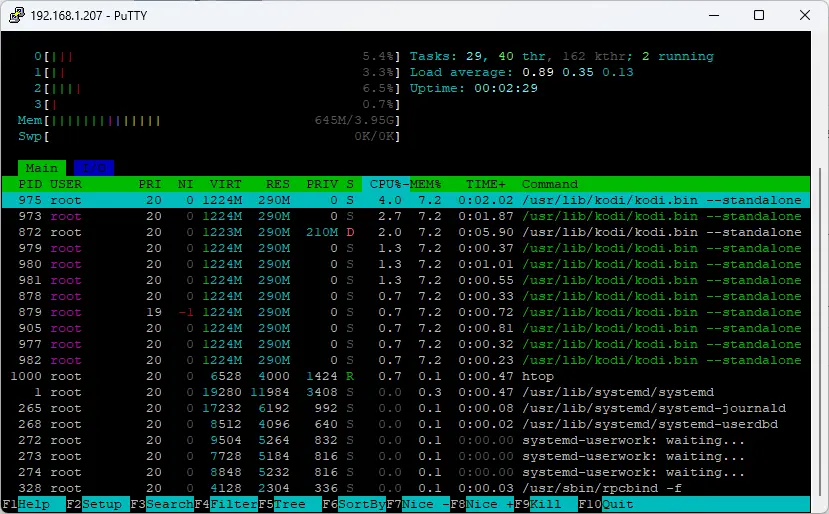
-

It would have been nice if someone with a Pi 5 2 GB could have confirmed that it handles smooth playback without any issues.
Even though people already have answered that the RAM has no impact on the performance of the 3D playback. Here is the usage of my RPi5 playing Avatar: Fire and Ash, with subtitles enabled.
RAM usage is constant around the 500-600MB mark when playing 3D Blu-ray ISOs. So if you are buying an RPi5 for this fork go with the 2GB version, even the 1GB version should work if you can find it.
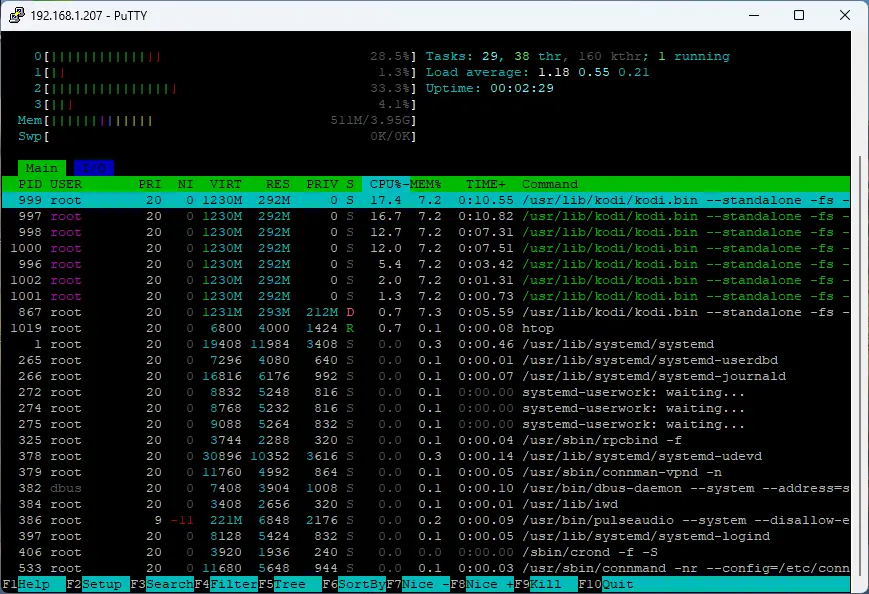
-
This version seems to have fixed all my issues. Skipping around now causes no issues with audio. The two files I found that played a a a frame or two every second now work fine again and opening my main ISO folder i file mode is now instant again. Tried it on the RPi5 but I am updating my RPi4 right now also.
Thank you -
Latest build in first post fixes an issue with iso resume.
There's also been quite a lot merged (some Blu-ray related) to kodi master today.
And a couple of subtitle related fixes from cinema-ONE.
Awesome, resume seems to work fine now
But I did notice some issues, I get the same audio problems as ht2tweak
I also found a couple of movies that used to play without issue that now basically will not play at all, maybe related to the GOP changes? I notice a large delay entering my ISO folder now if in file mode. Library open instant, file mode used to open instant but now takes several seconds. I can see that it opens every one of my ISO's in the log.
Debug logs
1. Playing movie that basically will not play.
2. Play and skip around in movie that works, except the audio bug.
3. Going to folder in file mode with the delay and browsing to another ISO that will no longer play. -
The subtitle torture test is now smooth for me on Pi4 without overclock (overclock may be useful for harder clips).
I did some testing and this version is alot betetr and the load between cores are now much more even. I still get some frame drops when playing the torture test when not overclocked but night and day difference to before. After overclocking it plays without issue as far as I can tell
Here is some graphs over the first 40 or so seconds of Big Buck Bunny with the torture test subtitle active.
Standard is no overclock and overclock is at 2.1GHz.
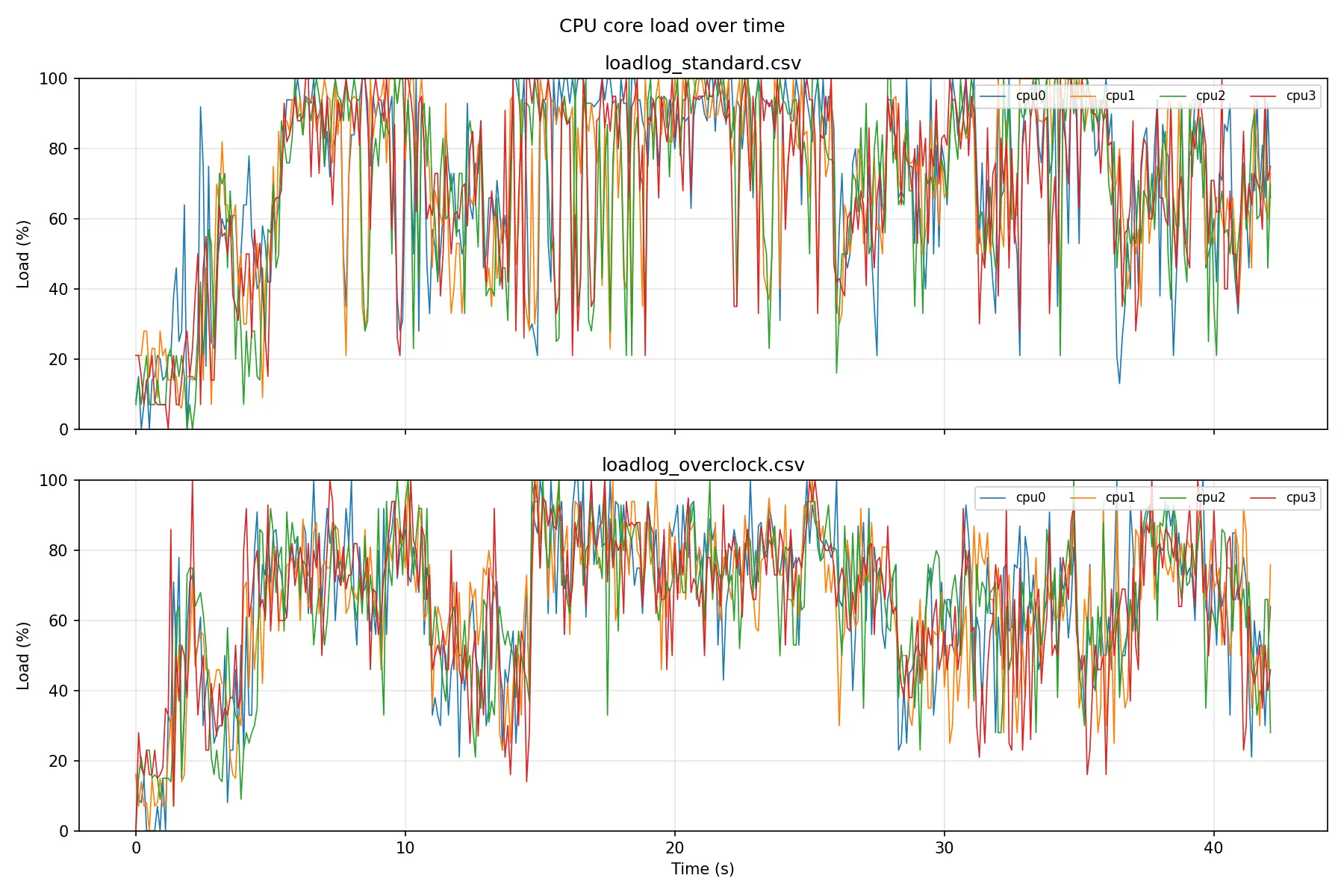
-
I have now tested both and as far as I can tell the all the depth changes are now shown as they should
However the RPi4 is struggling some with decoding the MVC. Regardless if subtitles is enabled or not, it seems one core spikes and when that happens frames are dropped. I tried overclocking even more but saw no real improvement and then the RPi4 got unstable instead so went back to 2.1GHz.
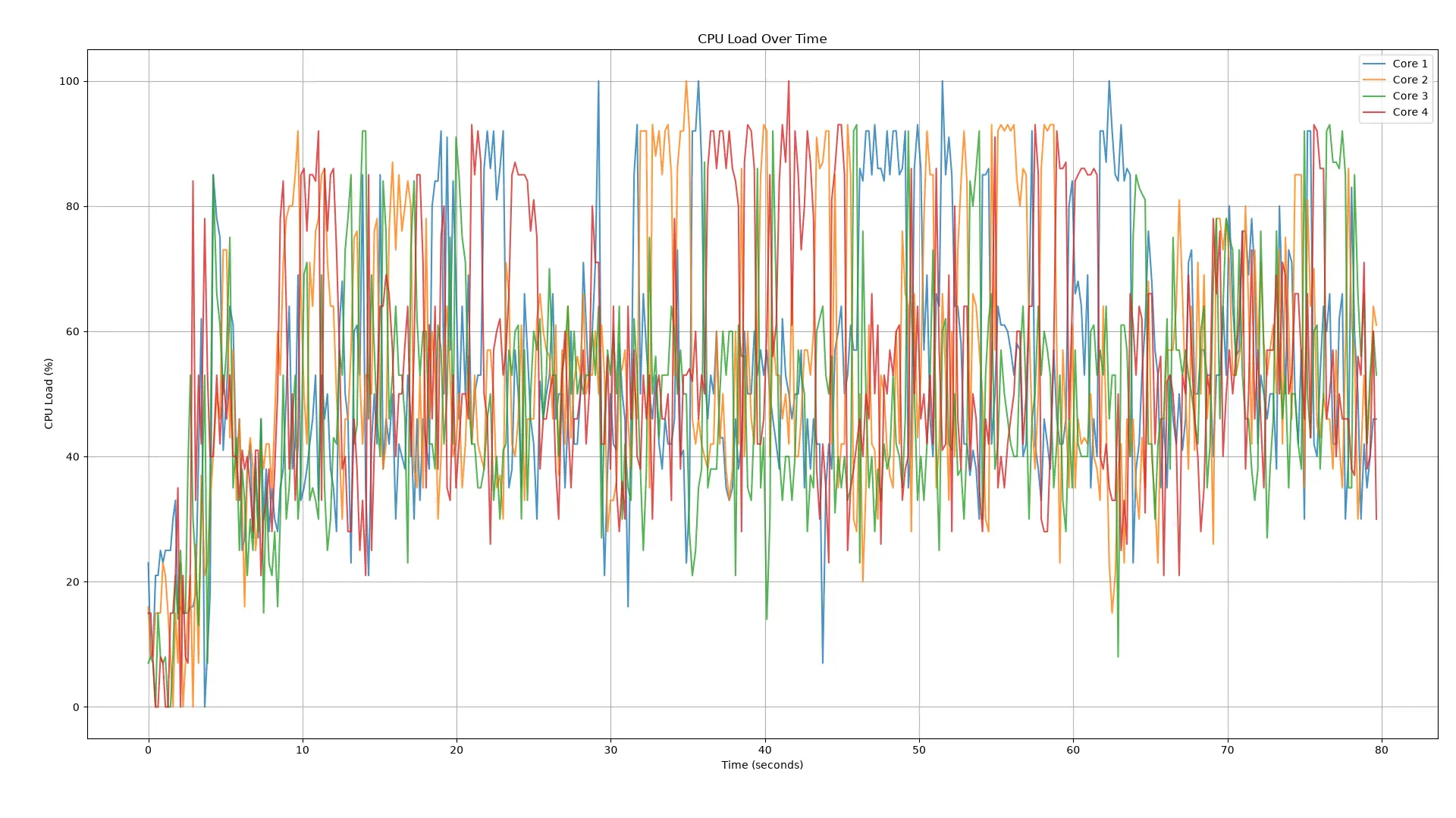
Here is a graph of the CPU core load every 100ms over the first minute or so of the 3D demo disc with a 1 frame subtitle track enabled. You can see how one core spikes while the three others stay around 40-60%. If it's possible to optimize the per core load a bit more evenly then the RPi4 should be able to play without dropped frames.
I was also wondering if you have had any success on solving the resume problem?
I need to give you a great big thank you! The work you've done here is great and being able to play all my 3D Blu-rays with proper subtitle support is awesome. Many commerical 3D Blu-ray players do not handle 3D subtitle this well! -
I've downloaded. It would be useful if you could describe where the output is wrong?
e.g. at 00:30 sub should have increased depth compared to 00:29, but was the same.
You can see the list on the Internet Archive page of what each subtitle should be doing. You also have an overlay at the top left corner that says what the currently selected subtitle is configured to do as you switch between subtitle 1-12 that are the demo ones. After changing subtitle track you need to wait until the next text line fore the overlay shows but after that stays on for the rest of the movie.
Currently none of the dynamic subtitle tracks are updating properly, there at a lot of missed and inconsistent depth updates. Sometimes seconds between updates.
If you watch the video I provided you can see how one subtitles where the depth change every frame behave on a real PS3. It updates the subtitles depth every frame just as instructed, making the subtitle smoothly sweep between -127 and +127 in depth.
Don't know if this has been asked before but can this build output frame packed mode all the time? My projector takes some time to sync over to 3D mode, so I lose about 10 or more secs of the movie when starting. On my old build on pc, I could have it in 3D mode all the time so there was no sync delay. Awesome build btw

Go to Settings/System/Display - "Stereoscopic 3D mode / Current": Over / Under
This will switch frame packing on.
But I would suggest to instead set Settings/System/Display - Delay after change of refresh rate: 10.0 seconds
Or what every value your switching delay is. That will pause the start of the movie for that amount of time after activing frame packing. -
I think most menus you are having trouble with are java ones (2,3,5). You need to install the "JRE for BD-J menus" addon from LibreELEC repo to support those.
1. wasn't obvious from log. I'd probably need a sample menu that behaves like that to debug further.4. looks fixable.
6. looks like a bad rip:
Codedemuxer seek to: 2410868.000000 bluray.c:925: Unable to seek clip 00800.m2ts! bluray.c:1720: Seek to 9400237248 bluray.c:824: Read past EOF ! Process - eof reading from demuxer CVideoPlayer::OnExit()
the indexes point beyond the end of the file - we hit EOF and end. It may be possible to treat that as switch to next item in playlist which may behave better.Ah, I'll try the JRE for 2,´ 3 and 5. Edit: I tried them after installing JRE but same same thing.
6 is not a bad rip it's a badly authored disc. There are quite a few of them that has been released over the years. PS3 for example is known to be picky and has issues with them. You can play that ISO on PowerDVD 18 without problem.
1 is not a bad disc. The menu works fine on the PS3 funnily enough Launches the 3D version, no problem.
Regarding 3D subtitles and dynamic depth there are still some ways to go. To help in this I have made this demo disc that has many different variants of dynamic and static depth for subtitles. I even included a torture test that sweeps between the max (127) and min (-127) depths possible with changes every single frame.
ISO can be downloaded here: https://archive.org/details/big_bu…tle_demo_ntm-3d
I have a capture playing the torture test on my real PS3, i handles it without issueExternal Content youtu.beContent embedded from external sources will not be displayed without your consent.Through the activation of external content, you agree that personal data may be transferred to third party platforms. We have provided more information on this in our privacy policy. -
Can you test one of these builds for a potential fix for garbled right eye on Cars: Pi5 Pi4
edit: updated links - attempted to clear menu when playing a second disc without stopping first.
Also enabled more BluRay logging. Can you enable logging and Blu-ray specific logging, and reproduce the issue where the 3D menu said you needed a 3d TV.
Logs: https://www.swisstransfer.com/dl/01a09982-0a…fb-d398c60dec5f
I have now tested both the RPi5 and RPi4 versions and Cars now seems to play without glitchingThe menu issues are unchanged. Most fail to play the menu but then fall back to playing the movie instead. But on Dune (2021) it crashes when you try to open the menu. No problems playing from the playlist.
I usually play my 3D ISOs on my PS3s. The PS3 is known for being a bit picky with playlist issues on some movies, causing skipping or complete failure of playback. So for some of these problematic movies I have made remuxed versions that play without issue. I tried John Carter that I know have this issue and I get the same problem here.
The resume issues are also still present.The attached log is from my RPi5 and have the following:
1. I am playing Money from Home using the menu and getting the no 3D TV error.
2. I try playing the menu on Dune (2021) and it crashes hard.
3. I try to play the menu on Jurassic World, it skips directly to the movie.
4. I play the menu on Jurassic World: Dominion and it works. This menu also has a 3D/2D option like Money from Home and I selected the 3D option and it plays the movie in 3D. However it flips between 2D and 3D several times while loading the menu.
5. I try to play the menu on Jurassic World: Fallen Kingdom, it skips directly to the movie.
6. I play the full ISO of John Carter, it starts but after I try to skip 20-30 min into the movie it crashes.
7. I play the remux ISO of John Carter, here I have no issues skipping in the movie.
8. I play Avatar: Fire and Ash that is 2 discs. I start from the playlist and it starts. I try to skip past the break point and I manage after i few failed attempts. It shows the playlist or menu box, I choose playlist and it starts playing disc 2. So kinda works but a bit janky -

Thanks for the update - it's reassuring to hear that the rpi4 is able to to handle the playback similar to the rpi5 with a 2.1 ghz overclock. I plan on running a good fan - it's part of the case I am using anyway. Did you notice any difference in the quality of the 3D between the 2 devices?
Regarding the rest of the issues, hopefully these will get fixed over the due course of time.
Since the MVC decoder is software the quality will be identical regardless of hardware. Your TV settings will have a much greater impact than running on different hardwares
-
I just updated both my RPi5 and RPi4 to the latest 20260909 versions. I have not been able to do extensive testing but as far as I can tell the MVC playback are identical on both.
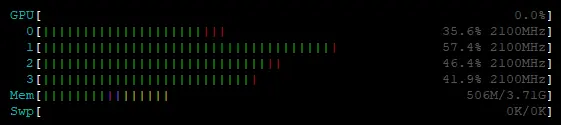
(Example of the typical load on my RPi4 during 3D Blu-ray ISO playback)I am running the RPi4 at 2.1GHz overclock on the CPU. I have no overclock at all on the GPU since it is not used. Keep in mind that you need proper cooling if you plan to overclock you RPi4. I am running the GeekPi Armor case on all my RPi4s.
The graphical issues with for example Cars is still present on both RPi4 and RPi5 versions. The RPi5 versions still has the playlist is used by another file issue for 3D Blu-rays and the RPi4 has the issue instead of broken resume for 3D Blu-rays.
Menus are still a bit hit and miss. Dune (2021) for example just refuse to even launch any menu at all.
I saw that ht2tweak had luck with Money from Home but when I try to play it from the menu I just get this box telling me I need a 3D TV, while the menu is playing in 3D Playing directly from the playlist works fine.
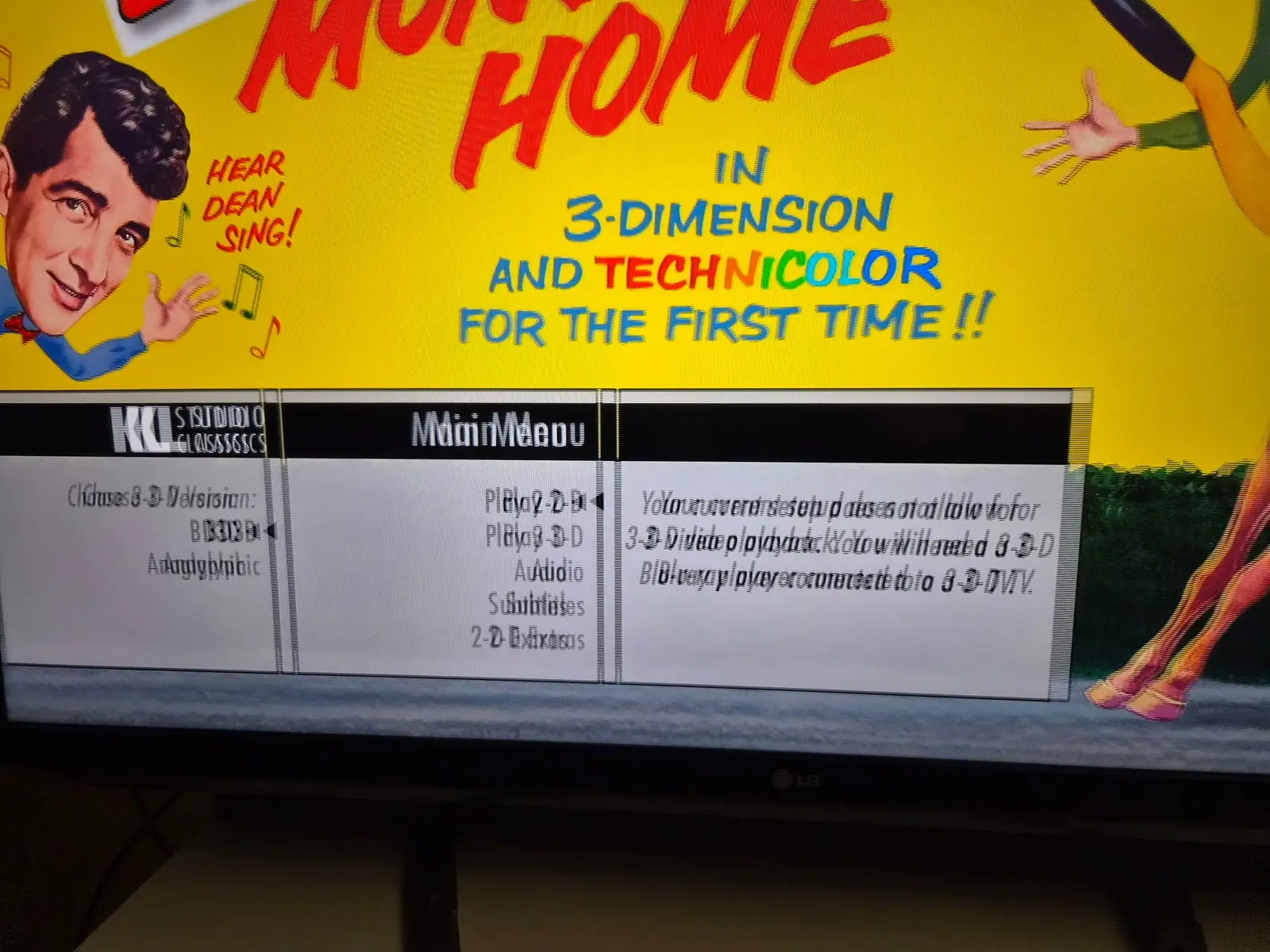
I then forgot to first stop Money from Home and tried starting Jurrasic World from the menu. The menu did not show but the movie starting playing behind the Money from Home menu, but now the menu was 2D. So got some sort of hybrid thing going