


No success even with the HDFury Communicator HDR HDMI 4K in between

Stay cool, it's bleeding edge software development right now. 

No success even with the HDFury Communicator HDR HDMI 4K in between
Stay cool, it's bleeding edge software development right now.
Can you provide a debug log when playing from files? Claude would appreciate it.
Here it is (w/component level logging). So, I am seeing the same ISO behavior w/Xioami Box S 3rd Gen using CE22, so wondering if this is a Kodi 22 change. With CE21, I always get chooser with the two '3D Rarities' ISOs:
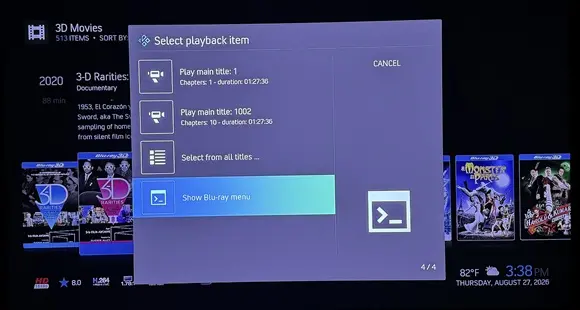
But, with last LE 3D build and CE22, even if using Files view, as soon as I choose ISO, no chooser, rather plays main title directly:
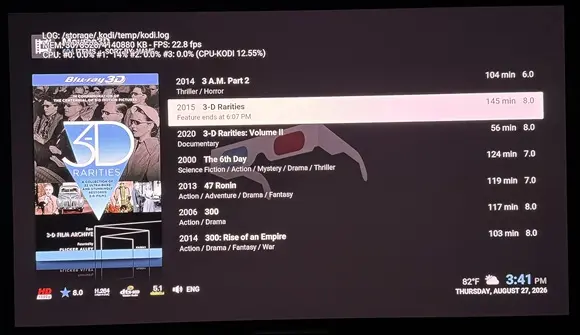
Odd this behavior only happens w/the two '3D Rarities' ISOs I have, but I get chooser w/the other couple 3D menu ISOs I have.

Stay cool, it's bleeding edge software development right now.
For sure :).
But wait wait wait!!! I Think I found it: Just went through all the projector settings again and switched "HDMI LINK" ON. And boom! Not one single glitch since then (the movie has been playing for 10 minutes now - fingers crossed...). Why this?
Sounds like it's something specific w/the Sim2.
But wait wait wait!!! I Think I found it: Just went through all the projector settings again and switched "HDMI LINK" ON. And boom! Not one single glitch since then (the movie has been playing for 10 minutes now - fingers crossed...). Why this?
I'm afraid this still doesn't make any sense. "HDMI LINK" is CEC. No obvious reason why it would affect the glitches.

But, with last LE 3D build and CE22, even if using Files view, as soon as I choose ISO, no chooser, rather plays main title directly:
Root causeHis library holds the movie's file path as the playlist, not the ISO. CVideoDatabase builds every list item with
so the item already carries bluray://…/3-D Rarities (2015).3D.iso//BDMV/PLAYLIST/01001.mpls before he presses Enter. The new log shows exactly that:
Code15:49:04.593 CInputManager::HandleKey: enter pressed, window 10025, action is Select 15:49:04.593 OnPlayMedia bluray://udf:///storage/Videos1/Movies3D/3-D Rarities (2015).3D/ 3-D Rarities (2015).3D.iso//BDMV/PLAYLIST/01001.mpls 15:49:04.596 CPlayerSelectionRule::GetPlayers: considering rule: discimageNote discimage is only considered, never matched — because the path is a bluray:// playlist, not an ISO. Compare the Spider-Man log, where the same rule reported matches rule: discimage.
From there, GetMenuDecisions gives NO_ACTION under Automatic menu selection: isBluray is false (dynpath isn't a disc image), isBlurayPath is true, and with BD_PLAYBACK_AUTO neither forceSelectionAtStart nor useDiscMenuSetting nor mainTitle is set, so every branch falls through. It plays 01001.mpls directly. AUTO is documented as "Only use simple menu if playlist not known" — the playlist is known, so it doesn't ask. Same for both volumes.
Why "play from Files" changed nothing: the dynpath comes from the database row, not from how he navigated to it. Window 10025 serves both views, and a Files item matched to a library entry gets the same dynpath. My suggestion was based on the assumption that Files view would give a raw ISO path — that was wrong, and I should have checked SetDynPath before offering it as a quick test.
Why IMAX / Best of 3D still work: those live under /storage/Videos2/Various/, and the earlier log shows them opening as raw .iso paths — not library items with a resolved playlist. So isBluray is true for them and the chooser runs.
How the path got stored
VideoInfoScanner.cpp:2140 — at scan time, when a playlist is known for a disc image, the scanner rewrites the item's path to the playlist:
Codeif (playlist > -1 && (IsBlurayDiscImage(path) || IsBDFile(path) || …)) { path = URIUtils::GetBlurayPlaylistPath(path, playlist); pItem->SetDynPath(path); }So any disc scanned into the library with a resolved playlist loses the chooser under AUTO from then on. That's the behaviour change he noticed, and it's a consequence of the playlist-resolution work rather than of the menu code.
What he can do today
- Set disc playback to Simple menu — forceSelectionAtStart && isBlurayPath && atStart then returns SHOW_SIMPLE_MENU, so the chooser comes back for library items too.
- Or Show Blu-ray menu, which he's already found works.
The decision for you
This is a design question, not a defect: under AUTO, a library item with a known playlist currently has no route to the disc menu at all — not via a chooser, and (as he notes) not from the OSD either. Options as I see them:
- Let AUTO return SHOW_SIMPLE_MENU for isBlurayPath at start when HasMenuSupport() — restores his chooser, at the cost of a dialog on every library play of a menu-capable disc.
- Leave AUTO alone and keep the OSD "DVD Menu" action available whenever the disc supports menus — closer to what he expected, and no extra dialog.
- Do nothing: AUTO behaving as documented, and he uses Simple menu.
I'd lean to (2) — it addresses the actual complaint without adding a prompt to every play — but it's your call, and I'll implement whichever you pick.
So the important point is whether it's been scanned to library. library items line direct to feature, not menu.
I'll probably go with (2) so you get back the option of playing the menu.
I'm afraid this still doesn't make any sense. "HDMI LINK" is CEC. No obvious reason why it would affect the glitches.
Fully agree - that's why I haven't tried it any sooner. If I turn "HDMI LINK" off, the glitches come back immediately. Turn it on again and they disappear for good. 
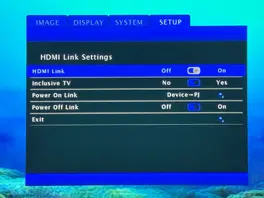
Fully agree - that's why I haven't tried it any sooner. If I turn "HDMI LINK" off, the glitches come back immediately. Turn it on again and they disappear for good.
For interest, what happens with "HDMI LINK" on, but CEC settings disabled on Pi.
That should narrow down if its purely enabling "HDMI LINK", or if it's something it interprets from the CEC data that makes it choose to do the glitches.
Also does the projector have any sort of firmware update mechanism? It could be a bug they've fixed.
So the important point is whether it's been scanned to library. library items line direct to feature, not menu.
I'll probably go with (2) so you get back the option of playing the menu.
That works, thanks. Again, not a biggie for those of us who don't care about menus. But, there are menu fans out there.
I installed the Java runtime and addon for full BD menu support on this build this afternoon. It seems to be working as intended. I have so many atmos / dts-x cooked isos though I cannot tell which have menus and which do not. Found a valerion disc that did , as well as a Hans Zimmer Live in Prague. All seem to be in order.
For interest, what happens with "HDMI LINK" on, but CEC settings disabled on Pi.
That should narrow down if its purely enabling "HDMI LINK", or if it's something it interprets from the CEC data that makes it choose to do the glitches.
Also does the projector have any sort of firmware update mechanism? It could be a bug they've fixed.
- "HDMI LINK" on, and CEC settings disabled on Pi -> no glitches
- "HDMI LINK" on, and CEC settings enabled on Pi -> no glitches
- "HDMI LINK" off, and CEC settings disabled on Pi -> no glitches
- "HDMI LINK" off, and CEC settings enabled on Pi (which was the standard setting) -> glitches!
The projector has no firmware update mechanism.
I do still own a 3D capable TV
Was thinking you need to invest in a 3D-capable projector :). Best way to enjoy 3D — anyway big, immersive screen is the way to go — and there are so many good options now.
Valerion Control v1.0 - Discussion on Facebook
Valerion Control v.1.0 - Download on Google Drive
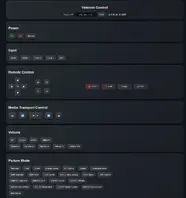
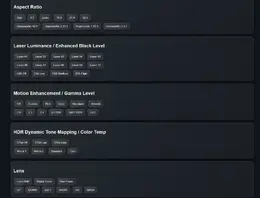
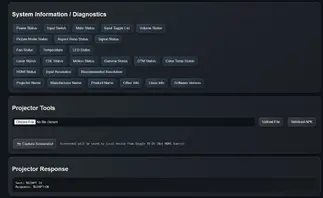
On the topic of projectors, If anyone has a Valerion Pro or Max series and possibly others, I cobbled together a python server for PJ Link / ADB control. I've pinned the tab and have been using the hell out of it stress testing it for almost 48 hours now. It is a Swiss army tool to drill almost every projection setting without a overlay and even supports screenshots from non hdmi sources , as well as upload and sideload install direct to projector
Some feedback from playing around: I tested a 3D file in 4K FSBS format (3840 x 2160), which is used for VR. Anyway: The Zidoo Z9X Pro appears to recognise, downsample and send it as 3D Framepacking, which is quite impressive. On the Pi 5, it is just sent as a standard SBS image which has to be manually switched to 3D using the projector's remote control. I guess this results in more resolution loss than with the Zidoo processing. However, to be fair, with the highest 4K FSBS resolution we sometimes see (7680 x 2160) the RTD1619BPD based Zidoo completely refuses to play.
A Full SBS on the Pi5 with this beta works fine and no resolotion loss. Just because it's squeezed before activating SBS mode does not mean you are losing anything when it's unsqueesed in the buffer. It would be pointless doing FSBS otherwise.
Can you provide a sample file that includes varying depth in the subtitles?
Managed to do a demo ISO
Also included the tracks and the 3D-plane log.
Some feedback from playing around: I tested a 3D file in 4K FSBS format (3840 x 2160), which is used for VR. Anyway: The Zidoo Z9X Pro appears to recognise, downsample and send it as 3D Framepacking, which is quite impressive. On the Pi 5, it is just sent as a standard SBS image which has to be manually switched to 3D using the projector's remote control. I guess this results in more resolution loss than with the Zidoo processing. However, to be fair, with the highest 4K FSBS resolution we sometimes see (7680 x 2160) the RTD1619BPD based Zidoo completely refuses to play.
That should be supported as frame-packed. Post a debug log so I can see what's going on.
edit: do you have a whitelist set up? I think if you do (and it includes [email protected]/1920x1080@24) then you'd get the FP output. I'll look into making that happen without a whitelist.
edit: do you have a whitelist set up? I think if you do (and it includes [email protected]/1920x1080@24) then you'd get the FP output. I'll look into making that happen without a whitelist.
Awesome, thanks for the tip! I hadn't set up a whitelist. I have one now and it's working By the way, will we have to create a new image and set everything up from scratch when you release a new version? Or will it appear in the LibreELEC update process?
Awesome, thanks for the tip! I hadn't set up a whitelist. I have one now and it's working
If you download the latest version (from first post) and put into /storage/.update and reboot it will update in place. No reinstall needed.
I had an issue that I thought was CEC, but apparently it was the BT volume controls coming from the profile for the shield remote that was triggering both internal and IR external volume to my AVR ( Denon). In the end. it was create a keyboard.xml file to block the command. The keymap editor did not work in addons. the code below stuck in the userdata/keymaps did the following at keyboard.xml. I think i could also disable avrp media controls via BT at the os level also but this worked so I am sticking with it. Weird issue but not sure i have used shield remote in the past on libreelec or any version of kodi linux image.
Code below:


