[x86-64][CroqueMr Builds] Dolby Vision w/FEL, HDR10+, and 3D

  • Thanks for the feedback, for the GUI that generate drops it's a known issue, many GPU can not handle FEL + GUI. In master reference mode I don't think I will be able to patch it completely. This mode is VERY restrictive, if any modification change the picture by one bit, even if it's invisible the mod is rejected. But I see one small issue, it may reduce the drops. I will push a debug2 later today.

    Thanks for the explanation, I understand the limitations of Master Reference mode, and I'd definitely prefer to keep the picture quality intact. I'll test Debug2 when it's available and let you know if the frame drops improve. Really appreciate your work.

  • Hi, I joined your project over a week ago.
    I have a question for the developers of these two projects, CroqueMr and dangerouslaser
    The first releases sent an 8-bit RGB signal in ITP color space through the tunnel, just like all players with DV do, but starting with a certain version, I see that YCbCr is being sent instead.
    What’s the reason for this? I know that both options are considered acceptable, but I’m curious to know why.
    I’ve already tested the ITP option and compared it with other players, and it worked great; I’m still testing the new version. But since the color representation is different, it’s not possible to perfectly align the signals for comparison with other players.
    In the YCbCr tunnel output mode, are all the necessary RGB-to-LMS conversions being performed?

  • Hi, I joined your project over a week ago.
    I have a question for the developers of these two projects, CroqueMr and dangerouslaser
    The first releases sent an 8-bit RGB signal in ITP color space through the tunnel, just like all players with DV do, but starting with a certain version, I see that YCbCr is being sent instead.
    What’s the reason for this? I know that both options are considered acceptable, but I’m curious to know why.
    I’ve already tested the ITP option and compared it with other players, and it worked great; I’m still testing the new version. But since the color representation is different, it’s not possible to perfectly align the signals for comparison with other players.
    In the YCbCr tunnel output mode, are all the necessary RGB-to-LMS conversions being performed?

    Nice we can continue our discussion here :) I sent you a mail but I will past my answer here also :


    I use YCbCr inside the RGB 8bit tunnel to avoid unnecessary conversions and rounding and help small GPUs. I send the matching YCbCr to RGB and RGB to LMS matrices for the TV to handle the conversion in TV-Led mode, following ETSI specs

    For your comparison, do you need IPT PQ c2 inside the RGB tunnel, like the earlier Yblod build? Just tell me what output and tunnel format you need, I can adapt the Master Reference circuit to match your need. Other circuits deliberately modify the signal and aren’t intended as exact references and I think do not deserved to be deeply analyzed

  • Nice we can continue our discussion here :) I sent you a mail but I will past my answer here also :


    I use YCbCr inside the RGB 8bit tunnel to avoid unnecessary conversions and rounding and help small GPUs. I send the matching YCbCr to RGB and RGB to LMS matrices for the TV to handle the conversion in TV-Led mode, following ETSI specs

    For your comparison, do you need IPT PQ c2 inside the RGB tunnel, like the earlier Yblod build? Just tell me what output and tunnel format you need, I can adapt the Master Reference circuit to match your need. Other circuits deliberately modify the signal and aren’t intended as exact references and I think do not deserved to be deeply analyzed

    Yes, to ensure 100% accuracy in the analysis, I need all players to use the same color space. Otherwise, I’d have to convert ITP to YUV or vice versa, and that isn’t a lossless process—I need a lossless process without any color conversions.
    I’m testing on an Intel i3-12100 (UHD730)—it seems to be sufficient for 30 fps tests.

  • Yes, to ensure 100% accuracy in the analysis, I need all players to use the same color space. Otherwise, I’d have to convert ITP to YUV or vice versa, and that isn’t a lossless process—I need a lossless process without any color conversions.
    I’m testing on an Intel i3-12100 (UHD730)—it seems to be sufficient for 30 fps tests.

    I will add a new circuit that includes this in the next version, it will be available tomorrow, or the day after if I run into any issues.

    Thanks a lot for your help.

  • Hey CroqueMr I have an rtx 4080 gaming laptop. I flashed the latest beta 4 on my usb and connected to tv via hdmi. I am not getting output to tv. Only the initial one line libreelec r1.0.0 beta 4 shows up on both tv and laptop, but after that everything is on laptop screen. I have tried libreelec hades build before and I was able to get output to my tv , I tested fel files and everything worked properly on that build. Any idea what's going on?

  • Hey CroqueMr I have an rtx 4080 gaming laptop. I flashed the latest beta 4 on my usb and connected to tv via hdmi. I am not getting output to tv. Only the initial one line libreelec r1.0.0 beta 4 shows up on both tv and laptop, but after that everything is on laptop screen. I have tried libreelec hades build before and I was able to get output to my tv , I tested fel files and everything worked properly on that build. Any idea what's going on?

    Could you try the beta 4 debug and send me back the log please. https://github.com/CroqueMr/libre…0.0-Beta4-debug

  • Could you please try the beta4 debug version and send me back the log even if it fixed your issue?

    https://github.com/CroqueMr/libreelec-x86-DV/releases

    Hi CroqueMr , the DV freeze is FIXED! :) Thank you!

    Here is the log requested with the bunch of "CB1 debug" lines added it seems? I played back the video for 3 minutes.

    What was the problem exactly I am curious? You can be technical I am a programmer.

    Thanks!

    P.S. I tried resuming the file at 3 minutes just to test a resume and it froze after playing for 1 second but with the image freezed instead of black. It seems that's it's the audio renderer that didn't work though so not sure it's from your code or not? I attach the log for that too just in case and the line with the error is line 234. There's a Stalled=true on line 512 from your debug info.

    I tried reproducing the freeze and it does not happen every time but it happened a second time now, I attach that log too, (2ndFreeze). Also, when the video plays correctly, I can scan in the file backwards and forward and all is working fine.

  • Hi CroqueMr , the DV freeze is FIXED! :) Thank you!

    Here is the log requested with the bunch of "CB1 debug" lines added it seems? I played back the video for 3 minutes.

    What was the problem exactly I am curious? You can be technical I am a programmer.

    Thanks!

    Nice good news :)

    To be 100% honest I don't know :S but here is the explanation of my buddy GPT 6 Astra that find the fix :

    "It was a VAAPI context-identity bug between the BL and FEL decoders. FFmpeg can recreate the BL decoder’s AVHWDeviceContext while keeping the same underlying VADisplay. The previous check compared the context identity, so it could reject a valid device renewal and block EL processing.

    Your file appears to trigger that reinitialisation path, explaining why other FEL files worked. The exact bitstream trigger hasn’t been identified, but this doesn’t mean the file is faulty.

    The fix compares the underlying VADisplay, while still rejecting actual device changes. Reconstruction and image processing remain unchanged."


    Edit : I saw your edit, I will check. I actually fixed a widespread bug this morning affecting FEL playback across several formats (MP4, MKV, M2TS...). You might be running into that same issue. Could you tell me what your exact file format is? This fix hasn't been added to the debug pre-release yet.

    Edited once, last by CroqueMr (October 19, 2026 at 9:32 PM).

  • The explanation is indeed complex. o.O;

    All my files are MKVs. If you want the complete MediaInfo I can send it.

  • The explanation is indeed complex. o.O;

    All my files are MKVs. If you want the complete MediaInfo I can send it.

    MKVs yes, I saw a lot of issues with VAAPI and FEL thanks to this issue report : https://github.com/CroqueMr/libreelec-x86-DV/issues/29 , I think I already fixed it in my internal build, I need to clean my code before pushing an update of the debug version.

    The issue is wider than MKV, it impacts also MP4, M2TS, everything has been fixed.

  • MKVs yes, I saw a lot of issues with VAAPI and FEL thanks to this issue report : https://github.com/CroqueMr/libreelec-x86-DV/issues/29 , I think I already fixed it in my internal build, I need to clean my code before pushing an update of the debug version.

    The issue is wider than MKV, it impacts also MP4, M2TS, everything has been fixed.

    According to the issue report, the person cannot playback DT DV. I have the DT test file of "This Device Can Play DV" but for the DT test file specifically, it only displays black screen on my AM6B+ on CoreElec NG AND on your builds same thing. I thought this was normal and unsupported by ffmpeg or something. If you fixed that too that's pretty neat.

  • A laptop powered by intel i7-1260p works fine with SONY TV X90L and beta4, FEL and all RPU response no issues.

    However, the laptop defaults to the internal display. You need to modify the cfg file to output signal correctly to the TV and activate Sony's Dolby mode.
    It is recommended to add a script to switch between the laptop's internal display and external display.


  • Disaster averted! I unplugged the Kodi box and powered it on again. Booted and was able to select DV again. Phew. Still hopefully it's useful feedback.

    Edited 2 times, last by Glennza: Merged a post created by Glennza into this post. (October 20, 2026 at 1:57 AM).

  • I also disabled DV once and then all the DV modes became unavailable until I rebooted. I did the same later and I did not have that problem.

    I'm guessing it's because I am using a centralised MariaDB database. Maybe it killed the network connection. Dunno. Just glad I didnt have to reinstall from scratch

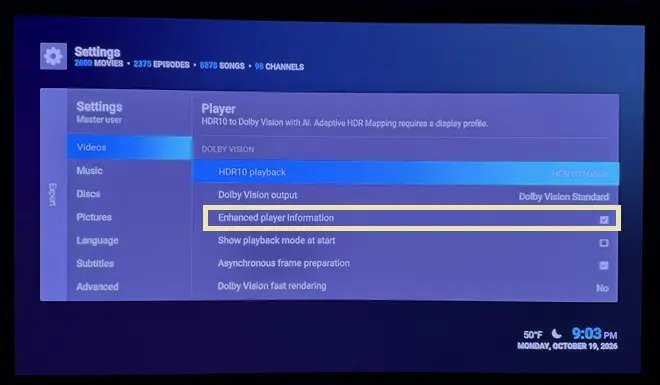
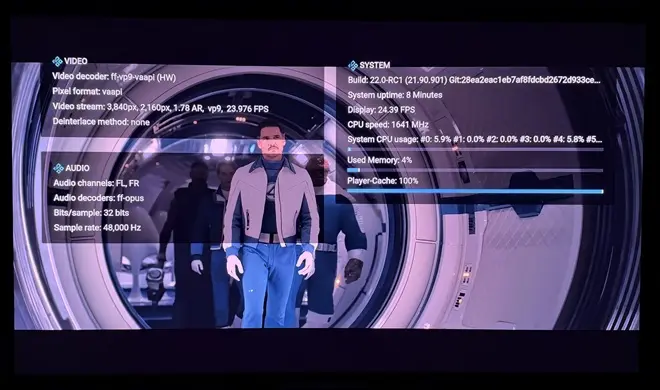
  • CroqueMr, looks like we've lost the enhanced player info w/beta4:


    Also, re-tested DV FEL playback of actual UHD rips on both AMD 5800H and Intel N150, and playback is excellent on both. Dramatic improvements in latter.

    Edited once, last by ht2tweak: Merged a post created by ht2tweak into this post. (October 20, 2026 at 2:33 AM).