Like to install and try this inside a VM. I have a 270K plus with Xe-LPG. How much ram is enough?
Dolby Vision w/FEL + 3D for PC (AMD/Intel/nVidia)
-
ht2tweak -
March 14, 2026 at 2:33 PM -
Thread is Resolved
-
-
Completed full suite of test files I have on both CroqueMr's and hadesdevls builds. Both are very good, with just a few things to address from what I see...
CroqueMr's RC1.1: Debug and crash logs here
- HDR10+ doesn't work, or only occasionally or w/certain clips/movies. HDR10+ works well with hadesdevls' 1.0 RC5
- As I reported, this 'Transformers' clip either plays (5800H) or shows cannot play error (N150 and H255/8745HS). When it does play, as reported earlier, OSD overlay won't show, including being able to bring up player controls to stop playback. Creator44 reported the first 5 'Transformers' UHD rips don't play for him
-
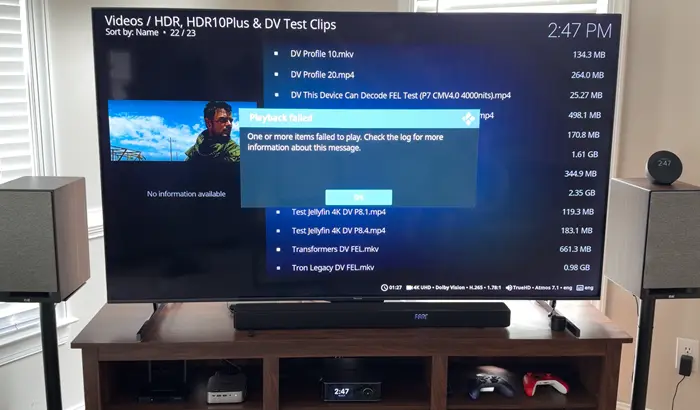
- The clip plays well on hadesdevls' 1.0 RC5, and I'm able to bring up the player process info and OSD w/o issue
-
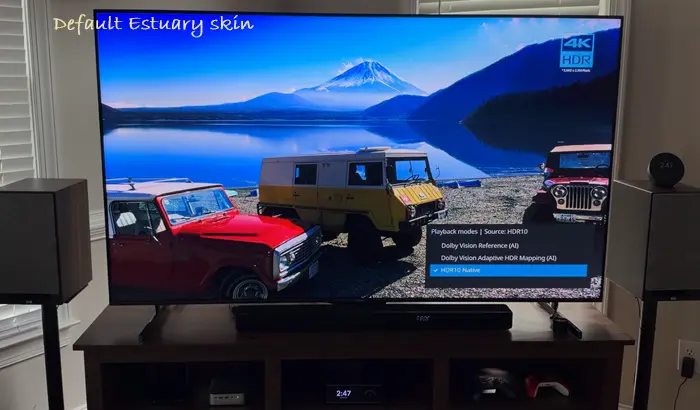
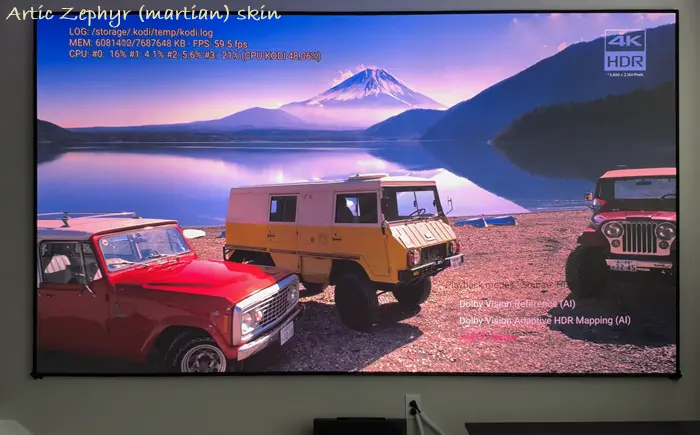
- The HDR formats overlay (pressing 'O' twice) is hard to see and navigate and tell which is highlighted to choose with Artic Zephyr skin (martian version specifically); not a problem with default Estuary as you can see
-
- There is instability with OSD on-the-fly switching from DV to HDR, etc. It works sometimes, more so on 5800H and 8745HS, while struggles, is unresponsive on N150
hadesdevls' 1.0 RC5:
- No on-the-fly switching between HDR formats via OSD, so couldn't test. Unless it's there and I missed how to initiate. If not, hadesdevls, are you planning to add? Hope so as I love it on CroqueMr's build... times it works reliably, it's great for conveniently switching from HDR to DV or vice versa
- Struggled with a few anime clips, namely pausing/freezing at start of playback. But, after that, no issues. So, minor thing. Sorry, don't have log, but here's a sample clip. Did fine with HEVC Main10 1080p, including ones w/heavy subtitles
Both builds play all 3D formats well. Tested a few random actual FEL movies ('Alien Romulus', 'Mission Impossible: Dead Reckoning - Part 1', and 'Saving Private Ryan'), and both did well, including bringing up OSD and player process info. HDR10 was also fine on both. AV1 24p HDR and 60p HDR also; no issues. Even an 8K AV1 24p HDR sample played surprisingly okay-ish most times, with a few dropped frames. No dice on OSD working, but surprised this clip played at all.
Thanks for your feedback, I am finalizing the RC2, I will push the release tomorrow, regarding your issues :
- FEL on transformer has been fixed
- OSD player information is more stable
- HDR10+ has been improved a lot, and since Hades is in GPLv2 I will audit the code and take what's work well.For the OSD with the quick switching, on my N100 it's clean, I do not have any issue, do you switch with the film paused?
For the theme I will check what I am exposing to be better integrated with themes and if it's not possible to ensure a good visibility regardless of the theme I will fix my pannel and no theme will be applied -

Kodi log attached
Thanks, Gen 10th is complicated to support, but I will try to force something, maybe it will not work but at least we can try.
-

Thanks, Gen 10th is complicated to support, but I will try to force something, maybe it will not work but at least we can try.
Thank you my friend, funny, I get the HDR badge, get audio, but no video. Also, having trouble playing .mp4 file. Whatever you do, I totaly appreciate your effort.
Have a good eveing
-
For the OSD with the quick switching, on my N100 it's clean, I do not have any issue, do you switch with the film paused?
For the theme I will check what I am exposing to be better integrated with themes and if it's not possible to ensure a good visibility regardless of the theme I will fix my pannel and no theme will be appliedNo, when it's playing. Look forward to HDR formats overlay for other skins being more like how it is with Estuary. Thanks!
-
No, when it's playing. Look forward to HDR formats overlay for other skins being more like how it is with Estuary. Thanks!
I've run all my tests while playback was paused, it's extremely stable and it was actually quite challenging to have no crash at all.
It hadn't occurred to me that people might try switching modes during playback. I'll prevent that for now by automatically pause/play the feed whenever the output format (HDR/DV/HDR10+) is changed.
-
Thanks for your feedback, I am finalizing the RC2, I will push the release tomorrow, regarding your issues :
- FEL on transformer has been fixed
- OSD player information is more stable
- HDR10+ has been improved a lot, and since Hades is in GPLv2 I will audit the code and take what's work well.For the OSD with the quick switching, on my N100 it's clean, I do not have any issue, do you switch with the film paused?
For the theme I will check what I am exposing to be better integrated with themes and if it's not possible to ensure a good visibility regardless of the theme I will fix my pannel and no theme will be applied
Hi brother do RC2 fixes my issues https://github.com/CroqueMr/libreelec-x86-DV/issues/73 -
Thanks for your feedback, I am finalizing the RC2, I will push the release tomorrow, regarding your issues :
- FEL on transformer has been fixed
- OSD player information is more stable
- HDR10+ has been improved a lot, and since Hades is in GPLv2 I will audit the code and take what's work well.For the OSD with the quick switching, on my N100 it's clean, I do not have any issue, do you switch with the film paused?
For the theme I will check what I am exposing to be better integrated with themes and if it's not possible to ensure a good visibility regardless of the theme I will fix my pannel and no theme will be applied
Hi CroqueMr,Thanks for the update and looking forward to testing RC2!
Regarding the OSD behavior:
- **Pause vs Live:** The coordinate shrinking/flickering happens while the video is playing live (not paused), specifically when target luminance triggers HDR-to-DV Adaptive conversion.
- **Hardware difference:** The N100 uses standard UHD (`i915`), while on Arc/Iris Xe hardware using the `xe` kernel driver, atomic modeset commits fail (`Admission checked (not committed)` in `dmesg`), leading to total signal loss on stop/refresh-rate changes.I'm traveling today, but the test machine is powered on and connected. Once you push RC2 tomorrow, I'll update via SSH and report back on whether the OSD and modeset stability hold on Arc/Xe!
-
this might be the missing piece for LLDV on x86 on iGPU and Dolby vision on ARM port
Greetings! An intriguing development has emerged: an ARM port! Could this mean that it might now be possible to implement full Dolby Vision (DV) FEL (Full Enhancement Layer) support on an ARM-based architecture—specifically on an SoC like the Rockchip RK3588S2? Up until now, DV FEL playback on platforms lacking native hardware support has been a challenge, but with this Rockchip chip entering the picture, I’m curious: to what extent might this simplify, improve, or accelerate the realization of DV FEL playback on such a platform? Apologies for bringing this up in an off-topic thread—I know it’s a bit of a departure from the usual order—but then again, without breaking a few rules, there’s no progress, right? 😊
-

Hi CroqueMr,Thanks for the update and looking forward to testing RC2!
Regarding the OSD behavior:
- **Pause vs Live:** The coordinate shrinking/flickering happens while the video is playing live (not paused), specifically when target luminance triggers HDR-to-DV Adaptive conversion.
- **Hardware difference:** The N100 uses standard UHD (`i915`), while on Arc/Iris Xe hardware using the `xe` kernel driver, atomic modeset commits fail (`Admission checked (not committed)` in `dmesg`), leading to total signal loss on stop/refresh-rate changes.I'm traveling today, but the test machine is powered on and connected. Once you push RC2 tomorrow, I'll update via SSH and report back on whether the OSD and modeset stability hold on Arc/Xe!
I do not forget your issue, only a part of it will be fixed in RC2, I will check deeply after RC2, I need to investigate the drivers/kernel.
-

Greetings! An intriguing development has emerged: an ARM port! Could this mean that it might now be possible to implement full Dolby Vision (DV) FEL (Full Enhancement Layer) support on an ARM-based architecture—specifically on an SoC like the Rockchip RK3588S2? Up until now, DV FEL playback on platforms lacking native hardware support has been a challenge, but with this Rockchip chip entering the picture, I’m curious: to what extent might this simplify, improve, or accelerate the realization of DV FEL playback on such a platform? Apologies for bringing this up in an off-topic thread—I know it’s a bit of a departure from the usual order—but then again, without breaking a few rules, there’s no progress, right? 😊
Yes it's possible, I do not have this chip but in term of raw power, I think it can handle the open source engine including the same Master Reference output as x86 in term of fidelity
When I said "ARM" I was more thinking about low powered chip. -
I do not forget your issue, only a part of it will be fixed in RC2, I will check deeply after RC2, I need to investigate the drivers/kernel.
Thanks a lot brother
-
When I said "ARM" I was more thinking about low powered chip.
I get the general idea. When I mentioned the RK3588S2-DV, I was referring to an example of hardware-based decoding—much like how it was handled with the Amlogic X922 in the Ugoos AM6+ when running CoreELEC (CE). It seems we just need to wait for the current "technology" for processing FEL Dolby Vision to become more established and reach the mainstream

-
The task was to strictly output 2 bits of data to the EL layer. Therefore, a solution involving direct editing of only the EL layer was necessary, since it is impossible to control how the DEE encodes the data—or what it decides to classify as residual data.
You absolutely can control what's in the EL and BL using DEE. You just have to do it manually rather than using their all-in-one Python script. This is the only proper way to ensure the NAL units(and rpu) are correct between the EL and BL is to use Dolby's Properties Tool.
dee_dv7_preproc -i "D:\mezzanine12bit-jpeg2000.mxf" --input-format jpeg2000_mxf:range=auto:framerate=23.976 -m "d:\metadata.xml" --input-bl f:\BL.yuv --input-bl-format raw:pix_fmt=yuv420p10le:width=3840:height=2160:target=hdr10:streaming=1:frame_count=8315 --progress 1 --el-type full -r D:\P7.rpu -o F:\EL.yuv
dee_video_encoder --bl-yuv F:\BL.yuv --el-yuv F:\EL.yuv --encoder x265 --metadata D:\staticHDR10.txt --rpu D:\P7.rpu --fps 23.976 --frames 8315 --use-case fel --el-bitrate 5000 --el-buffer 5500 --bl-bitrate 85000 --bl-buffer 99000 --preset slower --passes 2 --out-bl D:\BL_final.hevc --out-el D:\EL_final.hevc
-
- Best Answer
I get the general idea. When I mentioned the RK3588S2-DV, I was referring to an example of hardware-based decoding—much like how it was handled with the Amlogic X922 in the Ugoos AM6+ when running CoreELEC (CE). It seems we just need to wait for the current "technology" for processing FEL Dolby Vision to become more established and reach the mainstream
My build is fully open source and will never incorporate proprietary Dolby code. ARM port will be based on the existing x86 engine, without relying on dovi.ko file, even on licensed SoCs, the facts that a SoC is capable natively to read and send a DV stream is not important for a port of my build.
Of course, what I’ve said reflects only my own personal view and my builds, others might do things differently
-
Releases · CroqueMr/libreelec-x86-DVLibreELEC x86_64 with Dolby Vision support for Intel and AMD iGPUs - CroqueMr/libreelec-x86-DVgithub.com
R1.0.0 RC2 - Stability improvement, HDR10+ fixes, BD-J Menu experimental support
Changes since R1.0.0-RC1
Dolby Vision
- Renamed Dolby Vision Standard to Dolby Vision Reference to reflect its precision-oriented output rather than an entry-level mode. The optimized processing path is retained.
- Added optional CM2.9 to CM4.0 controls, including Auto/Auto 2 and independent L2-trim suppression. Selection rules adapted from avdvplus; neutral blocks and PQ formulas from quietvoid/dovi_tool.
- Fixed Master Reference startup readiness and per-file failure counters for YCbCr and IPT output.
- Fixed HDR10 Expert startup when the required TV profile is incomplete.
- Corrected tiny or misplaced OSD during HDR10-to-Dolby Vision playback.
- Fixed in-band MP4 FEL headers, BL/EL seek recovery in M2TS/ISO and valid duplicate luma pivots in the reported Transformers FEL sample.
- Reduced intermediate storage and redundant processing in HDR10 Basic/Expert and source analysis improving stability and performance
HDR10+
- Added HDR10+ to Dolby Vision: preserve decoded film pixels and use compatible source metadata, with LightGBM AI assistance working on your CPU when source statistics are incomplete. Distribution estimation and scene comparison adapted from Hades.
- Corrected native HDR10+ V1 metadata validation and HEVC/Matroska metadata handling.
- Improved Dolby Vision-to-HDR10+ metadata generation and creative-control handling, with targeted packet-progression diagnostics.
Playback and stability
- Improved return to SDR after playback stops or fails, without artificial audio/video offsets.
- Improved native resolution and refresh-rate selection for cropped and nonstandard source dimensions.
- Added an Auto view mode that avoids unnecessary near-native UHD enlargement while retaining normal Kodi scaling for smaller sources.
- Integrated Christian Hewitt's libplacebo shader-stage correction. Retained the shared rendering optimizations contributed by dangerouslaser.
Blu-ray menus, subtitles and 3D
- Add experimental HDMV and BD-J menus support
- Added PGS/DVB subtitle controls for brightness, saturation, size, placement and vertical offset, adapted from avdvplus.
GPU and HDMI support
- Added AMD DCN4 / RX9000 admission and improved Vega M colour-state preservation.
- Improved NVIDIA R615/R580 HDR/SDR packet handling, extended EDID ownership and native-TMDS detection; corrected the Pascal return-thunk build contract, adapted from Hades.
- Improved Intel EDID ownership, BT.2020 YUV signalling, neutral tunnel checks and advertised-CTA HDR10+ selection.
- Added bounded Intel Display9 Skylake/Kaby Lake HDR handling, retaining native output-depth and bandwidth checks. Other Display9/LSPCON restrictions remain unchanged.
Interface and diagnostics
- Kept the compact Quick Switch independent of the active skin while retaining native Kodi controls.
- Fixed Quick Switch availability during paused HDR10+ / Dolby Vision transitions, using native source identity separately from per-picture output validation.
- Shortened some player information labels.
- Added bounded diagnostics for decoder stalls, BL/EL imports, HDR10+ progression, audio settings and HDMI transitions.
Player information and audio
- Expanded audio source information: codec/immersive format, source format and channels, declared bed/objects, presentation, dialnorm, bitrate and language, when available.
- Separated source audio from actual Kodi output: passthrough/RAW, decoded or native PCM, transcode and effective output format/channels. Read-only metadata parsing adapted from avdvplus.
- Compact Video/Audio headings, readable labels across the panel, slightly smaller text and video dimensions without thousands separators.
Known issues
- RX7600 FEL vertical-detail loss and repeated DV-to-HDR10+ packets remain under investigation.
- Arc B570 black-screen transitions, RTX4070 HDR10 reception and GTX1000 boot compatibility still require confirmation on affected hardware.
- Some disc-specific MP4/BDMV and authored menu paths remain unverified.
- HDR10+ target curves, colour controls and multiple spatial windows cannot all be translated directly into Dolby Vision metadata, work is ongoing to improve current algorithm.
Next focuses
- Bug fixing following new issues
- Improve HDR10+ support and processing
- Improve hardware support
- Improve BD-J support
- Improve Player Information pannel UI
-
R1.0.0 RC2
One simply has to copy the release to .update and reboot to install, correct? No special procedure needed.
-

One simply has to copy the release to .update and reboot to install, correct? No special procedure needed.
yes
-