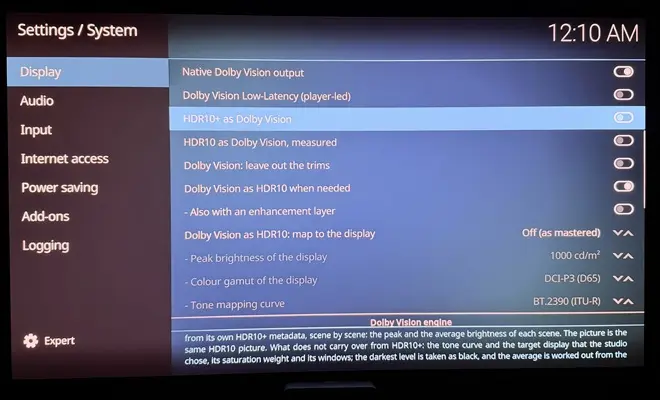
Dolby Vision w/FEL + 3D for PC (AMD/Intel/nVidia)

  • Thanks for giving my build a try! It genuinely makes me happy to see how much progress we're making with LibreELEC on PCs, without being limited by the hardware and resources of TV boxes, and being able to run it on all kinds of devices, including PCs we already have at home, sometimes with nothing more than a reasonably fast external storage drive.

    It's great to see how far we've come as a community since CroqueMr's first build. I'll keep doing my best to contribute, even in small ways, to improving what we already have and pushing things further.

    If you run into any bugs or have suggestions, please let me know!

  • Yeah I think I can give it a try, alors I think you was interested in DV to HDR10 expert conversion I saw some issue, black are crushed I will investigate to see the cause behind.

    Yep definitely still crushed but performance is completely fixed. Looking forward to the update thank you.


    Currently using basic and it's very surprising seeing the improvement vs HDR (DV disabled)

  • On the decoding itself there shouldn't be a quality difference. HEVC, H.264 and AV1 define the decoder's output exactly: for a stream without errors, a decoder that follows the standard, in hardware or in software, gives the same numbers for every frame, and the conformance streams check exactly that. Software decoders get faster and better at handling broken streams over time, but not better looking. Encoding is different: the standard fixes what a decoder outputs, not how an encoder compresses, which is why encoders still differ.

    So if software looked a bit better to you, the difference comes from after decoding, barring a driver bug. In Kodi a VAAPI frame and a software-decoded frame go through different render paths (different shaders, and for interlaced video VAAPI can deinterlace with its own methods), and chroma upsampling, scaling, colour conversion and deinterlacing are where pictures can differ.

    In Hades, Dolby Vision is decoded with VAAPI, both layers, and the picture is then rebuilt in shaders following the composer of the ETSI CCM 001 specification. On a software renderer it matches an integer reference of the specification bit for bit in every case we tested. So the decoder isn't where the quality is decided, for Dolby Vision or for HDR10 and SDR.

  • I tested a side circuit doing direct Profile 5 vs converted to YCbCr, and the differences were imperceptible. But it's definitely planned to skip this conversion for Profile 5 in the stable release, which can be avoided even though in reality it involves almost no loss in quality.

    Look forward to it.

    If anyone is interested https://discourse.coreelec.org/t/learning-abo…opment/50998/65 has a bunch of links that show ICtCp is better for the chroma sub-sampled video, so not converting the profile 5 converting to YCbCr is objectively better even disregarding computation aspects.

  • Hi hadesdevls i tried to update my usb stick to RC2 and today to RC3 but it won't take the update files, I would only take the image file (.img.gz). Just letting you know in case you want to check it. Maybe im doing something wrong. Thanks for sharing your build.

  • Look forward to it.

    If anyone is interested https://discourse.coreelec.org/t/learning-abo…opment/50998/65 has a bunch of links that show ICtCp is better for the chroma sub-sampled video, so not converting the profile 5 converting to YCbCr is objectively better even disregarding computation aspects.

    Thanks for the info.

    Of course avoiding a lossy conversion will be everytime better. I am finalizing the profile 5 path without ycbcr, it will replace the old circuit for profile 5 in the next update.

  • Hi hadesdevls i tried to update my usb stick to RC2 and today to RC3 but it won't take the update files, I would only take the image file (.img.gz). Just letting you know in case you want to check it. Maybe im doing something wrong. Thanks for sharing your build.

    Thanks for letting me know. The installer's Update works with the .img.gz on purpose: it replaces only the system part of the drive and keeps your settings, add-ons and diagnostics, so using the .img.gz there is the right way. The .tar is for updating from inside Hades: copy it to the Update folder (/storage/.update) and restart. File sharing (Samba) is off by default in Hades, so to reach that folder over the network, turn Samba on in the LibreELEC settings first. If it was the .tar route that didn't work, tell me and I'll look into it.

  • hadesdevls

    Hi, I'm having a problem connecting to your LibreELEC-Hades build using FileZilla on Windows. I'm using SFTP (SSH File Transfer Protocol) with the username root, but the connection keeps getting rejected.

    The same FileZilla setup works perfectly with CroqueMr's LibreELEC build, so I'm not sure what's different here. I also tried changing the SSH password through the LibreELEC settings, but that didn't help.

    Is SFTP supported in your build, or is there something else I need to enable?

    I also have one question about the RC3 release. I noticed this file:

    LibreELEC-Hades-1.0-RC3-firmware-and-nvidia.tar

    I'm not sure what it's meant for. Is it an update package, or does it need to be installed separately? Is it specifically for systems with NVIDIA GPUs? I'm using an RTX 5090, so I'd appreciate some guidance on how to use it.

    Thanks again for your help and all the effort you're putting into this project.

  • Hi Vertox, SFTP is there: Hades has the same SFTP server as LibreELEC. Three things differ by default, and one of them is probably what you're hitting:

    1. SSH is off, as in LibreELEC: LibreELEC settings, Services, SSH.
    2. While root still has the default password, Hades accepts only SSH keys, not passwords. Once you set a password in the same place, SSH takes it right away.
    3. The firewall starts in Home mode, which lets in the local network (addresses 10.x, 172.16 to 172.31.x and 192.168.x) and turns everything else away, a VPN address for example. It's in LibreELEC settings, Network, Firewall.

    If FileZilla still can't connect, its message says which one it is: "connection refused" or a timeout points at SSH being off or the firewall, "authentication failed" at the password.

    The firmware-and-nvidia .tar is nothing to install. It's part of the source code that the licences ask us to publish with the image: the firmware files and NVIDIA's driver package that the image takes its NVIDIA files from. The image already has everything your RTX 5090 needs. To install or update, use the .img.gz (the installer's Update option keeps your settings), or copy the LibreELEC-Generic .tar to the Update folder to update from inside Hades.

    Thanks for the kind words.

  • Hi, CroqueMr   hadesdevls

    Huge thanks for making this happen, DV on PC was basically a myth before!

    Do you think adding support for older NVIDIA Pascal cards might be possible in a future update?

    Thanks for the kind words! Pascal is on the list for Hades too. Those cards need NVIDIA's older 580 driver, since the one Hades uses covers GTX 16 and newer, so the work is getting that driver to send what Dolby Vision needs. I'll post here when there's something to try.

  • hadesdevls do you think your build would run better with my 3500u? I still get a lot of frame drops opening the OSD on a profile 7 movie.

    Which build and version are you on right now? It helps to know what you're comparing against.

    Hard to say without trying, since nobody has run Hades on a 3500U yet, but its graphics (Vega 8 ) are supported for native Dolby Vision. Your case is what the latest version worked on: with the OSD, the seek bar or subtitles over a Dolby Vision film, each frame is now redrawn only where they are. On the integrated graphics of a Ryzen 9 7950X3D, which has just 2 compute units, a profile 7 FEL film with the seek bar and the info panel open keeps all its frames, and a user saw the same on a Radeon RX 7600. The 3500U has more compute units but usually much slower memory, so I can't promise the same. If you try it, the Dolby Vision page of the player info shows the GPU time of each frame and how much headroom is left.

  • Which build and version are you on right now? It helps to know what you're comparing against.

    Hard to say without trying, since nobody has run Hades on a 3500U yet, but its graphics (Vega 8 ) are supported for native Dolby Vision. Your case is what the latest version worked on: with the OSD, the seek bar or subtitles over a Dolby Vision film, each frame is now redrawn only where they are. On the integrated graphics of a Ryzen 9 7950X3D, which has just 2 compute units, a profile 7 FEL film with the seek bar and the info panel open keeps all its frames, and a user saw the same on a Radeon RX 7600. The 3500U has more compute units but usually much slower memory, so I can't promise the same. If you try it, the Dolby Vision page of the player info shows the GPU time of each frame and how much headroom is left.

    Just switched to your RC3 build. Same issue. Would I be better off swapping this out for an N150? Or do you think this is fixable for the 3500u?

  • Just switched to your RC3 build. Same issue. Would I be better off swapping this out for an N150? Or do you think this is fixable for the 3500u?

    Thanks for trying it. I wouldn't buy an N150 for this: I want to fix it on the 3500U. The drops come from the extra work of the OSD over a profile 7 FEL frame, and the automatic step-down that Hades uses on slower graphics doesn't cover frames with menus over them yet (only profile 5 gets help there). That's what I'm going to work on.

    To fix it for your 3500U and not just in general, I need to see how long those frames take on its graphics. A diag shows that: rename DIAG-OFF.TXT to DIAG-ON.TXT on the LIBREELEC partition, start Hades, play the profile 7 film for a minute with the OSD open for part of it, shut down from the menu, and attach the hades-diag folder as a zip in an issue here: https://github.com/hadesdevls/LibreELEC-Hades/issues

  • Hi CroqueMr , I tested Beta5 and the DV DT file does not play correctly still, it seems to just display nothing or some vague wavy stuff, I think I was seeing my purple kodi theme in the back or something, like see-though? Not a big deal as nothing is in DT in MKV.

    I found a bad bug for me, if I put PGS subtitles ON, if any GUI is on, may it be the standard kodi gui, or my plexmod gui, etc. everytime there is a subtitle on screen, the video freezes and then plays correct when the subtitle disappears.

    It seems to be fine with SRT subtitles though and there is no freeze on those, only on PGS.

    Can you reproduce that and find a fix please?

    Thanks to you and hadesdevls for your work!