 Display More
LibreELEC Hades 1.1 is out
Download LibreELEC Hades 1.1: the image, the update file and the Windows installer.
New things to see and to choose, and fixes for what you reported after 1.0. Thank you to everyone who tried 1.0 and wrote here and in the issues: much of this version comes from your reports.
The highlights
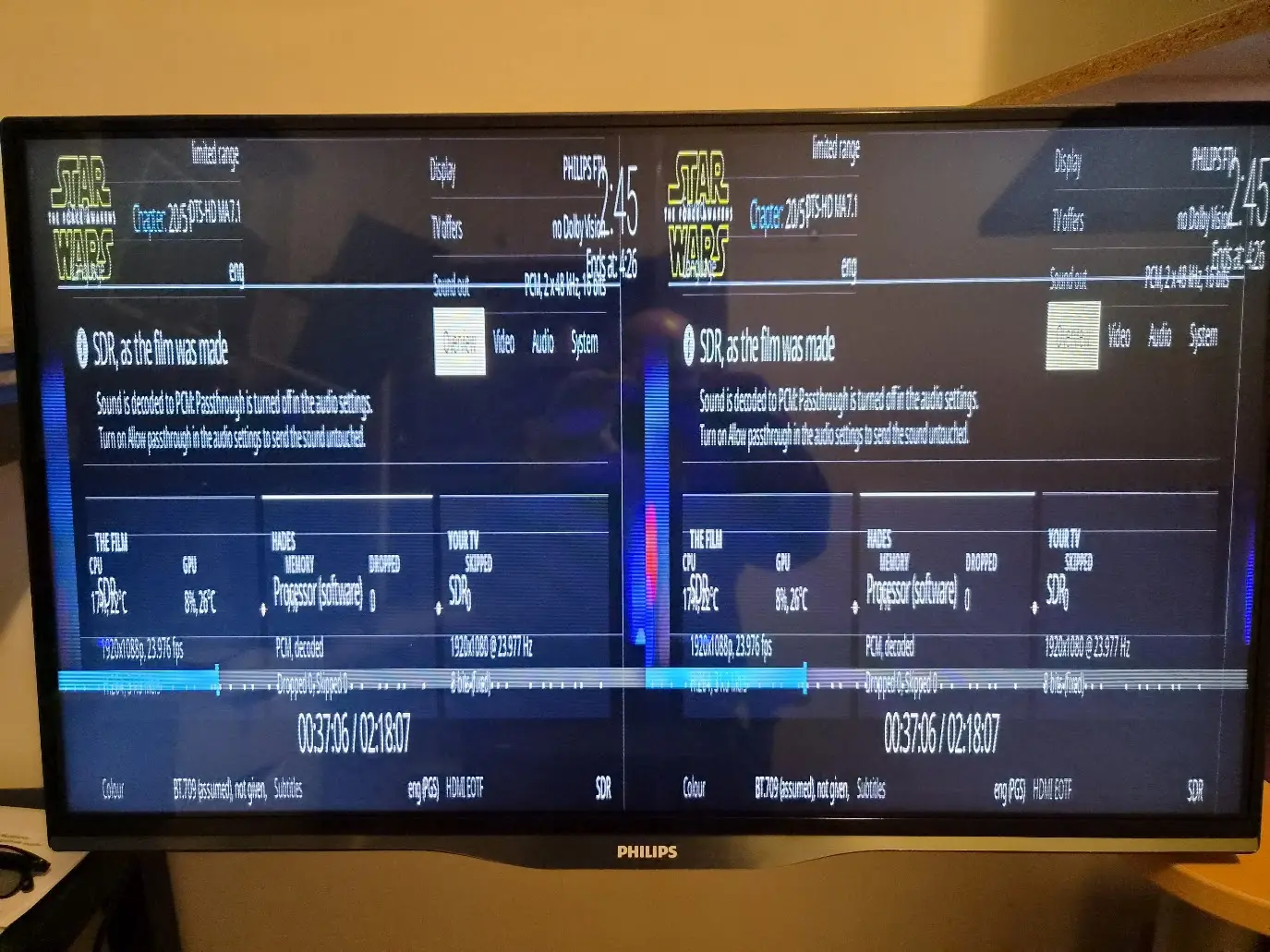
- The player information, redesigned and reachable with a remote. Press O: one frame with the path of the signal at the top (the film, Hades, your TV) and a bar with the processor, the graphics, dropped pictures and the output button. O, then OK, changes how a Dolby Vision video goes out while it plays, from a remote, a keyboard or Yatse. The System page now says how the TV is connected.
- Any HDR film as SDR, Dolby Vision included, from the output choice of that video. HLG videos get the choice too.
- HDR on a display without HDR is mapped again. Every profile of 1.0 had the tone mapping of Kodi set to "Off", which left HDR washed out on an SDR display or projector. It is switched to "Reference (BT.2390)" once.
- Menus and subtitles over HDR keep the shadows they have in SDR (the curve of BT.1886, as ITU-R BT.2408 says).
- For those who like to tune (Expert, off by default): the upscalers RAVU, FSRCNNX 8 and FSRCNNX 16, measured closer to the original than Lanczos 3; HDR10 mapped scene by scene for projectors and SDR; SDR videos made in BT.2020 in their wide colours (Advanced); zoom to the active area of Dolby Vision films for 2.35:1 and 2.39:1 screens; and video at its own rate with VRR, either always, so that the screen does not go black when a video starts or stops, or only where the display has no mode at the rate of the film (PC monitors without 24, 48 or 72 Hz).
- Adjust display resolution (Player > Videos, off by default), next to Adjust display refresh rate: a 1080p video goes out at 1920x1080 at its own rate, so that the TV scales it. Native Dolby Vision stays at 3840x2160.
- The right refresh rate in more cases: a 1080p film gets 3840x2160 at 23.976 Hz on a TV whose menus are at 2560x1440, each display keeps the resolution of its own menus, and HEVC videos whose pictures are whole are shown as progressive (25p at 25 Hz).
- Dolby Vision: Low-Latency that cannot use the values of the display falls back to Standard, or to HDR10 with the enhancement layer; colours past BT.2020 (laser projectors) are taken to its edge; no active area (level 5) that the video does not have; frames ahead for a graphics card held to a low power limit; the whole black bars of an HD encode with an RPU of its own; and Dolby Vision through the converter of a USB-C hub or adapter (Expert).
- Sound: a display that takes PCM of 16 or 20 bits only gets sound; Intel Alder Lake (N97 and N100 too) no longer goes silent after Dolby Vision with a passthrough track; an output kept on for an AV receiver keeps its sound; Dolby Digital at 32 kHz passes through; 6.1 and 6.0 tracks keep their back centre.
- Files and network: seeks no longer stall on a server that allows one connection per file, a change of subtitle track shows at once, and you choose which variety of a language goes first (Castilian or Latin American Spanish, European or Brazilian Portuguese, French from France or Canada, simplified or traditional Chinese).
- The start: one picture from the boot menu to the interface on a UEFI PC, a notice on the screen when Kodi cannot start, and the hardware clock read as local time or UTC, as it was measured to keep.
- NVIDIA: the return to 3840x2160 at 120 Hz after a video keeps the HDMI 2.1 link, with a way back at 60 Hz if the picture does not come back. HDMI variable refresh rate is off by default, as on AMD and Intel graphics, because some TVs switch to their game mode with it (Expert turns it on). With two or three displays, a change of mode waits three seconds at most.
- Windows and Hades on one PC: Restart into Windows in the power menu, and Restart into LibreELEC Hades in the installer (and on the desktop, if you tick its box), without the boot menu key. Each only sets the next start, once; no boot entry is added, removed or moved.
- Secure Boot, optional and off by default: for a PC that keeps it on, tick Start with Secure Boot in the installer. It makes a key for that PC alone, and the PC asks once to enroll it. The Secure Boot keys of the PC, its boot order and Windows are never touched.
- Up to date: Linux 7.3.5, the latest commits of Kodi 22 and LibreELEC master, and the security fixes of glibc, OpenSSL, BusyBox, FFmpeg and dav1d.
Every change, with its details, is in the release notes and the changelog.Updating from 1.0
Your settings and add-ons are kept either way.
- With the Windows installer: choose the drive that has Hades, then "Update".
- Or copy the .tar file to the Update folder (the Update share over Samba, or /storage/.update) and restart.
Two things you may notice afterwards: tone mapping now reads "Reference (BT.2390)" if your profile had "Off", and on NVIDIA, HDMI variable refresh rate stays off unless you turn it on in System > Display (Expert). The installer is not signed, so Windows may ask whether to run it.What I would most like to hear about
These need hardware that I do not have:
- Chromebooks, and USB-C hubs or adapters, for Dolby Vision and surround sound
- Secure Boot on a laptop
- Radeon RX 400, RX 500 and Vega cards with the Dolby Vision path on, and what Check the Dolby Vision output says
- Video at its own rate with VRR on an RTX 50 card and on AMD graphics
- Projectors and LCD TVs with Dolby Vision Low-Latency
- 3D displays, and AV receivers that switch inputs on Intel graphics
The README lists what has been tested and on what.Reporting a problem
Post here, or open an issue with a diagnostic report: Settings > LibreELEC > System > Submit Log > Create a diagnostic report makes one file and can copy it to a USB drive. A photo of the player information (O) helps a lot.Thanks to Felix Oghină, whose pull request for Chromebooks is in this version, done again with his findings; to mephis, for ideas for streams, subtitles and languages; to CroqueMr, whose build pointed to several fixes of this version; and to corgeone, for the measurements with an AV receiver. The upscalers are RAVU by Bin Jin and FSRCNNX by igv, shipped unchanged.
Thank you for your hard work, and continuous improvements. The new features and enhancements are greatly appreciated, especially the new neural shaders