

Ordered the BOSGAME P3 Pro tonight, as Amazon had only 4 left in stock and as it has DDR5 and 1 TB PCIe 4.0 SSD it's pretty much guaranteed to be more expensive when the next stock comes in. Actually excited to see where this goes.

Dolby Vision Hardware
-
DolbyVisionFriend -
October 18, 2026 at 10:55 AM -
Thread is Unresolved
-
-

Ordered the BOSGAME P3 Pro tonight, as Amazon had only 4 left in stock and as it has DDR5 and 1 TB PCIe 4.0 SSD it's pretty much guaranteed to be more expensive when the next stock comes in. Actually excited to see where this goes.
why didn't you ask before the gmktec k12 is far better, £158 barebones £120 for 16GB DDR5
that's £278, then just storage.
The Ryzen 9 7940HS marginally outperforms the Ryzen 7 H 255 by about 4% to 5% in overall processing benchmarks.
and the k12 is beefier box. the deal seems expired but we'll get more within a monthGMKtec K12 Mini PC AMD Ryzen7 H 255(Upgraded 8745HS)Oculink NO RAM/ROM/OS w/code [possible £157.39 w/PP and 2% credit back]@ GMKtec DirectThe deal starts on Saturday at 5 pm.PayPal discount is very limited so probably will run out quickly on a daily bases.Dispatched in the UK, so no extra paymentwww.hotukdeals.com
probably next price is £180 but still cheaper than what you're paying -
Ordered the BOSGAME P3 Pro tonight, as Amazon had only 4 left in stock and as it has DDR5 and 1 TB PCIe 4.0 SSD it's pretty much guaranteed to be more expensive when the next stock comes in. Actually excited to see where this goes.
using this system as only for dv fel is overkill.
if you use this system for many other things, then it is your choice if you need it 😀
-

using this system as only for dv fel is overkill.
if you use this system for many other things, then it is your choice if you need it 😀
yeah 100% for the price. but he could have gotten a k12 + single dim 8GB DIM for £210, storage either you already have or get some for £25, at this price , having a box that will last you 10+ years and sips lower power isn't that bad. about similar price to AM6B+ while being 10 times faster single core.
It's still on offer!
GMKtec K12 Mini-PC AMD Ryzen 7 H 255 (verbesserte 8745HS) Oculink-Unterstützung DDR5 NO RAM NO ROM NO OS Desktop-Computer Gaming-PC WIFI6E - AliExpress 7Smarter Shopping, Better Living! Aliexpress.comwww.aliexpress.com
jdrch get this, it's basically what you have at half the price and better cooling -
using this system as only for dv fel is overkill.
Overkill is my middle name. This is literally my 6th external player in my home theater cabinet. Also why I introduced myself as parachuting in from AVSforum where overkill is a way of life.

I don't want any test failures with the GUI on (see the results CroqueMr posted). The more horsepower I have that can just brute force that, the better. FTR - and I think this point seems to be lost on folks used to inexpensive Amlogic devices - DV7 FEL is not computationally easy. Doing it in software is so taxing even a 3rd Gen Apple TV 4K can't do it and Atmos height channels simultaneously:
QuoteHowever, due to current CPU constraints on the third-generation Apple TV, Rivulet cannot process Dolby Vision FEL and Atmos height channels simultaneously. Users must choose between the full video enhancement layer or overhead audio channels when playing Profile 7 media, though non-FEL files support height channels without issue.
I want to be able to do 4K60 (e.g. Gemini Man) with the GUI and all audio channels.
-
Overkill is my middle name. This is literally my 6th external player in my home theater cabinet. Also why I introduced myself as parachuting in from AVSforum where overkill is a way of life.
I don't want any test failures with the GUI on (see the results CroqueMr posted). The more horsepower I have that can just brute force that, the better. FTR - and I think this point seems to be lost on folks used to inexpensive Amlogic devices - DV7 FEL is not computationally easy. Doing it in software is so taxing even a 3rd Gen Apple TV 4K can't do it and Atmos height channels simultaneously:
I want to be able to do 4K60 (e.g. Gemini Man) with the GUI and all audio channels.
FEL is not a big issue, and we are not doing the maths in software/CPU, we use the shader of your iGPU to upscale the FEL and process all the picture. The big bottleneck is the 60fps. I will add the 7430U to my benchmark to have a better lock on requested performance to have no drops even with GUI
-

jdrch get this, it's basically what you have at half the price and better cooling
I don't buy from AE, especially when Amazon has 12 months equal payments and free returns through Jan 31 where I live. I wanted the fastest system with the max headroom, and I can get it, so I did.

The big bottleneck is the 60fps. I will add the 7430U to my benchmark to have a better lock on requested performance to have no drops even with GUI
Yep, this challenge is what I was referring to wanting to have the max headroom for.
-
I don't buy from AE, especially when Amazon has 12 months equal payments and free returns through Jan 31 where I live. I wanted the fastest system with the max headroom, and I can get it, so I did.
Yep, this challenge is what I was referring to wanting to have the max headroom for.
Can't wait to see what you think of it compared to other boxes you owned, also your CPU will barely sweat running 60fps FEL. need to see if you have any frame drops!
-
Looking at this software and coincidentally a mini pc for room EQ. Dual boot with Windows.
Any benefit to the K12 over the K15? K15 worth the extra €60?
-

Looking at this software and coincidentally a mini pc for room EQ. Dual boot with Windows.
Any benefit to the K12 over the K15? K15 worth the extra €60?
this project relies more on GPU, CPU won't even be affected much. the K12 has double the graphics performance
Audio DSP and Windows Thread SchedulingWhen you boot into Windows for Room EQ (using software like REW or Dirac Live), you want consistent, low-latency processing.
- The K12 gives you 8 identical, high-power performance cores. Every task gets maximum processing speed.
- The K15 uses an asymmetrical Intel architecture with only 2 Performance cores and 10 low-power Efficiency cores. Windows is notorious for occasionally mismanaging real-time audio threads, accidentally scheduling heavy audio processing onto the weak efficiency cores. This can cause frustrating, hard-to-diagnose audio dropouts or pops during your measurement sweeps.
K12 is better
-
this project relies more on GPU, CPU won't even be affected much. the K12 has double the graphics performance
Audio DSP and Windows Thread SchedulingWhen you boot into Windows for Room EQ (using software like REW or Dirac Live), you want consistent, low-latency processing.
- The K12 gives you 8 identical, high-power performance cores. Every task gets maximum processing speed.
- The K15 uses an asymmetrical Intel architecture with only 2 Performance cores and 10 low-power Efficiency cores. Windows is notorious for occasionally mismanaging real-time audio threads, accidentally scheduling heavy audio processing onto the weak efficiency cores. This can cause frustrating, hard-to-diagnose audio dropouts or pops during your measurement sweeps.
K12 is better
Appreciate it, thank you
-
Yesterday I was able to try out CroqueMr work:
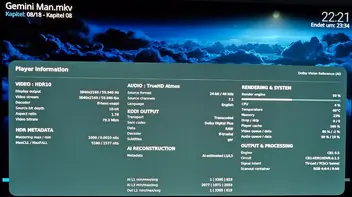
DV 60fps, ~50% GPU load.
I was just wondering: in Win11, the A5 Pro draws 3.9W, whereas in Kodi—even when not playing anything—it draws 12W. Are there no power-saving options enabled in Libreelec-Linux
 ?
-
This is from AI
Thanks for sharing your results! It's awesome to see CroqueMr’s Dolby Vision build pushing 60fps at only ~50% GPU load on the A5 Pro.Regarding that 12W idle draw vs. the 3.9W you see in Windows 11: this is a known quirk with LibreELEC/Kodi on x86 hardware. Windows is incredibly aggressive at putting the AMD APU into deep sleep states when the desktop is static, whereas LibreELEC keeps things a bit more active.
You can definitely bring that 12W idle down without hurting your 60fps playback performance by tweaking a few software settings:
1. Enable Kodi "Dirty Regions" (Highly Recommended)
By default, Kodi constantly redraws the entire user interface at full refresh rate even when you are just staring at a static menu. Forcing "dirty regions" tells Kodi to only render parts of the screen that actually change.
- Create or edit your advancedsettings.xml file in /storage/.kodi/userdata/.
- Add this configuration:
xml
Code<advancedsettings> <gui> <algorithmdirtyregions>3</algorithmdirtyregions> <nofliptimeout>0</nofliptimeout> </gui> </advancedsettings>Use code with caution.
- Restart LibreELEC. This keeps the GPU un-idled less often on menus.
2. Optimize the Linux CPU Governor
LibreELEC sometimes defaults to a high-performance governor, keeping the CPU clocks elevated. You can change this via SSH.
- Check your available governors first:
bash
Use code with caution.
- If ondemand is available, it’s the perfect middle ground. It drops CPU clocks down to save power at the home menu, but instantly ramps them back up to max when you play a movie so your 60fps Dolby Vision playback doesn't stutter. You can test it by running:
bash
Codefor cpu in /sys/devices/system/cpu/cpu*/cpufreq/scaling_governor; do echo "ondemand" > $cpu; doneUse code with caution.
(Avoid locking it to powersave, as the CB1 engine needs CPU power to handle the heavy on-the-fly Dolby Vision metadata processing and it will cause frame drops).
3. Turn on Screen Blanking
Make sure Kodi is allowed to cut the video signal when you walk away. Go to Settings > System > Power Saving and set Put display to sleep when idle to 5 or 10 minutes.
Give the dirty regions tweak a shot first—it usually shaves off a noticeable chunk of that idle wattage!
-
External Content www.youtube.comContent embedded from external sources will not be displayed without your consent.Through the activation of external content, you agree that personal data may be transferred to third party platforms. We have provided more information on this in our privacy policy.
noise reduced by half or less using that pt... thermal, but before you order see how it is without -
Okay I have great news and research for anyone interested in minipcs, and especially the k12
this person did thisQuoteCouldn't stand the fan noises from either K12 fan, but I do have wolf type ears and the K12 is 10-12 " away from me on my desk.
While u/grykom has done magic for the K12 and solved, I think pretty much all the flaws GMKTEC love to put into their mini pcs last several years, I don't have access to 3d printers etc.
You can still do the noctuwich or 2x120mm sandwich mod, I have only had mine for a week but you ditch the metal frame, remove the laptop style blower and top fan and you are left with a large hole on bottom enough for a noctua 120mm fan to blow and cool it well. You can rinse and repeat with another noctua on top.
The only hassle is modding the noctua fan to work with the existing 4 pin micro fan header ( I believe its JST 1.25 or picoblade 1.25) connector to the noctua fan. This way you can use both the existing fan headers and set the bios speeds of cpu and system fan. You do have companies like this here or from here. Just remember to email them and ask for an GMKTEC fan, I think they have to custom it to get it to work.
This is my quick nocuwich mod to give you an idea
ukman6's comment on "Das Originalgehäuse hat mir nicht gefallen, also hab ich eins entworfen und 3D-gedruckt (GMKtec K12)."Explore this conversation and more from the MiniPCs communitywww.reddit.com
the bottom has a circular cut where the fan can push air in
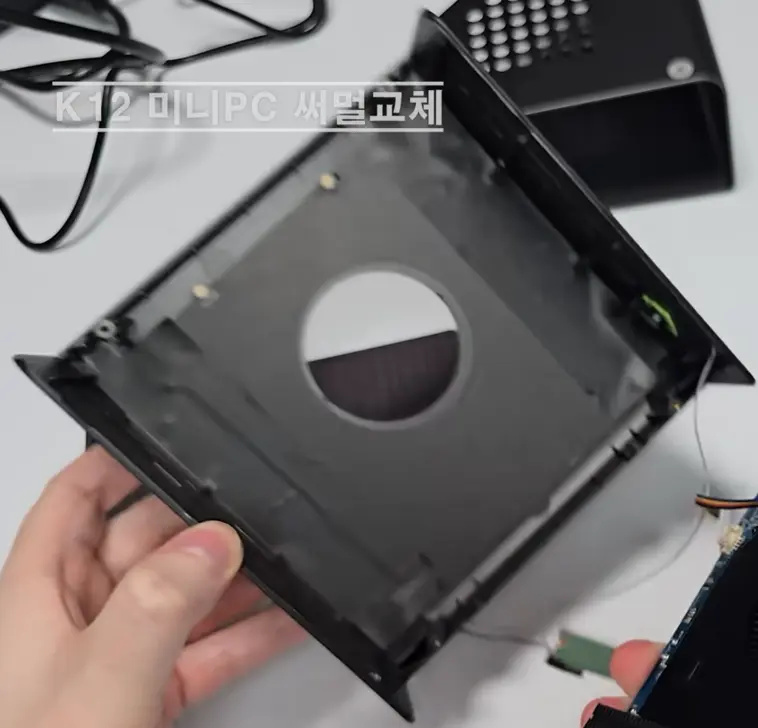
Remove both fans, you need an adapter to connect the fans to motherboard
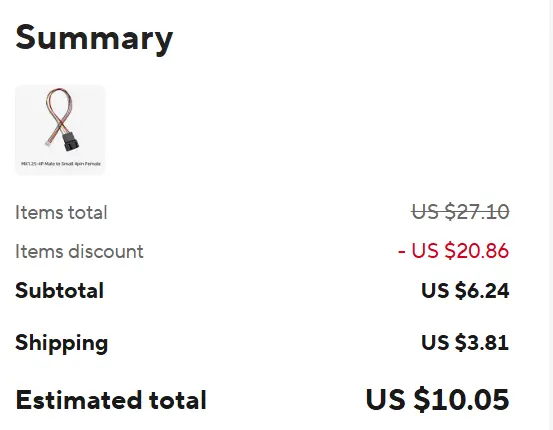
you need two2 Stück 1,25 auf kleines 4-Pin-Stecker- und Buchsenadapter-Kabel für Laptop-CPU-Lüfter, Temperatur- und Grafikkartensteuerung, 1/2 Verlängerungskabel - AliExpress 13Smarter Shopping, Better Living! Aliexpress.comwww.aliexpress.com
Color: D Length 15cm
good news you get two in that listing, with shipping I get it for $10.05
 Quote
Now for the fans, those Noctua are expensive but he does say
For about noise, its silent since its using noctua top end fans a12x25, using original bios since that one has best fan settings with fans i think set to 20/30 percent. It will be hard to hear it really from 1 metre away. You maybe ok with just testing it with LE DV build first since its not that taxing on cpu so maybe bottom cpu fan maybe fine, its the top fan thats annoying but you maybe you can remove it easily. Again if its LE DV it maybe ok with it.Yeah I questioned him about it and he knows of this project, so he's saying even one fan at top might be enough,
but regarding the fan, noctua are expensive so I looked around and
ARCTIC P12 Pro PST
https://www.amazon.co.uk/ARCTIC-P12-Pro-LN-Low-Noise/dp/B0FVXVVL11/ref=sr_1_7?crid=11WH5RDZB991P&dib=eyJ2IjoiMSJ9.datYF361qRAz4SL2ZCEiV4ezxDqc2YPORnm59sWMGk-6Fw7vjsXual2C_8l1udH6gNbHoBCewVsfNXYzHAEuobdNEOqeVM_7V08joW5ki4En8zEeryD9dZ1w689iC9EIeUIGqh8fVV_2hcWRr5mA-s-E5zjEB-wj8DOGawIy3DywsSio4uB7gYcDnK6HZVvQ1RXwVuqCwDZmjHORK7gWNpvphdVX0tJFnfzp6VUtbUo.-xC96ra32vAP6bBmm48OHdMitUsGtJ4FYItc_TF87y0&dib_tag=se&keywords=ARCTIC+P12+pwm&qid=1793713066&sprefix=arctic+p12+pwm%2Caps%2C170&sr=8-7
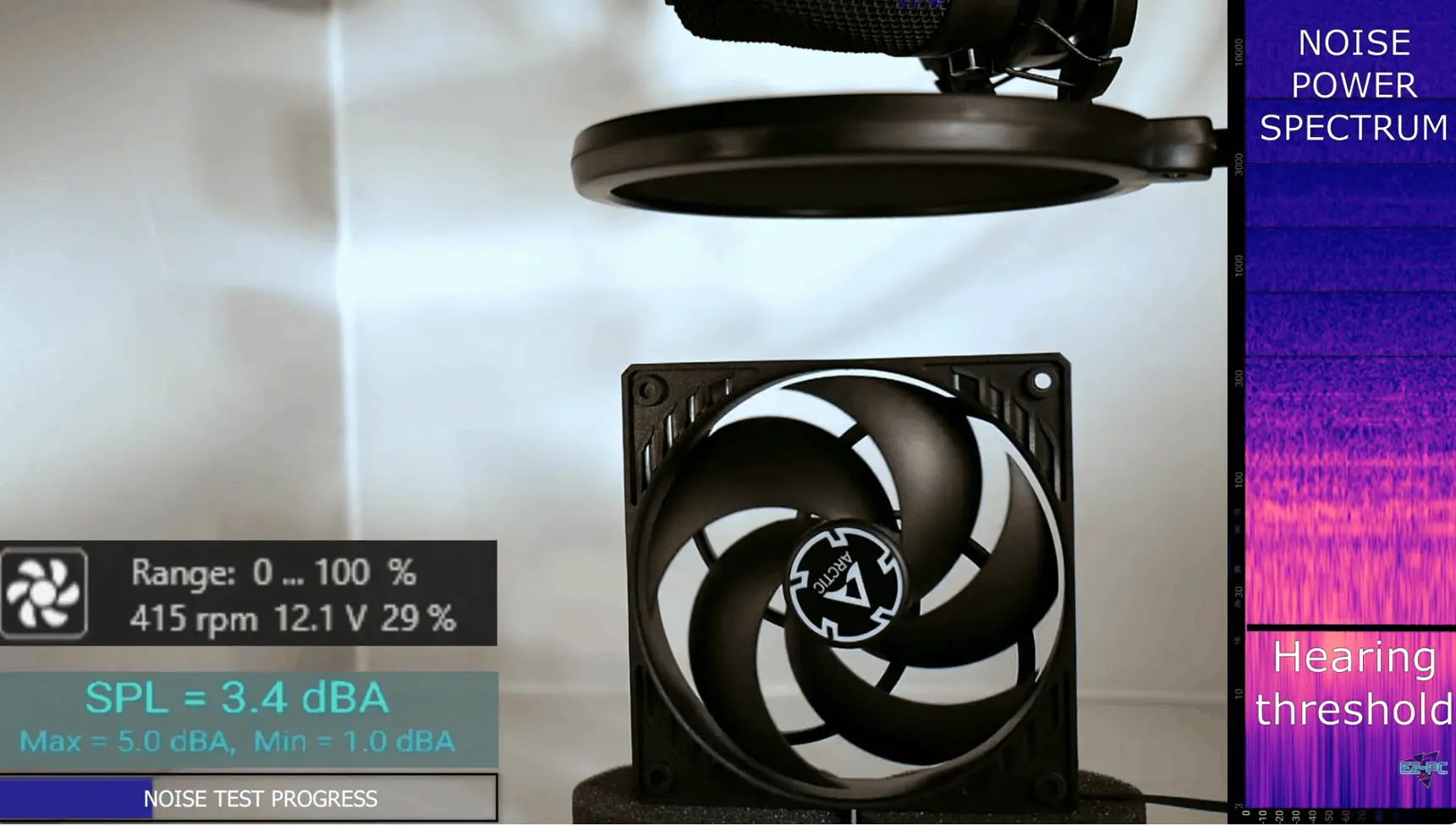
and these will be dead silent, in BIOS you set at 20%-30% (lowest) and that's about 400rpm and this gives you indication at how much noise that gives out
 External Content www.youtube.comContent embedded from external sources will not be displayed without your consent.Through the activation of external content, you agree that personal data may be transferred to third party platforms. We have provided more information on this in our privacy policy.
this is zero modification, you can buy fan guards and feet, but total cost is cheap. you might not even need the bottom fan.
You won't hear 3.4dBA 1 metre away and especially when it's a TV distance.
BIOS can ramp up the fans if it needs to. I don't think the person did the thermal paste change. you'll have a fatter system, but it's a beast! and silent
Display MoreOkay I have great news and research for anyone interested in minipcs, and especially the k12
this person did thishttps://www.reddit.com/r/MiniPCs/comm…nt=share_button
the bottom has a circular cut where the fan can push air in
Remove both fans, you need an adapter to connect the fans to motherboard
you need two
https://www.aliexpress.com/item/100501274…2%21%212%210%21
Color: D Length 15cm
good news you get two in that listing, with shipping I get it for $10.05
Yeah I questioned him about it and he knows of this project, so he's saying even one fan at top might be enough,
but regarding the fan, noctua are expensive so I looked around and
ARCTIC P12 Pro PST
https://www.amazon.co.uk/ARCTIC-P12-Pro…ps%2C170&sr=8-7
and these will be dead silent, in BIOS you set at 20%-30% (lowest) and that's about 400rpm and this gives you indication at how much noise that gives out
External Content www.youtube.comContent embedded from external sources will not be displayed without your consent.Through the activation of external content, you agree that personal data may be transferred to third party platforms. We have provided more information on this in our privacy policy.
this is zero modification, you can buy fan guards and feet, but total cost is cheap. you might not even need the bottom fan.
You won't hear 3.4dBA 1 metre away and especially when it's a TV distance.
BIOS can ramp up the fans if it needs to. I don't think the person did the thermal paste change. you'll have a fatter system, but it's a beast! and silent no custom case needed, no soldering, and at current prices this is a steal -
I have been using Noctua 120mm fans on both the J5040 and the N100 since day one.
Very quiet and temps on max 40C.
-

I have been using Noctua 120mm fans on both the J5040 and the N100 since day one.
Very quiet and temps on max 40C.
you're not using BIOS to set at 20% right? and when you say quiet is that silent or quiet? in later bios updates of k12 , you can set the fan curve to. the fans will only be running at 400RPM. the Noctuas are a beast, but at this level you won't hear on either, and it's 1/4 the price to go with arctic p12. MatteN you got a pic of your minipc?
-
Im using larger chassis like InWin Chopin where the fan fits inside.
-