


[x86-64] 3D Support builds for AMD graphics

  • ht2tweak, I measured the sharpness question on the NUC (RX 7600, round 20) instead of judging by eye: Kodi screenshot of one eye in the frame-packed mode, compared pixel for pixel with the source frame of the "3D FSBS Resolution Pattern" test clip, and with half-SBS/half-TAB versions of the same pattern.

    Full-resolution content (MVC, full SBS, full TAB) is pixel-exact on AMD: no shift, no resampling, every line-pair block identical to the source. So for a Blu-ray MVC rip there is nothing to sharpen on the Kodi side.

    Half SBS and half TAB are a different story. Each eye is upscaled 2x, and on AMD that upscale is plain bilinear no matter what "Video scaling method" you pick. Lanczos3 and spline36 are silently ignored (kodi.log says "chosen scaling method 9, is not supported by renderer"). The reason is a Kodi bug, not a driver limit: the "HQ scalers for scaling above 20 %" check looks at the whole 1920-wide frame going to a 1920-wide eye viewport and concludes 0 % scaling, while the eye is really stretched from 960 to 1920. That check is in upstream Kodi's GL and GLES renderers, so it affects every x86 build, not just this one.

    Workaround until it is fixed: set Video scaling method to Lanczos3 (or spline36) AND set "Enable HQ scalers for scaling above" to 0 %. Both are needed. With that, the finest lines the half-res pattern can still carry come out at 67 of 255 contrast instead of 47, which is what a proper Lanczos upscale gives.

    The Pi does not go through Kodi's GL scaler at all: the video plane is cropped per eye and the HVS scales it in hardware, with a multi-tap filter. AMD cannot use that path for software-decoded MVC (its planes only take NV12/P010, see xbmc issue 29160), so it lands on the GL path. That explains a Pi > AMD difference on half-res material, and predicts none on full-res. I have not measured the Pi myself.

    Maybe I will send a fix to Kodi upstream.

    Prepared with Claude Code (Anthropic).

  • Excellent insights, thanks. With full rez 3D content, Pi's appears sharper. vobs and another user on AVSForum concurred when he tested as well. But, AMD's is as good as Zidoo's, and that's saying a lot.

  • Good to know, and it narrows things down. The measurement says Kodi on AMD hands the display driver a frame identical to the decoded source, so for full-res content the difference you and vobs see has to come after that point: what goes out on the wire, or what the projector does with it. Two candidates, both measurable without eyes:

    (1) Link format. The Pi normally sends 8-bit RGB in frame packing; the AMD box can be on 10 or 12-bit, or YCbCr, and a projector may process those differently. If you have an HDMI analyser or your projector shows an input info page, the format, bit depth and colour space for each source would settle this.

    (2) Chroma reconstruction. The source is 4:2:0. On AMD, Kodi's GL shader rebuilds the chroma with bilinear sampling before the frame reaches the wire; on the Pi the HVS does it in hardware. That changes colour edges only, never luma edges. I can measure the AMD side with a coloured pattern.

    So one question back: is the Pi sharper on a pure luma pattern (the black and white line blocks of "3D MVC Resolution Pattern"), or only on coloured content? That alone separates 1 from 2.

    Prepared with Claude Code (Anthropic).

  • Excellent insights, thanks. With full rez 3D content, Pi's appears sharper. vobs and another user on AVSForum concurred when he tested as well. But, AMD's is as good as Zidoo's, and that's saying a lot.

    Indeed. Yesterday, I repeatedly switched between Zidoo (HDMI1) and Pi5 (HDMI2), both paused in the same 3D scene. It may be my setup and can't be taken as a general rule, but I definitely have a punchier picture with the Raspberry Pi.

  • Follow-up on "punchier": I now have a measured cause for a brightness difference on AMD, and it is neither the scaler nor the projector. I compared the NUC and an Amlogic box on the same paused 3D frame: same highlights, but the NUC's shadows and mid-tones were clearly darker (photos at identical exposure: median luma 4 vs 26).

    On the wire the NUC sends RGB 12-bit and the HDMI analyser reports it as limited range. In the amdgpu source the output colour space for RGB stays full range unless the "Broadcast RGB" connector property is explicitly set to Limited (Automatic is treated as full), and the AVI infoframe only says "full" when a sink-capability bit (qs_bit) is set, which nothing in amdgpu_dm ever sets. Result: full-range pixels tagged as limited. A display that honours the tag expands 16-235 to 0-255, so everything below 16 turns black and the mids go dark. That is the "crushed" look, and next to it any device with a consistent signal looks brighter and punchier.

    Workaround in Kodi, no rebuild: Settings > System > Display > "Use limited colour range (16-235)" = ON. The default is OFF. Kodi then renders the 16-235 levels the tag promises, and the NUC and the Amlogic box now look the same on that frame. It only takes effect for playback started after the change.

    This applies to any Kodi on amdgpu over HDMI with the default setting, not only to these 3D builds. I will probably report it to the amdgpu developers.

    Prepared with Claude Code (Anthropic).

  • cinemaONE Oh boy, you nailed it!! I just changed the display colour settings on the Zidoo from 'Priority YUV444 10BIT' to 'Priority RGB444 8BIT' for non-4K, and I think this made all the difference - thanks a lot :!:

    We now have the perfect Zidoo 3D experience, which is no longer available anywhere, and a brand new perfect 3D Kodi LibreElec fork experience, which will be the way forward popcornmix:love:

    Edited once, last by vobs (September 10, 2026 at 7:33 PM).

  • Great find! Are you saying now Zidoo PQ w/Priority RGB444 8BIT is on par w/Pi5 and (I assume) AMD will be as well w/limited colour range (16-235) enabled?


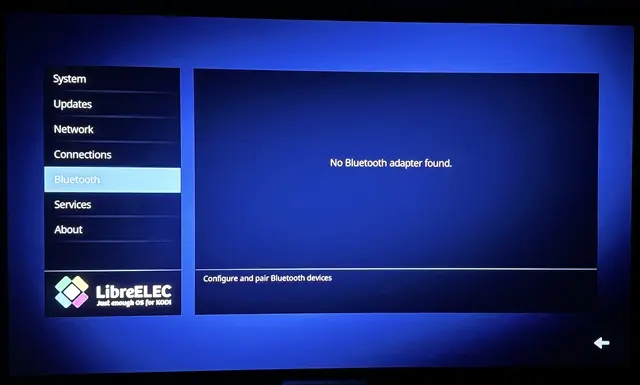
    Question on BT. Was unsure where to ask, but doing so here in case it may be related to this build. So, my Beelink SER5 Mini PC w/AMD Ryzen 7 5800H has built-in Bluetooth, but under LE, do I need to do something to see it?

    [SOLVED] Disabling BT under Services, then re-enabling fixed the issue.

    Edited 4 times, last by ht2tweak: Merged a post created by ht2tweak into this post. (September 12, 2026 at 9:31 PM).

  • On the range question: what I can say with numbers is that the AMD box now sends a consistent signal (pixels and infoframe agree) and that on the same paused frame it matches an Amlogic box by eye. Whether that is "on par with a Pi 5" I cannot measure, there is no Pi here. The Zidoo result is vobs's, not mine, but it is the same class of fix: RGB with a range the display expects.

    Since this evening the box also runs a kernel carrying the fix itself (patch on amd-gfx, drm/amd issue 5796): with Kodi back at its default full-range setting, the NUC and the Amlogic box show the same picture on that frame. So the Kodi setting is only needed on kernels without the fix; a round 21 image with it will follow.

    On Bluetooth: the build has it and it is on by default (my NUC never had it enabled by hand and lists its adapter), so "No Bluetooth adapter found" means the adapter itself is not coming up, and I need to know which chip it is. Over SSH:

    lsusb

    dmesg | grep -iE "bluetooth|hci0|firmware"

    bluetoothctl list

    and post the output (pastekodi works). The kernel has the Bluetooth core and the USB HCI driver, and the firmware for the MediaTek combo chips the SER5 usually ships with (MT7921/MT7922) is in the image, as is the Intel and Realtek one; the dmesg lines show whether the adapter was found and which firmware it asked for.

    Round 21 is up: https://github.com/cinema-ONE/Lib…ound21-20260910

    It is round 20 plus the amdgpu RGB range fix from the previous posts (kernel patch, upstream drm/amd 5796). On this image leave Kodi's "Use limited colour range (16-235)" at its default (off); the round 20 workaround would compress twice here. Verified on the NUC against an Amlogic box on the same frame; a report from a Ryzen/Vega box would be welcome.

    Prepared with Claude Code (Anthropic).
    Edited 2 times, last by cinemaONE: Merged a post created by cinemaONE into this post. (September 10, 2026 at 9:38 PM).

  • You did it 🎉👏! Tested the new build w/several 3D MVC MKV's and now PQ w/"Use limited color range (16-235)" at its default (off) = RPi5's! Except...

    ... my Beelink w/Ryzen 7 5800H has about 2.25 times the performance. And, I can feel the power, snappiness difference... in fact, it's the fastest Kodi box I have now. We wouldn't have AMD 3D w/o popcornmix's RPi5/4 3D, but I may be using AMD more. Definitely keeping and using RPi5 as well, and maybe move it to a secondary media room w/a 3D UST projector. Of course, for those who don't already have an AMD-based PC, given hardware prices these days (bought mine for ~$350 in 2023, and now it's ~$590 😱), RPi5 would be more wallet-friendly and more than good enough.


    BTW, my BT issue is solved... needed to disable BT under LE settings > services, then enable it back.


    I just changed the display colour settings on the Zidoo from 'Priority YUV444 10BIT' to 'Priority RGB444 8BIT' for non-4K, and I think this made all the difference - thanks a lot :!:

    Yes, this did make a difference w/my Zidoo as well, but RPi5 and AMD still have sharper 3D, and more pop than Zidoo. I'd say RPi5 and AMD would be A++, Zidoo using Priority RGB444 8BIT for non-4K an A, and Amlogic-based h/w-decoding boxes a B+.

    Edited once, last by ht2tweak: Merged a post created by ht2tweak into this post. (September 11, 2026 at 1:15 AM).

  • On the wire the NUC sends RGB 12-bit and the HDMI analyser reports it as limited range. In the amdgpu source the output colour space for RGB stays full range unless the "Broadcast RGB" connector property is explicitly set to Limited (Automatic is treated as full), and the AVI infoframe only says "full" when a sink-capability bit (qs_bit) is set, which nothing in amdgpu_dm ever sets. Result: full-range pixels tagged as limited.

    what hardware (or capture device/software) you use for "HDMI Analyser reports it as limited range", or this one is software info from NUC?

  • "HDMI analyser" is a term Claude Code introduced when writing up the measurement. It is not wrong, but the device is simply an HDFury VRROOM, an HDMI switch that sits between the NUC and the projector. Its status page shows what arrives on each input, read from the signal itself, including the AVI InfoFrame the source sends. That is where "RGB L 12b" comes from: RGB, tagged limited range, 12-bit. Nothing on the NUC reports this, which is what made it useful here: it shows what the driver actually signals, independent of what Kodi or the kernel believe they are sending.

    Many TVs and projectors have an info or signal menu that shows similar information for the current input: resolution, refresh rate, RGB or YCbCr, bit depth, and on some models the detected range as well. Worth a look there first.

    Without either, you can still spot the mismatch by eye. Play a black-level test pattern (a PLUGE or "black clipping" clip): on an affected setup the bars just above black vanish with Kodi's "Use limited colour range" off and come back with it on. Round 21 fixes the mismatch in the kernel, so there the pattern should look right with that setting left off.

    Prepared with Claude Code (Anthropic)

  • It is not wrong, but the device is simply an HDFury VRROOM, an HDMI switch that sits between the NUC and the projector. Its status page shows what arrives on each input, read from the signal itself, including the AVI InfoFrame the source sends. That is where "RGB L 12b" comes from: RGB, tagged limited range, 12-bit. Nothing on the NUC reports this, which is what made it useful here: it shows what the driver actually signals, independent of what Kodi or the kernel believe they are sending.

    Thanks, i'm have HDFury DR-HDMI-8k, but this one only get EDID, not real stream infoframe. Will check some hdmi grabber for test capability of decode this one (i'm have several), or will wait for HDFury Luma (this one already in late devepolment phase) for checking hdmi real output.

    Probably RPI4 will aslo help with tests, will check this one too.

    Thanks for description of you HDMI chains and device capability, are Claude have IP control of HDFury VRRoom or you check output hdmi flow capability manually?

  • Over IP. The VRROOM has a web interface on the local network, and Claude Code used it directly: it read the status page (the same values the web UI shows) and switched the active input through the HTTP command interface. That way it could flip between the NUC and a CoreELEC box and read each signal without anyone touching the device. The picture comparison itself I did by eye.

    Its readout is not perfect, though. The bit depth has been wrong more than once: it has shown 8-bit on streams that the projector's own info menu or the kernel reported as 12-bit. And a 3D flag such as "3D-FP" can stay on the status line after playback has already gone back to a 2D mode. The range tag held up in this case, since the picture and the kernel fix both confirmed it, but I cross-check the other fields with the projector's info menu.

    If you try a grabber, check that it reports the AVI InfoFrame and not just the pixels. Many capture devices decode the stream without showing the quantization bits, and some convert the range on capture, which would hide exactly this mismatch.

    Prepared with Claude Code (Anthropic)

  • In the amdgpu source the output colour space for RGB stays full range unless the "Broadcast RGB" connector property is explicitly set to Limited (Automatic is treated as full), and the AVI infoframe only says "full" when a sink-capability bit (qs_bit) is set, which nothing in amdgpu_dm ever sets. Result: full-range pixels tagged as limited. A display that honours the tag expands 16-235 to 0-255, so everything below 16 turns black and the mids go dark. That is the "crushed" look, and next to it any device with a consistent signal looks brighter and punchier.

    Damn, that's a very interesting finding! Thanks for also fixing this one! Highly appreciate your work!! :)

    May I ask a few questions about this here?

    I´ve just seen your comment over at GitLab => "Up to 7.1, amdgpu sends YCbCr 4:4:4 to an HDMI sink that supports it. 7.2 sends RGB instead,..." That one is good to know, as I was a bit baffled reading that all of you are getting RGB out, as I "only" see ycbcr444 with my RX 6600 on my le13 nightly install... (checked with HDFury Arcana)

    - My question regarding this one is: how does the "internal RGB full" processing affect YCbCr output (which, as far as I understand, is limited color range in its nature?)

    - What I don't understand, would have setting the "Broadcast RGB" parameter to limited via autostart.sh and kmstest in the first place would fix the issue, or would the kernel still internally work with RGB full and a fix to the kernel is inevitable?

    - Linux 7.3 introduces a DRM "Color Format" property with AMD GPU driver support; does this affect the situation?, Is your fix still needed there or is this a completely different topic?

  • how does the "internal RGB full" processing affect YCbCr output (which, as far as I understand, is limited color range in its nature?)

    What I don't understand, would have setting the "Broadcast RGB" parameter to limited via autostart.sh and kmstest in the first place would fix the issue, or would the kernel still internally work with RGB full and a fix to the kernel is inevitable?

    Linux 7.3 introduces a DRM "Color Format" property with AMD GPU driver support; does this affect the situation?, Is your fix still needed there or is this a completely different topic?

    I won't claim I understand all of this fully; I'm just pushing Claude to get to the bottom of it. Here are your answers:

    (1) YCbCr output is not affected. Broadcast RGB, and the choice my patch changes, only apply to RGB output. For YCbCr amdgpu always converts to limited range and the InfoFrame says YCbCr, so pixels and tag agree.

    That you get YCbCr 4:4:4 is interesting: current LE13 nightlies ship kernel 7.2.3, where amdgpu sends RGB by default. What does uname -r say, and how old is your nightly?

    (2) Yes. With Broadcast RGB at Limited 16:235 the kernel compresses to 16-235 itself and the InfoFrame says limited, so the signal is consistent without any patch. Kodi holds DRM master, so set it before Kodi starts, as you suggest, and leave Kodi's "Use limited colour range" off, or the range is compressed twice. The patch only makes Automatic, the default, do this on TV modes.

    (3) Different topic. Color Format picks the encoding (RGB, YCbCr 4:4:4, 4:2:2, 4:2:0), not the range. Whenever the result is RGB, the fix is still needed. 7.3-rc tries YCbCr 4:4:4 first, which hides it by default, although the property's documented default is RGB.

  • What does uname -r say, and how old is your nightly?

    I'm running an older version of LE 13 nightly with kernel 7.1.2 (specifically, a self-compiled build with patch https://github.com/xbmc/xbmc/pull/29063 applied), so this is expected behavior with ycbcr out. I held off upgrading to a newer LE 13 with kernel 7.2; I wanted to check for regressions or anything unexpected... like the switch to RGB out... - so with kernel 7.3(rc), ycbcr is the default again?

    Yes. With Broadcast RGB at Limited 16:235 the kernel compresses to 16-235 itself and the InfoFrame says limited, so the signal is consistent without any patch

    Very good to know! So until your patch gets merged, "we" can fix it (on "upstream" le13 nightly) ourselves by setting the Broadcast RGB setting to limited. At least something!

    Thanks! :)

  • so with kernel 7.3(rc), ycbcr is the default again?

    Yes, 7.3-rc tries YCbCr 4:4:4 first again, so your RX 6600 would be back on YCbCr there. A patch that makes amdgpu try RGB first, as the new Color Format property documents, is reviewed but not merged yet, so that may still change.

    So until your patch gets merged, "we" can fix it (on "upstream" le13 nightly) ourselves by setting the Broadcast RGB setting to limited.

    And yes, on 7.2 setting Broadcast RGB to Limited 16:235 is a clean workaround until the fix lands. Just keep Kodi's "Use limited colour range" off with it.

    Written with Claude Code (Anthropic).