

Builds on first page updated with improvements for menus and switching to 3D.

[RPi] 3D Support builds
-
popcornmix -
July 31, 2026 at 7:35 PM -
Thread is Resolved
-
-

I tried your Pi4 build it with a spare Raspberry Pi 4B 8GB and basically everything worked. Compressed FSBS files (3840x1080) were being processed on the fly and sent as frame-packed. However, as soon as I tried larger 3D MVC rips with higher bitrates of about 42–48 Mb/s, there was severe stuttering during playback. I switched from SMB to NFS and tried various tweaks in Kodi and LibreELEC, but nothing helped. Eventually, I gave up. I think the RP4's hardware is not powerful enough. Should I try again with an RP5?
Yes, MVC is pushing Pi4. You could try overclocking (the arm) but it may not be enough.
I think Pi5 will be fine with these files.
-
Can someone recommend a skin that looks nice and is compatible with Piers that isn't quite as plain jane as Estuary, seems to be a lot of issues with the included skins. I know kodi is super constumizable I used a great skin years ago, Not sure if its still active. that was fanstastic. Just looking for something with a bit more eye candy at this point. thanks.
-
If you want something efficient that just works and doesn't have the issues: use Estuary. If you want eye-candy and a slower GUI experience and issues: install other skins. I'm probably being mean to some skinner who slaves thousands of hours on their skin project, but 15+ years of Kodi (orig. XBMC) use has taught me that lesson

-

If you want something efficient that just works and doesn't have the issues: use Estuary. If you want eye-candy and a slower GUI experience and issues: install other skins. I'm probably being mean to some skinner who slaves thousands of hours on their skin project, but 15+ years of Kodi (orig. XBMC) use has taught me that lesson
I have been using Kodi since it was XBMC on the xbox classic. I appreciate your comments, but with all due respect Kodi is completely about customization and local media treatment. I have been away for about 2 years while using Plex basically. But I do share the love for more local control over media that kodi gives. Having a love for 3D , i am re-exploring kodi. Was just looking for the some of the best options for Piers support and a skin that enriches the experience. Estuary is fine. So is confluence but they live a little to be desired for those wanting more.
-
refreshed and experimented with a few commands in libreelec. Had to use ai a bit to refamiliarize myself with kodi via linux. Two commands that work really well during testing were
alt S to bring up settings when skins are broken due to piers 22 builds. and skin shortcuts v3.
The other is "systemctl restart kodi" or "reboot" via ssh. Those kept me out of trouble. Easier than editing the config back to the default estuary skin.
next step, since i am only testing and have not inserted this in my avr chain, I just have the Pi 5 connected to the valerion projector. Sound through the speaker wasnt really doing it for me. While it is not atmos, and no I dont use ARC, I was able to set up BT pairing with the projector to my Denon AVR ....albeit since its a much older denon avr3300w i had to compensate the BT delay in kodi to 1.5 ahead give / take. I set it as default for sync and everything is near perfect now. Turned off ARC> and the shield remote volume works via PCM to the BT speaker. All seems to be working well on that front. I have restarted kodi, rebooted kodi, played atmos streams, dts-hd , truehd, dolby eac3 5.1 etc. Everything syncs at 1.5 with passthrough turned off. A unique situation but helps in testing. I swear the pi5 libreelec video output is better than the shield sans dolby vision. HDR10, 1080p, its sharp. and its pretty easy to see on a projector at 120"
I am looking forward to the next build and where how this progresses forward.
-
With the new build, this doesn't show up at all:
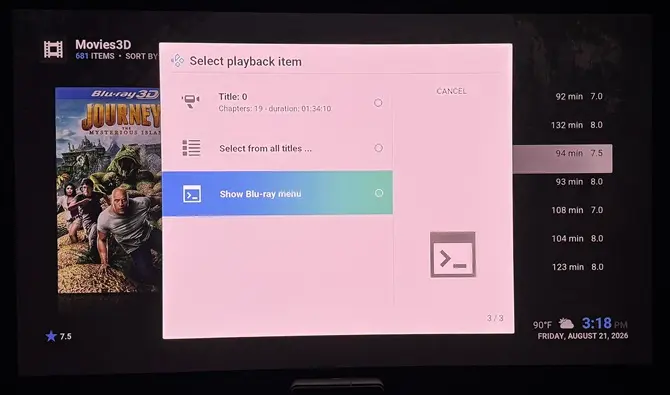
It goes straight to the main title, which does play fine framepacked (full over/under). There's no 'DVD Menu' option in the OSD either.
-

With the new build, this doesn't show up at all:
It goes straight to the main title, which does play fine framepacked (full over/under). There's no 'DVD Menu' option in the OSD either.have you gone into media player and checked show playback menu vs play item. I think that is what it is called. It could have been toggled somehow while testing or building the package for kodi
-
With the new build, this doesn't show up at all:
It goes straight to the main title, which does play fine framepacked (full over/under). There's no 'DVD Menu' option in the OSD either.
Really? If I select an ISO file I see the (usually) 3 item menu with "Show Blu-ray menu" last.
As nc88keyz says, my suspicion would be on settings/player/discs/Blu-ray playback mode - mine is set to "Automatic menu selection" - "Play main movie" would have the symptom you see.If you still have a issue then a debug log may help.
-
Really? If I select an ISO file I see the (usually) 3 item menu with "Show Blu-ray menu" last.
As nc88keyz says, my suspicion would be on settings/player/discs/Blu-ray playback mode - mine is set to "Automatic menu selection" - "Play main movie" would have the symptom you see.If you still have a issue then a debug log may help.
I set mine to play main movie because i dont care for the menus, and same as disc, and it still prompts the automatic menu selection. context menu , that is screengrabbed above. What gives. No matter what settiing the menu still pops up. I am not sure now what has been changed.
-

I set mine to play main movie because i dont care for the menus, and same as disc, and it still prompts the automatic menu selection. context menu , that is screengrabbed above. What gives. No matter what settiing the menu still pops up. I am not sure now what has been changed.
I've just tried "Play main movie" and selecting the iso plays the movie.
I've just tried Automatic menu selection" and selecting the iso plays the gives me the menu of choices.
Can you enable debug logging, restart, and provoke the wrong behaviour and I'll see what's different to mine.
-
Yes, MVC is pushing Pi4. You could try overclocking (the arm) but it may not be enough.
I think Pi5 will be fine with these files.
Sourced a Pi5 and tried it again. The MVC stuttering has basically gone. But there is something else: not exactly a stuttering, but here and there a slight shift in the image (I can't describe it any better; it's close to a very short stuttering, only happens once every 30 to 60 seconds. And only noticeable in scenes with little to no movement.
-
Sourced a Pi5 and tried it again. The MVC stuttering has basically gone. But there is something else: not exactly a stuttering, but here and there a slight shift in the image (I can't describe it any better; it's close to a very short stuttering, only happens once every 30 to 60 seconds. And only noticeable in scenes with little to no movement.
Might need a better description to understand.
Is it a frame drop/repeat? (although they are normally only visible in scenes with movement, like panning)
Or is a lateral movement (like a frame shifts up/down/left/right occasionally)?
Does it only apply to 3D/MVC? If you choose watch as 2D on a 3D/MVC file do you still see it?
-
Might need a better description to understand.
Is it a frame drop/repeat? (although they are normally only visible in scenes with movement, like panning)
Or is a lateral movement (like a frame shifts up/down/left/right occasionally)?
Does it only apply to 3D/MVC? If you choose watch as 2D on a 3D/MVC file do you still see it?
Thanks. First, I must correct myself: it's not just about higher bitrates; it's about the 3D mode in general.
The jutter is more like a lateral movement. It occurs in every situation where 3D is activated (frame packing?). Even when paused! See: https://youtu.be/MGxT68APm8U. Sometimes it plays fine for 30 to 60 seconds without a jutter.
Very strange is that these errors are also present when I disable the Stereoscopic 3D mode in Kodi (so that the film plays in 1080p side-by-side mode) and manually put my projector into SBS 3D mode (with the resulting loss in resolution).
I literally can only play 2D movies without those errors. My projector is a unit from the good old days with 144 Hz triple flash 3D (SIM2 Nero 3 Plus). I think the current version of LibreElec on the Pi5 does not yet work with older HDMI 1.4a 3D projectors.
-
A longer video would be useful. 1s is too short (and really annoying to watch in YouTube where it keeps switching to another video…)
I’m suspecting that’s more like a decode error than a 3d error.
Does the glitch occur at the same timestamp every video?
Have you tried multiple videos?A sample would be useful. e.g. cut a 1 minute chunk, confirm your can see the issue with it and then upload to google drive (or similar).
-
As nc88keyz says, my suspicion would be on settings/player/discs/Blu-ray playback mode - mine is set to "Automatic menu selection" - "Play main movie" would have the symptom you see.
If you still have a issue then a debug log may help.
Debug and crash logs. These are for the two full 3D ISO's ('3D Rarities' vol1 and Vol2 discs) that showed 'Select playback item' options w/the previous build, and I could then choose 'Show Blu-ray menu' that now don't... they both go straight into the main title and play it. I did/do have 'Automatic menu selection' enabled under Player settings. It seems to be the default anyway. See video demo1 on what's happening. (YT stupidly tagged this one as 'Viewable by 18+'; hope it's viewable)
Please LMK if you need me to enable component level debugging as well w/any or all of these?
- FFmpeg
- Audio
- Video
- Audio/Video timing
- Windowing
- Bluray
In Player settings, if I choose 'Show Blu-ray menu', I do get the Blu-ray menus for both ISO's... but, choosing any title to play results in them playing in weird side-by-side mode. See video demo2 for what I mean.
What's strange is that I tested a couple more full 3D ISO's, again with 'Automatic menu selection' enabled under Player settings, and the 'Select playback item' and actual Blu-ray menus worked well... for the most part. Video demo3 of other 3D ISO's, one fine, other with an issue.
-
Thank you for making this fork

I was wondering if you have any plans of adding support for rendering the subtitles at the dynamic depth according to the 3D-plane they are assigned when playing a 3D Blu-ray? Instead of just the static value you set in the Kodi settings. -

Thank you for making this fork
I was wondering if you have any plans of adding support for rendering the subtitles at the dynamic depth according to the 3D-plane they are assigned when playing a 3D Blu-ray? Instead of just the static value you set in the Kodi settings.Can you provide a sample file that includes varying depth in the subtitles?
-

