

Please try uploading the log from the LibreELEC settings this way:
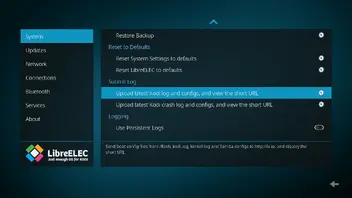
This is completely equivalent to the pastekodi command.

Please try uploading the log from the LibreELEC settings this way:
This is completely equivalent to the pastekodi command.
Please try uploading the log from the LibreELEC settings this way:
This is completely equivalent to the pastekodi command.
Done. Says "Log files pasted to https://paste.libreelec.tv/saving-sawfly.log"

Done. Says "Log files pasted to https://paste.libreelec.tv/saving-sawfly.log"
The installation wizard probably didn't complete properly, or this USB flash drive is also junk. The log is full of entries saying that the ssh key generation failed, so it tries again, but it can't be written.
There would be a workaround, but the easiest is to rewrite the image to the flash drive and start over. However, the toothpick method is not necessary again.
The installation wizard probably didn't complete properly, or this USB flash drive is also junk. The log is full of entries saying that the ssh key generation failed, so it tries again, but it can't be written.
There would be a workaround, but the easiest is to rewrite the image to the flash drive and start over. However, the toothpick method is not necessary again.
dtech - Redid the flash drive and SSH works! here's the log: https://paste.libreelec.tv/natural-giraffe.log
So what is the next step to get the remote to work? dtech
So what is the next step to get the remote to work? dtech
Last time we were here, this hadn't happened yet:
If you are ready with that, please press a few buttons on the remote control, then run the pastekodi command via SSH and copy the generated link here.
You will not see any changes on the screen, but the following lines that are important to me will appear in the log:
kernel: remote: Wrong custom code is 0xHEXACODE
And please don't post twice in a row, because I only get notified about the first one, and that's more than enough.
dtech - i did the pastekodi after pressing buttons on the remote. Then i provided the link output. What do i do next to get the remote to work?
dtech - i did the pastekodi after pressing buttons on the remote. Then i provided the link output. What do i do next to get the remote to work?
Where is the link?
The previous one doesn't show any key press event, and the first one was almost full of sshd errors. Apart from that, you don't need to do anything else for now, I'll try to find a compatible remote control config for you.
But for this I need that log, which contains at least one line like this:
kernel: remote: Wrong custom code is 0xHEXACODE
Where is the link?
The previous one doesn't show any key press event, and the first one was almost full of sshd errors. Apart from that, you don't need to do anything else for now, I'll try to find a compatible remote control config for you.
But for this I need that log, which contains at least one line like this:
kernel: remote: Wrong custom code is 0xHEXACODE
https://paste.libreelec.tv/natural-giraffe.log is the link.
I did it again and it says "link already exists". Does that mean I need to start over again?
https://paste.libreelec.tv/natural-giraffe.log is the link.
I did it again and it says "link already exists". Does that mean I need to start over again?
Just because you send the same link again doesn't mean it will includes the line I need...
Although I haven't studied the algorithm that generates the upload link yet, so chewitt will confirm or refute my theory: "link already exists" probably just means that the quasi-randomly generated link already exists, in which case you just need to run this command again because someone has already received the same link before.
I'm trying to help you, but the fact that we're not moving forward, or only making very small steps, is starting to get a little tiring.
Just because you send the same link again doesn't mean it will includes the line I need...
Although I haven't studied the algorithm that generates the upload link yet, so chewitt will confirm or refute my theory: "link already exists" probably just means that the quasi-randomly generated link already exists, in which case you just need to run this command again because someone has already received the same link before.
I'm trying to help you, but the fact that we're not moving forward, or only making very small steps, is starting to get a little tiring.
We're just dealing with normal hiccups. I'll redo it tonight and we'll try again. I appreciate the help!
you just need to run this command again because someone has already received the same link before.
Correct.
dtech - looks like it worked this time! I see that error in there several times (likely for each button I pressed). https://paste.libreelec.tv/cheerful-boxer.log
dtech - looks like it worked this time! I see that error in there several times (likely for each button I pressed). https://paste.libreelec.tv/cheerful-boxer.log
I created a configuration based on the layout, most of the buttons are functional, but most of the special buttons above are not defined in it.
Please extract the attachment, then open the following UNC path and copy the remote.conf file here:
\\10.0.0.11\Configfiles (If your box currently has a different IP address, you should obviously replace that part.)
Then restart the box and try the config, then report back whether it is working or not.
I created a configuration based on the layout, most of the buttons are functional, but most of the special buttons above are not defined in it.
Please extract the attachment, then open the following UNC path and copy the remote.conf file here:
\\10.0.0.11\Configfiles (If your box currently has a different IP address, you should obviously replace that part.)Then restart the box and try the config, then report back whether it is working or not.
Do i paste it there using SSH? Not sure what the commands are
Do i paste it there using SSH? Not sure what the commands are
File transfer doesn't work with PuTTY, if you want to transfer files over SSH, you need WinSCP.
Edit: Here's an alternative solution for SSH, because it seems LE forum allows to download attachments without logging in.
File transfer doesn't work with PuTTY, if you want to transfer files over SSH, you need WinSCP.
Or use the "MobaXterm", can do both, SSH terminal and file transfer at the same time. 
Sorry for off topic...
Ran into a couple of hiccups.
1. Did the alternative solution from dtech - worked like a charm, but some of the buttons didn't work on the remote. I figured it might be because I didn't press all of them before doing the "postkodi" command and it might be difficult to get the right calibration without all of the inputs.
2. I also noticed that my Kodi screen is "cut off". it's like it's zoomed in too much or stretched out and I need to bring it back into scope.
3. I installed OpenWizard and tried to restore my previous backup, but it failed. I checked the log and it said due to insufficient memory. So I started over with a much bigger flashdrive, pressed every button on the remote, and did the paste Kodi.
The new file is at https://paste.libreelec.tv/one-lemur.log
I appreciate your help with troubleshooting this!