[x86-64][hadesdevls Builds] LibreELEC Hades - native Dolby Vision, HDR10+ and 3D

  • hadesdevls  CroqueMr

    Tried one last time before going to sleep, finally got Hades to start and this time I got a message in the black void window:

    systemd[1]: iptables.service: Failed with result 'exit-code'

    after that I got the message that my main monitor will be disabled and it will switch to the HDMI output, which is the correct thing to happen and I was able to use Hades normally as before.

    I have no idea if that message is in any way related to why all my other starts with Croques RC2 or Hades RC5 failed, but for some reason it worked this time.

    Sadly I didn't get a debug output for the failed startup, but now with a succesful startup it finally wrote log files.

    Hades has got my debug zip in another issue for my USB dongles for my mouse & keyboard, so maybe there could be a hint on that startup problem. https://github.com/hadesdevls/LibreELEC-Hades/issues/13

  • hadesdevls  CroqueMr

    I think I might know the culprit now that makes the start-ups sporadic (not impossible, but sporadic)

    It seems like LibreELEC get hung up on my dedicated PCI soundcard. I have disconnected it and now the start-ups are consistent.

    Both versions show now zero problems with starting, since I removed the PCI soundcard.


    CroqueMr the problem with the Wifi mouse and keyboard extend to your version too sadly.

    For some reason with LibreELEC the distance to where they both work away from their USB-dongles is severely reduced compared to Windows 11. I have to put the mouse like 1-2 meters close to the dongle for it to work fine in LE, any idea why that could be?

    One is for the Keychron M5 8K
    and the other is for a generic cheap Rii keyboard
    Both are used with their Wifi signal.

    P.S. Oh and also the mouse worked pretty fine(not great but fine) in the setup menu in the beginning of the very first start, but as soon as it's in the main menu the outages begin.

    Edit: could it be that the USB dongle or devices in general are being run in some low powered mode to save energy or something?

    Edited once, last by Khazar (November 2, 2026 at 5:31 PM).

  • Khazar I've been experimenting similar issues with Nvidia SHIELD Remote, connected by bluetooth with an excellent range in my case, since my Asrock B660 ITX/AC uses antennas for both wifi and bluetooth. In my particular case, the remote pairs but then, it disconnet and connect continously, without any pattern, it's imposible is a problem with any kind of suspend mode y continuosly click buttons on the remote.

    I also tried with a ASUS dongle to discard a incompatibility of the Asrock mother board Intel controller. No luck, same problem.

    NVIDIA SHIELD Remote is particulary interesting since it integrates a IR too, so I can make volume on my a/v receptor works at the same time bluetooth works for the rest, you need SHIELD also to first programm that.

    I'm desesperante with theee disconnetions.

  • Indeed, disabling "Adjust display refresh rate" allows DV output to work. However, connecting the PC directly to the display doesn't change anything—DV output still fails when "Adjust display refresh rate" is ON.

    Thank You!

    sat4all Thanks for the logs with the PC straight to the TV. They show the same thing as through the Denon: at 3840x2160 23.976 Hz the driver wants its own HDMI vendor InfoFrame for the mode and turns down the Dolby Vision frames (275 times there), so the receiver is not the cause. I said before that the EDID of the Denon was why the driver picked the HDMI VIC; with the TV directly it picks it too, so that part was wrong. The fix stays the same: the mode goes in the AVI InfoFrame instead, which leaves the vendor InfoFrame free for Dolby Vision. It is in the next version.

    Khazar Thanks for the diagnostic and for finding the sound card. I answered on GitHub, in #13 and #14: a quick test for the receivers, a firewall problem the log showed, and a question about the card.

  • LibreELEC Hades 1.0 RC6 is out

    Download and release notes: v1.0-rc6 on GitHub

    Dolby Vision and HDR

    • "Dolby Vision output (this video)" applies while the video plays, for HDR10 and HDR10+ videos too, and is kept for each file.
    • For a video that has both Dolby Vision and HDR10+, a setting chooses which one is sent.
    • The content mapping v4.0 as a setting, with "Version 2.9 only" for a TV that shows a wrong picture with v4.0.
    • For projectors: Low-Latency mapped to a peak, colours and black set by hand, a limit on the luminance that HDR10 tells the display, and HDR10 and HDR10+ mapped to the display in the player.
    • Dolby Vision sent as HDR10+ version 1 carries DistributionY99 and DistributionY100nit as they are defined, and HDR10+ sent as Dolby Vision measures the scenes that come without statistics.
    • HDR10 through the HDMI port of Intel HD and UHD 6xx graphics goes out as Dolby Vision where the TV takes it.
    • Menus over Dolby Vision cost less GPU time on light graphics, with the same bytes sent.
    • Dolby Vision also with a long "Delay after change of refresh rate", Dolby Vision in two tracks a constant apart, and a more exact IPT tunnel.

    Display and HDMI

    • A TV switched off and on in a 4K mode at 50 or 60 Hz, or one that goes by FRL, gets its picture back on NVIDIA and AMD.
    • Limited colour range is compressed once, by the driver, on Intel, AMD and NVIDIA.
    • The HDMI patches of big-fella from YBLOD for Intel and AMD: short drops of the hot-plug signal held, the TV told that the source is a player, and a black background on Ryzen with Vega graphics.
    • On NVIDIA: Dolby Vision in the 4K modes that the driver names by their HDMI VIC (also with driver 580), three buffers for the window, and a change of resolution on an HDMI port driven through DisplayPort.
    • A change of mode that the driver refused is asked for again, and whole-number multiples of the frame rate can be kept under the whitelist.
    • An EDID extension block that is not valid is skipped, the same in Kodi and in the kernel.

    Subtitles, files and sound

    • Picture subtitles (PGS and VobSub) can be resized, moved and dimmed, from the pull request of cinemaONE to Kodi.
    • Text subtitles come back after a seek, also when the line started before the place the player reads from.
    • Editions of Matroska files, as an option.
    • Dialogue normalisation at 0 dB in passthrough, the compression of Dolby Digital in the audio settings, the centre level and the LFE up to 300 % for a downmix, and audio settings that apply during playback.
    • The player information says more of the sound (the bed and objects of Atmos, the dialogue level), and kodi.log says why a stream is not passed through.
    • CEC fixes for Pulse-Eight adapters.

    Interface
    A dialog that does not finish closing no longer leaves Kodi ignoring the remote and the keyboard, the settings window no longer saves the mode of a video as the resolution of the interface, and only what changes is drawn again when the focus moves in a list.

    A new boot menu
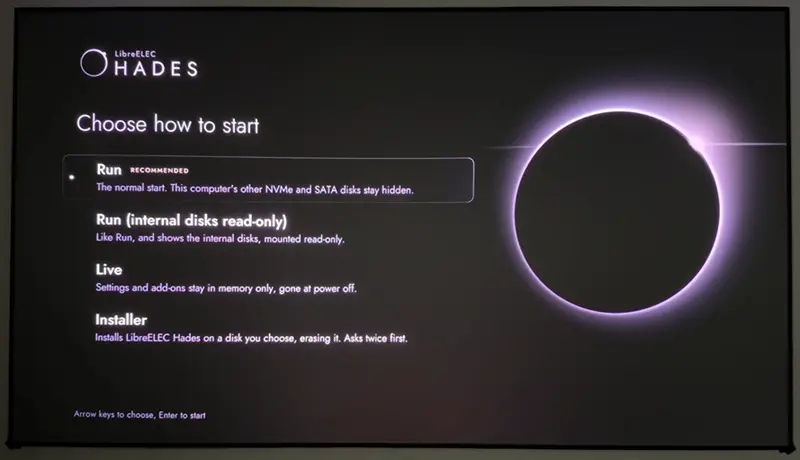
    Drawn for LibreELEC Hades: the eclipse of its mark on black, and the four entries, each with a line that says what it does: Run (recommended, first, starts by itself after 10 s), Run (internal disks read-only), Live and Installer. With several displays connected, the notice that Kodi uses one of them is now a picture on the start screen.

    Blu-ray
    Blu-ray playlists played directly keep one timeline across their seamless joins, so a film with several cuts no longer freezes or skips at each join. Menus are kept apart from subtitles, a 3D display can be simulated for discs that need one, 3D subtitles keep their depth, and movies on discs are kept right in the library.
    Blu-ray Java menus now play with nothing to install, in a service of the system, never inside Kodi: one process for each disc, with the Java runtime that comes with the image, a user of its own without privileges, a filter of system calls and no network, reading the disc only through Kodi. The idea of Java menus with nothing to install comes from the build of CroqueMr; the service that isolates them is written for Hades. BD-Live is there as an option, off by default, and with it the menus reach the Internet and nothing else: never this machine or your home network.

    Also: a diagnostic that keeps the log of a start that hung and filters the names of your drives and folders, a firewall that no longer stays open on a damaged setting, the Dolby Vision module of Kodi now under GPL-2.0-or-later, Linux 7.3.1, the latest of the Piers branch of Kodi, and many fixes from upstream.

    What is new in RC6 has not been tried on hardware yet, so reports in the issues are very welcome.

    What is new in this version is written for Hades, apart from the code of others that it takes, which keeps its author. Several features follow ideas seen in other builds, written anew here: from the build of CroqueMr, the CoreELEC builds of pannal (p3i), avdvplus and SamuriHL, matthane, YBLOD and Sebastiii. Thanks to them, to quietvoid and cinemaONE for definitions and measurements, to everyone who reported in the issues and here, and to the LibreELEC and Kodi teams.

  • hadesdevls

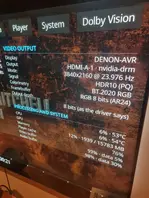
    Thanks to 1.0 RC6, the GTX 1060 issue is resolved, and DV works as expected at all refresh rates. The only issue remaining is that the HDR output signal is 8-bit rather than 10-bit.


    Really appreciate your fantastic work!

  • hadesdevls

    Thanks to 1.0 RC6, the GTX 1060 issue is resolved, and DV works as expected at all refresh rates. The only issue remaining is that the HDR output signal is 8-bit rather than 10-bit.


    Really appreciate your fantastic work!

    sat4all Thanks for testing and for the photo, good to hear that Dolby Vision works at every refresh rate on the GTX 1060 now.

    About HDR at 8 bits: your card and its driver can show a 10-bit picture (your RC5 log lists 10-bit and floating point formats for the display plane), but the 580 driver gives Kodi only 8-bit windows to draw in, and the driver sends HDR10 at the depth of that window. On the GTX 16 and later, with the 615 driver, Kodi draws in a floating point window and HDR10 goes out at 10 bits. So it is a limit of the way Kodi draws with the 580 driver, not of the card, and I'm looking at a way around it: drawing into a 10-bit buffer directly instead of a window. I can't promise it yet. What you see now is still HDR10 (PQ, BT.2020), with 8 bits per colour on the cable.

  • sat4all Thanks for testing and for the photo, good to hear that Dolby Vision works at every refresh rate on the GTX 1060 now.

    About HDR at 8 bits: your card and its driver can show a 10-bit picture (your RC5 log lists 10-bit and floating point formats for the display plane), but the 580 driver gives Kodi only 8-bit windows to draw in, and the driver sends HDR10 at the depth of that window. On the GTX 16 and later, with the 615 driver, Kodi draws in a floating point window and HDR10 goes out at 10 bits. So it is a limit of the way Kodi draws with the 580 driver, not of the card, and I'm looking at a way around it: drawing into a 10-bit buffer directly instead of a window. I can't promise it yet. What you see now is still HDR10 (PQ, BT.2020), with 8 bits per colour on the cable.

    Thank you for the detailed explanation! Hopefully, you're able to find a workaround in a future build. Fingers crossed!

  • hadesdevls can you explain what each option in CMv4 means?

    english is not my native language, so my reading speed is not that fast so i keep up reading of explanations in LE on tv.


    maybe an idea to put CMv4 explanation for each option on the release page on Github?


    and....thanks for everyone for hard work getting rhis done 👍👍

  • testmest Sure. The Dolby Vision metadata of a film come with a "content mapping" in one of two versions: 2.9, the older one, and 4.0, the newer one, which many recent TVs can use to fit the picture to their own brightness in a more refined way. Many films carry only 2.9. The setting Dolby Vision content mapping v4.0 (shown at the Expert settings level) decides what Hades sends to the TV:

    As in the video (the default): exactly what the file carries, nothing added or removed.

    Add v4.0 where the video has none: a film with only 2.9 gets a neutral 4.0 part added, the same one that dovi_tool adds by default, so the TV can use its 4.0 mapping. The picture itself is not changed, only the metadata.

    Automatic: adds that part only where the film was mastered brighter than the peak your TV declares, which is where the mapping matters most.

    Automatic 2: no trims in the video: adds it only where the film carries no trims from the colourist, so nothing the colourist set is put aside.

    Version 2.9 only: sends only the 2.9 part, also for films that carry 4.0. It is for a TV that shows a black or wrong picture with 4.0.

    The choice is made once per video, from its first metadata, and the player information shows what is being sent. If the picture looks right with the default, there is no need to change it.

    Every setting is explained in the documentation too: https://github.com/hadesdevls/Lib…ocs/settings.md

  • I just tried this out on my GTX1030 and performance was sadly the same with the struggling playback. I did an upgrade install of the image. Do you want me to try a clean fresh image and test again with diagnostics? Maybe I got some other setting I fiddled with that is causing heartburn now, so maybe clean usb drive is the way to go?

  • hadesdevls, I'm working on a video for your build. Testing RC6 on N150, because if it functions reasonably well on this machine, it should on better Intel and AMD mini-PC's (my 5800H I'm sure would be better).

    So, RC6 has played everything I've thrown at it, except the 'Transformers' and 'Tron' DV FEL samples (download here). No matter which options I select for DV in settings, they only play in HDR. Only these settings work for 'Saving Private Ryan' and a couple of random DV FEL movies I tested (but not those samples):

    BTW, love the initial installer; it'll be easier for new users (nicer than default LE):

    Edited once, last by ht2tweak (November 5, 2026 at 1:37 AM).

  • LibreELEC Hades 1.0 RC7 is out

    Download and release notes: v1.0-rc7 on GitHub

    An update that fixes faults found since 1.0 RC6, which came out earlier the same day, and adds a few smaller things.

    Fixes

    • A film no longer ends when its drive stops answering for a while: the picture waits while the drive is reset and goes on when it answers, also with Blu-ray and DVD images and folders.
    • Limited colour range on NVIDIA is right from the start of Kodi and when the setting changes: no more crushed blacks.
    • The output that carries the sound stays on, found by itself, so a receiver or sound bar on another output keeps its sound. A file can name more outputs to keep on, from the patch of harment.
    • Each UEFI boot entry starts the kernel of its own drive, so a second drive with another build no longer gets in the way. An update in place fixes the menu too.
    • A Blu-ray played with its menus no longer pauses at the seamless joins of a film with several cuts.
    • Dolby Vision whose level 5 metadata do not fit the picture keeps native Dolby Vision, and an open-matte film with the metadata of its letterboxed master shows whole.

    Smaller things

    • "Dolby Vision as HDR10+" for one video in the player, next to "Dolby Vision as HDR10", to compare the two. On Intel, HDR10+ chosen while a video plays now goes out.
    • During native Dolby Vision, the output depth says "8 bits: Dolby Vision carries its 12 bits in them".
    • HDR10 at 10 bits with NVIDIA driver 580 (GTX 900, GTX 10, TITAN V), through buffers that Kodi allocates itself, where the driver takes them.
    • Dolby Vision decoded by the processor (single layer, AV1 included) goes out natively, with the same bytes as from a hardware decoder.
    • An empty /opt for Entware, and diagnostics that record the USB controllers and every disk.
    • Up to date: the Piers branch of Kodi (HEIF and AVIF photos made of tiles, as most iPhone photos are, shown whole) and LibreELEC.

    Every change was tested on the host with the code that the image runs, and the changelog says how for each item. Reports with the diagnostic switch on confirm them on more hardware.

    What is new in this version is written for Hades, apart from the updates of LibreELEC and Kodi and the code of others that it takes, which keeps its author. Two features follow ideas seen in the build of CroqueMr, written anew here: Dolby Vision decoded by the processor, and level 5 metadata that do not fit the picture. Thanks to everyone who reported and tested 1.0 RC6.

    I just tried this out on my GTX1030 and performance was sadly the same with the struggling playback. I did an upgrade install of the image. Do you want me to try a clean fresh image and test again with diagnostics?


    Thanks for trying it. A clean install should not be needed: an update keeps your settings, and the diagnostic shows them. With RC7, turn the diagnostic on (rename DIAG-OFF.TXT to DIAG-ON.TXT on the boot partition of the drive, or tick the diagnostic box in the installer), play a file that struggles for about a minute, then zip the hades-diag folder from that partition and attach it here or in an issue, with what the file is (Dolby Vision profile or HDR type, and resolution). The log says whether the decoder or the GPU of the card falls behind, and what Hades did about it.

    So, RC6 has played everything I've thrown at it, except the 'Transformers' and 'Tron' DV FEL samples. No matter which options I select for DV in settings, they only play in HDR.


    Thanks, glad you like the installer, and thanks for making a video: RC7 is the one to use for it. When a Dolby Vision video does not go out as native Dolby Vision, the Dolby Vision page of the player information says why. Could you play one of those samples on RC7 and post a photo of that page? With that I can tell whether it is something about how those files are made or about the N150, and fix it.

  • Hi hadesdevls for those of us using a projector with LLDV edid spoof, the best option would it be to disable "native DV output" (LLDV goes gray) and enable "DV as hdr10" or viceversa? Or both? (Dont remember if it's possible)


    Thank you!

  • Hi hadesdevls for those of us using a projector with LLDV edid spoof, the best option would it be to disable "native DV output" (LLDV goes gray) and enable "DV as hdr10" or viceversa? Or both? (Dont remember if it's possible)


    Thank you!

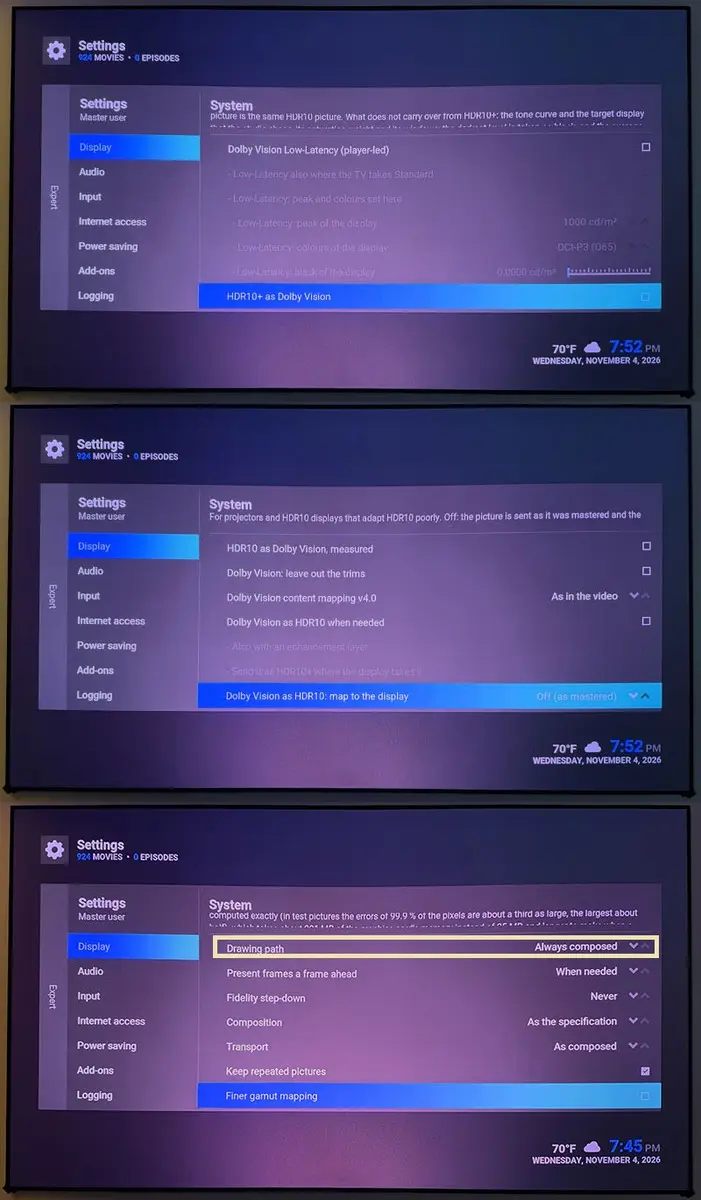
    For one video it is one or the other, not both. "Dolby Vision as HDR10 when needed" only acts where Dolby Vision is not sent natively, so leaving it on does no harm. Both ways below are meant for projectors (Settings > System > Display, with the settings level at Expert):

    1. Low-Latency, with native Dolby Vision on
    Turn on "Dolby Vision Low-Latency (player-led)", then "Low-Latency: peak and colours set here", and set the peak, colours and black of your projector as measured. Hades maps each scene to those values with the BT.2390 curve, guided by the Dolby Vision metadata of the scene, in place of the values that the spoofed EDID claims.

    2. HDR10, with native Dolby Vision off
    Set "Dolby Vision as HDR10: map to the display" to "To this display", with the peak and colour gamut of your projector under it. Every Dolby Vision video, profile 7 with its enhancement layer included, is then rebuilt from its Dolby Vision data and mapped shot by shot with the tone and gamut mapping of libplacebo. The projector is told that the picture already fits it, so turn its own dynamic tone mapping off. Hades does not need the spoof for this one. For plain HDR10 films, "HDR10: limit the luminance told to the display" tells the projector at most the peak you set.

    I can't tell you which one looks better on your projector: they have not been compared on one. To compare them without going back to the settings, play a Dolby Vision film and switch "Dolby Vision output (this video)" in the video settings of the player between native and "Dolby Vision as HDR10".

  • LibreELEC Hades 1.0 RC8 is out

    Download and release notes: v1.0-rc8 on GitHub

    An update that fixes faults found in 1.0 RC7, which came out earlier the same day, and adds a few smaller things.

    Fixes

    • HDR10 is upright again with NVIDIA driver 580 (GeForce GTX 900 and GTX 10, TITAN V): in 1.0 RC7 it went out upside down, menus and subtitles too.
    • No GRUB error after an update with the .tar: the update now replaces GRUB on the boot partition too, so a drive installed before 1.0 RC6 no longer stops at "can't find command `['".
    • Seeking, the arrows and the player information work again during a Blu-ray played with its Java menus. The menus still get the keys while they are on screen.
    • The thin text of Blu-ray menus is no longer faint at 3840x2160.

    Smaller things

    • HDR at 10 bits over HDMI on GeForce GTX 10 cards and the TITAN V, as an option. Over HDMI, driver 580 sends RGB at 8 bits at most on these cards (the 1.0 RC7 post said 10 bits there: over HDMI that was not right), but they do drive YCbCr 4:2:2 at 10 bits. Turn on System > Display > "HDR at more than 8 bits where the card sends RGB at 8 (NVIDIA)" (settings level Expert). The same setting turns on the 12 bits of GeForce GTX 16 and RTX 20 graphics, which needed a kernel parameter until now. It stays off by default until someone confirms it on one of those cards.
    • How long the boot menu waits: 10 seconds as before, 3 or 1, in LibreELEC Settings > System > Boot menu.
    • Up to date: LibreELEC (NSS 3.133, LLVM 23.1.5, HarfBuzz 15.1.0, lz4 1.11.0, hwdata 0.413) and the Piers branch of Kodi, whose new commit keeps the display clock running through a change of mode.

    Every change was tested on the host with the code that the image runs. None of them has been seen yet on the hardware it is for, so reports with the diagnostic switch on are very welcome.

    sat4all  ApexAftermath your GTX 1060 and GT 1030 are among these cards: HDR10 is upright again, and the new option is the way past 8 bits on them over HDMI. A diagnostic with it on would be very welcome.

    Thanks to sat4all1-dev and roronoazoro-blip for their reports and photos. If you missed 1.0 RC7 or 1.0 RC6, the release notes sum them up at the end.

  • I tried both builds on the same machine (Geekom A5 Pro Ryzen 5 7430U)

    Hades: playback stutters while the media info overlay (O key) is open. Without the overlay, playback is smooth.

    Another point that interests me and I’m unable to judge is whether CB1, with its "Dolby Vision Master Reference" option (offering state-of-the-art Dolby Vision output with uncompromised precision), is technically superior to the Hades `dvbridge` module (which uses FFmpeg and `libplacebo`).

    Thanks for your work on both projects!