

VacuumTube with Multichannel Audio

  • I have managed to have 5.1 E-AC3 audio for all multichannel videos on YouTube.

    GitHub - atrugiel69/vacuumtube-5.1-eac3: 5.1 E-AC-3 surround sound runtime and patches for VacuumTube on LibreELEC
    5.1 E-AC-3 surround sound runtime and patches for VacuumTube on LibreELEC - atrugiel69/vacuumtube-5.1-eac3
    github.com


    The following discussion describes the process I (and others) went through in understanding how we could achieve this.
    I "developed" this by taking advantage of the well documented patches available on Thorium's repository but it's pretty much all explained on GitHub.

    You can ask questions here, of course, but I'm not a developer, so my answers probably will leave lots to be desired.

    The wayland compositor we currently use (cage) doesn't support HDR (yet).

    We are (more precisely CvH is) currently looking at using labwc instead, which should support HDR.

    ATM the only things you can change are the display resolution (with the latest addon updates also independently for each flatpak addon) and a few audio settings.

    Keyboard layout and the audio device are taken from kodi's settings.

    We'll have to think about if/how to add more settings, but we also need to be careful that we don't overcomplicate things.

    Thanks a lot for the thorough reply. I absolutely agree in not overcomplicating things (which is why I thought maybe extra settings were located in config files for advanced users that care about them). All in all, I think two worthy additions would be HDR (for sure) and multichannel audio (there's a few videos on YT that exploit this capability, don't know if it's exposed in any Leanback device implementation, so I'm not entirely sure this would be possible at all, as opposed to HDR).

    Edited once, last by ashlar (November 11, 2026 at 3:07 PM).

  • All in all, I think two worthy additions would be HDR (for sure) and multichannel audio (there's a few videos on YT that exploit this capability, don't know if it's exposed in any Leanback device implementation, so I'm not entirely sure this would be possible at all, as opposed to HDR).
    I recently added support for multichannel audio, but so far only for the Moonlight addon.

    If you are running the latest nightly image and the latest addon versions you can easily test it yourself:

    modify the "start" line of the flatpak addon's default.py file and add "pulseaudio_channels=6"

    eg /storage/.kodi/addons/flatpak.vacuumtube/default.py:

    Code
    flatpak.start(args=['--no-sandbox'], pulseaudio_channels=6)

    Please report back if this worked, then we can enable the audio setting in vacuumtube (or other addons that support multichannel), too.

    so long,

    Hias

  • VacuumTube just doesn't support multichannel audio, the dev has tried to get it working but never did.

    If you really want it you can try this fork of the YouTube add-on https://github.com/scsion/CoreTube it works fine in LibreElec, and doesn't need the API keys like the original add-on. It's not a slick as the proper Leanback interface but it's pretty good.

  • Code
    flatpak.start(args=['--no-sandbox'], pulseaudio_channels=6)

    Please report back if this worked, then we can enable the audio setting in vacuumtube (or other addons that support multichannel), too.

    Tested this. What happens is that everything is outputted as 6 channels audio, with mixing happening inside the LE machine. I activated the "Direct" decoding on my AVR (Denon X3800H). When in Kodi, if I play back a stereo source, the AVR displays "Stereo" and pushing the Info button on its remote shows that the source has only Front Left and Front Right speakers content. Again, in Kodi, if I play back a multichannel source (a movie with FLAC 5.1 sound), the AVR displays "Multi Channel Input" and the Info button shows content from source for Fronts, Center, Surrounds and Subwoofers channels.

    With that pulseaudio_channels=6 flag, for all VacuumTube content the AVR displays "Multi Channel Input" and source content for Fronts, Center, Surrounds and Subwoofer channels. This includes stereo tracks. So the machine (not the AVR) is upmixing stereo to 5.1. And when playing content on YouTube that has real 5.1 content (typically sent as EAC3), the audio codec remains Opus at 251kbps.

  • Which LE image are you running? Upmixing was recently disabled - so audio output should have been 6ch but only left and right having audio, the other channels silent.

    so long,

    Hias

  • Which LE image are you running? Upmixing was recently disabled - so audio output should have been 6ch but only left and right having audio, the other channels silent.

    so long,

    Hias

    Oh, sorry, I was not aware of that. I am using this specific build (maybe you know where to look in order to check whether that specific commit is included or not): https://github.com/CroqueMr/libre…0.0-RC4-Preview

    Although the fact that Opus was used as audio codec probably points to what nissel mentioned above, that is VacuumTube still unable to "transmit" its multichannel capabilities to YouTube leanback.

  • Oh, sorry, I was not aware of that. I am using this specific build (maybe you know where to look in order to check whether that specific commit is included or not): https://github.com/CroqueMr/libre…0.0-RC4-Preview

    Although the fact that Opus was used as audio codec probably points to what nissel mentioned above, that is VacuumTube still unable to "transmit" its multichannel capabilities to YouTube leanback.

    worth a try to see if multichannel works on youtube.com/tv (leanback, install extension to get it to work on browser)
    if it works then get chatGPT and figure it ourself, I've done that and got further than dev on something, though not tested on all platforms.

  • worth a try to see if multichannel works on youtube.com/tv (leanback, install extension to get it to work on browser)
    if it works then get chatGPT and figure it ourself, I've done that and got further than dev on something, though not tested on all platforms.

    I did a bit of testing, from a Windows 10 machine (connected to the same AVR). With the firefox extension I did not have much luck.

    Tried with Ungoogled Chromium and installed this extension: https://chromewebstore.google.com/detail/youtube…gphaeikombjmnkh

    This video: https://www.youtube.com/tv#/watch?v=9rQmFHapxEs had actual 5.1 content, using Opus multichannel at 773kbps. Other videos from the same channel gave the same result, such as:

    YouTube TV

    YouTube TV

    and others.
    Other videos from the same channel were streaming as Opus stereo 251kbps, such as this:

    YouTube TV

    But the same video, from an Android box using Smart Tube, was outputting EAC3 5.1 audio.

    Probably a sufficiently advanced AI model could make something out of this.

    EDIT
    To offer an additional element of info: on Smart Tube I have never ever seen a multichannel Opus 773kbps audio stream. It was always EAC3 when multichannel was present. Opus multichannel maybe is reserved for scenarios where the platform is unsure about a Dolby decoder being present in the playback chain?

  • Regarding multichannel sound in VacuumTube, if Gemini is to be believed, there are good news and there are bad news.

    The good news is that making it capable of outputting Opus multichannel should be relatively easy. The bad news is that not all videos with multichannel content actually carry a multichannel Opus stream (they often just carry an AC3 and an EAC3 one). And having VacuumTube support EAC3 looks like a bit of a nightmare.
    For the Opus multichannel route, I attach what Gemini proposed. I'm no coder, so I just limited myself to input the different sources and explain the overall situation and my findings.

    As far as EAC3 is concerned (which would grant full compatibility with all multichannel videos available on the platform), it would require, according to Gemini:

    1. Patch Chromium's C++ source code to enable E-AC-3 in mp4_stream_parser.cc.
    2. Patch ffmpeg_audio_decoder.cc to map AudioCodec::kEAC3 to AV_CODEC_ID_EAC3.
    3. Compile a custom version of Electron from source on Linux with proprietary codecs and custom FFmpeg branding enabled.
    4. Repackage the entire Flatpak with your custom Electron binary.

    This would basically become a mess for building and maintaining everything.

    Working towards Opus multichannel compatibility could still be worth it, as its use is destined to become more widespread as time goes by.

    I hope not to have wasted anybody's time with the above. As I stated: I am not a coder and I have no illusion of becoming one just because I have access to a moderately advanced LLM.

  • HiassofT  nissel  ashlar
    The fix turned out to be surprisingly simple: upgrading Electron from 44.5.1 to 45.2.3, which moves Chromium from version 152 to 156 and enables IAMF/Opus decoding.

    No changes to VacuumTube's playback logic, YouTube client identity, or audio processing were required.

    I wrote in an issue with patch file, it's late here (4:30am) so I'll look to get it as a PR sometime

    [Fix Available] Enable 5.1 surround sound (IAMF) by upgrading Electron 44 to 45 · Issue #300 · shy1132/VacuumTube
    Hi @shy1132, I've managed to get genuine multichannel audio working in VacuumTube on Windows, addressing the current lack of 5.1 surround support. The fix…
    github.com


    Source Code with changes working in windows (just the changes using the patch file) is in my Issue post.
    Let me know what you think and if it works in Linux, I haven't got that far and would appreciate someone confirming, not sure how to turn it into a flatpaq to test either.

  • I won't be able to help with testing as I don't have a surround sound setup - 2.0 FTW :)

    So someone else will have to step up here.

    Once the fixes are in the official flatpak on flathub people can just update their flatpaks and we can enable the audio settings configuration in LE (like for moonlight).

    so long,

    Hias

  • I remain available to test whatever is needed.

    I'm not a coder, I used ChatGPT to get the fix and tested it on Windows VacuumTube. I'll have to look into turning this into my own flatpaq app, but you would test it on windows with your speaker set up, this gives confirmation it's working (I tested on stereo using software)

    download the source in your windows build
    https://github.com/user-attachments/files/34563546/VacuumTube_2.0.2-iamf.1_IAMF_5.1_SOURCE.zip

    unzip in a different folder to a previous the official (if you have that)
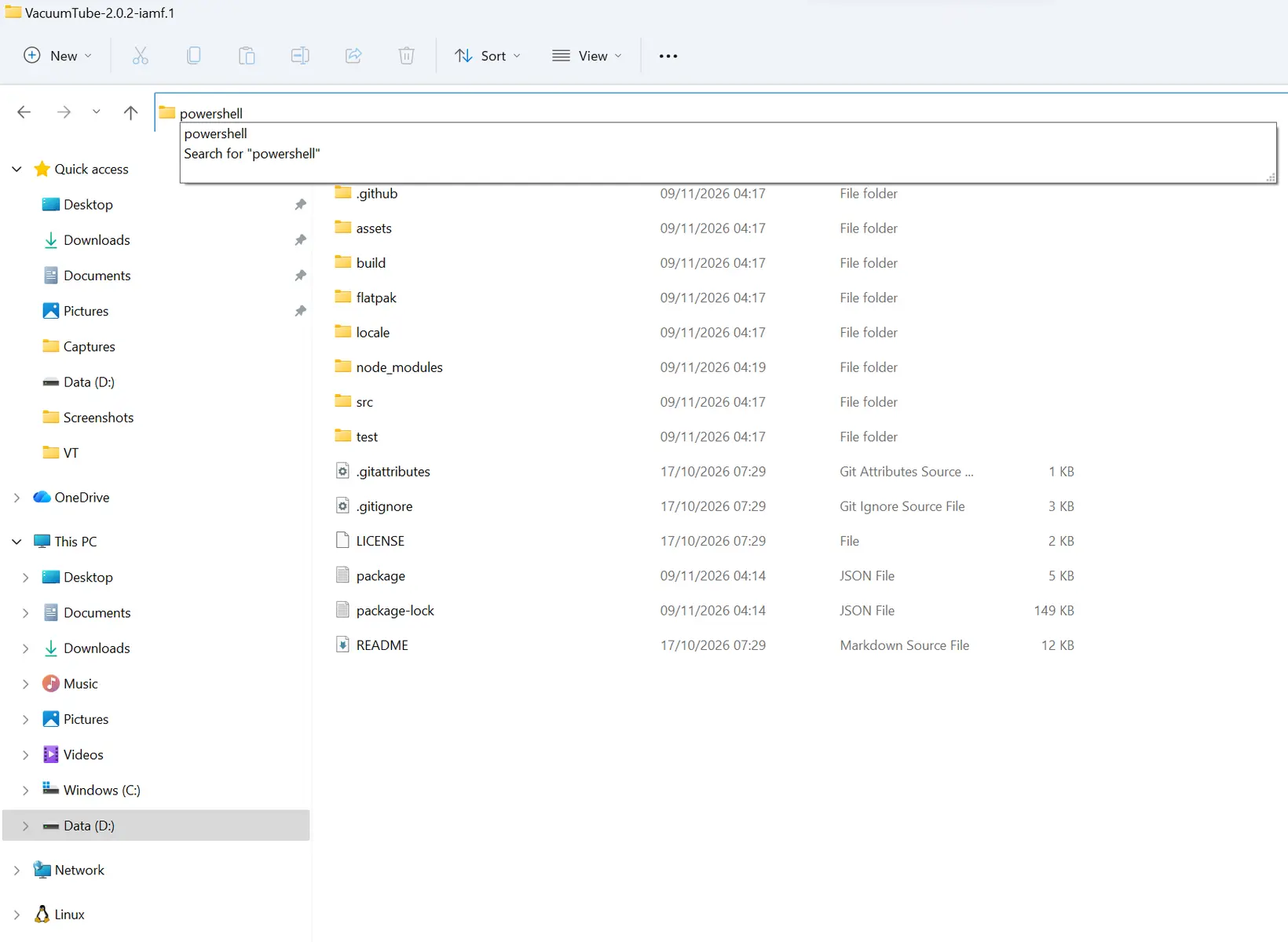
    inside the folder, type powershell in search


    it will open in powershell then type these commands

    npm.cmd ci

    and then

    npm.cmd start -- --portable ".\DEV_DATA"

    you'll be able to test if indeed it gives you 5.1 , if it works then post a comment on github if you want, the changes are just updating electron. and when dev gets a chance he'll have it in his next build so HiassofT can get it working on LE

  • it will open in powershell then type these commands

    npm.cmd ci

    and then

    npm.cmd start -- --portable ".\DEV_DATA"

    Hmmm... I might be doing something wrong but I'm not sure what. I have unzipped the source, went to the directory you show in your window (basically the content of the zip file, the containing folder), typed in the first command and got back:

    npm.cmd : The term 'npm.cmd' is not recognized as the name of a cmdlet, function, script file, or operable program.
    Check the spelling of the name, or if a path was included, verify that the path is correct and try again.
    At line:1 char:1
    + npm.cmd ci
    + ~~~~~~~
    + CategoryInfo : ObjectNotFound: (npm.cmd:String) [], CommandNotFoundException
    + FullyQualifiedErrorId : CommandNotFoundException

  • follow this, you need to install node js

    Check out this chat
    Here's a chat someone thought you'd want to see.
    chatgpt.com

    I realised that it's not a complete solution, we are not playing dolby digital tracks. I'm looking through if anything I can do. but we have 5.1 that don't need dolby digital which is something

    Edited once, last by hcliec001: Merged a post created by hcliec001 into this post. (November 9, 2026 at 1:51 PM).

  • That's good news.

    But from a practicality point of view i'd personally probably keep VacuumTube at 2 channel output anyway, as the vast majority of videos are only stereo and i just let my AVR up-mix to surround. With multichannel output it will have 6/8 channels active all the time, great for the occasional surround sound video, but only the front 2 with signal and the rest silent during stereo video and my AVR won't up-mix that.

    Yes there are ways to get Pulseaudio to up-mix for us, but its just going to get complicated fast :D

  • That's good news.

    But from a practicality point of view i'd personally probably keep VacuumTube at 2 channel output anyway, as the vast majority of videos are only stereo and i just let my AVR up-mix to surround. With multichannel output it will have 6/8 channels active all the time, great for the occasional surround sound video, but only the front 2 with signal and the rest silent during stereo video and my AVR won't up-mix that.

    Yes there are ways to get Pulseaudio to up-mix for us, but its just going to get complicated fast :D

    I'm trying to see if we can intercept at application level with electron before leanback chooses for us. this way we should be able to choose our own track like smart tube does. I don't understand any of this. just vibing it

  • follow this, you need to install node js
    https://chatgpt.com/share/6af1cb97…20-91abc5374fc3


    I realised that it's not a complete solution, we are not playing dolby digital tracks. I'm looking through if anything I can do. but we have 5.1 that don't need dolby digital which is something

    Ok, I can confirm that this works with Opus multichannel tracks.

    Dolby Digital and Dolby Digital Plus tracks are apparently beyond reach, unless somebody decides to do some serious forking/maintenance of the packages involved. I detailed in a previous post why Gemini claimed this.
    Basically Chromium by default specifically refuses to use ffmpeg to decode Dolby encoded content to multichannel PCM.


    But from a practicality point of view i'd personally probably keep VacuumTube at 2 channel output anyway, as the vast majority of videos are only stereo and i just let my AVR up-mix to surround. With multichannel output it will have 6/8 channels active all the time, great for the occasional surround sound video, but only the front 2 with signal and the rest silent during stereo video and my AVR won't up-mix that.

    Apparently that's due to internal upmixing that's been recently disabled: RE: Chromium, Firefox, RetroArch, SuperTuxKart and Terminal addons for LE13

    If that is the case, unless you select upmixing in your AVR, stereo content should drive just your front left and front right speakers.

    Edited once, last by ashlar: Merged a post created by ashlar into this post. (November 9, 2026 at 3:10 PM).