[RPi4/5] CEC TV remote control only working after switching sources in versions > LE 9.2

  • Hello and thank you very much for developing libre software.

    Controlling my RPi5 with the TV remote via CEC doesn't work if I power on the TV and the HDMI channel that the RPi is using is already selected (HDMI1).
    If I switch the source from HDMI1 to TV and back to HDMI1 it starts working.
    With my old RPi4 and LE9.2 it was working flawlessly before. So I tried different versions on the RPi4 for testing purposes and flashed LE 10.0, 11.0, 12.0 and 12.2.
    All versions newer than 9.2 had the very same problem as described above. In the end I flashed 9.2 again and everything was working again.
    There is no 9.2 image for RPi5 that I can test.

    "[...] powering everything down, disconnecting cables, leaving everything for 20 mins" as described in this thread didn't help.

    In KODI.log with additional CEC info enabled I see an EDID error. For the log I started the TV with HDMI1 as selected source, pressed a few buttons on my TV remote which apparently did nothing at 15:19 o'clock and switched to TV and back to HDMI1 at 15:20 o'clock and it was working again.

    Maybe it's unrelated but sometimes when the TV source is set to TV when starting the TV and I switch to HDMI1 later I get no picture at all.

    Do you have any idea to solve this problem?

  • Try LE 13, all the work goes into that, any older releases is at end of development.

    Hello and thank you for your good suggestion. I tried LibreELEC-RPi5.aarch64-13.0-nightly-20260919-238f3fd and the problem persists.
    I wonder why it's working with LE 9.2 and all newer versions refuse to work with CEC when the TV got no source switch after booting.

  • To make it short: Selecting from your list, the 12.2.x would be the worst combination in my experience to get a reliable CEC setup.

    Since you already stumbled over the thread with the required information about the CEC mechanism, you have seen my postings there as well - or was it written to technical by me and you skipped that?

    CEC behavior relies heavily on a stable HDMI connection with valid EDID information. But this kind of error is known and harmless for your issue:

    Code
    2026-09-18 15:19:36.065 T:875     error <general>: [display-info] Error parsing EDID:
    2026-09-18 15:19:36.065 T:875     error <general>: [display-info] ----------------------------------------------
    2026-09-18 15:19:36.065 T:875     error <general>: [display-info] Block 1, CTA-861 Extension Block:
    2026-09-18 15:19:36.065 T:875     error <general>: [display-info]   Colorimetry Data Block: Reserved bits MD0-MD3 must be 0.
    2026-09-18 15:19:36.065 T:875     error <general>: [display-info] 
    2026-09-18 15:19:36.065 T:875     error <general>: [display-info] ----------------------------------------------
    2026-09-18 15:19:36.065 T:875      info <general>: [display-info] make: 'Panasonic Industry Company' model: 'Panasonic-TV'

    As far as I recall, the HDMI handling changed fundamentally after the underlying display architecture was switched - starting with LE 10 - to the standard Linux kernel mechanisms (including drivers, libCEC, Kodi, etc.). That will be the trigger of your observation with a RPi4.

    Am I right, your physical HDMI connection looks like this? Please correct me if I'm wrong:

    • HDMI 0/HDMI-A-1 (port nearest to USB) Pi5 -> Panasonic TV HDMI port 1
    • Other HDMI components like a HDMI splitter, HDMI switch, AVR, Soundbar or a device for fancy LED ambilight are not involved, right?

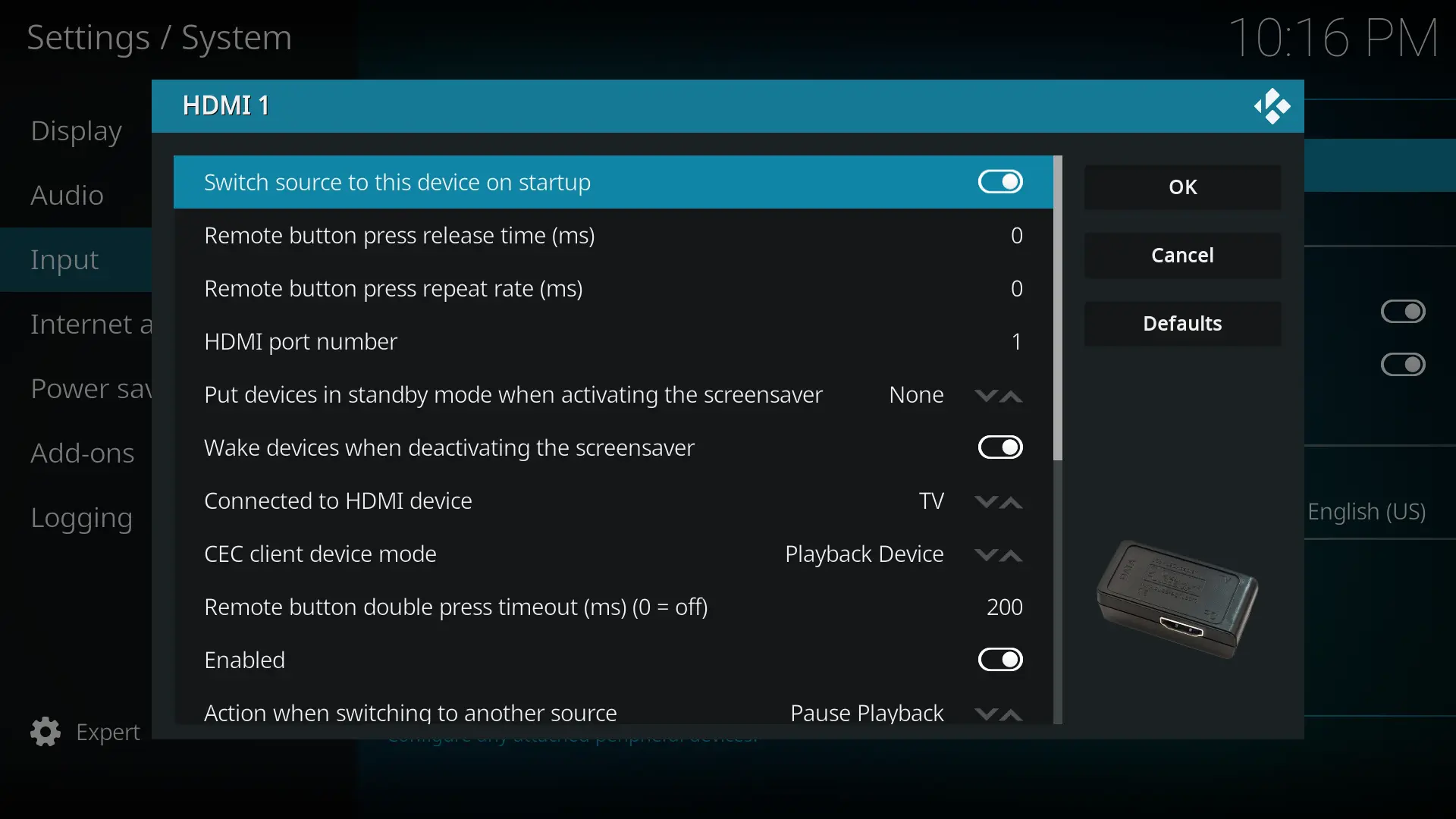
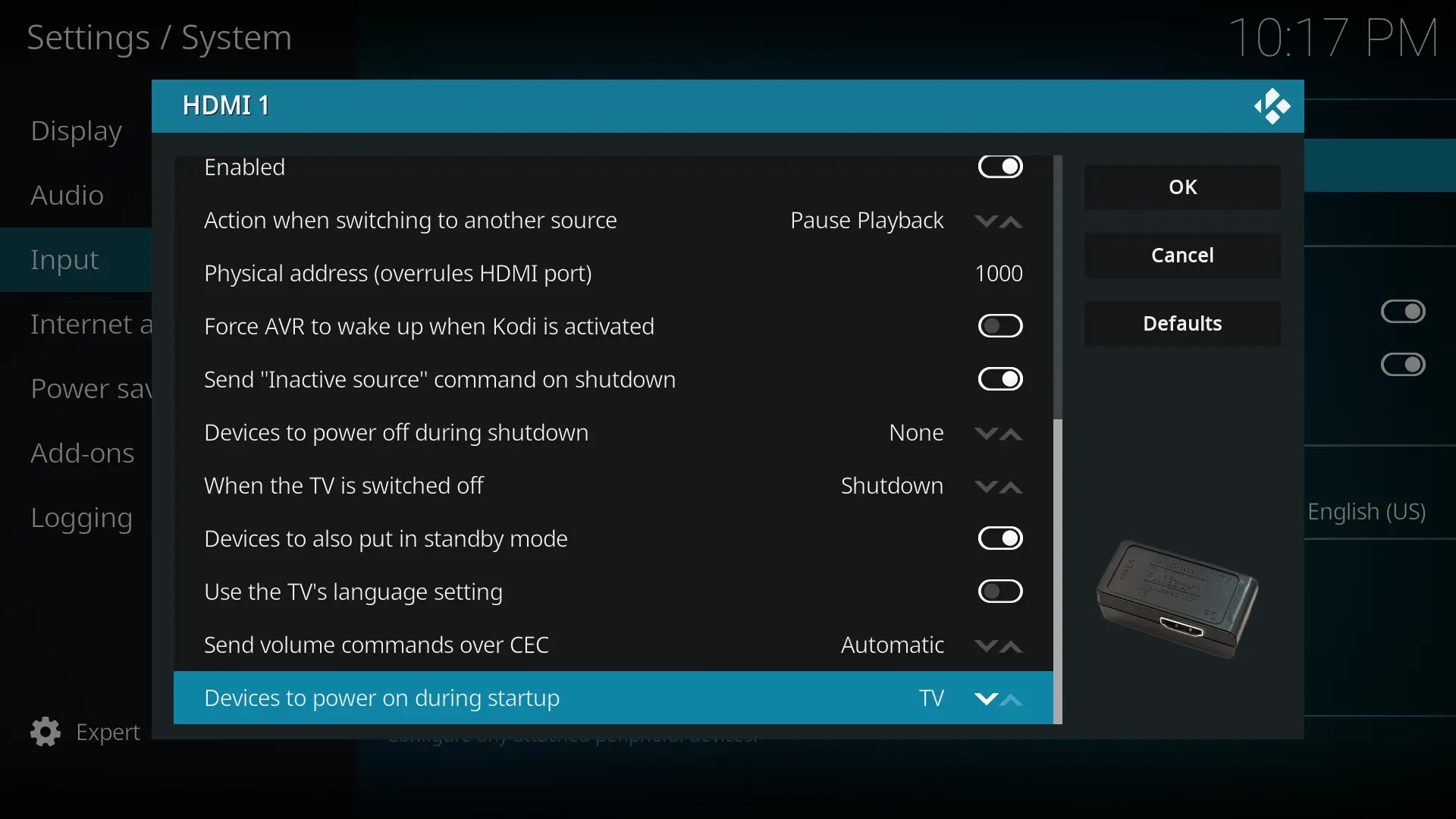
    Please post the current settings of your CEC Adapter within KODI GUI of the LE 13.

  • or was it written to technical by me and you skipped that?

    Great to have you in my thread too now. I tried getedid delete as you suggested on my RPi5 with LE12 but it didn't solve the problem.

    • HDMI 0/HDMI-A-1 (port nearest to USB) Pi5 -> Panasonic TV HDMI port 1
    • Other HDMI components like a HDMI splitter, HDMI switch, AVR, Soundbar or a device for fancy LED ambilight are not involved, right?

    Please post the current settings of your CEC Adapter within KODI GUI of the LE 13.

    Correct and correct.

    If I set Devices to power on during startup to None then Switch source to this device on startup gets automatically disabled after reboot. So I set it to TV again because you suggested to activate the startup option in the other thread. Later I don't want the TV to switch to KODI when powered on but for now I let it activated. I tried many more combinations in the HDMI 1 CEC options but none have worked out. I disabled HDMI 2 CEC that appeared since LE13.

    My previous logs were from my RPi4 so here are the new logs from RPi5 with LE13.
    I have pressed a few buttons at 2026-09-22 22:20:36.301 T:865 which didn't work and switched source to TV and back to HDMI1 at 22:21 o'clock and CEC started working correctly.

  • Quote

    If I set Devices to power on during startup to None then Switch source to this device on startup gets automatically disabled after reboot.

    Unfortunately this is one of the caveats of the current KODI/libCEC behaviour. The CEC specification supports separate usage of :

    • 'One Touch Play'
      The combination of power on TV/projector: <Image View On> and switch to the active HDMI input: <Active Source>
    • Switch to the HDMI input where the sending HDMI source is connected to <Active Source>.

    The corresponding CEC messages are shown in angle brackets.

    Could you please check:

    • Ensure Devices to power on during startup is set to TV -> Some variation of 'One Touch Play' or the first of the 2 commands only. /shrug
    • Ensure Switch source to this device on startup is Enabled -> triggers the <Active Source> message
    • If not already done, switch the TV to HDMI1 (where the RPi is physical connected to)
    • Power off TV via remote control
    • Restart the RPi4/5 (via SSH) or perform a cold start.

    Does the TV power on automatically and the remote control work then within KODI, without having to switch back and forth between the internal TV tuner and the other source first?


    Background: My assumption is, that your TV doesn't send a working trigger for the current libCEC implementation to be notified that the TV is back again. Usually the CEC message like <Set Stream Path> is intended for by specification. I know that some TV doesn't send this CEC message after the TV was powered on by remote control. However, they usually send this message after a source change, e.g. internal tuner <-> HDMI port, since according to the specification it is mandatory to inform HDMI switches about a new route. That would explain the behaviour you have already described.

    As a result of the missing or ignored trigger message, KODI does not send a <Menu Status> command to request the routing of the TV remote control buttons. Depending on their firmware level, newer TVs with CEC 2.0 upwards route every time (also without <Menu Status>) the remote control keys to the <Active Source> - as it's recommended for the 'One control' steers all idea.
    Important: If the <Menu Status> message is required for the TV, the sending HDMI device must be registered as the <Active Source> in beforehand! Maybe you recognise better now the dilemma with the current CEC Adapter settings behaviour, we have to fight against.

    While there are other ways to detect via CEC that the TV has become available again, I am afraid such specific solutions have not yet been implemented in libCEC. I haven't examined the libCEC and KODI code in detail yet, as I am not familiar enough with C++ to quickly get an overview.

    Edited 2 times, last by HarryH (September 23, 2026 at 6:27 PM).

  • Thank you again for helping me. Panasonic is calling their HDMI CEC "VIERA Link" and I can't find any info about the version in the specification and manual of the TV so I don't know if the TV has CEC 2.0.
    I'm fine with the CEC specification because once everything works I don't want the RPi to power on the TV and I don't want the TV to always switch source to the RPi on HDMI 1 when the TV is powered on.

    Could you please check:

    Ensure Devices to power on during startup is set to TV -> Some variation of 'One Touch Play' or the first of the 2 commands only. /shrug
    Ensure Switch source to this device on startup is Enabled -> triggers the <Active Source> message
    If not already done, switch the TV to HDMI1 (where the RPi is physical connected to)
    Power off TV via remote control
    Restart the RPi4/5 (via SSH) or perform a cold start.

    I'm using a master slave power outlet for the TV (master) and RPi5 (slave). The TV is in standby mode instead of completely off to trigger the current threshold correctly iirc. If I turn off the TV using the TV remote the RPi shuts down and has enough time to perform a clean shutdown before it loses power.
    So because of that I always perform a cold start with the RPi using the TV remote as you want me to ensure.
    All other steps are also fulfilled and are what I did and what the log from my previous post shows.
    That's the reason why I don't need TV in the Devices to power on during startup option because when I use the TV remote to start the TV (master) the TV is already on before the RPi and after that the RPi is starting as slave.

  • Quote

    I'm fine with the CEC specification because once everything works ...

    That sound more that you are not fine with the CEC specification, because your setup and desire currently in conflict with that in some important details.

    To be the <Active Source> is a requirement to get the TV remote control routed to the connected HDMI device. One of the HDMI devices is ever the active source. The last one which signaled <Active Source> wins. For example if the TV is believing it was the last one, then the TV doesn't route the remote control keys to an attached HDMI device. This is the situation you have.

    Therefore you will require a kind of "Switch source to this device on startup". Something like "React to <Request Active Source> messages" would be better. After such message the active source needs to identify itself using <Active Source>. However, since your setup consists only of the TV and KODI, it has to be the one to identify itself. Right now, my goal is to figure out how your Panasonic handles this. That is the only way we have a chance of bringing about an improvement in the long run. The current software version certainly won't achieve that out-of-the-box.

    The test I suggested has nothing to do with your final setup. Its purpose is simply to determine whether and how your TV reacts. Based on the results of some tests, we could then try to:

    • Find a "hacky" workaround via cec-ctl
    • Report the detailed issue to libCEC and/or KODI
    • Try to submit a patch

    As you skipped the first test, information to near down the behaviour of your TV is missing.

    You hadn't mentioned the detail about the master-slave power outlet before, but it is important. For the test, the RPi4/5 should not be connected to the slave socket.

    There is a second test I would like you to perform; this requires the RPi5 to remain on while you turn the TV off and then back on again using the remote control.

    Be aware: The KODI debug log won't provide enough information in this second test case. Instead, running cec-ctl -w -M and paying close attention to the messages displayed via SSH when the TV is turned on will reveal the CEC messages the TV sends out on its own.

    You should get some output like this: RE: LE13 - TV CEC Remote loses control of Kodi, when TV switched OFF and back ON.

  • your setup and desire currently in conflict with that in some important details.

    Thank you and you're right, I read your first part again.

    The test I suggested has nothing to do with your final setup.

    Yes, I had understood it that way before.

    As you skipped the first test

    I will remove the master slave power outlet, SSH into the RPi and execute the second test in a couple of days. Please clarify what test you mean with "first test" so I will gladly test it too. If you refer to this test I have done it and my last logs belong to this test as I said.

  • Quote

    Please clarify what test you mean with "first test" so I will gladly test it too. If you refer to this test I have done it and my last logs belong to this test as I said.

    There may be a misunderstanding, but I didn't need a protocol for this initial test:

    Quote
    • Ensure Devices to power on during startup is set to TV -> Some variation of 'One Touch Play' or the first of the 2 commands only. /shrug
    • Ensure Switch source to this device on startup is Enabled -> triggers the <Active Source> message
    • If not already done, switch the TV to HDMI1 (where the RPi is physical connected to)
    • Power off TV via remote control
    • Restart the RPi4/5 (via SSH) or perform a cold start.

    Does the TV power on automatically and the remote control work then within KODI, without having to switch back and forth between the internal TV tuner and the other source first?

    I would like to see (and hopefully you report ;)) how your TV reacts to this - something that cannot be determined from the Kodi log - specifically whether the TV turns on and enables the forwarding of remote control commands to KODI. Since the RPi was previously connected to the slave port, the test could not have been performed correctly.

    The second test with cec-ctl -w -M is to identify some by TV initiated CEC messages, which we can use to differentiate if the TV is on and sending of <Active Source> message by KODI is 'desired' or 'not desired'.

    • 'Desired' equals: TV was powered on and starts at HDMI 1 where the KODI is connected to. Must lead to <Active Source> and afterwards <Menu Status> messages to show a picture by KODI and activate the TV remote control routing.
    • 'Not desired' equals: TV was powered on and starts at internal TV tuner, App or another HDMI port than HDMI port 1. KODI shouldn't send <Active Source> in that case.

    Yes, that requires a bit of CEC "magic" via polling - in case the TV isn't communicative right out of the box - but in principle, it is doable.
    Only use 'polling' would lead to additional CPU load and require a background thread/service or an add-on to observe the CEC bus, therefore the preferred way would a trigger message which can processed by libCEC.