

[RPi4] No video output on HDMI-0

  • Hello Everyone :)

    So, up until a while ago everything worked great. My setup is the following:
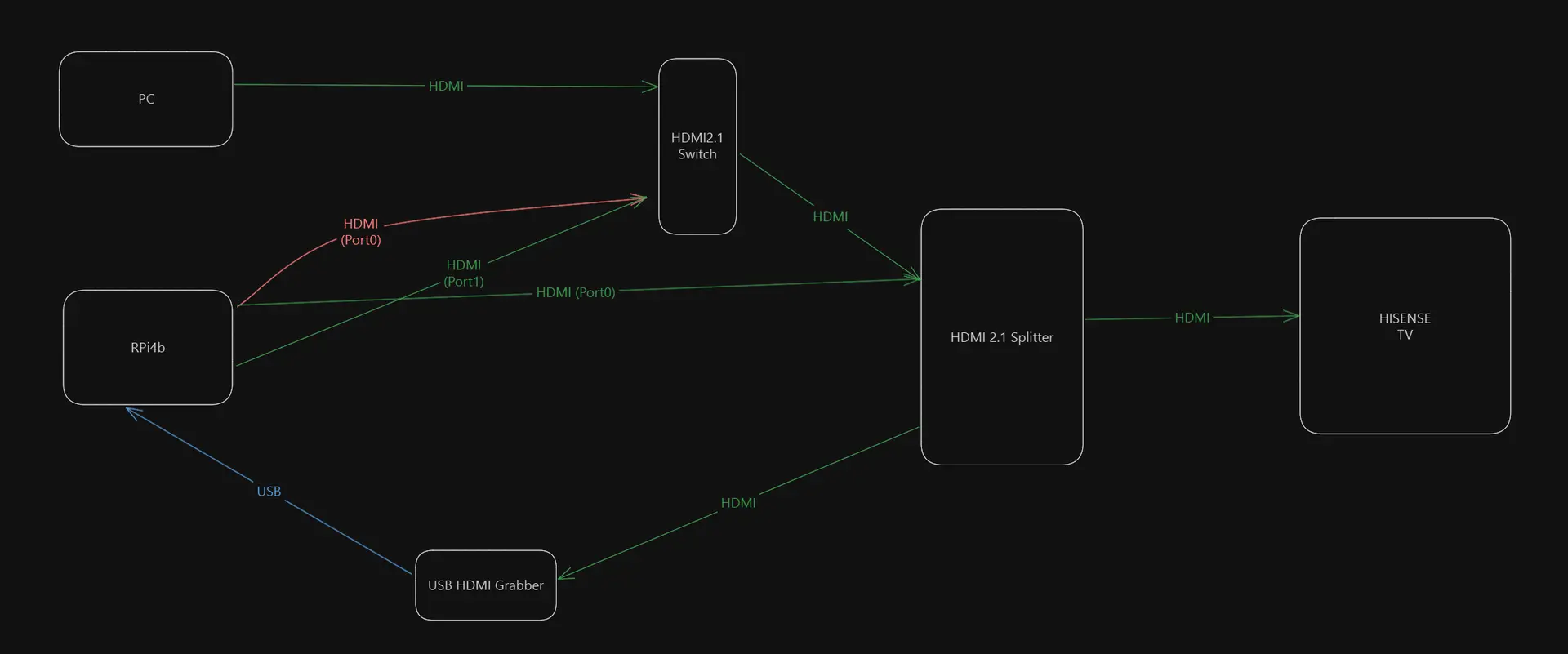
    Raspberry Pi 4b (4GB RAM) outputting to HDMI0 (the port next to the USB-C) into a HDMI 2.1 Switch that Feeds a HDMI 2.1 Splitter from which one output goes to the TV (Hisense 55E7NQ, 2024) and the other one into an HDMI grabber that goes into HyperHDR (also running on the Pi). I remember when I first set it up I had some problems to get a picture out of the Pi but then it worked and I had no issues over the past months until about a week ago when I reinstalled LibreElec due to some plugin problems.

    I can't get any image out of the HDMI0 port. The TV recognizes that Kodi is indeed connected there (in the HDMI menu) but tells me "weak or no HDMI Signal". I tried restarting everything multiple times, changed the startup order but to no avail. Switching to HDMI1 on the Pi and rebooting immediately fixes the issue and I had picture again with the setup (but no HDMI CEC and from what I read it's very tricky to get that working). If I remove the HDMI Switch and plug the Pi straight into the splitter, the first HDMI port works as expected. Weird thing is, my PC feeding the same HDMI switch before the splitter has no issues at all and I even bought a different HDMI 2.1 switch yesterday (one that has its own power supply, just to be sure) but the exact same behavior occurred. No output from the first port, second one and PC work flawlessly.
    While trying to get this working, I had image for a short while but when I restarted everything the problem reappeared and now I can't reproduce it.

    Any Idea what could be the problem? I don't think the port can be physically defective since there's no problems when it's connected to the splitter directly, even when I move the cable around.. Thanks for your help!

  • Depends on how your HDMI switch works. The modern approach should utilize CEC routing information. This will work only if the HDMI source (KODI) is configured and behaves right. As there were many bugs within libCEC and KODI as well, I recommend to skip LE 12.2.x if you are depend on working CEC. Please try with an LE 13 nightly image of 2026-05-14 and upwards and prevent usage of 'getedid create' as the static EDID information disturbs the CEC negotiation in my experience.

    With my RPi4 setup this parameter added to kernel boot line cmdline.txt was required to get a working HDMI0 output with 12.2.x.

    Code
    video=HDMI-A-1:1920x1080M@60D

    But with LE13 nightly 2026-04-20 upwards, this line prevented CEC from working right and should removed!

    PS: I haven't tested this myself, but with a current LE13 nightly build, CEC should also work on HDMI1. But HDMI0 remains the recommended port as the optimized GPU capabilities (RPi4 resources/firmware limitation).

  • Connect to hdmi (through the problematic splitter). Power the pi without an sdcard (or anything else connected).

    You shoud see a diagnostic display on TV. What does the "display:" line show?

  • So, up until a while ago everything worked great.

    Hi, many years ago I worked on a TV repair shop and that I heard many times... Usually everything's working till... stopping working.

    Raspberry Pi 4b (4GB RAM) outputting to HDMI0 (the port next to the USB-C) into a HDMI 2.1 Switch that Feeds a HDMI 2.1 Splitter from which one output goes to the TV (Hisense 55E7NQ, 2024) and the other one into an HDMI grabber that goes into HyperHDR (also running on the Pi).

    That's a really "unusual" way to connect a display to an RPi. My hint is, somewhere the display (TV) EDID data is cut to reach the RPi. And because the RPi (and LE) didn't "see" the display, didn't provide picture. So, you should try at first to connect the TV directly to the RPi's HDMI0 and check it. And if in that way working, you have picture from RPi, you could try to save the TV's EDID to RPI: SSH to RPi and run the "getedid create" command (no more need for the RPi to "see" the display's properties). If you ran that command before, better to delete the previous data and run the "getedid delete" first. After that you could connect back your "strange" HDMI chain and try it. If isn't working maybe something defective, play "lego" by removing elements from chain (switch, splitter, cables) till you found what's the cause. I almost forget, start the TV first, and the RPi few seconds later to be sure it get the EDID (the "getedid create" fix that too).

  • So your signal chain is RPi4 (without microSD card) -> splitter -> display, right?

    My signal chain here was RPi4 (without microSD card) -> switch -> splitter -> display. When I skip the switch and go straight into the splitter the display line is the same though.

    As to VLouis's remarks: I know it's probably unusual but the perfect setup for Kodi and HyperHDR all in a small package.. :) what irritates me is that when I use the second HDMI port it works flawlessly with that exact setup (minus CEC), so it can't be impossible (plus I ran this exact setup on Port 0 for quite some time)

    The playing Lego I already did quite a bit:

    - switch works, RPi HDMI0 through switch -> TV works

    - splitter works, RPi HDMI0 through splitter -> TV works

    - PC through switch AND splitter works

    - RPi HDMI1 through switch AND splitter works

    - RPi HDMI0 through switch AND splitter: weak or no HDMI signal (except when in DBUG mode with no microSD card)

    Just now I connected the RPi through the splitter to the TV, got picture and did "getedid delete", followed by "getedid create" and now when I reconnect the RPi to the switch in front of the splitter again, I get a black screen (not "weak signal" anymore). The Debug Output is still exactly the same as before..

    I made this signal flow chart - green is the connections that work and the orange one is the one I'm trying to get working but doesn't (in case this makes it easier to understand haha) Thanks for your input already!!

  • When I connect it through the Splitter without anything connected, I see:

    display: DISP0: HPD=1 EDID=none #0 DISP1: HPD=0 EDID=none #0

    That is the key information. EDID=none means your splitter is not forwarding (or provising its own EDID).

    That means downstream devices (i.e. LibreELEC) do not know what hdmi modes are supported.

    That is a fault with the splitter (it is not hdmi compliant).


    You may be able to work around it with getedid create, ran when the spliter is not connected (i.e. directly connected to TV) to capture the EDID to a file. Then you add back in the splitter and LE can see the HDMI modes available from the EDID file.

  • Hmm, I connected the TV directly to the Pi and indeed I now get EDID=ok!

    After "getedid create" I still get "weak or no HDMI signal" with the switch involved though, directly through the splitter works as it always has. In Debug I still see EDID=none..

    The splitter not correctly handling EDID is weird since I purchased a FeinTech SP210 that (supposedly) has EDID Management built in and I made sure to set it to COPY OUT with the TV connected to the relevant output.. Could anything else go wrong there?

  • The splitter not correctly handling EDID is weird since I purchased a FeinTech SP210 that (supposedly) has EDID Management built in and I made sure to set it to COPY OUT with the TV connected to the relevant output.. Could anything else go wrong there?

    If direct connection to TV shows an EDID and through splitter doesn't, then it's the splitter or the second hdmi cable you are presumably using that doesn't support reporting the EDID.

  • Okay thank you, I tried different HDMI cable combinations (both 2.0 and 2.1 cables) to connect the Pi to the splitter - I contacted the FeinTech support, maybe they can shed some light on the EDID handling. Thanks again for the help, I'll get back here if I have some new insights and/or managed to fix the problem :)

  • Hmm, I connected the TV directly to the Pi and indeed I now get EDID=ok!

    After "getedid create" I still get "weak or no HDMI signal" with the switch involved though, directly through the splitter works as it always has. In Debug I still see EDID=none..

    The "getedid create" save the connected display EDID data (if is display connected and working correctly). That means, next time, at startup the RPi will use the saved EDID data to set the picture parameters, instead waiting to get it through the HDMI connection, and send image to HDMI regardless "see" a display or not.

  • Is there a way to check that the created EDID file is actually working? Since it still won't output any video through switch and splitter even after saving the TVs EDID..

    FeinTech Support assured me the splitter doesn't interfere with EDID in COPY ALL mode and the switch should be completely unaware of EDID anyways (according to FeinTech).

  • Is there a way to check that the created EDID file is actually working?

    You can try to start the RPi with nothing connected to RPi's HDMI ports. Wait soime time and onnect the HDMI cable directly to the TV. If working, the saved EDID is correct. Or you can save it again: run the "getedid delete" command, power off the RPi, connect the TV directly to RPi's HDMI port, start the TV, wait few seconds and start the RPi. Only if you see the correct image on the display run the "getedid create" command.
    Another workaround could be to add to the "cmdline.txt" the "video=HDMI-A-1:1920x1080@60D". That should force at the startup the standard FHD resolution. This I never tried, I'm using the "EDID save" method.
    EDID is the display's capability information stored in a dedicated memory in display. The OS (linux - LibreElec) try to obtain it from display at the startup to know what picture resolution and FPS to use. Without EDID data usually the OS doesn't provide image. By saving the EDID data (getedid create command), the OS will use the saved one, regardless the display is connected or not.

  • FeinTech Support assured me the splitter doesn't interfere with EDID in COPY ALL mode and the switch should be completely unaware of EDID anyways (according to FeinTech).

    If that were true, how would you explain the fact the diagnostic shows "EDID:none" when the splitter is in place, and "EDID:ok" when the splitter is removed?

    I think the only explanations are:

    1) The splitter prevents the EDID from being read

    or

    2) The additional HDMI cable prevents the EDID from being read

  • Yeah, I see that it has to be the splitter's fault somehow.. Overriding the EDID with the direct TV connection and enabling HDMI Hotplug in the config.txt also doesn't bring back picture in the setup. ugh. I still don't understand how it worked for almost a year without any configuration and now it doesn't, maybe the splitter broke somewhere along the line - I'll see if I can get a replacement. Out of curiosity, since my PC seems to cut through all that EDID chaos without any issues and recognizes the display capacities without issue immediately - is Windows getting that information another way?

  • ...enabling HDMI Hotplug in the config.txt also doesn't bring back picture in the setup.

    HDMI options are not active at config.txt anymore. Remove them. Use cmdline.txt (kernel parameters) instead:

    For HDMI-0: vc4.force_hotplug=1

    For HDMI-1: vc4.force_hotplug=2

    For HDMI-0 and HDMI-1: vc4.force_hotplug=3

  • Thank you for the hint! :) - output is sadly still black screen after forcing hotplug in cmdline.txt - with and without EDID override


    Can anyone recommend an HDMI 2.1 capable splitter that is known to work with Raspberry Pis EDID detection?

    Edited once, last by Luvide: Merged a post created by Luvide into this post. (August 24, 2026 at 6:48 PM).