Posts by Luvide

    okk so it turns out it really was the splitter! FeinTech sent me a new one (same model) and now if the channel of the switch is set correctly when I start the TV & RPi i get EDID=ok in debug mode - yayy!

    New problem is, now when I select 4k display mode in Kodi Display Settings, The UI switches to only a quarter of the Frame and weird glitches start appearing from the Skin, Video Playback (also of 4k video) is the same, If I switch to 1080p, the UI works as expected but when I try to play a 4k movie the UI shrinks down to the same upper left quarter including the film, running in 4k.
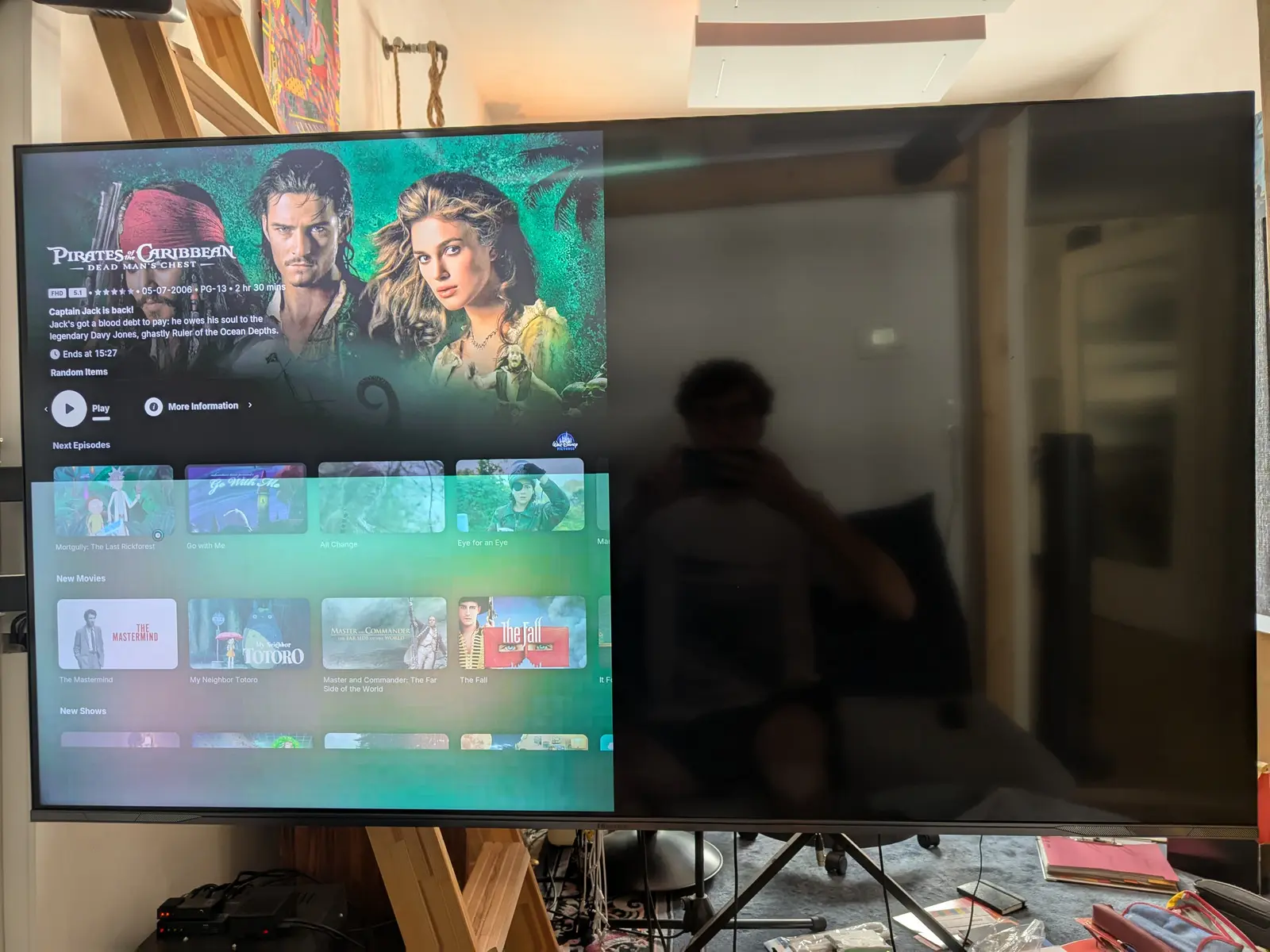
    Probably something broke from all the EDID stuff? Of course I deleted the EDID overrides I created from before but to no avail. My cmdline.txt looks like this, i only changed the hotplug.

    Code
    boot=UUID=0111-0454 disk=UUID=4c74a0fe-98a5-4395-9d8a-ca9a2997521d quiet console=tty0 vc4.force_hotplug=1

    Also when switching to 4k, I can't set the refresh rate to 60Hz while 1080p 120 seems to be no problem.

    Any ideas? Thanks for your help so far!!


    quick update after some further digging & testing, it appears it's the skin breaking when setting the GUI resolution to unlimited. Setting that to 1080p, rebooting and THEN reconfiguring the display settings to 4k works again. Setting it to 60fps is still not working but since it's just the GUI I can live without it, unless anyone knows a quick fix off the top of their head..

    Thanks again for the great help on this forum and this wonderful software, enabling us to ditch those pesky proprietary streaming devices!!

    Yeah, I see that it has to be the splitter's fault somehow.. Overriding the EDID with the direct TV connection and enabling HDMI Hotplug in the config.txt also doesn't bring back picture in the setup. ugh. I still don't understand how it worked for almost a year without any configuration and now it doesn't, maybe the splitter broke somewhere along the line - I'll see if I can get a replacement. Out of curiosity, since my PC seems to cut through all that EDID chaos without any issues and recognizes the display capacities without issue immediately - is Windows getting that information another way?

    Is there a way to check that the created EDID file is actually working? Since it still won't output any video through switch and splitter even after saving the TVs EDID..

    FeinTech Support assured me the splitter doesn't interfere with EDID in COPY ALL mode and the switch should be completely unaware of EDID anyways (according to FeinTech).

    Okay thank you, I tried different HDMI cable combinations (both 2.0 and 2.1 cables) to connect the Pi to the splitter - I contacted the FeinTech support, maybe they can shed some light on the EDID handling. Thanks again for the help, I'll get back here if I have some new insights and/or managed to fix the problem :)

    Hmm, I connected the TV directly to the Pi and indeed I now get EDID=ok!

    After "getedid create" I still get "weak or no HDMI signal" with the switch involved though, directly through the splitter works as it always has. In Debug I still see EDID=none..

    The splitter not correctly handling EDID is weird since I purchased a FeinTech SP210 that (supposedly) has EDID Management built in and I made sure to set it to COPY OUT with the TV connected to the relevant output.. Could anything else go wrong there?

    So your signal chain is RPi4 (without microSD card) -> splitter -> display, right?

    My signal chain here was RPi4 (without microSD card) -> switch -> splitter -> display. When I skip the switch and go straight into the splitter the display line is the same though.

    As to VLouis's remarks: I know it's probably unusual but the perfect setup for Kodi and HyperHDR all in a small package.. :) what irritates me is that when I use the second HDMI port it works flawlessly with that exact setup (minus CEC), so it can't be impossible (plus I ran this exact setup on Port 0 for quite some time)

    The playing Lego I already did quite a bit:

    - switch works, RPi HDMI0 through switch -> TV works

    - splitter works, RPi HDMI0 through splitter -> TV works

    - PC through switch AND splitter works

    - RPi HDMI1 through switch AND splitter works

    - RPi HDMI0 through switch AND splitter: weak or no HDMI signal (except when in DBUG mode with no microSD card)

    Just now I connected the RPi through the splitter to the TV, got picture and did "getedid delete", followed by "getedid create" and now when I reconnect the RPi to the switch in front of the splitter again, I get a black screen (not "weak signal" anymore). The Debug Output is still exactly the same as before..

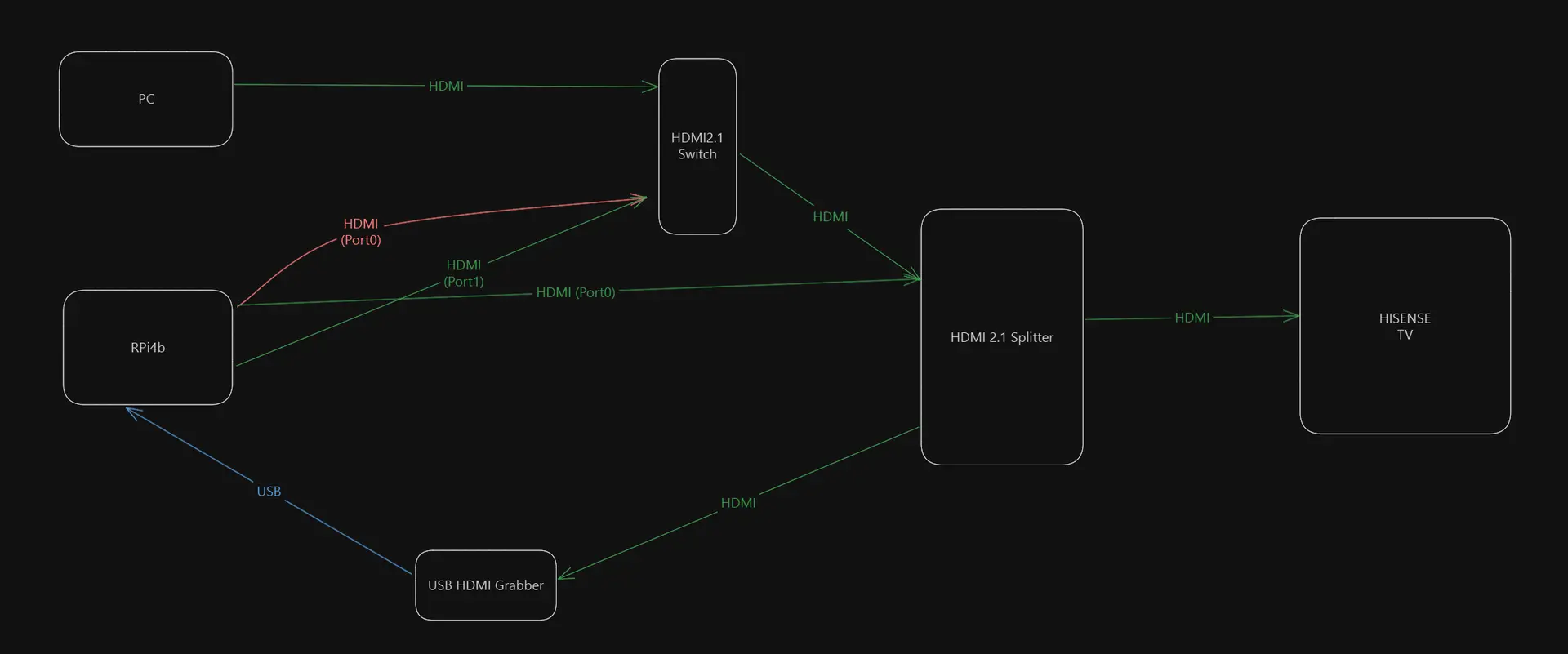
    I made this signal flow chart - green is the connections that work and the orange one is the one I'm trying to get working but doesn't (in case this makes it easier to understand haha) Thanks for your input already!!

    Hello Everyone :)

    So, up until a while ago everything worked great. My setup is the following:
    Raspberry Pi 4b (4GB RAM) outputting to HDMI0 (the port next to the USB-C) into a HDMI 2.1 Switch that Feeds a HDMI 2.1 Splitter from which one output goes to the TV (Hisense 55E7NQ, 2024) and the other one into an HDMI grabber that goes into HyperHDR (also running on the Pi). I remember when I first set it up I had some problems to get a picture out of the Pi but then it worked and I had no issues over the past months until about a week ago when I reinstalled LibreElec due to some plugin problems.

    I can't get any image out of the HDMI0 port. The TV recognizes that Kodi is indeed connected there (in the HDMI menu) but tells me "weak or no HDMI Signal". I tried restarting everything multiple times, changed the startup order but to no avail. Switching to HDMI1 on the Pi and rebooting immediately fixes the issue and I had picture again with the setup (but no HDMI CEC and from what I read it's very tricky to get that working). If I remove the HDMI Switch and plug the Pi straight into the splitter, the first HDMI port works as expected. Weird thing is, my PC feeding the same HDMI switch before the splitter has no issues at all and I even bought a different HDMI 2.1 switch yesterday (one that has its own power supply, just to be sure) but the exact same behavior occurred. No output from the first port, second one and PC work flawlessly.
    While trying to get this working, I had image for a short while but when I restarted everything the problem reappeared and now I can't reproduce it.

    Any Idea what could be the problem? I don't think the port can be physically defective since there's no problems when it's connected to the splitter directly, even when I move the cable around.. Thanks for your help!