3D Support builds for Raspberry Pi

  • Depends on you settings. From original post:

    FP mode supports the full 1920x1080 resolution (SBS and TAB half the resolution).

    If your movies are half-SBS or half-TAB, then "same as movie is fine".

    If they are full-SBS or full-TAB then you ideally want FP mode.

    If you set "preferred mode" to "over/under" and your display supports FP, then that should be selected by default.


    Also can you set your resolution (in settings/system/display) to 1920x1080? I think you may be ending up at 3840x2160 when playing video (which doesn't support 3d) and will stop the autoswitch.

    A whitelist would allow this, but it seem without a whitelist kodi won't lower the resolution when starting a video.


    run "kmsprint" to check which type of 3d mode you are in (it should say one of fp/sbs/tab).
  • Choosing 1080p in System for resolution has no impact on behavior.

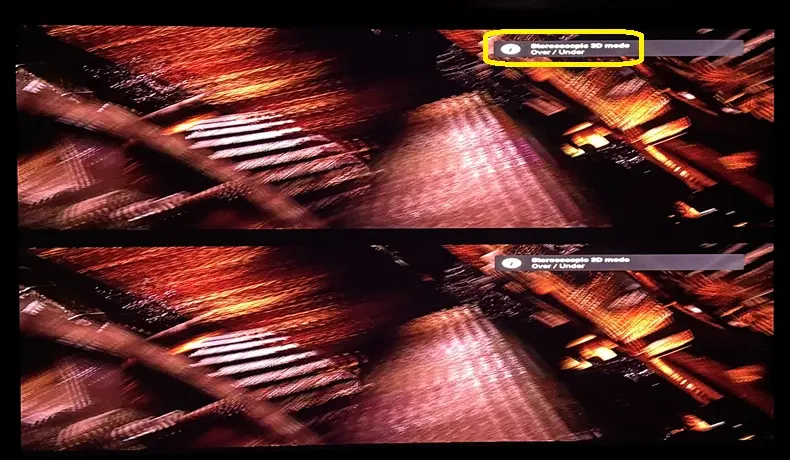
    Yes, choosing Over/Under does play my MVC MKV's (and even my FSBS MKV's) as such (similar to Zidoo/Vero V/AM6B+ by default), and I can choose 'Framepacked 3D' mode on my projector to get it into proper 3D. Think my projector's FP and top/bottom modes basically do the same thing.

    Here it is:

    Edited 3 times, last by ht2tweak: Merged a post created by ht2tweak into this post. (August 12, 2026 at 8:46 PM).

  • As instructed, with 'Same as movie' selected:

    Code
    LibreELEC:~ # kmsprint
    Connector 0 (35) HDMI-A-1 (connected)
      Encoder 0 (34) TMDS
        Crtc 2 (94) [email protected] 74.176 1920/638/44/148/+ 1080/4/5/36/+ 24 (23.98) D
          Plane 2 (83) fb-id: 687 (crtcs: 2) 0,0 1920x1080 -> 0,0 960x1080 (XR24 AR24 AB24 XB24 RX24 RA24 BX24 BA24 RG16 BG16 AR15 XR15 RG24 BG24 YU16 YV16 YU24 YV24 YU12 YV12 NV12 NV21 NV16 NV61 P030 XR30 AR30 AB30 XB30 RGB8 BGR8 XR12 AR12 XB12 AB12 BX12 BA12 RX12 RA12 P010 P012 P016 S010 S012 S016)
            FB 687 3840x1080 YU12
          Plane 5 (118) fb-id: 682 (crtcs: 1 2 3) 1920,0 1920x1080 -> 960,0 960x1080 (XR24 AR24 AB24 XB24 RX24 RA24 BX24 BA24 RG16 BG16 AR15 XR15 RG24 BG24 YU16 YV16 YU24 YV24 YU12 YV12 NV12 NV21 NV16 NV61 P030 XR30 AR30 AB30 XB30 RGB8 BGR8 XR12 AR12 XB12 AB12 BX12 BA12 RX12 RA12 P010 P012 P016 S010 S012 S016)
            FB 682 3840x1080 YU12
    Connector 1 (44) HDMI-A-2 (disconnected)
      Encoder 1 (43) TMDS
  • Yes - it's not choosing the 3d mode. Are settings set to 1920x1080?


    Setting a whitelist that includes "[email protected] TAB" and setting "preferred mode" to "over/under" is also likely to get FP mode enabled. If not, another debug log. (don't enable component logging - the windowing/video makes the log very big).

  • Yes, settings set to 1920x1080. I don't need to whitelist "[email protected] TAB"; just setting "preferred mode" to "over/under" gets projector to see video as FP. Leaving at "same as movie" renders as SBS, but projector sees it as "Stereoscopic 3D", same as w/the top/bottom image with "preferred mode" to "over/under".

    I can live with leaving "preferred mode" to "over/under", even if FSBS (along with MVC MKV and 3D ISO) plays as top/bottom.

    Any value in debug log still? If so, with "preferred mode" to "same as movie"?

  • Not had chance to revisit this week, but applied the 'MVC mkv fixed' build from post 17 this evening. System is set to 1920x1080 (60). The "preferred mode" is "over/under". The MVC mkv are playing in 3D now. The Valerion MAX projector also auto-switches to Framepacked mode (like the Vero V). So that's great!!!! No matter what did before on the ffmpeg 8 or 9 builds, MVC mkv always was in 2D whatever mode or combinations selected.

    Assume this build from post 17 is ffmpeg 8? Only say that, as played an 8bit AV1 Full SBS too, and it stuttered a bit, whereas on the ffmpeg 9 build it was fine with no drops. I know this is pushing the Pi5 but was pleasantly surprised with a Full SBS AV1 8bit playing fine on the ffmpeg 9 build!

    Thanks again for this. If you need specific logs or steps to do, can also help, but can't till weekend.

  • Thanks, look forward to any enhancements. Just thrilled we have another 3D-capable Kodi device now. Appreciate your work, aided by Monsieur Claude :).

    Oh, in the future, would there be .tar like updates vs full image? Been a while since I've used LE.

  • Thanks, look forward to any enhancements. Just thrilled we have another 3D-capable Kodi device now. Appreciate your work, aided by Monsieur Claude :).

    Oh, in the future, would there be .tar like updates vs full image? Been a while since I've used LE.

    Do you need the tar? The img.gz can be used for updates too. Just copy to /storage/.update and reboot.

  • Updated latest build in first post with tweaks for hdmi mode chosen.

    It will try harder to choose a 3d mode (e.g. if gui was 4k it will switch to 1080p24 FP).

    The whitelist removes 3d variants so isn't as long.

    If you enable 1080p24 then it will be willing to switch to any supported 3d variant of that mode.

    FP is preferred if available, otherwise it prefers the setting in video/stereoscopy/preferred mode.

  • First of all, thanks for doing awesome work on 3D playback and MVC decoding! 3D is not dead! (... yet)

    If they are full-SBS or full-TAB then you ideally want FP mode.

    Does this mean full-SBS (3840x1080) files are processed on the fly "to" frame-packed, and sent as frame-packed video (1920 x 2205) to the display or projector? Is the RPI4/5 fast enough to do this conversion on the fly?


    (What are the chances that we see this 3D implementation working on x86 hardware? What would be missing? If I understand it correctly, MVC streams are software-decoded, so no special hardware decoder is needed? Does the drm/gbm display stack on x86 need fixes, or is this "only" a Kodi fix?)

  • First of all, thanks for doing awesome work on 3D playback and MVC decoding! 3D is not dead! (... yet)

    Does this mean full-SBS (3840x1080) files are processed on the fly "to" frame-packed, and sent as frame-packed video (1920 x 2205) to the display or projector? Is the RPI4/5 fast enough to do this conversion on the fly?

    Yes, conversion is done on the fly.


    (What are the chances that we see this 3D implementation working on x86 hardware? What would be missing? If I understand it correctly, MVC streams are software-decoded, so no special hardware decoder is needed? Does the drm/gbm display stack on x86 need fixes, or is this "only" a Kodi fix?)

    Need someone to put the bits together and test it. But I don't use x86 for kodi so it's not me.

  • Just tested the latest build, and now 3D MVC/ISO show as framepacked stereoscopic to my projector, and behave like Zidoo, OSMC and CE. Thanks!

    popcornmix, this is expected behavior right w/framepacked?

    I'm also finding the 3D rendering, quality from RPi5 maybe better than all those other players. Reminds me of the Intel 3D quality from 2015-16. Maybe it's something to do with the Broadcom SoC because I remember 3D looking just as good w/Pi3.

    Edited once, last by ht2tweak (August 17, 2026 at 1:09 AM).

  • popcornmix, this is expected behavior right w/framepacked?

    In HDMI terms, framepacking uses a 1920x2205 framebuffer (1080 left eye + 45 blanking + 1080 right eye) which kodi treats as the gui being in Over/Under mode, so very similar to TAB mode, but full rather than half resolution, and with a 45 pixel gap.

    So yes, I'd expect the Over/Under mode for framepacking.

  • Hello,

    My seventh Zidoo in three years has just died and while looking for a suitable replacement, probably the OSMC Vero V.

    Even though I am not using 3D at the moment I have built up a library of around 100 titles on disc over the years and planned on getting a projector in the next year or two.

    Is this project going to be my saviour?

    Will it support my frame packed 3D MKV rips as well as a Zidoo or Blu Ray player going forward?

    Cheers,

    Martin.