

Loving VacuumTube! Interface is a bit sluggish on my ROCK 4C+ but great on my x86 box.

Chromium, Firefox, RetroArch, SuperTuxKart and Terminal add-ons for LE13
-
HiassofT -
May 5, 2026 at 12:55 PM -
Thread is Resolved
-
-
Thanks, it works pretty well

now we need Retrodeck to make the experience perfect -

Thanks, it works pretty well
now we need Retrodeck to make the experience perfectFeel free to give it a try and report back if it works (note: according to the flathub page it's not available for aarch64, only x86_64 is listed).
ssh in and run "flatpak install flathub net.retrodeck.retrodeck", then try to start it directly from the flatpak addon.
so long,
Hias
-
Feel free to give it a try and report back if it works (note: according to the flathub page it's not available for aarch64, only x86_64 is listed).
ssh in and run "flatpak install flathub net.retrodeck.retrodeck", then try to start it directly from the flatpak addon.
so long,
Hias
You're completely right, I'll try it with Pegasus instead:
Install Pegasus on Linux | FlathubCross platform, customizable graphical frontend for launching emulatorsflathub.org -
Quick heads up:
Google finally released Chrome for 64bit ARM and it's now available in our addon repo.
It should also support widevine (usually it's installed via chrome's component updates) so Netflix etc should work with it, too.
If you update Chromium (use the update function of the Flatpak addon) you should also be able to get widevine working.
I haven't been able to verify that myself (as I'm currently away from home), but in the past widevine was installed when you first visited a (streaming-) site that required DRM and then you needed to restart Chrome/Chromium to actually get it working - so try that, too, if it doesn't work at first try.
so long,
Hias
-
just come across this, I didn't realise we can basically get SmartTube equivalent in Kodi already!
thanks HiassofT Matter showed us from here
https://forum.kodi.tv/showthread.php?tid=385600&pid=3316603#pid3316603
Devs got Dolby Vision Fel and 3D working on x86 libreELEC, and now we basically got the full YouTube addon. great suff! thankyou -
First of all, an enormous thank you to the developer of this. I deem this an absolute game changer.
A couple of questions:
1) I am trying VacuumTube on a Nuc 11 i3. I can't seem to be able to activate HDR playback on HDR videos. I've read reports of people managing to do so and I *think* they were using an AMD GPU for this. Is Intel not capable of this with VacuumTube, for whatever reason? Nuc 11 i3 outputs HDR in regular Kodi (and now Dolby Vision). I have tried with the Wayland HDR setting both on and off.
2) I've discovered the External programs helper addon and found the option to change resolution. If one wants to change other things, like mouse speed or whatever else... is it something doable by modifying the addon files somehow? Or is there a configuration file somewhere one can edit, with linux commands or whatever? I am absolutely not familiar with how Flatpaks work, so I might be asking for something that is technically impossible. Sorry in advance if so.
-
The wayland compositor we currently use (cage) doesn't support HDR (yet).
We are (more precisely CvH is) currently looking at using labwc instead, which should support HDR.
ATM the only things you can change are the display resolution (with the latest addon updates also independently for each flatpak addon) and a few audio settings.
Keyboard layout and the audio device are taken from kodi's settings.
We'll have to think about if/how to add more settings, but we also need to be careful that we don't overcomplicate things.
so long,
Hias
-
Steam Link (x86_64 only) and the Brave Browser are now in the repo, too.
so long,
Hias
Can somebody please point a newbie in the direction of installing Brave in his Pi4 ?
-

Can somebody please point a newbie in the direction of installing Brave in his Pi4 ?
First make sure you are running the latest LE13 nightly image https://test.libreelec.tv/13.0/RPi/RPi4/
Then just install it from the LE addon repository: Add-ons->Install from repository->LibreELEC Add-ons->Program add-ons->Brave
so long,
Hias
-
I had a little blip with this update yesterday. I think I fixed it by changing from Default video resolution to 1920x1080. I have a pi5 running nightly libreelec where hdmi0 is my 4KTV and hdmi1 is my AVR (audio only). (I got here via a circuitous route)....
Thank you all for doing this... This really is the missing piece for libreelec and Kodi.
Side question: Can anyone tell me if I export bookmarks in firefox where they would be found via ssh? -

I had a little blip with this update yesterday. I think I fixed it by changing from Default video resolution to 1920x1080. I have a pi5 running nightly libreelec where hdmi0 is my 4KTV and hdmi1 is my AVR (audio only). (I got here via a circuitous route)....
What kind of "blip" did you have with the update? Would be good to know details and if it also occurs with the default video resolution.
Regarding Firefox: it's flatpak comes with quite restrictive default permissions, only allowing access to the Downloads folder in the home directory, but this currently doesn't work (I know what the issue is but have to think about how to best fix it).
A simple workaround is to give it access to the full home folder (/storage), like chromium etc do, then you can load and store files from/to /storage and all it's subfolders.
ssh in and run the following command:
so long,
Hias
-
What kind of "blip" did you have with the update?
Sorry, I figured out the workaround and it was so long and ugly that i deleted it.
TLDR; I think "default" resolution was selected... After coming here and reading, I changed "default" to 1080 and it worked.... (I also changed my Kodi resolution to 1080 from 4K, but I do not think that mattered to this issue other than that may be where default was getting its resolution and if I went back to Default it would work).
The circuitous route:
Being a bad scientist. On or about the 11th All was well as I watched youtube; however, on the afternoon of the 12th (date not really specific because I can no longer find the list of updates in the kodi UI) when starting ff It would just hang at the black screen with the libreelec version showing in the top left.Somehow, I noticed that Flatpack had been updated that day while firefox had not changed (for at least the past 4-5 days)... I did not even think to look at the this Extensions last update. So in quick course I: Installed the latest nightly going from my October Build to Nov 13th; I uninstalled and reinstalled flatpack and ff. When flat pack installed it asked for (I think) 3 prerequisites, and I am not sure if this Extensions was one:( Bad scientist). At this point I started digging into journalctl and finding that there was no (window) to connect to and that funky things were happening... I tried creating HDMI1 setups that would be like the settings in Kodi, only to find that the (I am not even sure if it is new) kanshi? could not do audio only (https://wiki.archlinux.org/title/Kanshi). I am not sure how the old setup worked... I got about to creating two buffers (hdmi 1&2) with a fake one for my AVR only to lose my mouse out there somewhere in the darkenss.... This is about when I found this, thread.
I Originally used setting to make a custom resolution, and set the Audio output to HDMI 2, but that didn't work (not having a frame for HDMI 2 doesnt allow sound?).
SO then in Settings I tried just 1080 (AND I changed my kodi settings from 4K to 1080 (which I do not think mattered) ) And unset the Audio Device. Finally it worked.
And yea, there is still a giant unamed land to the right of my my screen where my mouse may wander away. But when my pointer is lost, I keep pushing left and it will return to me, at some point, so far, hopefully it never gets hopelessly lost, which is what happened when I setup two custom screens
I also disabled auto update of addons. And will be a little more careful. -
Last Friday we switched to a different wayland compositor (labwc instead of cage), with support for screen blanking and volume control with the multimedia keys on the keyboard - this was not possible with cage.
Very likely this is the cause of your issue.
I don't have an AVR and could only simulate the 4k+AVR setup on HDMI1+2 here.
I did notice the mouse issue (it seems the AVR is kept as second screen right of the main screen) and also noticed that screen mirroring no longer worked - when viewing the output of HDMI2 it was blank (with the mouse cursor though if it moved there) instead of showing the top-left quarter of the image.
This seems to be a bug with labwc and I found an open issue related to that on github: https://github.com/labwc/labwc/issues/3435
However, it worked fine with the Default display option in Externalhelper and kodi's audio device set to vc4hdmi1 (the second HDMI port).
BTW: "Default" means to use the native resolution of your TV/monitor and in general you don't need to change the audio device in Externalhelper - the one configured in kodi will be used automatically.
It would be good if you could reproduce the issue with the "Default" display setting and post a log - start Firefox, then ssh in and run "pastekodi" and post the URL you got.
BTW2: In order to get audio out of HDMI2 that port needs to be set up for video, too (there's no such thing as audio-only HDMI).
Therefore the default kanshi config simply configures all connected outputs at their native resolution in mirrored mode:
The "1920x1080" configuration contains a separate entry for HDMI1+2, setting both to 1920x1080:
Code# display on HDMI-A-1 with AVR for audio on HDMI-A-2 profile hdmi1and2 { output HDMI-A-1 mode 1920x1080@60 position 0,0 output HDMI-A-2 mode 1920x1080@60 position 0,0 }You could also test with a separate config (eg in .config/kanshi/4k-avr, then choose "4k-avr" custom display config) with HDMI1 set to 4k and HDMI2 set to HD:
Codeprofile hdmi1and2 { output HDMI-A-1 mode 3840x2160@60 position 0,0 output HDMI-A-2 mode 1920x1080@60 position 0,0 }so long,
Hias
-
Anyone else lost audio in Vacuumtube after upgrading to LE13 Beta 1? Was running the nightly for 14/11 fine.
-

Anyone else lost audio in Vacuumtube after upgrading to LE13 Beta 1? Was running the nightly for 14/11 fine.
Vacuumtube is working fine here.
Make sure all addons have updated, if the issue persists open a new thread and post a logfile:
Enable debug logging in kodi, reboot, start Vacuumtube, then while Vacuumtube is running ssh in and run "pastekodi" and post the URL.
so long,
Hias
-
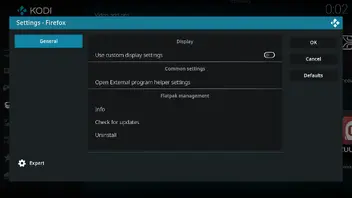
Quick update: I've just added basic flatpak management functions (show info, check for updates, uninstall) and a shortcut to open the External programs helper settings to all the flatpak addons, so you can do the most common tasks directly from the addon settings and don't need to open the flatpak or external programs helper addons:
Updated ARMv8/aarch64 addons (eg RPi4/5) are already in the repo, x86/Generic addons will follow in a day or two - the CI build ran a bit too soon and so it missed the change.
so long,
Hias
-
Quick update: I've just added basic flatpak management functions (show info, check for updates, uninstall) and a shortcut to open the External programs helper settings to all the flatpak addons, so you can do the most common tasks directly from the addon settings and don't need to open the flatpak or external programs helper addons:
Updated ARMv8/aarch64 addons (eg RPi4/5) are already in the repo, x86/Generic addons will follow in a day or two - the CI build ran a bit too soon and so it missed the change.
so long,
Hias
Thank you. Would it be possible to have per flatpak settings for things such as screensaver and resolution? Firefox in 4K, on a 77" it's almost unusable with no DPI scaling. Ran at 1080p is fine. VacuumTube needs 4K if one wants to enjoy 4K videos.
-