


ApexAftermath your GTX 1060 and GT 1030 are among these cards: HDR10 is upright again, and the new option is the way past 8 bits on them over HDMI. A diagnostic with it on would be very welcome.
Diagnostics attached.
ApexAftermath your GTX 1060 and GT 1030 are among these cards: HDR10 is upright again, and the new option is the way past 8 bits on them over HDMI. A diagnostic with it on would be very welcome.
Diagnostics attached.
 Quote from DolbyVisionFriend
Hades: playback stutters while the media info overlay (O key) is open. Without the overlay, playback is smooth.
DolbyVisionFriend Thanks for testing it on the Geekom. That stutter is a fault in Hades, and I am working on it for the next version. While anything of the interface is on screen, each Dolby Vision frame is composed with it before it goes out, because the TV gets the interface inside the Dolby Vision signal. The info overlay redraws itself all the time, so every frame takes that longer way, and on integrated graphics it costs about twice the GPU time of the picture alone (on Intel graphics at 60 Hz: 35 to 40 ms per frame with the interface, 16.5 ms without). The next version makes the frames with the interface cheaper, so that an overlay no longer makes the video stutter. If you have a minute, a diagnostic with the overlay open would let me measure it on your Radeon as well, but the work does not wait for it.
Quote from DolbyVisionFriendwhether CB1, with its "Dolby Vision Master Reference" option, is technically superior to the Hades dvbridge module
CB1 is the work of CroqueMr, and he is the right person to explain it. Here is what Hades does, in short. Each picture is rebuilt the way ETSI GS CCM 001 describes the composer: the base layer, the reshaping of its RPU and, in profile 7 FEL, the residual of the enhancement layer, at 12 bits. It goes to the TV in the IPT-PQ-c2 transport used for TV-led displays. FFmpeg decodes the video and reads the RPU, and libplacebo runs the reshaping on the GPU. The ways of drawing (direct, composed with the interface, a frame ahead) are checked against each other with a software renderer, and at full fidelity they give the same bytes. A step-down happens only where the GPU cannot keep up, and the log says so.
ApexAftermath Thanks, the diagnostic has what I needed (start-2 is your RC8 run; start-1 is an older one from RC5). Your GT 1030 played the profile 7 FEL film at about 12 frames per second instead of 24, and two things in the log explain it. Both are faults in Hades.
Frames. The GT 1030 takes about 31 ms of GPU time per frame, and a refresh at 23.976 Hz lasts 41.7 ms, so the frames fit. But each one went out the way that waits for its flip, which on your card took about two refreshes per frame. Presenting frames a frame ahead removes that wait (it is what made integrated AMD graphics play at full speed). On NVIDIA, Hades turns it on only after it has measured missed refreshes in two runs of 240 frames, which at half speed takes about 40 seconds, and your test stopped at 47. The next version turns it on within a few seconds when most frames miss their refresh like this. You can try it now: add this inside <advancedsettings> in /storage/.kodi/userdata/advancedsettings.xml and restart Kodi:
It has not run on a GeForce 10 card yet. If the driver refuses it, Hades goes back to the usual way and kodi.log says so.
Enhancement layer. 133 times in those 47 seconds, the VAAPI driver could not hand Kodi a picture of the enhancement layer ("resource allocation failed"), so about a third of the frames went out without their FEL residual. With 2 GB on the card, video memory is the likely reason. The next version records the memory of the card in the diagnostic, and I am going through what Hades keeps in video memory during Dolby Vision, to bring it down on 2 GB cards.
The run has no HDR10 video, so nothing yet on the 10-bit option. As sat4all found (issue #17), on GeForce 10 cards RC8 sends 10 bits but still draws the picture at 8; the next version fixes that.
sat4all Thanks for confirming. One correction from your photos on GitHub: on the GTX 1060 the link is 10 bits, but the picture is still drawn at 8 bits, because the plane of that card cannot flip the 10-bit buffers Hades draws into. Details and the fix for the next version are in issue #17.
@hadesdevls CroqueMr Hi everyone,
I just finished testing LibreELEC Hades 1.0 RC7 using the exact same hardware and configuration as before, to compare it with the CroqueMr build.
Environment:
Test Results:
1. FEL_test_for_AVS (m2ts, mkv, mp4, iso):
Everything works perfectly! All four formats play normally, successfully trigger Dolby Vision, and seeking (fast-forward/rewind) works flawlessly.
2. Transformers 2 Revenge of the Fallen 2009 (UHD BDMV/ISO):
Unfortunately, this movie has the same issue: when playback starts, the TV initially triggers the Dolby Vision logo, but shortly after, it drops back to HDR10 playback.
Important note: CroqueMr has already fixed this specific issue in their R1.0.0 RC2 build. The Transformers movie played perfectly and stayed in DV on RC2.
Therefore, this means the fix is likely already in the CroqueMr codebase. Maybe hadesdevls could look into the changes made in CroqueMr's RC2 regarding BL/EL pairing or metadata handling for this specific movie, as it might save a lot of debugging time.
Please let me know if either of you needs a full kodi.log or a specific sample clip from the Transformers playback. Thanks to both of you for the continuous hard work!
 Quote from lfemperor
Transformers 2 Revenge of the Fallen 2009 (UHD BDMV/ISO): Unfortunately, this movie has the same issue: when playback starts, the TV initially triggers the Dolby Vision logo, but shortly after, it drops back to HDR10 playback.
lfemperor Thanks for testing RC7 so thoroughly, and good to hear the FEL test plays in all four formats, seeking included. Transformers 2 dropping to HDR10 is a fault in Hades. ht2tweak saw the same with the Transformers and Tron samples on an N150, so both reports are on Intel graphics. I'll reproduce it with those samples and fix it for the next version.
Yes please, the kodi.log of a playback that drops would help, ideally with the diagnostic on (rename DIAG-OFF.TXT to DIAG-ON.TXT on the boot partition, play the film until it drops, then zip the hades-diag folder from that partition). When Hades leaves native Dolby Vision, it writes the reason in kodi.log and on the Dolby Vision page of the player information. I'll start with the samples from ht2tweak and ask for a clip only if they don't show it. Thanks also for pointing to RC2 of CroqueMr.
hadesdevls I’ve noticed one little bug: when I play a video from my S24 (HDR10+)—processed as Dolby Vision—and then stop the clip, the screen remains black. The PC hasn’t crashed, though; I can tell because I can hear the audio feedback as I navigate through the menu.
Is this a known issue, or should I provide a log? There are no such problems when playing in HDR.
Another thing I noticed in terms of comparison: with CroqueMr, skipping between chapters doesn't really work, the image usually just stays frozen when using mkv DV FEL whereas with Hades, you can jump through the chapters without any issues.
Hi, many thanks for the good read and your efforts the last few weeks, really awesome what you have built in such a short time frame.
Both your builds do not seem to work with my newly aquired AMD RX550 LP. Dolby Vision does fallback to HDR on CroqueMRs Build, and on HADES build the tv shows the Dolby Vision logo and i can hear Audio,
Attached is a log from CroqueMR build, i tested two scenarios: plugged directly into the TVs HDMI4 Port and also with my Denon AVC-x3800H in between. Hope i can contribute to this project by testing and shareing my logs.
Please let me know if i did something wrong or if you want me to test anything.
01_KODI.log
Quote from DolbyVisionFriend
I’ve noticed one little bug: when I play a video from my S24 (HDR10+)—processed as Dolby Vision—and then stop the clip, the screen remains black. The PC hasn’t crashed, though; I can tell because I can hear the audio feedback as I navigate through the menu.
Is this a known issue, or should I provide a log?
DolbyVisionFriend Yes, please capture this with diagnostics on. The menu sounds show that Kodi is still responding, but I need the state after stopping to see whether the Dolby Vision signal was removed and the normal output restored.
Rename DIAG-OFF.TXT to DIAG-ON.TXT on the boot partition, play the S24 clip as Dolby Vision, then stop it and leave the black screen for at least 30 seconds before restarting. Attach the hades-diag folder from that run. It records the output state 5 and 30 seconds after Dolby Vision ends, which is the part I need here.
If possible, please include a short original S24 clip that reproduces it, without re-encoding. Please also say whether the TV still reports Dolby Vision while the menu is black. I cannot yet say whether this shares anything with the overlay stutter. Good to hear chapter skips work on FEL MKV here.
 Quote from ApexAftermath
Diagnostics attached.
ApexAftermath One remaining test for the HDR depth option: the attached RC8 run is native Dolby Vision on the GT 1030, so it does not establish the HDR10 rendering depth on either card.
When you next test HDR10, enable System > Display > "HDR at more than 8 bits where the card sends RGB at 8 (NVIDIA)" at Expert level and capture a diagnostic for each card separately. Please identify which is the GTX 1060 and which is the GT 1030.
I need both the rendering-buffer depth and the HDMI output depth. RC8 can report a 10-bit link while still drawing at 8 bits if the display plane rejects the vertical reflection required by its own HDR buffers, as the GTX 1060 report in issue #17 showed.
 Quote from SunnySnacksALot
Hi, many thanks for the good read and your efforts the last few weeks, really awesome what you have built in such a short time frame.
Both your builds do not seem to work with my newly aquired AMD RX550 LP. Dolby Vision does fallback to HDR on CroqueMRs Build, and on HADES build the tv shows the Dolby Vision logo and i can hear Audio,
Attached is a log from CroqueMR build, i tested two scenarios: plugged directly into the TVs HDMI4 Port and also with my Denon AVC-x3800H in between. Hope i can contribute to this project by testing and shareing my logs.
Please let me know if i did something wrong or if you want me to test anything.
SunnySnacksALot Thank you for testing both builds on the RX550. I already reviewed the Hades diagnostic you opened as https://github.com/hadesdevls/LibreELEC-Hades/issues/20, and I left the next comparison there.
The attachment here is from CroqueMr RC3, not from Hades. I read it as a comparison. On this card his kernel reports the AMD family as unsupported for native Dolby Vision (family_supported=0), so native output is not started (native_dv=false, native_eligible=false). Playback then sets HDR at 3840x2160. That matches the fallback you described. Both sessions in the file see the G3 (LG TV SSCR2) on HDMI; I do not see a Denon EDID in this log.
Hades takes the other path on the same card: it does start native Dolby Vision, which is why the TV shows the Dolby Vision logo and why you still hear audio. The picture staying black is the fault I am investigating. The Godzilla capture in that diagnostic is MEL, so the black screen is not limited to FEL reconstruction.
The comparison I still need is the same Godzilla file, over the same direct HDMI connection, with "Dolby Vision as HDR10" selected, plus whether opening the playback controls during native Dolby Vision leaves those black as well. Please keep diagnostics on and attach the folder on the GitHub issue.
hadesdevls Thank you for reading the CroqueMR log too, stumbled upon that while reading the logs myself - very curious what he thinks about the attached log, but i also want him to take breaks to not overwork himself - both you guys please take breaks if you feel like you need to (and even if you do not feel like you need to but your loved ones tell you to).
I did the tests you wanted me to (and some mistakes along the way) and sent you the logs on github.
For now i will keep the Denon AVC-x3800H out of the equation - as i feel it would overcomplicate things unneccessarily.
If you guys are able to make it work on a direct connection, then i will happily test it with my Denon in between.
Very excited about both your approaches, i like my homatics Box with coreELEC, but even just scrolling the menu you can tell its performance is not up to my (way too high) standard.
Quote from SunnySnacksALot
hadesdevls Thank you for reading the CroqueMR log too, stumbled upon that while reading the logs myself - very curious what he thinks about the attached log, but i also want him to take breaks to not overwork himself - both you guys please take breaks if you feel like you need to (and even if you do not feel like you need to but your loved ones tell you to).
I did the tests you wanted me to (and some mistakes along the way) and sent you the logs on github.
For now i will keep the Denon AVC-x3800H out of the equation - as i feel it would overcomplicate things unneccessarily.
If you guys are able to make it work on a direct connection, then i will happily test it with my Denon in between.
Very excited about both your approaches, i like my homatics Box with coreELEC, but even just scrolling the menu you can tell its performance is not up to my (way too high) standard.
SunnySnacksALot Thank you for the extra tests and for sending the logs to the GitHub issue. I will go through them there. Thank you as well for the kind note about taking breaks.
Leaving the Denon out for now is the right call. Once native output works over the direct HDMI connection, your offer to test it with the receiver in between will be very useful.
Haha, I understand about the Homatics. I also have one with my own custom build based on the nightlies, which I have not uploaded, but I do appreciate the performance difference a PC can give.
If possible, please include a short original S24 clip that reproduces it, without re-encoding.
thats easier for me, here a sample: Link

hadesdevls since I didn't see it in the change logs, any chance we can get the quick change menu for the DV conversions?
I think in Croqs build it is available with a double O tap.
And a big thank you for the 1.0 release, I will try it out tomorrow.

There is a "Change output for this video" button in the player process window (O key), but I can't seem to activate it using the keyboard or the Yatse app. I can only seem to reach it using a mouse.
But there is also a change video output button in the default Estuary skin that is delivered with this build which does work.
hadesdevls Happy to report that the video stuttering I experienced with the Avatar 2 ISO is no longer present in 1.0.
Khazar MrMagic Thanks both. The player information page (O) has "Change output for this video" for that, but MrMagic is right that it can only be reached with a mouse: with a keyboard, a remote or Yatse the focus never gets to it. That is a fault in Hades and I will fix it in the next version, and look at a quicker way to switch the Dolby Vision conversion while a video plays at the same time. Until then, the change of video output in the player controls of Estuary works, as MrMagic found.
MrMagic Great to hear the stutter with the Avatar 2 ISO is gone, thanks for telling me.

Looks like a very solid release, congrats! Will do a fresh install and try out.
ht2tweak Thanks! A fresh install is a good way to see the new defaults; if anything looks off, the diagnostic report (Settings > LibreELEC > System > Submit Log) makes it easy to see why.

Hi hadesdevls I see you copied my DVD-related PR in your build, I don’t care that you use the code or the idea obviously it’s what open source is for but my PR was still WIP, untested. I do think most if not all of it is fine but maybe wait a bit before porting stuff to your build, no need to rush!
CorentinB Hi, thanks for reaching out about it, and for the work you shared. The film detection for DVDs in Hades builds on your pull request 101 to the build of CroqueMr: the idea and the approach with fieldmatch and decimate come from there, and I adapted them to how Hades decodes and presents video, with its own checks and tests. You are credited for it in the README and the changelog, as you should be. The measured display latency in 1.0 also grew from something you pointed out in another pull request; that credit is only in the commit for now, and I will add it to the README and the changelog as well.
And fair point about it still being in progress, I appreciate the heads-up. In Hades it is marked as not tried on hardware yet, and I will gladly follow your pull requests and bring in your improvements as they come. It is great to see more people working on DVD and timing on PC, so thanks again, and if you would like the credit worded any differently, just let me know.
Sorry, adding this post for you to mishmash away as well 😜.
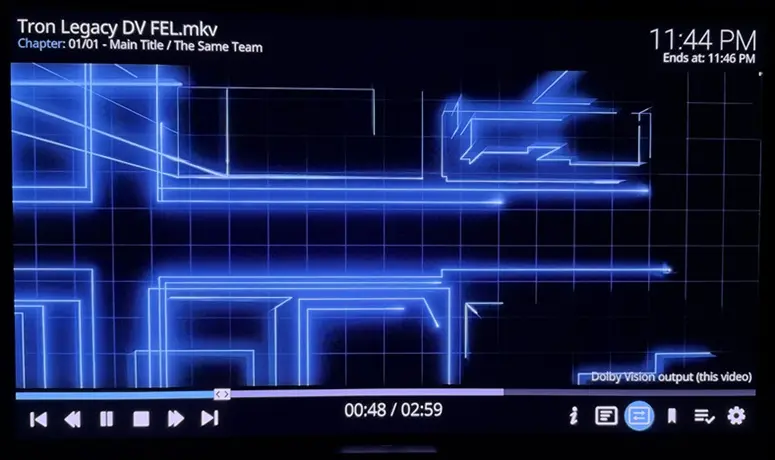
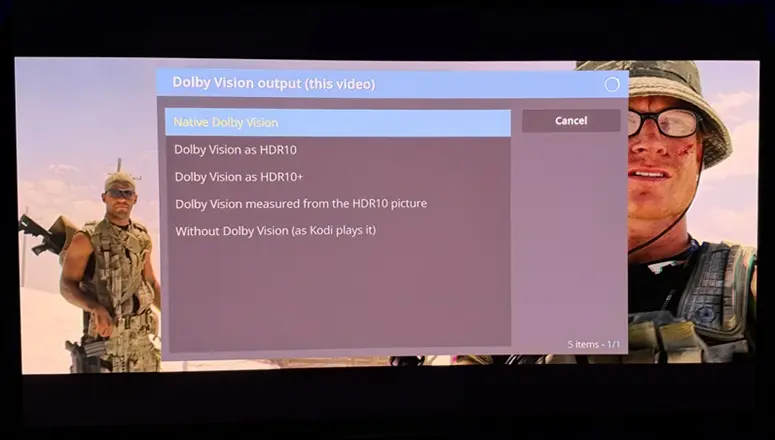
hadesdevls, I'm very impressed with 1.0! Tested using AMD 5800H. The 'Transformers' & 'Tron Legacy' samples play with ease, bringing up the excellent new multi-tabbed playerprocessinfo overlay, and toggling from DV to HDR, HDR10+, etc. (which I tried):
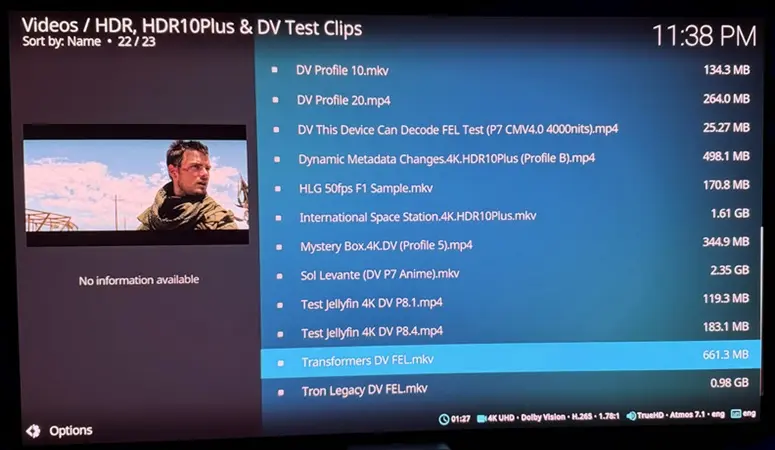
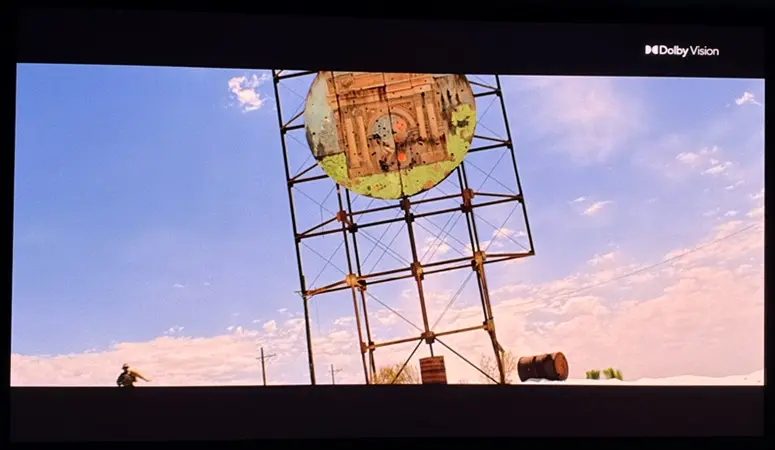
Also quickly re-tested a few minutes of actual DV FEL movies, and no issues. Also a MVC MKV and FSBS.
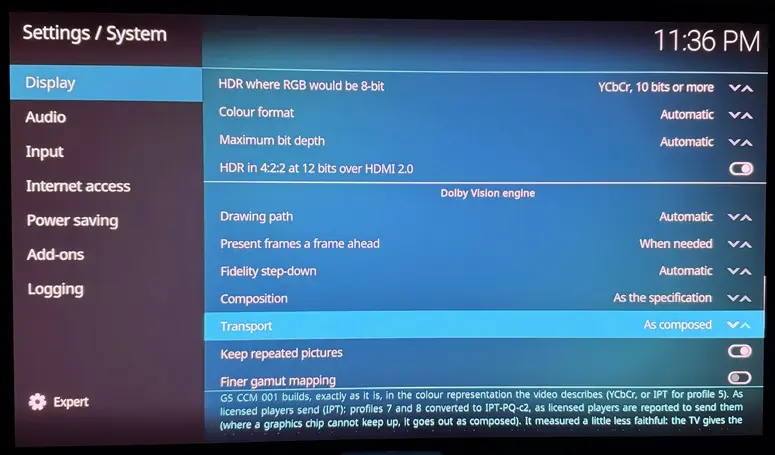
You've also improved the settings options, and thumbs up for the defaults:
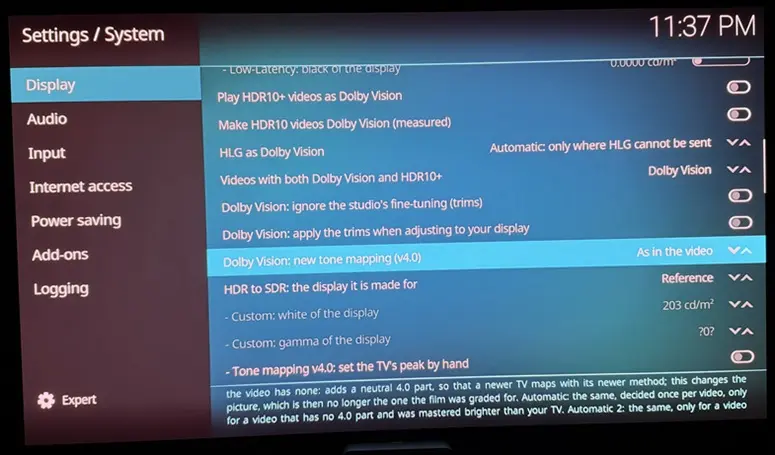
The only issue I've found so far is inability to navigate to 'Change output for this video' from playerprocessinfo. As soon as I arrow down to try to get there, the overlay goes away:
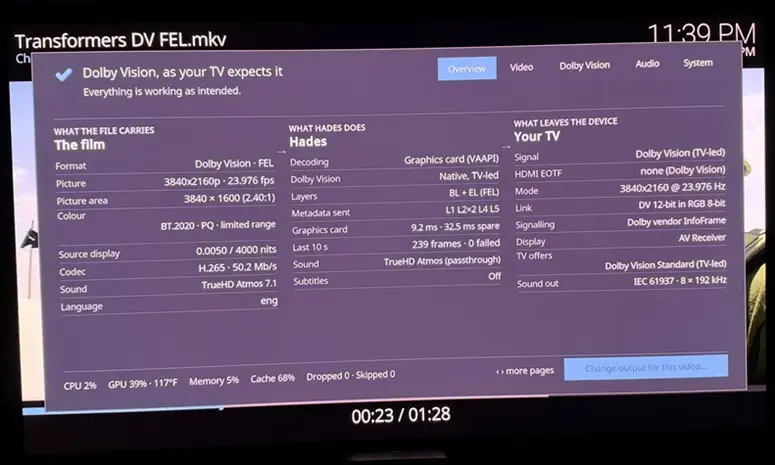
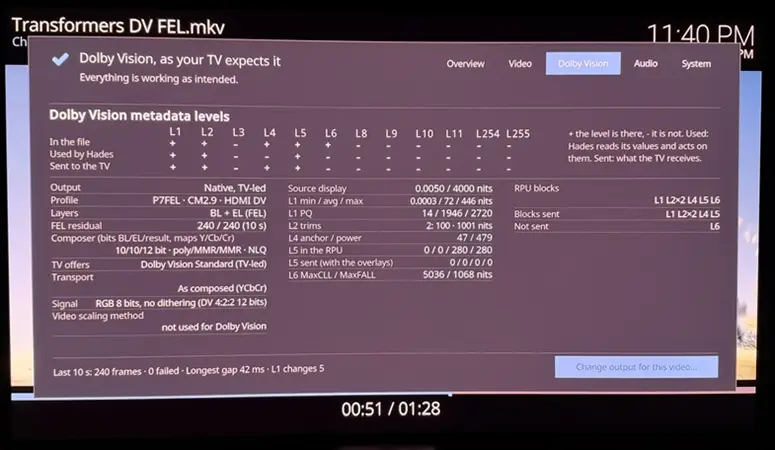
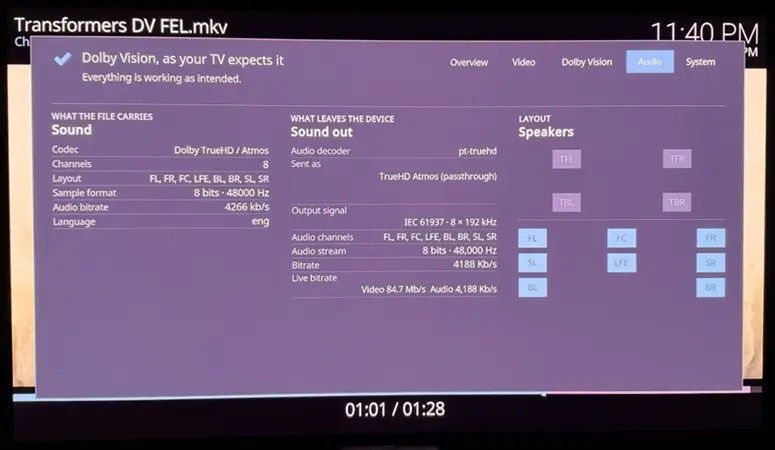
(The above details are beautiful)
I can only toggle HDR/SDR formats on the fly from by bringing up the player OSD and:
LibreELEC Hades
LibreELEC Hades is an unofficial build of LibreELEC for 64-bit PCs. It sends native Dolby Vision from the PC to the TV over HDMI the way Dolby Vision players do, including profile 7 with its full enhancement layer (FEL), and adds HDR10+, 3D Blu-ray and HD sound passed through. Everything LibreELEC does is kept, with safer defaults.
This thread was split off the Dolby Vision on PC thread, as ht2tweak and ashlar suggested, so that each build can be followed on its own. Questions and results are welcome here; faults are best reported on GitHub (see below).
What it does
What you need
Which graphics have been tried with which TV is listed in the README.
Getting started
Download the latest version from GitHub and run the Windows installer. It writes Hades to the USB drive or disk you choose, and later updates it keeping your settings. Then start the PC from that drive. The README explains each step, the settings and how it works.
Version 1.0, the first stable release
Work goes on: the next versions are already being prepared, and your reports shape what comes first. Everything in 1.0 is in the release notes.
I tried 1.0 on my PC: a GeForce RTX 4080 SUPER with an LG C5 TV, a TCL Q85H Pro sound bar on its eARC and a Samsung Odyssey OLED G6 monitor. Native Dolby Vision of profiles 5, 7 with FEL and 8.1, HDR10 as Dolby Vision, TrueHD Atmos and DTS-HD MA, HDR10+ on the monitor and switching between them all work. My TV has no 3D, but users with 3D displays have seen 3D working. Results on other hardware, AMD and Intel above all, are very welcome.
Reporting problems
Please use the GitHub issues, not LibreELEC or Kodi, and attach a diagnostic report: Settings > LibreELEC > System > Submit Log > Create a diagnostic report makes one file and can copy it to a USB drive. It is filtered, but look through it first.
Thanks
This work began in the Dolby Vision fork of LibreELEC by CroqueMr and its contributors, from which the Dolby Vision output of Hades grew. Several features follow ideas from the build of CroqueMr, YBLOD, CorentinB, cinemaONE, SamuriHL, pannal, avdvplus, matthane, malard, damnms and Pro-me3us, written again here, and others are credited one by one in the README. Thanks to the LibreELEC and Kodi teams, to Da Flex for giving the builds their own threads, to ht2tweak and ashlar for suggesting it, and to everyone who reported, asked and tested.
Quote from ht2tweakI'm very impressed with 1.0! Tested using AMD 5800H. The 'Transformers' & 'Tron Legacy' samples play with ease… The only issue I've found so far is inability to navigate to 'Change output for this video' from playerprocessinfo. As soon as I arrow down to try to get there, the overlay goes away.
ht2tweak Thank you for testing 1.0 so thoroughly and for the detailed feedback. It's good to hear that Transformers and Tron Legacy play well on the 5800H, along with the MVC and FSBS files. The overlay closing when you arrow down to "Change output for this video" is a fault in Hades, and I will fix it in the next version. Until then, you can change the output from the player controls in Estuary.
ashlar ht2tweak Thanks for suggesting a separate thread. Hades now has its own here: [x86-64] LibreELEC Hades - native Dolby Vision, HDR10+ and 3D for PCs (NVIDIA, AMD and Intel)
ht2tweak thank you for photo's about O key information.
what a massive info hadesdevls . this is the biggest and most extended info i ever have seen with kodi.
thank you
I tried it on my 5600u with excellent results. It seems to have eliminated the occasional flickering I had in CroqueMR build. The temperature runs lower and DVDs play at more reasonable frame rates.
Hardware
Beelink EQ12 Pro (Intel Core i3-N305, 16GB DDR5 RAM, Alder Lake iGPU 32EU 1.25GHz, 2.5GbE Network)
Hisense L9H 4K Projector
Samsung HW-Q990C Soundbar
Jellyfin Server on TrueNAS CE also on 2.5GbE Network
Hades v1.0 on SATA SSD-USB3 adapter
Jellyfin Kodi Client Add-on.
Default settings from fresh install.
No bugs so far.
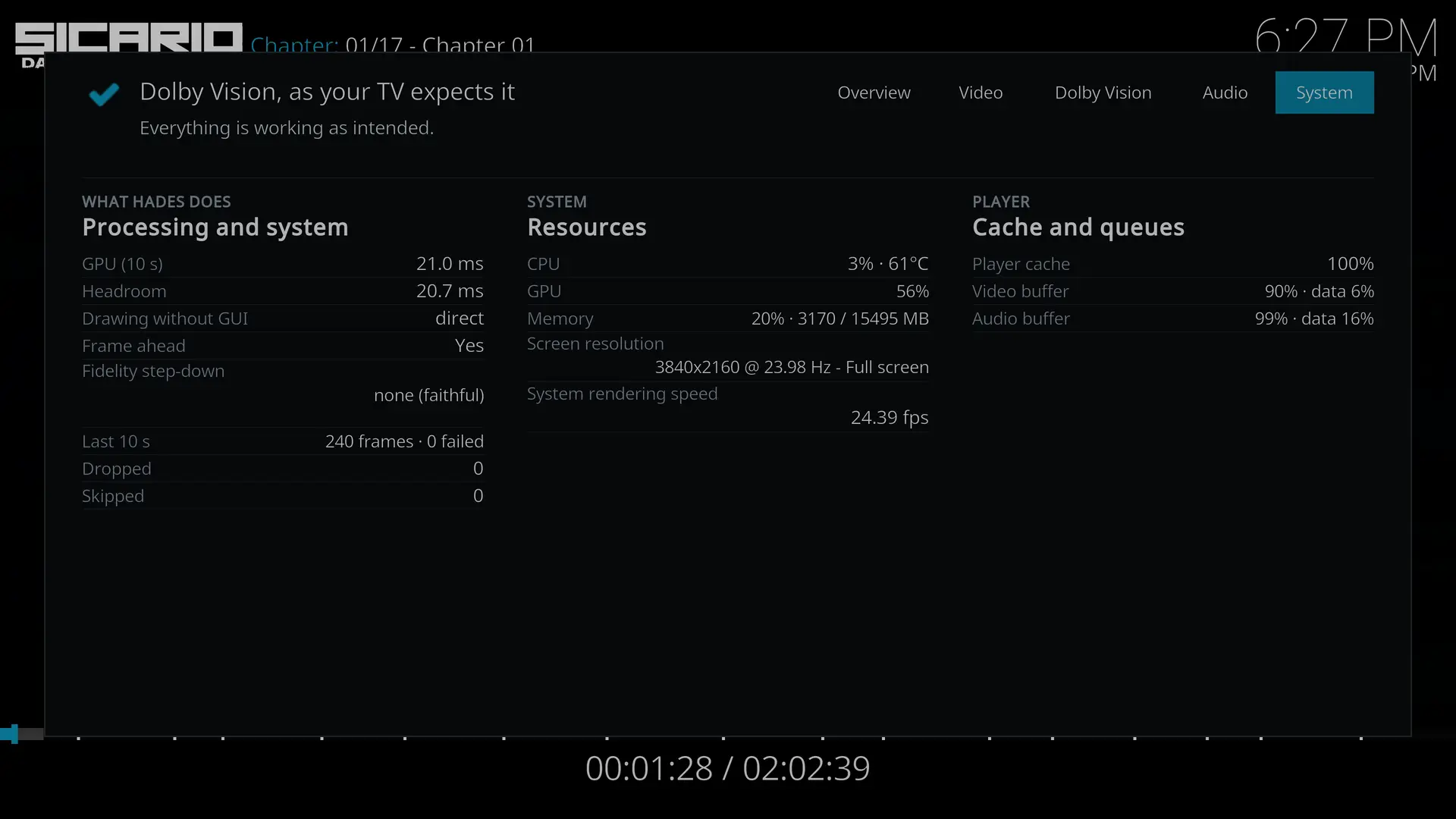
Previously on Hades RC8, Sicario2 will jump back to Main Menu just after the end of the opening credits (Lionsgate & Black Label Media). On v1.0 Sicario2 plays fine.
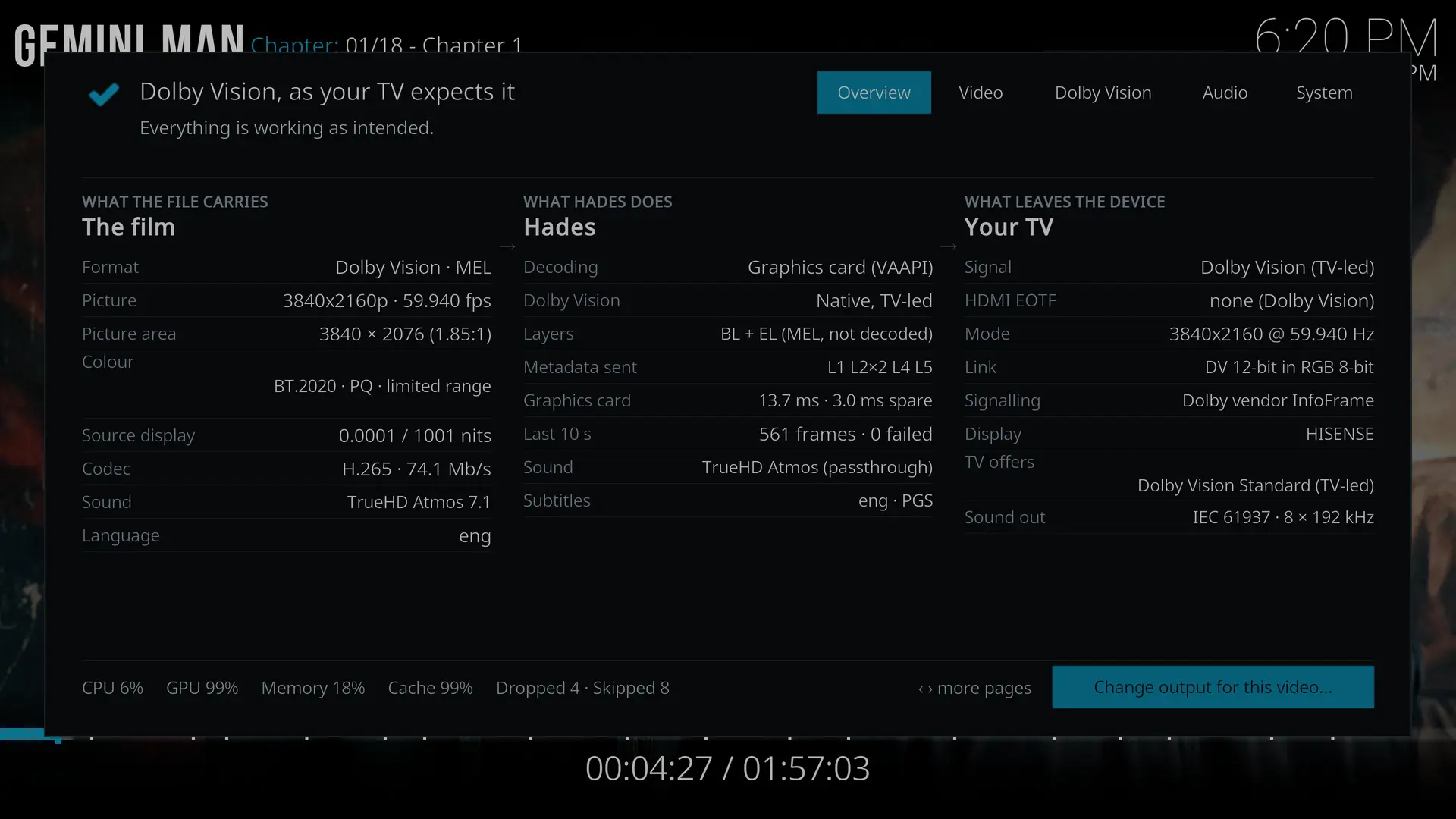
Gemini Man plays fine even with near GPU ceiling limit.
Dropped & skipped frames kept increasing only with OSD turned on.
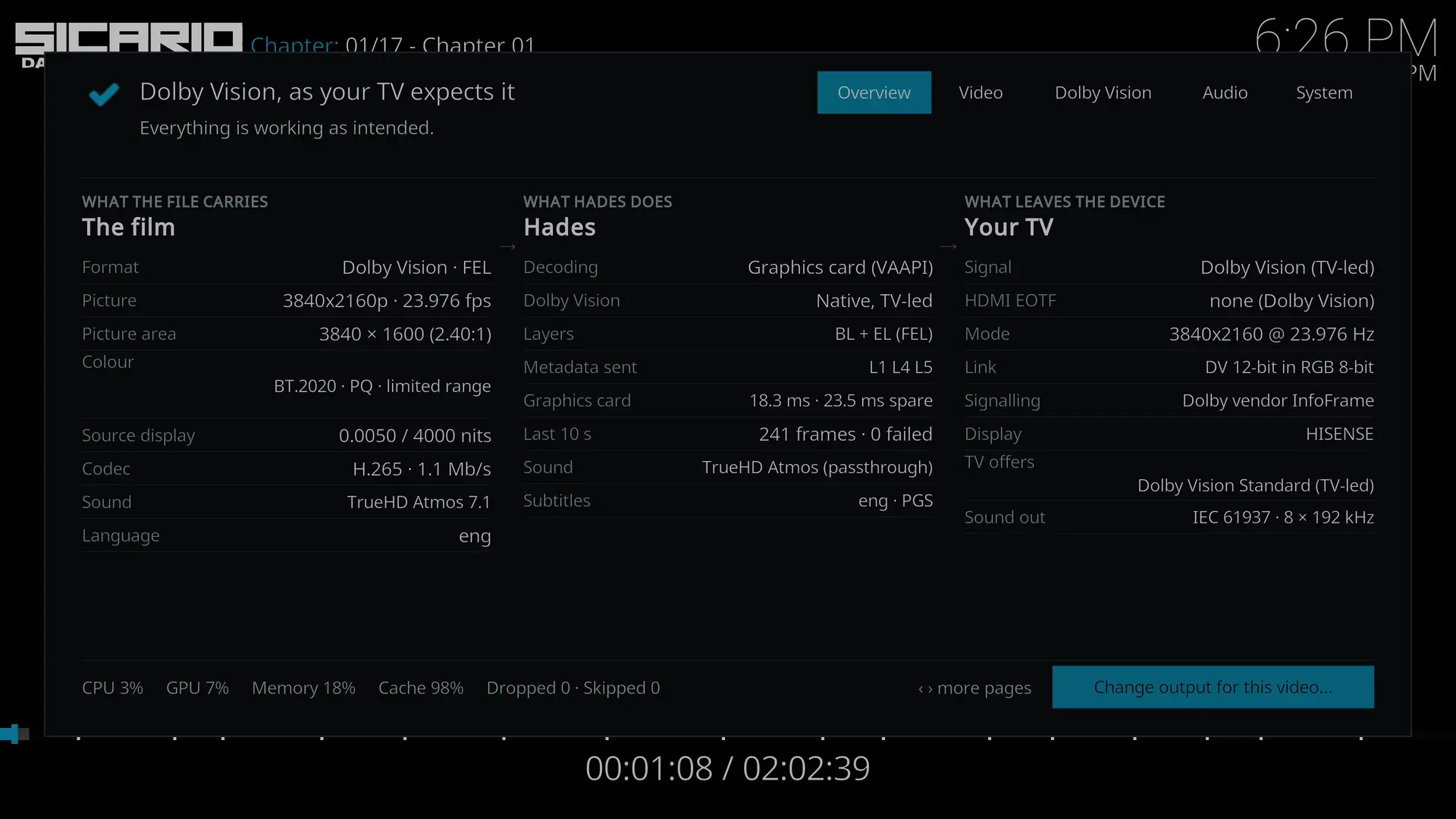
Typical DoVi 4K @ 24Hz playback, GPU is around 50-60%.
Post #1 updated. hadesdevls, LMK if anything else should be added, also w/new users in mind.