

Question for 4K configuration according to Wiki

  • Hi all,

    I have a two questions regarding the Wiki, specifically the 4K Configuration in LE as described here: https://wiki.libreelec.tv/configuration/4k-hdr

    I am currently configuring my LE 12.2.1 according to the points described on that page and noticed two things.

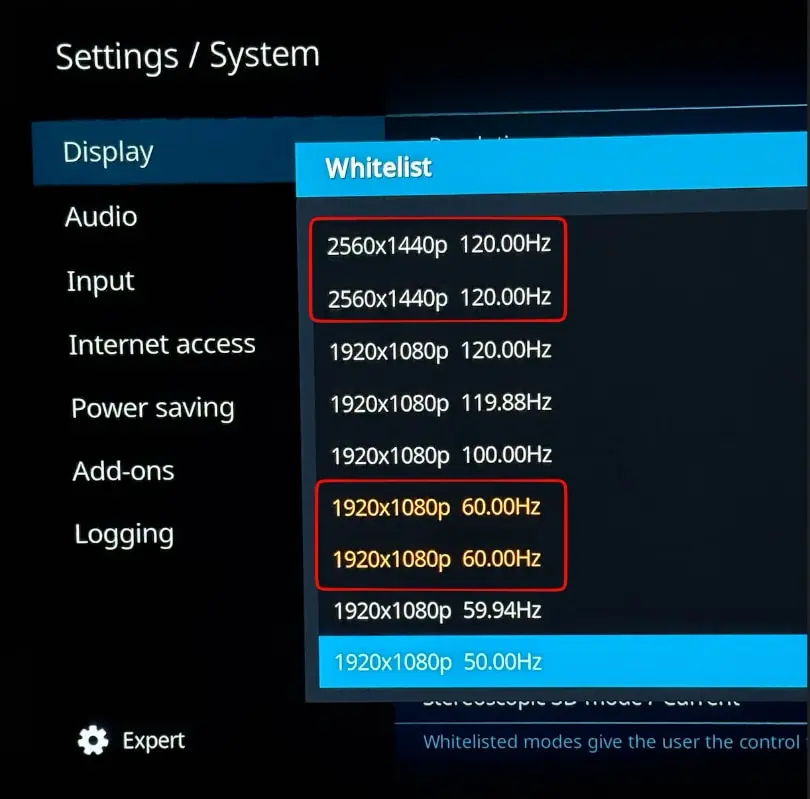
    1) For the 2nd point ("Mode Whitelist"), I noticed that some modes are listed twice. a) why is that? and b) shall I just select both in these cases?
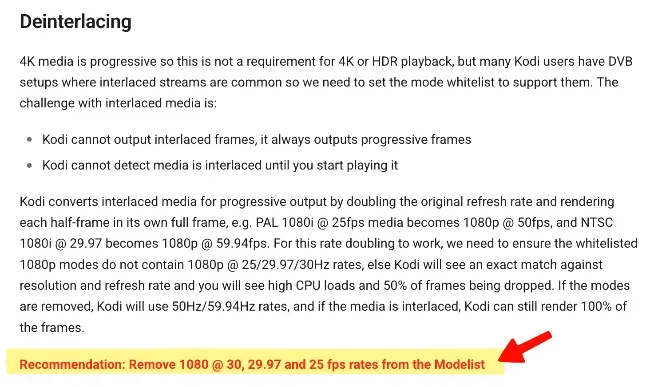
    2) In the "Deinterlace" Section I want to remove the modes that are mentioned in that article. However, I cannot find the Deinterlace setting where I can do that. Can someone point me to the exact location for that setting?
    Many thanks!!

  • I've no idea why those specific resolutions are duplicated in the selector on your system but there is presumably a difference other than the resolution that results in a different mode being listed. The display order in the GUI should be the same as the "Found resolution" data you can see in a kodi debug log (must be a debug log). You can also compare the output of "modetest" on the CLI to see what's listed there.

    NB: There is no separate deinterlace section. If there are 1080@25/29.97/30 modes in the whitelist deselect them. If none of those modes are selected .. don't select them.

  • Thanks chewitt ! I still had a fairly recent debug log from a few days ago that was created with <setting id="debug.setextraloglevel">131072</setting> (due to a different issue that has been solved). This is the log.

    At the beginning of the log, I can see these resolutions (1920/1080 60Hz also shows twice):

    Not sure what I should make of that. I think I will simply select both values that are present in the selector...

    Thanks for the explaining the deinterlace topic - noted!

    Edited once, last by Quiffy (December 30, 2025 at 5:31 PM).

  • The resolution list from kodi tends to be the list extracted from the edid, plus the mode kodi was launched in (internally denoted RES_DESKTOP). The latter of these shows as a duplicate.

    In some places (like setting the default resolution for the GUI) they behave differently. Consider choosing 1920x1080@60 vs RES_DESKTOP (which we'll assume was 1920x1080@60).

    e.g. if you connected to a different display that reported 1280x720@50 as it's preferred mode (but still supported 1920x1080@60) then choosing the former option would result in a 1920x1080@60 GUI resolution, whereas choosing the latter would result in 1280x720@50 GUI (this monitor's RES_DESKTOP).

    As kodi doesn't make it clear which is which in the GUI, this distinction is less useful.

    It would be better if in settings, RES_DESKTOP showed with a unique name (e.g. "DEFAULT").

    And it should probably be filtered out from whitelist.


    Your second duplicate resolution is probably the edid reporting two different modes with same refresh/timing, but some other differences (e.g. blanking period or aspect ratio).

    Code
    edid-decode /sys/devices/platform/axi/axi:gpu/drm/card?/card?-HDMI-A-1/edid

    may provide some clue.