



OK - was hoping to get a 2nd opinion  Alright, I'll ride with my current SSD/Setup for now. Hope & pray that the SSD holds up and that I do not ever see that error again. In case I do even one more time, that SSD will be trashed and I'll buy a new one ...
Posts by Quiffy
-
-
chewitt one last question: based from your experience: how likely do think it is that this error occurs again if it happened once? Reason I ask: I am think of either leaving it as is - for now - monitoring if anything similar will occur again and then trashing the SSD, buying a new one and attempting another new install of LibreELEC.
Option B: It would be likely that it happens again - because it already happened once - so trash the SSD now, buy a new SSD and do another new install of LE.
Any thoughts based on your experience?
-
Got it - makes sese. I think years ago I also only picked that WD Green 120GB SSD because of the price and known brand. In case it will fail (again) at some point, I guess I would switch to another brand and pick a small size again.
-
Thank you chewitt appreciate it! I also found another related thread:
ThreadLibreElec - Error in mount_sysroot: mount_common: Could not mount /flash/SYSTEM
My LibreElec has been working fine but suddenly has the error. with:
Starting debugging shell for boot step: prepare_sysroot.... type exit to quit.
If I type exit I get other errors, attached
How is best way to recover from this. ctrl_alt_delete
February 1, 2023 at 7:13 PM Again, so far I never had any issues with the SSD, that is the first time I ever had such an error. I will for sure monitor - I'll do this anyway when I boot up my Kodi machine. As all my data/media is on a seperate NAS, even if the SSD would be corrupt, it wouldn't be the end of the world.
If I see this error during bootup one more time, I will replace the SSD with a new one and make a clean install again.
Offtopic: is there any specific SSD brand / model /series that you can recommend from your experience in terms of a) reliability and b) low power consumption?
-
Hi all,
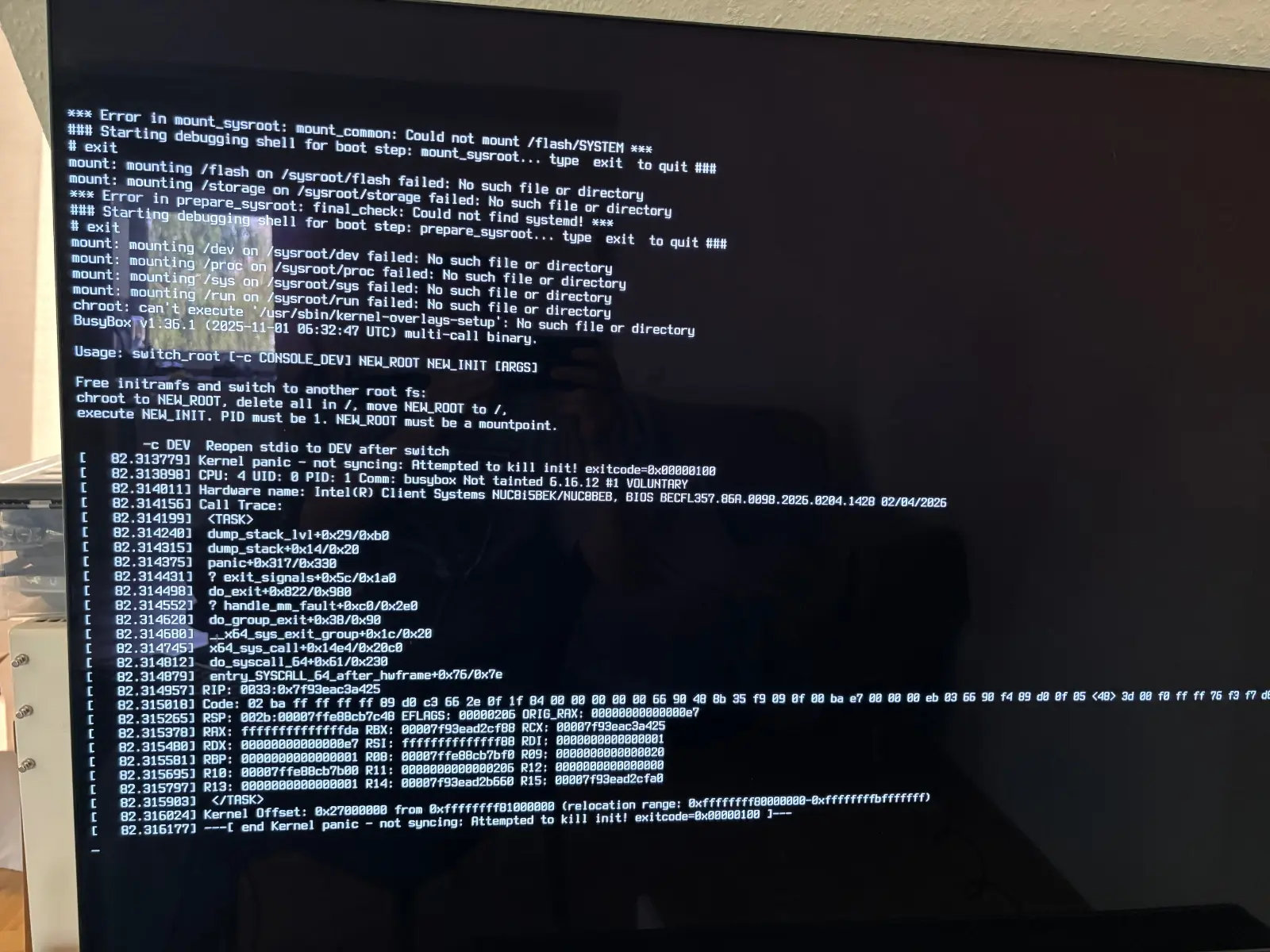
I just made a fresh new install of LE on my Intel NUC. After the 2nd boot today, the following error was printed on my screen (I was just able to make a photo with my phone) - I then typed "exit" twice and it booted up. On the 3rd boot, it booted into LE without any issues.
Shall I need to be worried about that error ? I have never encountered it in all my years prior using LE. Using a Western Digital WDS120G2G0B WD Green 120 GB Internal Solid State Drive - SATA - M.2 in my LibreELEC machine.
It happened only once and since then I have no issues with booting ...
-

There is something wrong with your advancedsettings.xml file, so you're still at log level 0:
Code2026-04-28 21:49:46.726 T:823 error <general>: Error loading special://profile/advancedsettings.xml, no <advancedsettings> node 2026-04-28 21:49:46.726 T:823 info <general>: Default Video Player: VideoPlayer 2026-04-28 21:49:46.726 T:823 info <general>: Default Audio Player: paplayer 2026-04-28 21:49:46.726 T:823 info <general>: Disabled debug logging due to GUI setting. Level 0.[/thread]
I don't get it ... I was able to reproduce the Clean Library freeze (about 4 minutes of freeze before it went through) with the following in /storage/.kodi/userdata/advancedsettings.xml
<advancedsettings>
<loglevel>1</loglevel>
<debug>
<showloginfo>false</showloginfo>
</debug>
</advancedsettings>Why does it say this part:
2026-04-29 21:38:58.796 T:948 info <general>: Loaded settings file from special://profile/advancedsettings.xml
2026-04-29 21:38:58.796 T:948 info <general>: Contents of special://profile/advancedsettings.xml are...
<advancedsettings>
<!-- Logging -->
<loglevel>1</loglevel>
<!-- 0=none, 1=normal, 2=debug -->
<debug>
<showloginfo>false</showloginfo>
</debug>
</advancedsettings>
2026-04-29 21:38:58.796 T:948 warning <CSettingsManager>: missing version attribute
2026-04-29 21:38:58.796 T:948 info <general>: Default Video Player: VideoPlayer
2026-04-29 21:38:58.796 T:948 info <general>: Default Audio Player: paplayer
2026-04-29 21:38:58.796 T:948 info <general>: Disabled debug logging due to GUI setting. Level 1.See attached newly generated log ... I also noticed that additionally a crash log was generated (attached as well). Could the NFS issues be due to a mismatch of NFS version (LibreELEC: 3, Synology NAS: 4)?
In any case, I think I will make a clean, new install and verify all NFS related permissions in accordance with the Wiki to double-check.
If you spot anything in both logs: thanks in advance!
*Update:*
I checked the crash log again and I think I may have found something:
2026-04-29 21:36:40.134 T:892 debug <general>: NFS: Context for 172.30.11.26 not open - get a new context.
End of last year, I switched to a new private subnet: 10.XX.XX.X instead of 172.XX.XX.1. I changed all my IPs in Kodi for the shared folder on my NAS already, but somehow Kodi still searches for some parts in the old subnet. Maybe that is the part that is leading to internal timeouts which become visible as a freeze in the GUI. End of last year I already rebuild my database file and the issues were gone .... apparently they are back.
From an outside perspective it looks problematic to me if you change your local IPs (or IP subnet in my case) for the NFS shares in your Kodi installation. Not sure at which places Kodi still saves the old IP for the share (or if its cached anywhere). Could this be some sort of bug?
Anyway: I will make a complete fresh install and I have a good feeling that this may resolve things. I will also make sure NFS version on client (Kodi) and Synology (Media NAS) side are on par.
-
Hi Da Flex
thanks for your help! Here is the result from my test session from just now:
Created advancedsettings.xml with
<loglevel>1</loglevel>
<setting id="debug.extralogging">true</setting>
<setting id="debug.setextraloglevel">131072</setting>Removed a video title from my NAS (for test purposes), then ran a “Clean Library”. To my surprise, this time it did not freeze and the “Clean Library” wen through.
I then tried to play a movie and again - Kodi freezes upon clicking on the Movie thumbnail. After 4 minutes of freezing, the movie starts playing …
I am super curious as to why the freeze happens.
You can see it in the log that I pressed 21:59h to play and 22:03h (4 minutes later it only started to play). In between: freeze …
Another weird thing I observed from the logs:
2026-04-28 21:59:31.285 T:823 error <general>: GetDirectory - Error getting /storage/videos/Chess 26-10-2024/
2026-04-28 21:59:31.304 T:823 error <general>: GetDirectory - Error getting /storage/videos/Chess/Rating Climb/These were videos (video folders) I placed on my internal Kodi HD (not on my external NAS) to watch years ago! I have also deleted them years ago. Why are they still being requested somehow in the log?
Also - not sure if this is related to the freezing - lots of:
2026-04-28 22:03:06.368 T:900 error <general>: NFS: Failed to mount nfs share: (nfs_service failed)
Why is that? Up until recently I never had any issues (since years) and didn't change anything on my NAS. Please see attached NFS version running on my Synology. Shall I set it down to v3 maybe?
Third question:
2026-04-28 21:59:36.383 T:823 error <general>: GetDirectory - Error getting nfs://10.30.11.27/volume1/media/movies/en/Miss You Already (2015)/
2026-04-28 21:59:45.598 T:823 info <general>: CleanDatabase: Cleaning videodatabase done. Operation took 14888 msThis was the Movie that I removed for test purposes for the Clean Library test. Does Clean Library remove those entries that fail with this Error?
Seeing all of that ... would you say maybe a clean new install of LibreELEC might be better? I have been upgrading inplace for 5 years or so straight. Appreciate your help!
-
Hi friends,
(LibreELEC 12.2.1)
I have - all of a sudden - an issue with LibreELEC freezing whenever I attempt do interact anything from my NAS. The weird part is, that after approx. 5 minutes or so, it de-freezes. In particular I noticed the following:
- Clean up library: freezes upon attempt to clean, after a few minutes de-freeze and clean up has completed
- Playing a movie: upon hitting "Enter" on the thumbnail - freezes and after a few minutes de-freeze and plays movie
I did not make any changes whatsoever on my NAS or in Kodi, up until yesterday, everything played fine as always until the freezing issues popped up.
My NAS is accessible from my network without any problems.
Shall I try to reproduce for a log with the following settings?
<loglevel>3</loglevel>
<setting id="debug.extralogging">true</setting>
<setting id="debug.setextraloglevel">131072</setting>Any help much appreciated
-
Thanks chewitt ! I still had a fairly recent debug log from a few days ago that was created with <setting id="debug.setextraloglevel">131072</setting> (due to a different issue that has been solved). This is the log.
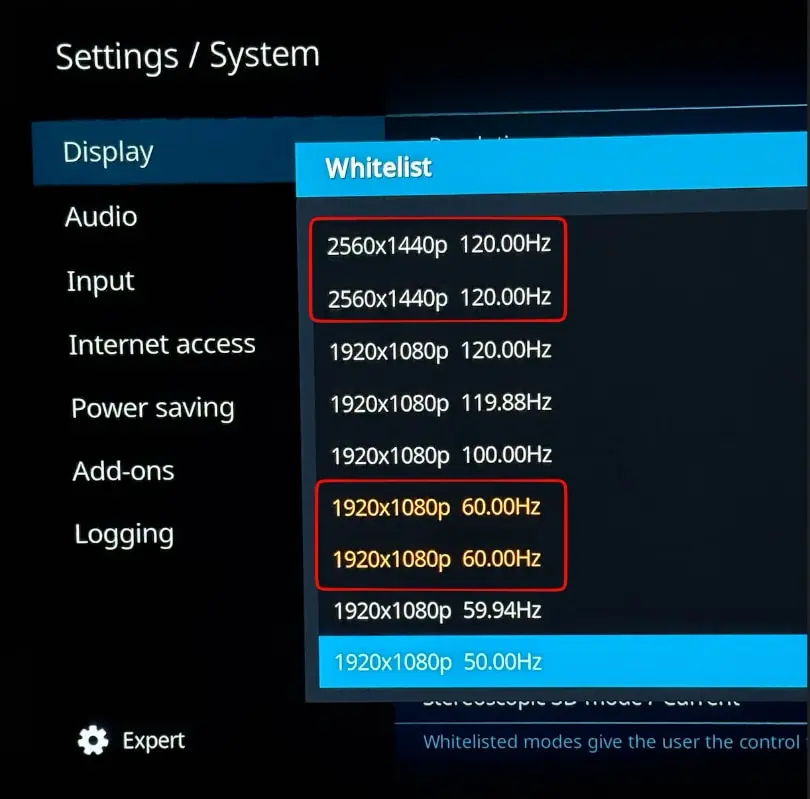
At the beginning of the log, I can see these resolutions (1920/1080 60Hz also shows twice):
Code
Display More2025-12-20 21:12:57.976 T:824 debug <general>: CWinSystemGbm::InitWindowSystem - initialized DRM 2025-12-20 21:12:57.976 T:824 info <general>: Found resolution 3840x2160 with 3840x2160 @ 60.000000 Hz 2025-12-20 21:12:57.976 T:824 info <general>: Found resolution 4096x2160 with 4096x2160 @ 60.000000 Hz 2025-12-20 21:12:57.976 T:824 info <general>: Found resolution 4096x2160 with 4096x2160 @ 59.940063 Hz 2025-12-20 21:12:57.976 T:824 info <general>: Found resolution 4096x2160 with 4096x2160 @ 50.000000 Hz 2025-12-20 21:12:57.976 T:824 info <general>: Found resolution 4096x2160 with 4096x2160 @ 30.000000 Hz 2025-12-20 21:12:57.976 T:824 info <general>: Found resolution 4096x2160 with 4096x2160 @ 29.970032 Hz 2025-12-20 21:12:57.976 T:824 info <general>: Found resolution 4096x2160 with 4096x2160 @ 25.000000 Hz 2025-12-20 21:12:57.976 T:824 info <general>: Found resolution 4096x2160 with 4096x2160 @ 24.000000 Hz 2025-12-20 21:12:57.976 T:824 info <general>: Found resolution 4096x2160 with 4096x2160 @ 23.976025 Hz 2025-12-20 21:12:57.976 T:824 info <general>: Found resolution 3840x2160 with 3840x2160 @ 59.940063 Hz 2025-12-20 21:12:57.976 T:824 info <general>: Found resolution 3840x2160 with 3840x2160 @ 50.000000 Hz 2025-12-20 21:12:57.976 T:824 info <general>: Found resolution 3840x2160 with 3840x2160 @ 30.000000 Hz 2025-12-20 21:12:57.976 T:824 info <general>: Found resolution 3840x2160 with 3840x2160 @ 29.970032 Hz 2025-12-20 21:12:57.976 T:824 info <general>: Found resolution 3840x2160 with 3840x2160 @ 25.000000 Hz 2025-12-20 21:12:57.976 T:824 info <general>: Found resolution 3840x2160 with 3840x2160 @ 24.000000 Hz 2025-12-20 21:12:57.976 T:824 info <general>: Found resolution 3840x2160 with 3840x2160 @ 23.976025 Hz 2025-12-20 21:12:57.976 T:824 info <general>: Found resolution 2560x1440 with 2560x1440 @ 120.000000 Hz 2025-12-20 21:12:57.976 T:824 info <general>: Skipped 1 duplicate messages.. 2025-12-20 21:12:57.976 T:824 info <general>: Found resolution 1920x1080 with 1920x1080 @ 120.000000 Hz 2025-12-20 21:12:57.976 T:824 info <general>: Found resolution 1920x1080 with 1920x1080 @ 119.880127 Hz 2025-12-20 21:12:57.976 T:824 info <general>: Found resolution 1920x1080 with 1920x1080 @ 100.000000 Hz 2025-12-20 21:12:57.976 T:824 info <general>: Found resolution 1920x1080 with 1920x1080 @ 60.000000 Hz 2025-12-20 21:12:57.976 T:824 info <general>: Skipped 1 duplicate messages.. 2025-12-20 21:12:57.976 T:824 info <general>: Found resolution 1920x1080 with 1920x1080 @ 59.940063 Hz 2025-12-20 21:12:57.976 T:824 info <general>: Found resolution 1920x1080 with 1920x1080i @ 60.000000 Hz 2025-12-20 21:12:57.976 T:824 info <general>: Found resolution 1920x1080 with 1920x1080i @ 59.940063 Hz 2025-12-20 21:12:57.976 T:824 info <general>: Found resolution 1920x1080 with 1920x1080 @ 50.000000 Hz 2025-12-20 21:12:57.976 T:824 info <general>: Found resolution 1920x1080 with 1920x1080i @ 50.000000 Hz 2025-12-20 21:12:57.976 T:824 info <general>: Found resolution 1920x1080 with 1920x1080 @ 30.000000 Hz 2025-12-20 21:12:57.976 T:824 info <general>: Found resolution 1920x1080 with 1920x1080 @ 29.970032 Hz 2025-12-20 21:12:57.976 T:824 info <general>: Found resolution 1920x1080 with 1920x1080 @ 25.000000 Hz 2025-12-20 21:12:57.976 T:824 info <general>: Found resolution 1920x1080 with 1920x1080 @ 24.000000 Hz 2025-12-20 21:12:57.976 T:824 info <general>: Found resolution 1920x1080 with 1920x1080 @ 23.976025 Hz 2025-12-20 21:12:57.976 T:824 info <general>: Found resolution 1280x1024 with 1280x1024 @ 60.000000 Hz 2025-12-20 21:12:57.976 T:824 info <general>: Found resolution 1152x864 with 1152x864 @ 59.940063 Hz 2025-12-20 21:12:57.976 T:824 info <general>: Found resolution 1280x720 with 1280x720 @ 60.000000 Hz 2025-12-20 21:12:57.976 T:824 info <general>: Found resolution 1280x720 with 1280x720 @ 59.940063 Hz 2025-12-20 21:12:57.976 T:824 info <general>: Found resolution 1280x720 with 1280x720 @ 50.000000 Hz 2025-12-20 21:12:57.976 T:824 info <general>: Found resolution 1024x768 with 1024x768 @ 60.000000 Hz 2025-12-20 21:12:57.976 T:824 info <general>: Found resolution 800x600 with 800x600 @ 60.000000 Hz 2025-12-20 21:12:57.976 T:824 info <general>: Found resolution 720x576 with 720x576 @ 50.000000 Hz 2025-12-20 21:12:57.976 T:824 info <general>: Found resolution 720x480 with 720x480 @ 59.940063 Hz 2025-12-20 21:12:57.976 T:824 info <general>: Found resolution 720x480 with 720x480 @ 60.000000 Hz 2025-12-20 21:12:57.976 T:824 info <general>: Found resolution 640x480 with 640x480 @ 60.000000 Hz 2025-12-20 21:12:57.976 T:824 info <general>: Skipped 1 duplicate messages.. 2025-12-20 21:12:57.976 T:824 info <general>: Found resolution 720x400 with 720x400 @ 70.000000 Hz 2025-12-20 21:12:57.977 T:824 info <general>: EGL_VERSION = 1.5 2025-12-20 21:12:57.977 T:824 info <general>: EGL_VENDOR = Mesa ProjectNot sure what I should make of that. I think I will simply select both values that are present in the selector...
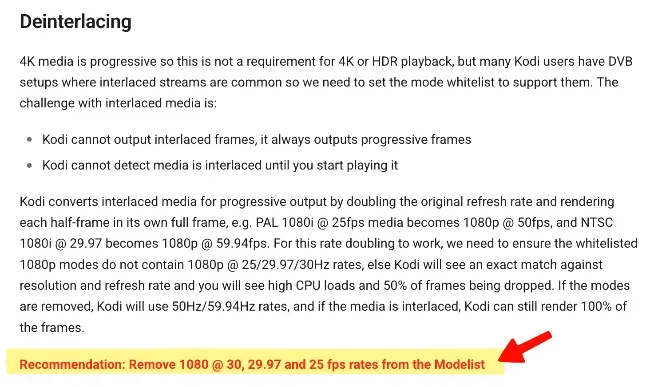
Thanks for the explaining the deinterlace topic - noted!
-
Hi all,
I have a two questions regarding the Wiki, specifically the 4K Configuration in LE as described here: https://wiki.libreelec.tv/configuration/4k-hdr
I am currently configuring my LE 12.2.1 according to the points described on that page and noticed two things.
1) For the 2nd point ("Mode Whitelist"), I noticed that some modes are listed twice. a) why is that? and b) shall I just select both in these cases?
2) In the "Deinterlace" Section I want to remove the modes that are mentioned in that article. However, I cannot find the Deinterlace setting where I can do that. Can someone point me to the exact location for that setting?
Many thanks!!
-
I have a noob question regarding HDR and the latest Nexus beta 1. From the latest blog post:
Quote(...) The Generic image now runs the same GBM/V4L2 graphics stack we have long used with ARM platforms. It now supports HDR with recent AMD and Intel GPUs.
My LibreELEC PC is an Intel® NUC Coffee Lake i5-8259U with an onboard Intel Iris Plus 655 GPU. Does this mean HDR is now supported in that GPU? I am not up to date with any hardware details and curious if I understood correctly, that previously HDR was not and is now supported on my specs.

Many thanks!
-

The changes are live, please test
Thank you CvH , great job! I can confirm that the LE feed is working again on my end in Kodi (LE 10.0.4).
 Again, big thanks for taking care of that and updating the feed.
-
Many thanks also from my side CvH for taking care of this! It might be a small thing but as kurai pointed out it's always nice to have the LibreELEC feed in Kodi. If you are able to provide both Atom and RSS even better.
Feel free to update this thread once the update has been deployed on the server so that we can enable our feeds again. Again appreciate you taking care of that "patch". -

For whatever reason the inbuilt Kodi RSSReader ticker cannot parse this particular feed, even though it checks out fine on the W3C validator.
I copied the XML to my local webserver and chopped out all the article entries, in case it was a parsing issue with one post, but even with just the barebones XML feed structure it still failed to parse it.
Just found this thread and was curious about the same thing: since December or so, the LibreELEC Newsfeed in the built-in Kodi RSS Feedtool had stopped and after some testing, it turned out that the Kodi Feed functionality is not able to parse the LibreELEC feed url - so thanks for confirming kurai
In fact, if you try to enter https://libreelec.tv/feed.xml into the Kodi RSS mask, it won't let you save and it complains about an unsupported or invalid url - very weird.Since the LE feed validates properly (as confirmed as well), would this be a bug with the Kodi RSS widget? I know it's a minor issue, but always loved having the latest news posts from LE at the bottom of my TV when using Kodi/LE.
-
Thanks a ton, manual update from RC1 -> V10 went smooth on my Intel NUC. I also like the new theme of the website, great work!
-


It`s too complicated for me.I wait until à new release is there.
It is not complicated to fix by yourself: go to your Computers BIOS while starting up (usually pressing F2 or DEL Key) and look for "HD-Audio DSP". Make sure it's disabled, save your BIOS settings and reboot. That's it.
-
Thanks for posting this, disabling "HD-Audio DSP" has fixed the Audio issue for me as well.
I am running LibreELEC on an Intel NUC NUC8i5BEH. -
LibreELEC 9.2.0 / Kodi 18.5
Logitech K830 Wireless Keyboard
Intel NUC 815BEK
I am in the process of setting up a new Media PC based on an Intel NUC. Everything works so far, except that I cannot get my Logitech K830 Wireless Keyboard to pair via Bluetooth. The NUC has Bluetooth 5.0, while the K830 Keyboard has "Bluetooth Smart" which is basically Bluetooth 4.0.
Bluetooth itself is enabled on the NUC and also in LibreELEC. When I navigate in Kodi (via an old wired Keyboard) to "LibreELEC" -> "Bluetooth", the K830 shows up. I then bring the Keyboard into Bluetooth pairing mode and click on "Trust and Connect" ... but then after a few seconds I just get an error which says: "Bluetooth error. Software caused connection abort". When I click on "Pair" instead, I get an error which says "Authentication failed" (see attached screenshots).I would prefer to use the built-in Keyboard Bluetooth over the Logitech Unifying Dongle. Any idea why I cannot pair the K830 Keyboard via Bluetooth with my Intel NUC?
Here is a Debug Log: https://pastebin.com/raw/syqryj2q
Any help is highly appreciated!