[S912H] LE for Minix Neo U9-H

  • Dusted off my Minix Neo U9-H again to try my kinda-yearly attempt at reviving it again. I tried booting the latest image from your testing share, but it did not boot properly; Kodi did not manage to start. The first boot, it got stuck on repeatedly starting and stopping kodi.service, the second boot, the Kodi splash screen actually showed up, but it just remained there indefinitely.


    I booted into textmode and got the journalctl and dmesg logs.


    journalctl:

    https://paste.libreelec.tv/accurate-hermit.log


    dmesg:

    https://paste.libreelec.tv/joint-magpie.log


    Any idea what might be the problem? The problems are very similar to what I encountered last time I tried LE on this box, and this issue was fixed at some point in the testing shares (although there were still other issues), but seems to have resurfaced.


  • Computeraar If the problem is "Kodi won't start" a textmode boot log isn't going to show anything useful because Kodi isn't being started. Create /storage/.kodi/userdata/advancedsettings.xml with this content to put Kodi in debug mode:

    XML
    <?xml version="1.0" encoding="utf-8" ?>
    <advancedsettings version="1.0">
      <loglevel hide="false">1</loglevel>
    </advancedsettings>
    • Then touch /storage/.config/safemode.disable to ensure that safe.mode doesn't kick in
    • Then tail -F /storage/.kodi/temp/kodi.log > log_dump with capital F and tail will wait/watch for the file appearing
    • Then systemctl start kodi and allow it to fail a couple of times before stopping the service
    • Then cat log_dump | paste and share the URL
    • Then systemctl | paste and share the URL

    If we're lucky the logs might have some clues on what the problem is ..

  • While testing best practice is to disable kodi restart at all. Create (with path):

    Code: /storage/.config/system.d/kodi.service.d/norestart.conf
    [Service]
    Restart=no

    then reboot to create fresh logs - kodi is only started once. Finally:

    Bash
    pastekodi
    pastecrash
  • I was playing around with some custom Android ROMs as well, and am now stuck on some Android 7 ROM from which I can't boot LibreELEC. Also can't seem to flash any other Android ROM with the Amlogic Burning Tool, as I just get an error.


    Will report back here and do as you guys suggested once I (hopefully) manage to solve this and am able to boot LE again

  • I was able to revive my box. I got the logs.


    Computeraar If the problem is "Kodi won't start" a textmode boot log isn't going to show anything useful because Kodi isn't being started. Create /storage/.kodi/userdata/advancedsettings.xml with this content to put Kodi in debug mode:

    XML
    <?xml version="1.0" encoding="utf-8" ?>
    <advancedsettings version="1.0">
      <loglevel hide="false">1</loglevel>
    </advancedsettings>
    • Then touch /storage/.config/safemode.disable to ensure that safe.mode doesn't kick in
    • Then tail -F /storage/.kodi/temp/kodi.log > log_dump with capital F and tail will wait/watch for the file appearing
    • Then systemctl start kodi and allow it to fail a couple of times before stopping the service
    • Then cat log_dump | paste and share the URL
    • Then systemctl | paste and share the URL

    If we're lucky the logs might have some clues on what the problem is ..

    I did not use the approach with tail, as it did not seem to work. After the tail command, if I typed systemctl start kodi, nothing seemed to happen (or maybe I did something wrong)


    While testing best practice is to disable kodi restart at all. Create (with path):

    Code: /storage/.config/system.d/kodi.service.d/norestart.conf
    [Service]
    Restart=no

    then reboot to create fresh logs - kodi is only started once. Finally:

    Bash
    pastekodi
    pastecrash

    This approach worked. I created the norestart.conf, then rebooted the box, then ran systemctl start kodi. This caused the Kodi splash screen to appear, and like before, it stayed there indefinitely. I had to pull the power from the box, as I could not cancel or power down with the power button. After rebooting, I then ran the commands for generating the logs.


    pastekodi: https://paste.libreelec.tv/ifbmuiz-lynx.log

    Here, you need to replace "ifbmuiz" with the word you get by replacing each letter with the letter that precedes it in the alphabet. For some reason, I get "The message contains disallowed words: xxxxxxx" (with xxxxxxx being the disallowed word) when I try to post the original URL, even though it is a totally normal word:/. Seems like a bug in the forum.


    pastecrash: https://paste.libreelec.tv/caring-flamingo.log


    cat log_dump | paste: This gave "invalid file size"


    systemctl | paste: https://paste.libreelec.tv/rare-bear.log


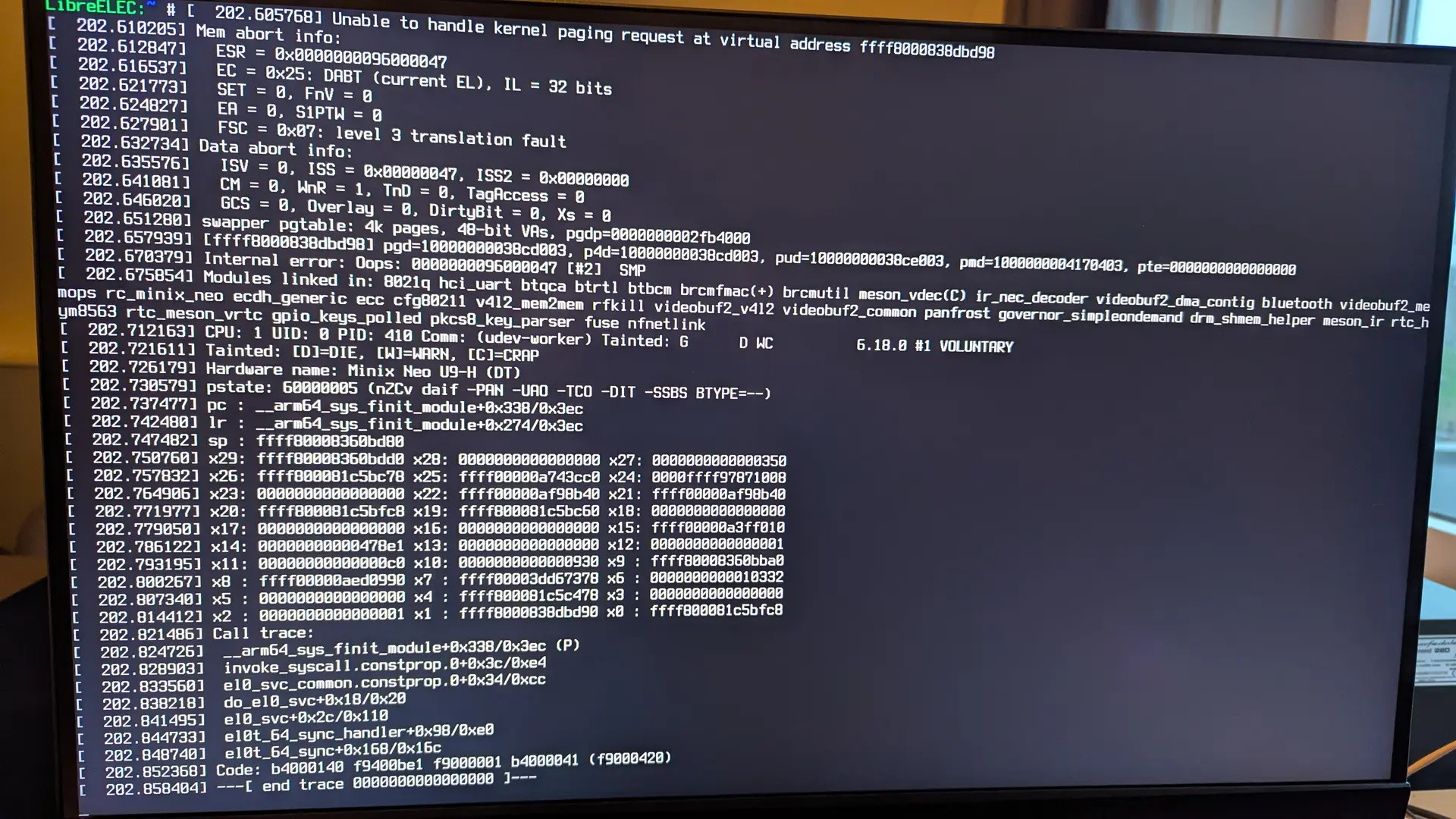
    Edit: after this, some more errors suddenly popped up on the screen. Of this, I took a picture:

    Edited once, last by Computeraar (December 17, 2025 at 2:43 PM).

  • The log looks clean except for a kernel splat from the broadcom SDIO module, which i'd interpret as a symptom of stability issues on the SDIO bus, which is a general issue with this era of hardware due to Amlogic silicon bugs. The upstream kernel contains general mitigations that work for most GXL/GXM hardware, but not all hardware, and the U9-H seems to be one of the boards with issues.

    At some point in the past I did acquire some hardware and build a test image with upstream u-boot (Minix shared some u-boot sources to support the FIP files being extracted). I have fuzzy recall the image worked okay for me and some users, but not for others, and then efforts have fizzled out for various reasons. I also lack the hardware diagnostics skills to do much more than the relatively basic software tinkering that I've already done.

    So not sure what to suggest really. To recreate the test image the FIP files are here https://github.com/chewitt/amlogi…x-u9h/minix-u9h and some u-boot work here: https://github.com/chewitt/u-boot/commits/minix-u9h/

    NB: The forum is configured with a list of banned words to prevent human 'bots' making spam posts on certain topics, e.g. medical and fit-ness themed ones. It's just a random coincidence the paste URL uses one of the words.

  • The log looks clean except for a kernel splat from the broadcom SDIO module, which i'd interpret as a symptom of stability issues on the SDIO bus, which is a general issue with this era of hardware due to Amlogic silicon bugs. The upstream kernel contains general mitigations that work for most GXL/GXM hardware, but not all hardware, and the U9-H seems to be one of the boards with issues.

    At some point in the past I did acquire some hardware and build a test image with upstream u-boot (Minix shared some u-boot sources to support the FIP files being extracted). I have fuzzy recall the image worked okay for me and some users, but not for others, and then efforts have fizzled out for various reasons. I also lack the hardware diagnostics skills to do much more than the relatively basic software tinkering that I've already done.

    Yes, SD issues were the cause last time I attempted this too. I was one of the users that tested your images as you updated them. Indeed, your image back then actually solved the SD issues and allowed Kodi to boot, but I believe there were other issues afterwards, but at the time I did not have the time to continue troubleshooting. But I think re-adding that fix might solve the issue now as well.


    I think this is the image where it was fixed:


    Also:

    chewitt
    January 21, 2024 at 3:05 AM

    Perhaps this never got pushed, hence the issues returned?


    Quote

    So not sure what to suggest really. To recreate the test image the FIP files are here https://github.com/chewitt/amlogi…x-u9h/minix-u9h and some u-boot work here: https://github.com/chewitt/u-boot/commits/minix-u9h/

    So to build the test image, I would clone the repo, switch to the u9h branch and run the command in the Github's README? The README mentions specifying the path to the u_boot/bl33.bin, but I only see up to bl32.


    Edit: just realized I guess that is what I need to get or compile from the u-boot github you linked. I'll give it a try later

  • Okay, I managed to create the u-boot.bin.sd.bin using the u-boot from the minix-u9h branch and FIP files from the minix-u9h branch. How would I now integrate this into an LE image? From what I could find, I first just flash the LE image to an SD Card, and then overwrite certain sectors of the drive with my u-boot.bin.sd using the dd command. Which sectors do I write to?

    Or is there something else I should do?

  • I pushed a u-boot branch with slightly reworked u9h commits to my GitHub repo, it's now based on 2025.10. For the next step I use the LE buildsystem and change the u-boot source to the one with the patches, and add a new device to build.

    See: https://github.com/chewitt/LibreELEC.tv/commits/minix-u9h

    Then PROJECT=Amlogic DEVICE=AMLGX ARCH=aarch64 UBOOT_SYSTEM=minix-u9h make image generates a complete LE image. I have the benefit of a proper build server at home though, so building images isn't a big deal.

    If not you need to follow the image flow from scripts/mkimage and then projects/Amlogic/bootloader/mkimage.

  • I pushed a u-boot branch with slightly reworked u9h commits to my GitHub repo, it's now based on 2025.10. For the next step I use the LE buildsystem and change the u-boot source to the one with the patches, and add a new device to build.

    See: https://github.com/chewitt/LibreELEC.tv/commits/minix-u9h

    Then PROJECT=Amlogic DEVICE=AMLGX ARCH=aarch64 UBOOT_SYSTEM=minix-u9h make image generates a complete LE image. I have the benefit of a proper build server at home though, so building images isn't a big deal.

    If not you need to follow the image flow from scripts/mkimage and then projects/Amlogic/bootloader/mkimage.

    Thanks, I'll try to build it, but am first trying to get the required sources with the download-tool. But I'm unable to get some of the sources.

    For meson-vdec, which it tries to obtain from https://:@github.com/chewitt/meson-vdec/archive/efac5cfcd73e049c8b3470bd0b63981ebfd610c4.tar.gz, it gives a 404 error. Indeed, when opening it in a web browser, it returns "Not found".

    For kmscube, which it tries to get from https://gitlab.freedesktop.org/mesa/kmscube/-…0010dda2.tar.gz, I get an incorrect checksum.

    Finally, for grub, which it tries to grab from http://git.savannah.gnu.org/cgit/grub.git/…rub-2.12.tar.gz, it keeps timing out.


    What should I do? I'm guessing I could manually get these sources from elsewhere and place them in the correct folder, but am unsure on specific version requirements


    Edit: Also, should I replace the uboot tar.gz in sources/u-boot with my uboot.bin.sd file? Or how does the replacing of the uboot work?

  • I pushed changes to drop the meson-vdec commit. This is in a private repo so you cannot download the source, but it's not required for the normal image (despite the useful sounding name). The AMLGX image doesn't require grub or kmscube either.

    NB: The download tool will download all sources for all packages for all hardware targets. The build command I shared will download only the needed sources for the image being built. I never use the download tool.

    You don't need to touch u-boot source because I updated the package.mk to use the githash that already contains the changes.

  • I pushed changes to drop the meson-vdec commit. This is in a private repo so you cannot download the source, but it's not required for the normal image (despite the useful sounding name). The AMLGX image doesn't require grub or kmscube either.

    NB: The download tool will download all sources for all packages for all hardware targets. The build command I shared will download only the needed sources for the image being built. I never use the download tool.

    You don't need to touch u-boot source because I updated the package.mk to use the githash that already contains the changes.

    I pulled the latest commits and tried building the image, but I get an error at the u-boot stage. I have attached the relevant log:

    86.log


    When checking the file mentioned as missing in the log, indeed I find that it does not exist. Only the tar.gz of the file is there, not the tar.bz2 that it expects

  • I managed to solve this error by editing the packages\tools\u-boot-tools\package.mk file to use the tar.gz file. After that it got stuck at a later stage, again related to u-boot. Full log is here:

    134.log

    Relevant part of the log seems to be:

    u-boot: creating u-boot.bin
    Invalid board name "minix-u9h"
    FAILURE: scripts/build u-boot:target during makeinstall_target (package.mk)
    *********** FAILED COMMAND ***********
    . ${FOUND_PATH}
    **************************************
    *********** FAILED COMMAND ***********
    ${SCRIPTS}/build "${1}" "${PARENT_PKG}"
    **************************************
    FAILURE: scripts/install u-boot:target has failed!


    I checked the build.LibreELEC-AMLGX.aarch64-13.0-devel\build\amlogic-boot-fip-f5cf6a7a78bad9d42d44293d5f2b8e2140cf2e2f folder, and in there, there is no minix-u9h folder. Could it be that the package.mk is pointing to the wrong githash?

    What I did to solve this is manually copy the minix-u9h folder from the latest commit from https://github.com/chewitt/amlogic-boot-fip/tree/minix-u9h to the build.LibreELEC-AMLGX.aarch64-13.0-devel\build\amlogic-boot-fip-f5cf6a7a78bad9d42d44293d5f2b8e2140cf2e2f folder. This then resulted in a successful build. Not sure if this was a proper solution though?


    Either way, I tried flashing the resulting image to an SD card and booting it, but I got similar issues as before. I then again booted into text mode, and added the advancedsettings.xml and norestart.conf like last time.

    pastekodi: https://paste.libreelec.tv/stirring-rabbit.log

    pastecrash: https://paste.libreelec.tv/neat-swift.log

    systemctl | paste: https://paste.libreelec.tv/divine-oryx.log


    In case it's relevant, I ran the build process on Ubuntu 24.04.3 under WSL on Windows 11