Clone microSD card not booting

  • Hi,

    I upgraded to the latest LibreElec only to discover that the Netflix Add-on now longer works. So, in attempting to reverse course, I've cloned an existing, working microSD card. However, it refuses to boot.

    I'm aware it is most likely because the clone is using the UUID of the original disk, but despite changing that UUID in the cmdline.txt, it still refuses to boot.

    I cloned the cards using the Mac's dd tool:
    dd bs=128m  if=/dev/disk4s1 of=SDCard.img
    dd bs=128m  if=SDCard.img of=/dev/disk4s1

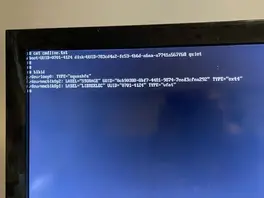
    Below is the cmdline.txt and the UUIDs.
    (I would much rather get the latest LibreElec running with the Netflix add-on, but it seems that owing to that add-on's developer, it is currently a paused project. Hence, why I need to return to an older, working build. The Netflix add-on is a bit of a rabbit hole and I haven't been able to get any further beyond breaking the existing, working build. 🤦‍♂️ )

    Appreciate all thoughts!

    Thanks,

    A.

  • Go to Best Answer
  • I'd have to differ to a dev to comment if "downgrading" to the previous version of Libreelec can be done in your case. I.e. putting the release in update folder and rebooting. I say that because I'm vaguely aware of kernel differences and I don't know how that would play out.

    If you want to make a duplicate of your SD, why not use the Backup app to create a backup, create a new SD using the USB-CD creator, then restoring the backup to the new SD?

    You could test bootability before you commit to restoring the backup.

    Offered as is, since I don't have Libreelec booting from SD. Nor with using the Netflix addon.

  • For some reason the ext4 / storage partition has a different UUID.

    Adjust the disk=UUID=783... option in cmdline.txt so it matches the actual UUID (disk=UUID=0cb...)

    so long,

    Hias

  • For some reason the ext4 / storage partition has a different UUID.

    Adjust the disk=UUID=783... option in cmdline.txt so it matches the actual UUID (disk=UUID=0cb...)

    so long,

    Hias

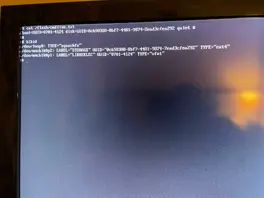
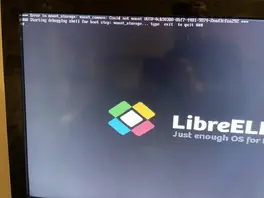
    Even though I've updated cmdline.txt, but LibreElec refuses to boot. New image attached:

    Also, can you tell me what the boot=UUID=0701-4124 refers to in cmdline.txt?

    The only thing I can think is that the UUID contains a bad character that appears ok but is perhaps a different unicode or ascii character?

    Can the command line be "boot=/dew/nmcblk0p2" or whatever the disk name/label is? Or must it be the disk's UUID?

    Thanks,

    A.