[RPi2B] Invalid Key/WiFi issues with USB dongle

  • If there was a general problem with DHCP on WiFi connections with LE13 nightlies there'd be a ton of posts on the topic, and there aren't. So whatever the issue is, i'm confident it's local to your environment.

    ConnMan debug logs are verbose and somewhat human-readable, but if you have a poor signal the inherent 'noise' that will add to the logs will make it challenging to spot any real issues. Poor signal is not the cause of the invalid-key issue, but as the issue is likely to be an unhandled radio/wireless error condition (the patch on the list is addressing that) poor signal correlates to the problem.

  • If there was a general problem with DHCP on WiFi connections with LE13 nightlies there'd be a ton of posts on the topic, and there aren't. So whatever the issue is, i'm confident it's local to your environment.

    I agree, but something seems to have changed between LE 12.0.2 and 12.2 that broke DHCP for me.

    I've built an image with the WiFi patch and flashed it to the Pi. It starts fine, but the DHCP issue persists. I haven't seen anything that looks like the invalid key issue, but I also have not tested for very long (<30 minutes) so I wouldn't say it's solved.
    Unfortunately, I can't really evaluate if the issue is fixed without a proper WiFi connection.

    I also tried moving the Pi as close to the AP as I can (~4m with a wall in line of sight; I'm limited by the availability of ethernet cable) and it reported signal strengths of 55-60 dBm which, according to a quick google search, seems to be excellent to good signal. Still the issue seemed to persist. When I tested the different versions earlier (in #17) I saw similar dBm values btw.

    I'll try current Raspbian (which seems to use kernel 6.12) next to see if the adapter fails in the same way there.

  • WiFi under RapberryPi OS works, but it uses rtl8192cu instead of the newer rtl8xxxu (which LibreELEC uses).

    Code
    pi@raspberrypi:~ $ lsmod | grep rtl
    rtl8192cu              86016  0
    rtl_usb                16384  1 rtl8192cu
    rtl8192c_common        61440  1 rtl8192cu
    rtlwifi               118784  3 rtl_usb,rtl8192c_common,rtl8192cu
    mac80211              954368  3 rtl_usb,rtlwifi,rtl8192cu
    cfg80211              888832  2 mac80211,rtlwifi
    rfkill                 28672  4 rtlwifi,cfg80211

    During research I've also found these two threads, might be relevant/interesting

    I'll try rtl8192cu under LibreELEC next.

    Edit: LibreELEC kernel does not seem to have this module. How would one enable it during the build process?

    Edited once, last by GamerBene19 (February 8, 2026 at 2:24 AM).

  • Quick update: I have switched to the other adapter (the one with the 'proper' antenna) -- the problem still occurs.

    When connected, I see dBm values <50 (which is an improvement), but the connection still drops frequently and is really unreliable.

    I'm thinking about buying simply buying something new to 'solve' the problem. What hardware is known to have reliable WiFi with LibreELEC? Does the newer Pi's onboard WiFi work reliably?

    This out of tree driver was dropped in favour of the now maintained in kernel mainline driver. https://github.com/LibreELEC/Libr…5c5c358151e3b61

    How can I temporarily re-enable that driver? Is reverting the three commits from the PR that disabled it enough?

  • Most USB dongle WiFi devices normally trump on-board WiFi as the antenna is larger (albeit still small) and separated from other chips and RPi5 may or may-not be an improvement on earlier models, it's hard to tell. If you are in a poor/difficult signal area USB dongles also allow you to choose a device that can be hooked up to a proper external antenna. As a rule we avoid making wireless hardware recommendations due to the ephemeral nature of success; what works amazing for one person often sucks for someone else. This page from a linux-wireless maintainer is worth reading: https://github.com/morrownr/USB-WiFi/

    Revert of the PR will restore the previous driver to the buildsystem, but you'll probably need to update the driver source version or add some source patches to compile the driver against newer kernels that we are using now; Realtek downstream drivers often break when we bump the kernel major version (hence we dumped them in-favour of in-kernel ones).

  • Quick update: I have switched to the other adapter (the one with the 'proper' antenna) -- the problem still occurs.

    When connected, I see dBm values <50 (which is an improvement), but the connection still drops frequently and is really unreliable.

    Hi, that could be because of the "unstable" wifi source. Maybe one of your neighbor use the same wifi channel, you did a channel analysis to see the interferences? The possible existent connman-iwd issue I think appear at reconnecting. But even without the "reconnection issue", an unstable network and continuous streaming isn't the best option. I'm just wondering... that part of the stable/unstable wifi network could be the reason that only a few users reported this issue...

  • Hi, that could be because of the "unstable" wifi source. Maybe one of your neighbor use the same wifi channel, you did a channel analysis to see the interferences? The possible existent connman-iwd issue I think appear at reconnecting. But even without the "reconnection issue", an unstable network and continuous streaming isn't the best option. I'm just wondering... that part of the stable/unstable wifi network could be the reason that only a few users reported this issue...

    Sorry for not answering about that earlier. Yes I did look at channel utilization and signal strength of other APs. To me it looked fine.
    I just looked again, this roughly is the current situation according to iw dev wlan0 scan:

    Signal StrengthChannel
    -56 dBm1
    -90 dBm1
    -90 dBm1
    -96 dBm1
    -82 dBm6
    -94 dBm6
    -82 dBm11
    -90 dBm11
    -94 dBm6
    -82 dBm6
    -96 dBm1
    -90 dBm6
    -77 dBm5
    -76 dBm5
    -86 dBm6
    -86 dBm6
    -98 dBm10

    I am connected to the network of the first row (interestingly iw wlan0 station dump shows a better dBm value for the connected WiFi; don't know why). It might be better to switch to channel 11, but I think overall this is situation is fine considering all other dBm values of the same channel are >90

  • Make sure you set/configure the wireless regulatory domain for your country in LE settings, it can make a large difference to the radio spectrum that's usable.

    I have no access to the devices display output at the moment, but at least via SSH it looks correct

    Code
    LibreELEC:~ # iw reg get
    global
    country DE: DFS-ETSI
    	(2400 - 2483 @ 40), (N/A, 20), (N/A)
    	(5150 - 5250 @ 80), (N/A, 23), (N/A), NO-OUTDOOR, AUTO-BW
    	(5250 - 5350 @ 80), (N/A, 20), (0 ms), NO-OUTDOOR, DFS, AUTO-BW
    	(5470 - 5725 @ 160), (N/A, 26), (0 ms), DFS
    	(5725 - 5875 @ 80), (N/A, 13), (N/A)
    	(5945 - 6425 @ 160), (N/A, 23), (N/A), NO-OUTDOOR
    	(57000 - 66000 @ 2160), (N/A, 40), (N/A)

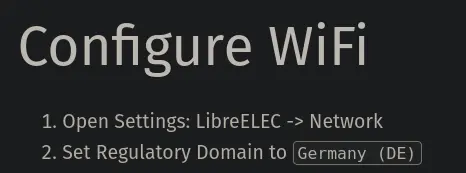
    and I have written down the following in my documentation of the setup steps

    so I am reasonably sure I've set it correctly.