

dale can you test please? https://jernej.libreelec.tv/images/h616/
code: https://github.com/jernejsk/Libre…allwinner-h616/
This wasn't tested on my side yet.

dale can you test please? https://jernej.libreelec.tv/images/h616/
code: https://github.com/jernejsk/Libre…allwinner-h616/
This wasn't tested on my side yet.
dale can you test please? https://jernej.libreelec.tv/images/h616/
code: https://github.com/jernejsk/Libre…allwinner-h616/This wasn't tested on my side yet.
Hi, I will test and let you know today. Thanks.
Hi jernej the analog audio and ethernet work with updated image on my vontar h618 box. Thanks!
LibreELEC-H6.aarch64-13.0-nightly-20261009-97d1943-beelink-gs1.img.gz
Gigabit ethernet was always broken on Beelink GS1, at least on my box. Could never hold more than a few minutes of sustained load, dying with transmit queue watchdog timeout.
Spent some time investigating, it seems this marvel of Shenzhen AZW Technology Co. engineering requires some additional tx delay.
/dts-v1/;
/plugin/;

/ {
    compatible = "azw,beelink-gs1", "allwinner,sun50i-h6";

    fragment@0 {
        target = <&emac>;
        __overlay__ {
            allwinner,rx-delay-ps = <0>;
            allwinner,tx-delay-ps = <200>;
        };
    };
};I have absolutely no idea on how to tune the actual tx-delay-ps value properly.
200 seems to work, box survived overnight iperf3 test with 5 TiB transferred and no link drops or errors in eth0 stats.
Did some tests, a few modesets on GS1 with 1440p monitor.
[email protected]    10bpc   RGB full

1920x1080@50       10bpc   RGB limited
[email protected]    10bpc   RGB limited
1920x1080@60       10bpc   RGB full
[email protected]   10bpc   RGB limited
1920x1080@120      10bpc   RGB limited

[email protected]    10bpc   RGB full      not in EDID, appers in Kodi after booting with video=HDMI-A-1:2560x1440@59
[email protected]                          modeset failure with black screen
[email protected]    10bpc   RGB full      not in EDID, appers in Kodi after booting with video=HDMI-A-1:2560x1440@61
[email protected]    8bpc    YUV422        not in EDID, appers in Kodi after booting with video=HDMI-A-1:2560x1440@100
2560x1440@120      8bpc    YUV422
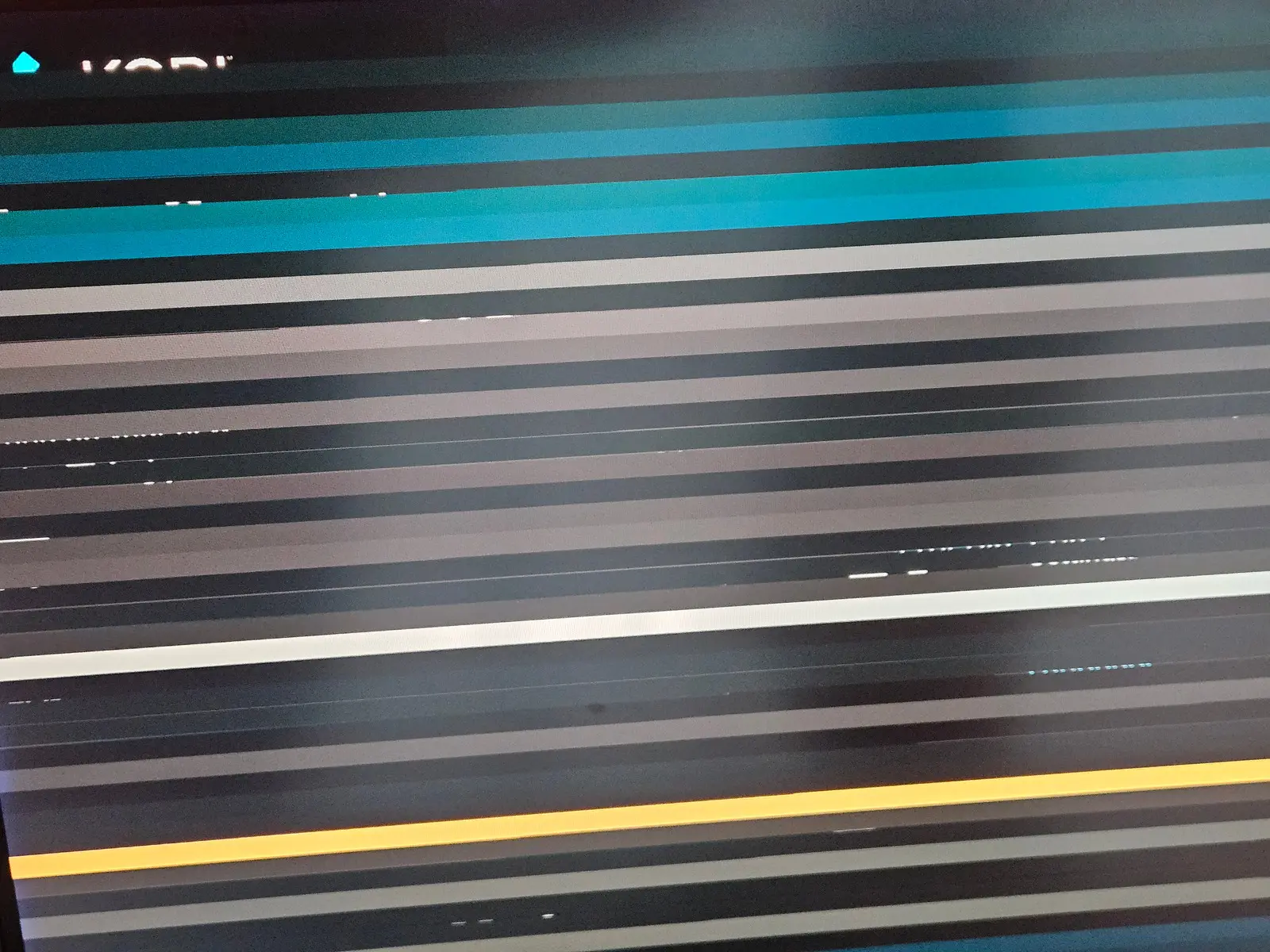
[email protected]   8bpc    YUV422        modeset failure with striped screen, OK after playing at least one video

[email protected]    8bpc    YUV422
3840x2160@60 8bpc YUV422Monitor EDID
Block 0, Base EDID:
  EDID Structure Version & Revision: 1.3
  Vendor & Product Identification:
    Manufacturer: AUS
    Model: 13043
    Serial Number: 21759 (0x000054ff)
    Made in: week 9 of 2021
  Basic Display Parameters & Features:
    Digital display
    Maximum image size: 71 cm x 40 cm
    Gamma: 2.20
    DPMS levels: Off
    RGB color display
    First detailed timing is the preferred timing
  Color Characteristics:
    Red  : 0.6845, 0.3046
    Green: 0.1894, 0.7333
    Blue : 0.1474, 0.0537
    White: 0.3134, 0.3291
  Established Timings I & II:
    IBM     :   720x400    70.081663 Hz   9:5     31.467 kHz     28.320000 MHz
    DMT 0x04:   640x480    59.940476 Hz   4:3     31.469 kHz     25.175000 MHz
    Apple   :   640x480    66.666667 Hz   4:3     35.000 kHz     30.240000 MHz
    DMT 0x05:   640x480    72.808802 Hz   4:3     37.861 kHz     31.500000 MHz
    DMT 0x06:   640x480    75.000000 Hz   4:3     37.500 kHz     31.500000 MHz
    DMT 0x08:   800x600    56.250000 Hz   4:3     35.156 kHz     36.000000 MHz
    DMT 0x09:   800x600    60.316541 Hz   4:3     37.879 kHz     40.000000 MHz
    DMT 0x0a:   800x600    72.187572 Hz   4:3     48.077 kHz     50.000000 MHz
    DMT 0x0b:   800x600    75.000000 Hz   4:3     46.875 kHz     49.500000 MHz
    DMT 0x10:  1024x768    60.003840 Hz   4:3     48.363 kHz     65.000000 MHz
    DMT 0x11:  1024x768    70.069359 Hz   4:3     56.476 kHz     75.000000 MHz
    DMT 0x12:  1024x768    75.028582 Hz   4:3     60.023 kHz     78.750000 MHz
    DMT 0x24:  1280x1024   75.024675 Hz   5:4     79.976 kHz    135.000000 MHz
  Standard Timings:
    DMT 0x52:  1920x1080   60.000000 Hz  16:9     67.500 kHz    148.500000 MHz
    DMT 0x15:  1152x864    75.000000 Hz   4:3     67.500 kHz    108.000000 MHz
    DMT 0x55:  1280x720    60.000000 Hz  16:9     45.000 kHz     74.250000 MHz
    DMT 0x20:  1280x960    60.000000 Hz   4:3     60.000 kHz    108.000000 MHz
    DMT 0x23:  1280x1024   60.019740 Hz   5:4     63.981 kHz    108.000000 MHz
    DMT 0x2f:  1440x900    59.887445 Hz  16:10    55.935 kHz    106.500000 MHz
    DMT 0x3a:  1680x1050   59.954250 Hz  16:10    65.290 kHz    146.250000 MHz
  Detailed Timing Descriptors:
    DTD 1:  2560x1440  144.033092 Hz  16:9    222.243 kHz    592.500000 MHz (708 mm x 399 mm)
                 Hfront    8 Hsync  32 Hback   66 Hpol P
                 Vfront   25 Vsync   5 Vback   73 Vpol N
    DTD 2:  2560x1440   59.950550 Hz  16:9     88.787 kHz    241.500000 MHz (708 mm x 399 mm)
                 Hfront   48 Hsync  32 Hback   80 Hpol P
                 Vfront    3 Vsync   5 Vback   33 Vpol N
    Display Range Limits:
      Monitor ranges (GTF): 48-165 Hz V, 30-225 kHz H, max dotclock 600 MHz
    Display Product Name: 'ASUS PG329'
  Extension blocks: 1
Checksum: 0x16

----------------

Block 1, CTA-861 Extension Block:
  Revision: 3
  Underscans IT Video Formats by default
  Basic audio support
  Supports YCbCr 4:4:4
  Supports YCbCr 4:2:2
  Native detailed modes: 1
  Video Data Block:
    VIC   1:   640x480    59.940476 Hz   4:3     31.469 kHz     25.175000 MHz
    VIC   2:   720x480    59.940060 Hz   4:3     31.469 kHz     27.000000 MHz
    VIC   3:   720x480    59.940060 Hz  16:9     31.469 kHz     27.000000 MHz
    VIC  17:   720x576    50.000000 Hz   4:3     31.250 kHz     27.000000 MHz
    VIC  18:   720x576    50.000000 Hz  16:9     31.250 kHz     27.000000 MHz
    VIC  19:  1280x720    50.000000 Hz  16:9     37.500 kHz     74.250000 MHz
    VIC   4:  1280x720    60.000000 Hz  16:9     45.000 kHz     74.250000 MHz
    VIC  15:  1440x480    59.940060 Hz  16:9     31.469 kHz     54.000000 MHz
    VIC  29:  1440x576    50.000000 Hz   4:3     31.250 kHz     54.000000 MHz
    VIC  30:  1440x576    50.000000 Hz  16:9     31.250 kHz     54.000000 MHz
    VIC  31:  1920x1080   50.000000 Hz  16:9     56.250 kHz    148.500000 MHz
    VIC  16:  1920x1080   60.000000 Hz  16:9     67.500 kHz    148.500000 MHz (native)
    VIC  63:  1920x1080  120.000000 Hz  16:9    135.000 kHz    297.000000 MHz
    VIC  97:  3840x2160   60.000000 Hz  16:9    135.000 kHz    594.000000 MHz
  Audio Data Block:
    Linear PCM:
      Max channels: 2
      Supported sample rates (kHz): 96 48 44.1 32
      Supported sample sizes (bits): 24 20 16
  Speaker Allocation Data Block:
    FL/FR - Front Left/Right
  Vendor-Specific Data Block (HDMI), OUI 00-0C-03:
    Source physical address: 1.0.0.0
    DC_36bit
    DC_30bit
    DC_Y444
    Maximum TMDS clock: 300 MHz
    Supported Content Types:
      Game
  Vendor-Specific Data Block (HDMI Forum), OUI C4-5D-D8:
    Version: 1
    Maximum TMDS Character Rate: 600 MHz
    SCDC Present
    Supports 12-bits/component Deep Color 4:2:0 Pixel Encoding
    Supports 10-bits/component Deep Color 4:2:0 Pixel Encoding
    Supports Auto Low-Latency Mode
  Vendor-Specific Data Block (AMD), OUI 00-00-1A:
    Version: 2
    Feature Caps: 0x03
    Minimum Refresh Rate: 48 Hz
    Maximum Refresh Rate: 165 Hz
    Flags 1.x: 0xe6 (MCCS)
    Flags 2.x: 0x05
    Maximum luminance: 118 (644.196 cd/m^2)
    Minimum luminance: 50 (0.248 cd/m^2)
    Maximum luminance (without local dimming): 118 (644.196 cd/m^2)
    Minimum luminance (without local dimming): 50 (0.248 cd/m^2)
  Colorimetry Data Block:
    BT2020cYCC
    BT2020YCC
    BT2020RGB
    Gamut Boundary Description Metadata Profile P0
  YCbCr 4:2:0 Capability Map Data Block:
    VIC  97:  3840x2160   60.000000 Hz  16:9    135.000 kHz    594.000000 MHz
  HDR Static Metadata Data Block:
    Electro optical transfer functions:
      Traditional gamma - SDR luminance range
      Traditional gamma - HDR luminance range
      SMPTE ST2084
    Supported static metadata descriptors:
      Static metadata type 1
    Desired content max luminance: 118 (644.196 cd/m^2)
    Desired content max frame-average luminance: 118 (644.196 cd/m^2)
    Desired content min luminance: 50 (0.248 cd/m^2)
  Detailed Timing Descriptors:
    DTD 3:  1280x1440   60.089673 Hz   8:9     88.993 kHz    123.700000 MHz (708 mm x 399 mm)
                 Hfront    8 Hsync  32 Hback   70 Hpol P
                 Vfront   27 Vsync   8 Vback    6 Vpol N
    DTD 4:  2560x1440  119.997589 Hz  16:9    182.996 kHz    497.750000 MHz (708 mm x 399 mm)
                 Hfront   48 Hsync  32 Hback   80 Hpol P
                 Vfront    3 Vsync   5 Vback   77 Vpol N
Checksum: 0x42 Unused space in Extension Block: 12 bytesTL;DR
1) Broken [email protected] and semi-broken [email protected]
2) Limited RGB in some but not all of 1080p modes
3) Way too conservative downgrade to 8-bit and YUV422. Theoretically, assuming HDMI 2.0, for this monitor everything up to 1440p@120 can be 10bpc+RGB, 4K@60 can be 8bpc+RGB
offbeat Test following image: https://jernej.libreelec.tv/images/h6/Libr…013-81ecad3.tar
it's build from https://github.com/jernejsk/Libre…inner-vp9-hdmi/
Note that it only fixes VP9 playback and should stabilize fractional display modes.
Test following image
VP9 is now working straight after reboot 
As for 1440p modes:
1) Every 1440p mode from EDID is now 8bpc+YUV422  But non-EDID ones supplied in cmdline like video=HDMI-A-1:2560x1440@61 are still 10bpc+RGBfull!
2) [email protected] modeswitch now works. No stripes in video playback.
3) 2560x1440@120 is fine on boot, in Kodi UI and in videos up to 1080p, but playback breaks to horizontal stripes on 4K videos.
4) [email protected] works in console, stripes in Kodi UI on first boot until some video played. Video playback is fine upto 720p, 1080p and 4K video playback breaks to stripes.
Also, in 8bpc+YUV422 modes there is a green vertical line on the left, probably first 1px wide column.
Thanks for testing!
1. That's how format selection worked so far. Your monitor declares 300 MHz as its max TMDS clock for non-scrambled signals, so at [email protected] (241.5 MHz) 10-bit RGB doesn't fit anymore (301.9 MHz), while at 120 and 144 Hz 10-bit RGB is over the 594 MHz limit. In all those cases the driver fell back to 10-bit YUV 4:2:2 (monitors usually show 4:2:2 as 8 bpc, but it carries 10 bits). Your custom 61 Hz mode has different timings, so 10-bit RGB still fits there.
That said, 4:2:2 makes sense only for HDR content, so I changed the policy: YUV 4:2:2 is now used only when HDR metadata is set (HDR video playback), otherwise RGB 8-bit is preferred if it fits. This also applies to 4K@60 modes, which used YUV 4:2:0 for SDR on HDMI 2.0 sinks before. Output format is switched automatically when HDR playback starts and stops.
The green line: I couldn't reproduce it on my monitor, but YUV 4:2:2 conversion used a long filter, which can produce garbage at the line start. It now drops chroma samples without filtering, the same as the vendor driver does. Since SDR is now RGB, you'll only see 4:2:2 with HDR videos - please check if the line is still there.
3. This one is a hardware limit. Downscaling 4K video to 1440p at 120 Hz needs about 75 % more display engine bandwidth than it has, and with compressed frames (HEVC and VP9 decoders output them on H6) the display engine can't skip lines to compensate. The vendor driver has the same limitation. Please enable "Adjust display refresh rate" in Kodi, so 4K videos are played at 24/25/30/50/60 Hz instead. Which codec are those 4K videos?
4. The stripes in the UI at 144 Hz were with YUV 4:2:2 at 592.5 MHz, while the console (RGB 8-bit) worked fine. Since UI and SDR videos are now RGB, that should be gone. Bandwidth shouldn't be an issue for 1080p video at that mode, so please report how it behaves now.
Test image: https://jernej.libreelec.tv/images/h6/Libr…241-0dafbf3.tar
Thank you, tested HDR video, mode switched to 4:2:2, no green line anymore.
So according to strict interpretation of EDID this particular monitor isn't allowed to use pixel clocks between between 300MHz and 340MHz over HDMI? I could try connecting it over HDMI to amdgpu PC some time next week, test how it behaves. Over displayport this monitor has different EDID with max pixel clock 690MHz, allowing 1440@175 mode.
As for 1440@120, this is an unfortunate limitation of Allwinner, being multiple of 24/30/60 is such a good refresh rate for typical video content, it's also kind of OK for 25/50 videos. Whitelists and refresh adjust options in Kodi are nice, but monitors/TV's are typically slow to adjust rates, which is annoying.
Anyway, messed around a bit with EDID editor, 1440p modes can only be described in DTD blocks, and only four of these fit in EDID. Defined 60/50/48/47.95Hz modes with CVT-RBv2 timings, created edid override in LE, all four modes run in 10bpc RGB.
1440@144 issue still persists. I mean 144Hz itself isn't really usable for video playback purposes because of display engine limitations, etc. But this bug is bad for usability reasons. On new installation, Kodi boots to 1080p60 because of default cmdline, user then tries to change resolution to monitors native 1440p, Kodi automatically chooses highest refresh rate for that particular resolution and UI goes brrr. Workaround is playing single video in some other resolution, then UI doesn't corrupt at 1440@144 anymore (until next reboot).
Thanks for confirming the green line fix!
About the 300-340 MHz range: yes, that's per spec. HDMI 2.0 section 10.3.2 says that Max_TMDS_Character_Rate in the HF-VSDB covers only rates above 340 MHz, while Max_TMDS_Clock in the HDMI 1.4 VSDB still sets the limit for rates up to 340 MHz. Your monitor declares 300 MHz there, so 300-340 MHz isn't allowed over HDMI, which matches the black screen you got with 10-bit at [email protected]. Testing with amdgpu would still be interesting, but note that it ignores that limit, so if it works there, it only means the monitor tolerates more than it declares.
Nice work with the EDID override.
1440p@144: found it. Kodi renders its UI at 1080p and the display engine upscales it to the screen resolution. The scaler produces one pixel per display engine clock cycle and the display engine ran at 600 MHz, which isn't enough at 592.5 MHz pixel clock with reduced blanking - it was busy about 93 % of each line. The console isn't scaled, so it worked fine. I reproduced the stripes on my side by lowering the display engine clock at 4K@60 to get the same load. It starts breaking at about 90 % and works at 86 %. The vendor kernel runs the H6 display engine at 696 MHz, so the new image does the same, which brings 1440p@144 down to 80 %.
Test image: https://jernej.libreelec.tv/images/h6/Libr…047-9f52d60.tar
1440p@144 seems to be fixed, modeset+gui works on fresh reboot, thank you!
Quickly went through all the EDID modes, everything except following three modeset in Kodi without problems:
720x480@60 wrong colors, flickering, semi-readable
1280x720@60 wrong colors for a split second, 1279x720 on monitors OSD, then failure, black screen
1280x1440@60 failure, black screen
Of these 1280x720 is probably useful to have in Kodi for older HD TVs.
offbeat Thanks for testing, good to hear that 1440p@144 works now!
Found the issue with the other three modes. It affects 10-bit output only. I reproduced it on my side with 720x480 and 720p, and both are clean now. Other monitors could be affected too when 720p@60 is output with 10 bits, so thanks for catching it.
EDIT: One more change: I reverted the RGB preference for SDR content from the previous image. Video planes are YUV, so YUV output lets the display engine pass video through without converting it to RGB and back, and 10-bit video stays 10-bit in 4:2:2. 10-bit RGB is still used wherever it fits, e.g. at 1080p, and 4:2:2 is only used where it doesn't, like 1440p at 120/144 Hz or 4K@60. The green line and the 144 Hz stripes, which made 4:2:2 look bad, are fixed separately.
Test image: https://jernej.libreelec.tv/images/h6/Libr…921-ec9f767.tar
Found the issue with the other three modes
Three problematic modes are fixed now, thanks! Retested all EDID resolutions with max refresh for each, no messed up colors or flickering anywhere.
As for limited/full broadcast range, H6 driver heuristics seem to be EDID based: "limited" is set for TV'ish resolutions from VDB SVD records, and "full" for monitor'ish resolutions from STI and DTD records, with "full" being given priority if same resolution is on both sides. Wonder why this flag isn't exposed to userspace apps like Kodi?
and 10-bit video stays 10-bit in 4:2:2
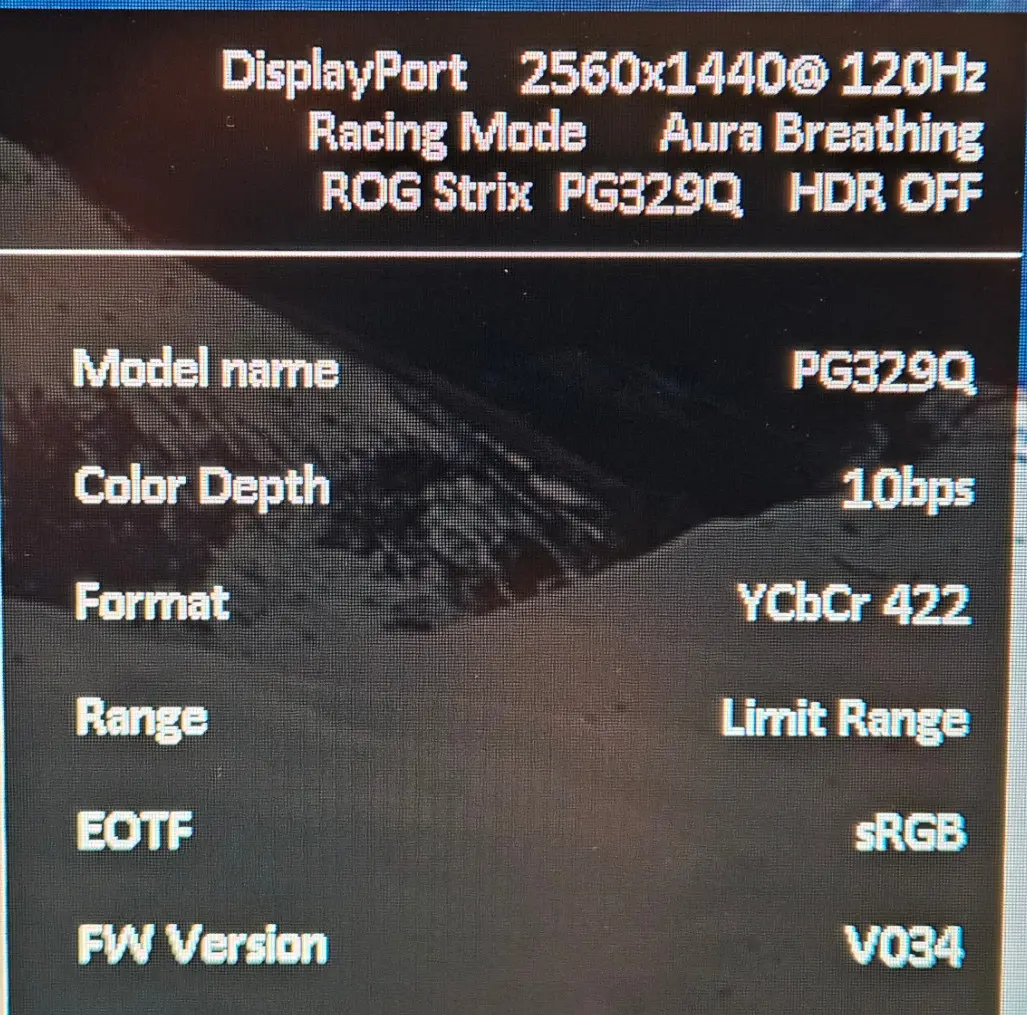
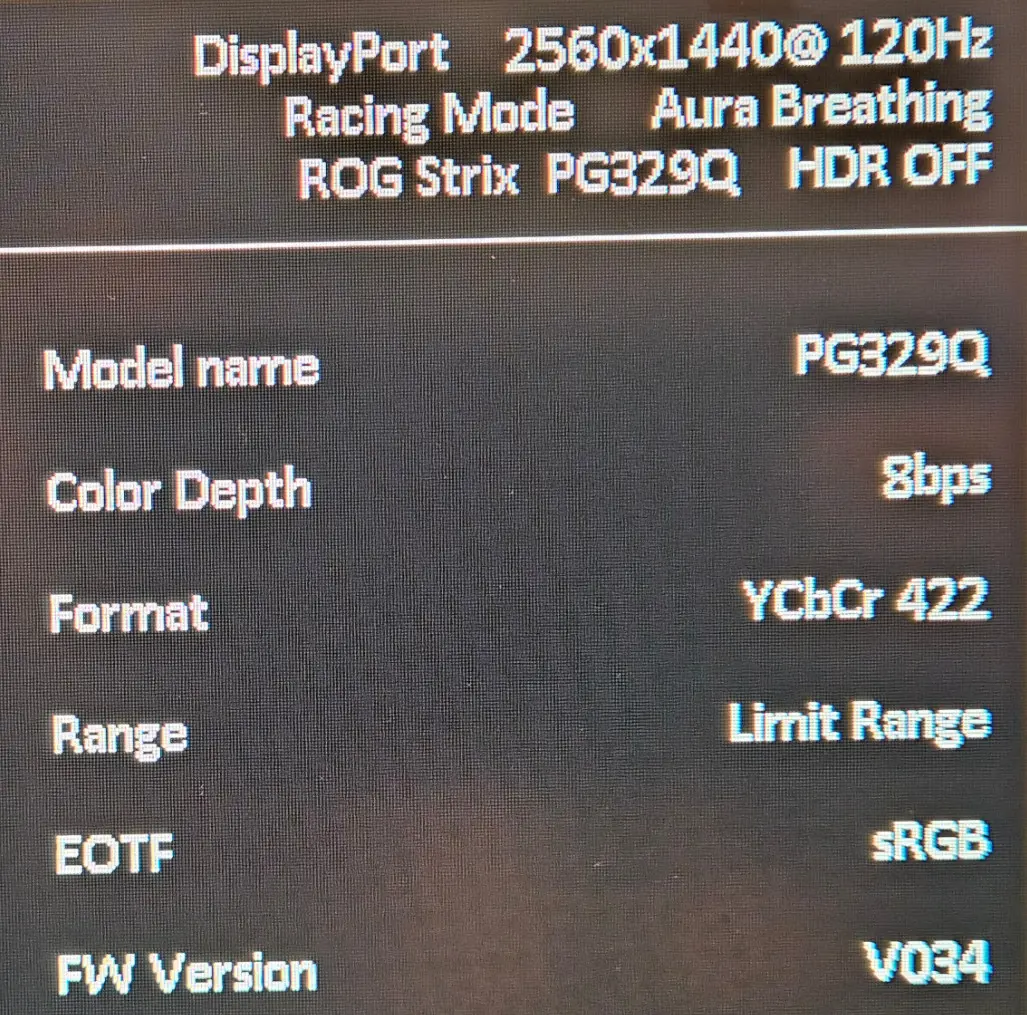
EDIT: Tested how amd gpu modesets this monitor in win11, color depth (10/8/6 bpc) and color format (RGB full, RGB limited, 4:4:4, 4:2:2) settings are available there as two separate lists. It is possible to set 4:2:2 + 8bpc and 4:2:2 + 10bpc mode separately, monitor OSD confirms it.
Thanks for retesting!
The range selection follows CTA-861 and is the same as in every other mainline driver, it's not H6 specific. It doesn't depend on where the mode comes from in the EDID, but on its timing. If the timing matches a CTA video format (a VIC, except 640x480), it's a "CE" format and RGB defaults to limited range, everything else is an "IT" format and defaults to full range. SVDs are by definition CTA formats and your 1440p DTDs aren't, which is why it looks like it depends on the EDID section. Your monitor doesn't have a Video Capability Data Block, which means it doesn't support explicit range signalling, so the spec only allows sending the default range for each format, and the monitor expects exactly that. YCbCr is always limited range.
One thing doesn't fit, though: in your first test 1920x1080@60 was RGB full, but its timing is the same as CTA VIC 16 even when it comes from the standard timings, so it should be limited. Could you set that mode again and post the mode line from `cat /sys/kernel/debug/dri/0/state`? Please also post the raw EDID, e.g. the output of `hexdump -C /sys/class/drm/card*-HDMI-A-1/edid`, since the parsed version doesn't show everything.
There's a "Broadcast RGB" property in DRM for overriding this, but the HDMI driver used on Allwinner doesn't implement it. Without range signalling support on the sink side, you'd also have to switch the monitor to full range manually for it to make sense.
About 8 vs 10 bpc in 4:2:2: your screenshots are from DisplayPort, which signals the bit depth explicitly. HDMI doesn't. YCbCr 4:2:2 over HDMI always uses 12-bit components and there's no field which would tell the monitor how many of them are actually used, so the monitor OSD just guesses 8 bpc. With 10-bit content all 10 bits get through.
in your first test 1920x1080@60 was RGB full
1920x1080@60 still is 10bpc RGB full, at least according to OSD.
1080p 50/59.94/119.88/120Hz modes are limited.
post the mode line from `cat /sys/kernel/debug/dri/0/state
Modeline:
plane[35]: plane-0
	crtc=crtc-0
	fb=64
		allocated by = kodi.bin
		refcount=2
		format=AR24 little-endian (0x34325241)
		modifier=0x0
		size=1920x1080
		layers:
			size[0]=1920x1080
			pitch[0]=7680
			offset[0]=0
			obj[0]:
				name=0
				refcount=3
				start=0010160a
				size=8364032
				imported=no
				dma_addr=0x00000000fe000000
				vaddr=000000007832d95e
	crtc-pos=1920x1080+0+0
	src-pos=1920.000000x1080.000000+0.000000+0.000000
	rotation=1
	normalized-zpos=0
	color-encoding=ITU-R BT.709 YCbCr
	color-range=YCbCr limited range
	color_mgmt_changed=0
	color-pipeline=0
plane[41]: plane-1
	crtc=(null)
	fb=0
	crtc-pos=2560x1440+0+0
	src-pos=2560.000000x1440.000000+0.000000+0.000000
	rotation=1
	normalized-zpos=0
	color-encoding=ITU-R BT.601 YCbCr
	color-range=YCbCr limited range
	color_mgmt_changed=0
	color-pipeline=0
plane[45]: plane-2
	crtc=(null)
	fb=0
	crtc-pos=0x0+0+0
	src-pos=0.000000x0.000000+0.000000+0.000000
	rotation=1
	normalized-zpos=2
	color-encoding=ITU-R BT.601 YCbCr
	color-range=YCbCr limited range
	color_mgmt_changed=0
	color-pipeline=0
plane[49]: plane-3
	crtc=(null)
	fb=0
	crtc-pos=0x0+0+0
	src-pos=0.000000x0.000000+0.000000+0.000000
	rotation=1
	normalized-zpos=3
	color-encoding=ITU-R BT.601 YCbCr
	color-range=YCbCr limited range
	color_mgmt_changed=0
	color-pipeline=0
crtc[53]: crtc-0
	enable=1
	active=1
	self_refresh_active=0
	planes_changed=1
	mode_changed=0
	active_changed=0
	connectors_changed=0
	color_mgmt_changed=0
	plane_mask=1
	connector_mask=1
	encoder_mask=1
	mode: "1920x1080": 60 148500 1920 2008 2052 2200 1080 1084 1089 1125 0x40 0xa
	background_color=ffff000000000000
connector[55]: HDMI-A-1
	crtc=crtc-0
	self_refresh_aware=0
	interlace_allowed=1
	ycbcr_420_allowed=1
	max_requested_bpc=16
	colorspace=Default
	broadcast_rgb=Automatic
	is_limited_range=n
	output_bpc=0
	output_format=RGB
	tmds_char_rate=0
connector[59]: Writeback-1
	crtc=(null)
	self_refresh_aware=0
	interlace_allowed=0
	ycbcr_420_allowed=0
	max_requested_bpc=0
colorspace=Defaultpost the raw EDID
EDID:
00000000  00 ff ff ff ff ff ff 00  06 b3 f3 32 ff 54 00 00  |...........2.T..|
00000010  09 1f 01 03 80 47 28 78  2a 4b f5 af 4e 30 bb 25  |.....G(x*K..N0.%|
00000020  0d 50 54 bf cf 00 d1 c0  71 4f 81 c0 81 40 81 80  |.PT.....qO...@..|
00000030  95 00 b3 00 01 01 72 e7  00 6a a0 a0 67 50 08 20  |......r..j..gP. |
00000040  95 04 c4 8f 21 00 00 1a  56 5e 00 a0 a0 a0 29 50  |....!...V^....)P|
00000050  30 20 35 00 c4 8f 21 00  00 1a 00 00 00 fd 00 30  |0 5...!........0|
00000060  a5 1e e1 3c 00 0a 20 20  20 20 20 20 00 00 00 fc  |...<..      ....|
00000070  00 41 53 55 53 20 50 47  33 32 39 0a 20 20 01 16  |.ASUS PG329.  ..|
00000080  02 03 4f f1 4e 01 02 03  11 12 13 04 0f 1d 1e 1f  |..O.N...........|
00000090  90 3f 61 23 09 17 07 83  01 00 00 68 03 0c 00 10  |.?a#.......h....|
000000a0  00 38 3c 08 6d d8 5d c4  01 78 80 03 02 00 00 00  |.8<.m.]..x......|
000000b0  00 00 6d 1a 00 00 02 03  30 a5 e6 05 76 32 76 32  |..m.....0...v2v2|
000000c0  e3 05 e0 01 e3 0f 00 20  e6 06 07 01 76 76 32 52  |....... ....vv2R|
000000d0  30 00 6e 50 a0 29 50 08  20 b8 04 c4 8f 21 00 00  |0.nP.)P. ....!..|
000000e0  1a 6f c2 00 a0 a0 a0 55  50 30 20 35 00 c4 8f 21  |.o.....UP0 5...!|
000000f0  00 00 1a 00 00 00 00 00  00 00 00 00 00 00 00 42  |...............B|
00000100YCbCr 4:2:2 over HDMI always uses 12-bit components
Connected over HDMI to amdgpu on Windows, but strangely driver doesn't even offer YUV modes over HDMI: RGB full/limited only. Allowed bpc values are also different: 6/8/10 for Displayport vs 8/10/12 for HDMI
Also, another quick unscientific test: same amdgpu+HDMI+monitor, Linux, Kodi 22 in gbm/console. Kodi doesn't allow choosing refresh rate for GUI there, so only max for each mode:
640x480@75    12bpc RGB full
720x400@70    12bpc RGB full
720x480@60    12bpc RGB limited
720x576@50    12bpc RGB limited
800x600@75    12bpc RGB full
1024x768@75   12bpc RGB full
1152x864@75   12bpc RGB full
1280x720@60   12bpc RGB limited
1280x960@60   12bpc RGB full
1280x1024@75  12bpc RGB full
1280x1440@60  12bpc RGB full
1440x480@60   12bpc RGB limited
1440x576@50   12bpc RGB limited
1440x900@60   12bpc RGB full
1680x1050@60  12bpc RGB full
1920x1080@120 12bpc RGB limited
2560x1440@144  8bpc RGB full
3840x2160@60 8bpc RGB limitedThanks, that explains it. There is a bug in Linux kernel, where 1080p60 mode configuration has wrong values. This makes failure to recognize your EDID mode as CTA format, so it doesn't set it as RGB limited mode. Your monitor still shows correct colours, since it sees non-CTA mode configured. I'll send Linux fix upstream and it will trickle down as fix later.
Note that broadcast_rgb, is_limited_range and output_* fields in the state dump come from a generic HDMI helper which the Allwinner HDMI driver doesn't use, so they don't reflect the actual output.
The amdgpu list matches, by the way: CTA formats are limited and everything else is full.