

As an aside, after further testing, I found that with the above-noted Zidoo settings ('Priority RGB444 8-bit for non-4K content' and 'HDMI Range 16-235'), still images from both systems appear almost identical. However, I can't quite put my finger on it, but playing a high-quality 3D scene with popcornmix LibreELEC 3D fork on the Pi5 feels even crisper and easier on my eyes than with the Zidoo. I can hardly believe it, but that's just how it seems to me (and ht2tweak seems to see it similarly) 

[RPi] 3D Support builds
-
popcornmix -
July 31, 2026 at 7:35 PM -
Thread is Resolved
-
-
Has to be due to different hardware, different OS'es, and/or different processing. Assume you're already tried all the possible SDR settings on Zidoo. For whatever reason, there are PQ differences, close, but noticeable with Pi5/AMD > Zidoo > Amlogic devices.
-
Yes, I tried every possible setting on the Zidoo as I really wanted to see it being on a par with the Pi5. But, honestly, it couldn't get there ¯\_(ツ)_/¯
-

Currently none of the dynamic subtitle tracks are updating properly, there at a lot of missed and inconsistent depth updates. Sometimes seconds between updates.
I see. For the 1 update per second tracks it looked broadly okay, but with faster updates it’s more obvious many updates are missed.
It’s when a sub changes depth but not text it may get skipped as it’s not triggering the update as dirty, should have a build tomorrow. -
It’s when a sub changes depth but not text it may get skipped as it’s not triggering the update as dirty, should have a build tomorrow.
-
I have now tested both and as far as I can tell the all the depth changes are now shown as they should

However the RPi4 is struggling some with decoding the MVC. Regardless if subtitles is enabled or not, it seems one core spikes and when that happens frames are dropped. I tried overclocking even more but saw no real improvement and then the RPi4 got unstable instead so went back to 2.1GHz.
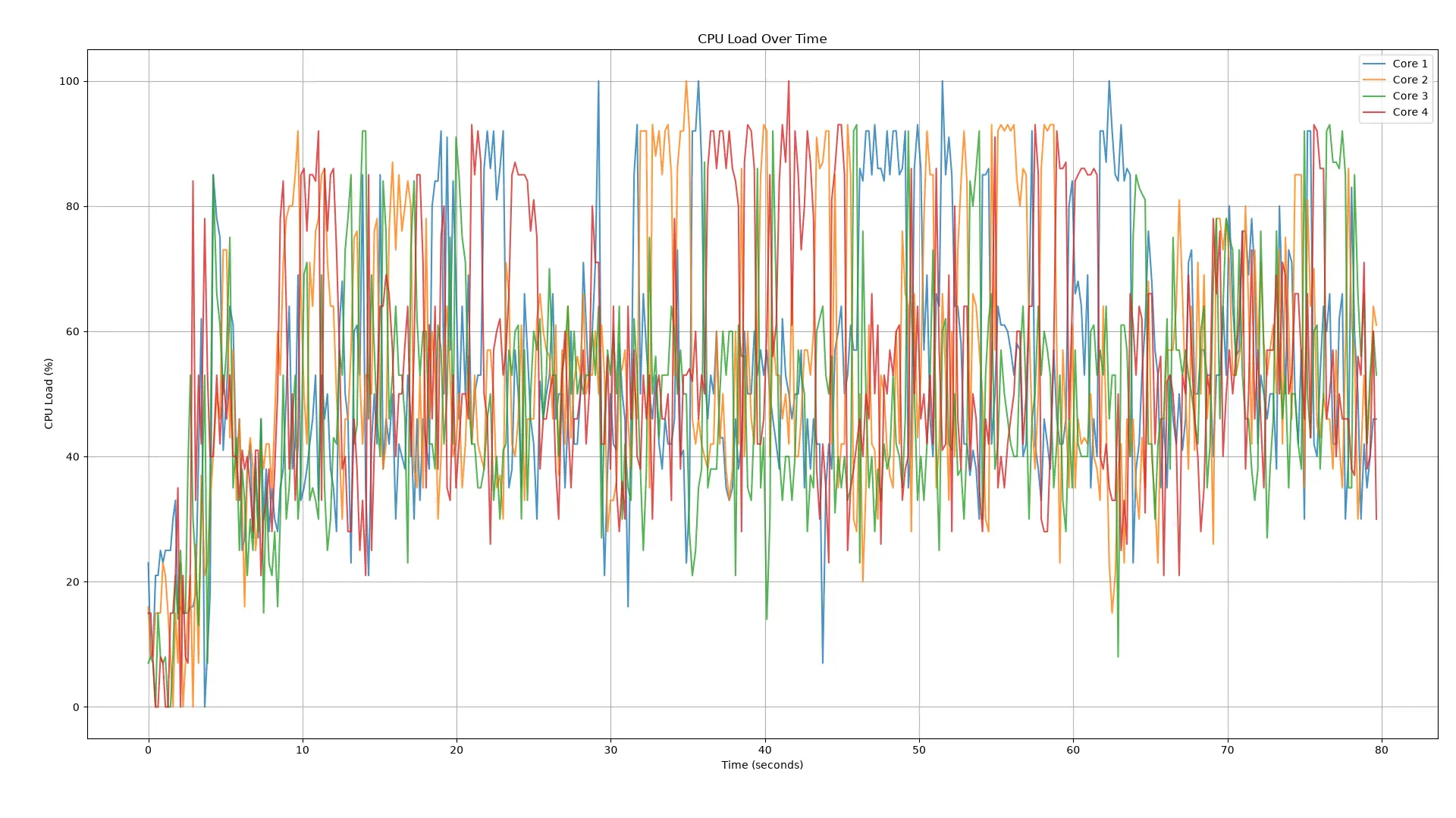
Here is a graph of the CPU core load every 100ms over the first minute or so of the 3D demo disc with a 1 frame subtitle track enabled. You can see how one core spikes while the three others stay around 40-60%. If it's possible to optimize the per core load a bit more evenly then the RPi4 should be able to play without dropped frames.
I was also wondering if you have had any success on solving the resume problem?
I need to give you a great big thank you! The work you've done here is great and being able to play all my 3D Blu-rays with proper subtitle support is awesome. Many commerical 3D Blu-ray players do not handle 3D subtitle this well! -
I got the latest build up and running on my RPI 4B (still waiting on my RPI 5 to be delivered). I am playing 3D content on a Valerion Max.
Some of the movies play just fine with no issues, but in some of them, the motion is jittery. Here are the details for one of the movies where the motion is jittery
Video stream is 1920x1080p, 1.78 AR, 23.976 FPS.
CPU temperate while playing 3D content is around 53C and around 43C when idle/paused.
System rendering speed varies between 5 and 8 fps
cpu usage #0 goes as high as 85% sporadically, while the rest of them are in 30 to 40% range
Any idea what might be going on?
-

I got the latest build up and running on my RPI 4B (still waiting on my RPI 5 to be delivered). I am playing 3D content on a Valerion Max.
Any idea what might be going on?
Yes, Pi4 will struggle to decode harder MVC files. Overclocking may help.
A Pi5 will be fine.
-
Yes, Pi4 will struggle to decode harder MVC files. Overclocking may help.
A Pi5 will be fine.
I have it overclocked to 2.1 Ghz. With heatsinks and an active fan, I am able to keep the temperature in check (around 54C). The odd thing is that many movies play perfectly fine, but the odd one here and there stutters - not sure why.
Btw, are there any settings to be changed on the RPi4 to have the 3D effect pop out more? When I was using my desktop with Nvidia 3D driver enabled (had to use a hack to make it work on recent driver releases), there were options available to increase/decrease the effect. Do we have anything similar on the RPi?
-
I've done some work on optimising the MVC decode.
MVC is trickier to multi-thread, as the right eye typically depends on the left eye, so you can't just work on them in parallel.
The best I (Opus) could do originally used slice threading which has more overhead.
I've had another go with Fable to get frame threading working and it is now better than slice threading.
This should help all platforms, but especially Pi4.
The subtitle torture test is now smooth for me on Pi4 without overclock (overclock may be useful for harder clips).
I've updated builds in first post.
-
Sounds awesome. But please, please, under no circumstances, do anything with the Pi5 build that might touch its spectacular, unmatched MVC 3D quality
 ! The Pi5 obviously has no performance issues with your current builds.
 -
thanks much popcornmix - I will install the latest version on my Pi4 and test it out later today.
-

Sounds awesome. But please, please, under no circumstances, do anything with the Pi5 build that might touch its spectacular, unmatched MVC 3D quality
! The Pi5 obviously has no performance issues with your current builds.The output will be bit identical to previous version. It just will be faster.
-
The subtitle torture test is now smooth for me on Pi4 without overclock (overclock may be useful for harder clips).
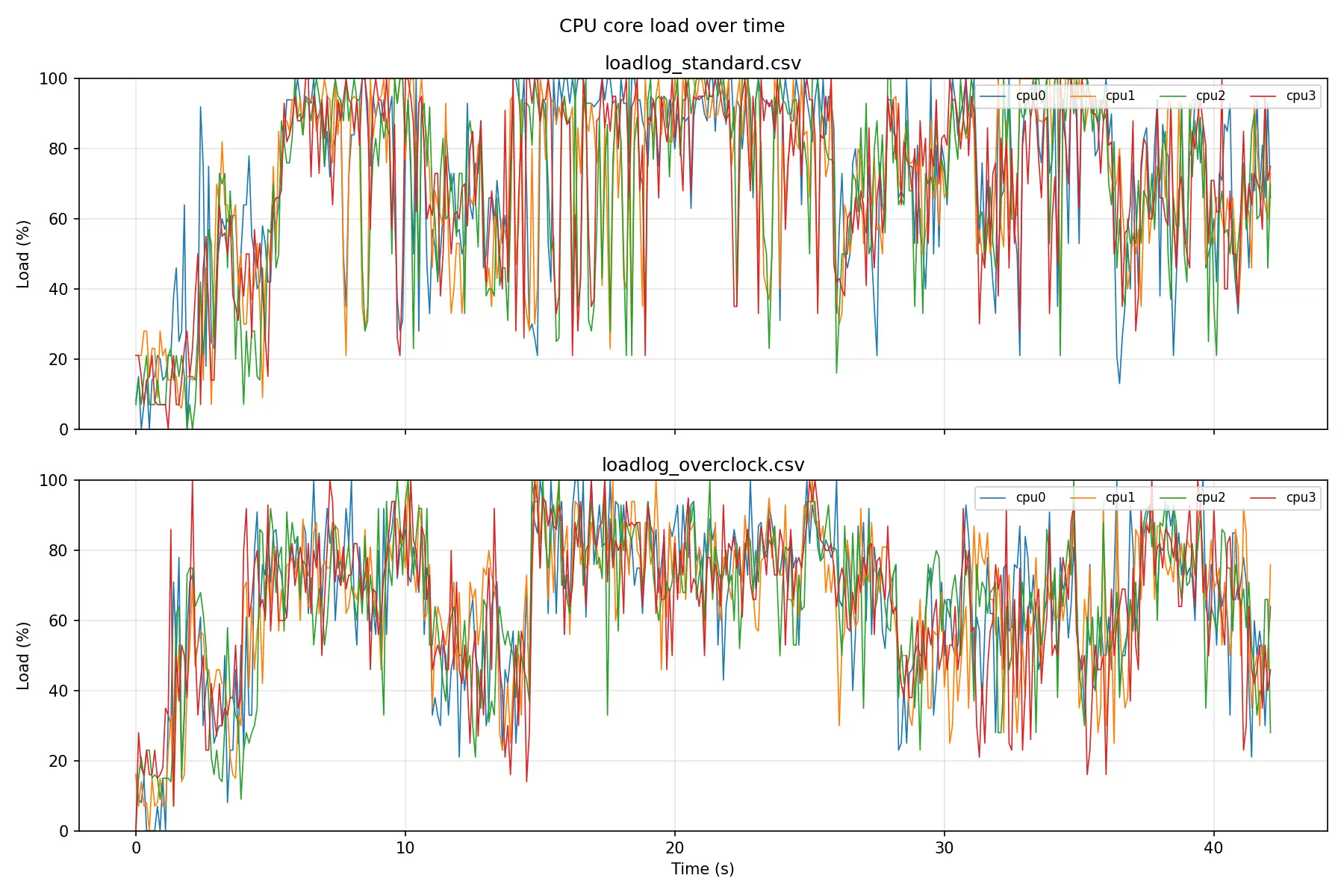
I did some testing and this version is alot betetr and the load between cores are now much more even. I still get some frame drops when playing the torture test when not overclocked but night and day difference to before. After overclocking it plays without issue as far as I can tell
Here is some graphs over the first 40 or so seconds of Big Buck Bunny with the torture test subtitle active.
Standard is no overclock and overclock is at 2.1GHz.
-
Display More
I've done some work on optimising the MVC decode.
MVC is trickier to multi-thread, as the right eye typically depends on the left eye, so you can't just work on them in parallel.
The best I (Opus) could do originally used slice threading which has more overhead.
I've had another go with Fable to get frame threading working and it is now better than slice threading.
This should help all platforms, but especially Pi4.
The subtitle torture test is now smooth for me on Pi4 without overclock (overclock may be useful for harder clips).
I've updated builds in first post.
Thank you - you have done outdone yourself with this release! The video that used to have a lot of stuttering on the previous release plays smooth like butter now
Also, CPU utilization is much much better like NTM-3D pointed out earlier. Temperature stays steady around 55 C, just like earlier. Much appreciated!To clarify, I am running this on my Pi4 overclocked to 2.1 Ghz.
-
I did find one major issue - when you click into a 3D ISO, Kodi throws up a menu asking how it should play the movie with options that say "Preferred Mode (same as movie), 2D, etc. The only way to exit this screen is to play the movie. If you hit "cancel", it does nothing, just stays there. I selected play the movie and then immediately hit "stop", but got stuck on this screen - nothing worked anymore. I had to ssh into the pi and reboot it. Please look into it when you get a chance - let me know if there are any additional details that I can share.
-

