Posts by the_jaguar

    Thank you. Tested the new build, and I do notice chooser coming up quicker for 3D ISO's with menus. Anything else "faster" we should be noticing? Pi5 is already fantastic as vobs stated... it has become my #1 3D playback device.

    If you have a Pi4 lying around, can you try the latest version on it (after overclocking to 2.1 Ghz) - it's working flawlessly with no issues. I would love to hear your thoughts on it.

    I watched one of the Avatar movies yesterday on the Pi4 and it was quite good.

    Given the current price of the Pi5, folks who already have a Pi4 can now use this after overclocking it (after installing heatsinks and a fan to ensure the Pi doesn't throttle or freeze up).

    I did find one major issue - when you click into a 3D ISO, Kodi throws up a menu asking how it should play the movie with options that say "Preferred Mode (same as movie), 2D, etc. The only way to exit this screen is to play the movie. If you hit "cancel", it does nothing, just stays there. I selected play the movie and then immediately hit "stop", but got stuck on this screen - nothing worked anymore. I had to ssh into the pi and reboot it. Please look into it when you get a chance - let me know if there are any additional details that I can share.

    Thank you - you have done outdone yourself with this release! The video that used to have a lot of stuttering on the previous release plays smooth like butter now :) Also, CPU utilization is much much better like NTM-3D pointed out earlier. Temperature stays steady around 55 C, just like earlier. Much appreciated!

    To clarify, I am running this on my Pi4 overclocked to 2.1 Ghz.

    Yes, Pi4 will struggle to decode harder MVC files. Overclocking may help.

    A Pi5 will be fine.

    I have it overclocked to 2.1 Ghz. With heatsinks and an active fan, I am able to keep the temperature in check (around 54C). The odd thing is that many movies play perfectly fine, but the odd one here and there stutters - not sure why.


    Btw, are there any settings to be changed on the RPi4 to have the 3D effect pop out more? When I was using my desktop with Nvidia 3D driver enabled (had to use a hack to make it work on recent driver releases), there were options available to increase/decrease the effect. Do we have anything similar on the RPi?

    I got the latest build up and running on my RPI 4B (still waiting on my RPI 5 to be delivered). I am playing 3D content on a Valerion Max.

    Some of the movies play just fine with no issues, but in some of them, the motion is jittery. Here are the details for one of the movies where the motion is jittery

    Video stream is 1920x1080p, 1.78 AR, 23.976 FPS.

    CPU temperate while playing 3D content is around 53C and around 43C when idle/paused.

    System rendering speed varies between 5 and 8 fps

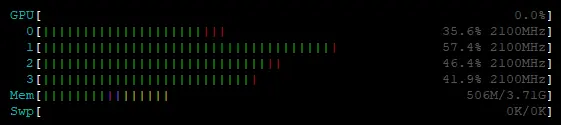
    cpu usage #0 goes as high as 85% sporadically, while the rest of them are in 30 to 40% range

    Any idea what might be going on?

    Thanks for the update - it's reassuring to hear that the rpi4 is able to to handle the playback similar to the rpi5 with a 2.1 ghz overclock. I plan on running a good fan - it's part of the case I am using anyway. Did you notice any difference in the quality of the 3D between the 2 devices?

    Regarding the rest of the issues, hopefully these will get fixed over the due course of time.

    This is incredible stuff - thanks for making this happen. I have a couple of RPI 4's lying around, so I would prefer to use this for 3D MVC playback and not spend another $150 to $200 on a new RPI 5. If I were to overclock the RPI 4 to 2.1 ghz, would that pretty much provide the same viewing experience as an RPI 5 specifically for 3D movies? My collection is mostly 3D MVC ISO's. Thanks!